@signalk/freeboard-sk
Version:
Openlayers chart plotter implementation for Signal K
252 lines (152 loc) • 8.86 kB
Markdown
# Freeboard-SK
Freeboard-SK is a stateless, multi-station, Openlayers based chart plotter for Signal K.
Use it to display:
- Resources _(i.e. routes, waypoints, notes, charts, etc)_
- Alarms & notifications
- AIS information
- Weather information
- Signal K instrument WebApps.
and more from any web enabled device.

See the [FAQs](https://github.com/SignalK/freeboard-sk/wiki) for more information.
## Features:
### Vessel / Chart Display:
Moving map display with:
- Multiple chart overlay using both of online and locally served charts
- Built in support (no plugin required) for OpenStreetMap and OpenSeaMap(from Signal K server)
- North-up / Vessel-up orientation
- Moving Map / Moving Vessel
- Vessel Heading / Bearing lines
- Wind True / Apparent display
- Closest point of approach
and more.
Charts are sourced from the `/resources/charts` path on the Signal K server and the following chart types / sources are supported:
- Image tiles _(XYZ)_
- Vector Tiles _(MVT / PBF)_
- [S57 ENC's converted to vector tiles](#S57-charts) _(MVT / PBF)_
- WMS _(Web Map Server)_
- WMTS _(Web Map Tile Server)_
- PMTiles _(ProtoMap files)_
### Resources:
Freeboard-SK supports the creation, editing and deletion of all resource types defined in the Signal K specification that are available under the `/resources` path.
__Routes and Waypoints:__
_Path(s): `/resources/routes`, `/resources/waypoints`_
- Show / Hide Routes & Waypoints
- Set a Waypoint as a destination
- Set an active Route
- Select destination point along an Active Route
- Create / Edit / Delete Routes
- Create / Edit / Delete Waypoints
- Create Waypoint at current vessel position
- Import Routes and Waypoints from GPX files
- Attach Notes to Routes & Waypoints
__Notes and Regions:__
_Path(s): `/resources/notes`, `/resources/regions`_
- Display Notes and Regions
- View / Edit Note properties
- Draw Regions and attach Notes
- Add / Edit / Delete Notes
- Attach Notes to Regions
__Tracks:__
Whilst not specifically defined in the Signal K specification, Freeboard-SK supports the import and display of tracks from GPX files which are available under the `/resources/tracks` path.
- Show / Hide Tracks
- Delete Tracks
### Autopilot Console:
Freeboard-SK supports the Signal K Autopilot API which enables common operations to be performed
including:
- Engage / Disengage the autopilot
- Setting the operation mode e.g. compass, route, gps, etc.
- Setting and adjusting the target heading
- Dodging obstacles

### Alarms and Notifications:
Freeboard-SK can display alarms _(visual and audio)_ & messages contained in *Notification* messages transmitted by the Signal K server.
Additionally you can set alarms, including _anchor watch_, as well as raise alarms such as _man overboard_, _sinking_, etc directly from the user interface.
Supported alarm types include:
- Depth
- Closest Approach
- Anchor drag / watch
- "Buddy" notifications
- All Signal K specification defined alarms.
Freeboard-SK also implements API endpoints to accept requests for raising and clearing Signal K specification defined alarms.
_See OpenAPI documentation in Signal K Server Admin UI for details._
### History Playback
Freeboard-SK supports the Signal K `playback` api and can replay recorded time-series data captured on a Signal K server equipped with the `signalk-to-infludb` plugin.
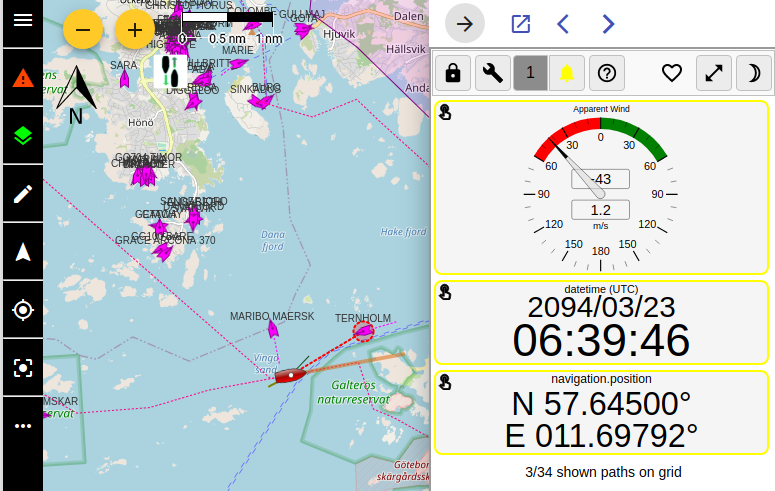
### Instruments:
Freeboard-SK allows you to use your favourite instrumentation apps installed on the Signal K server.
Select one or more installed applications listed in the `settings` screen and they will displayed in the instrument drawer.
When more than one app is selected you can cycle through them within the instrument drawer.
_Note: The `Signal K Instrument Panel` app will be displayed if no user selection has been made._
### S57 Charts
Freeboard-SK is able to display S57 ENC charts that have been converted to vector tiles with [s57-tiler](https://github.com/wdantuma/s57-tiler). _(See the [README](https://github.com/wdantuma/s57-tiler) for instructions how to create the vector tiles from downloaded S57 ENC's.)_
See [Open CPN chart sources](https://opencpn.org/OpenCPN/info/chartsource.html) for a list of locations to source charts.
_Note: Only unencrypted ENC's are supported (no S63 support)._
**_Requires: @signalk/charts-plugin_**
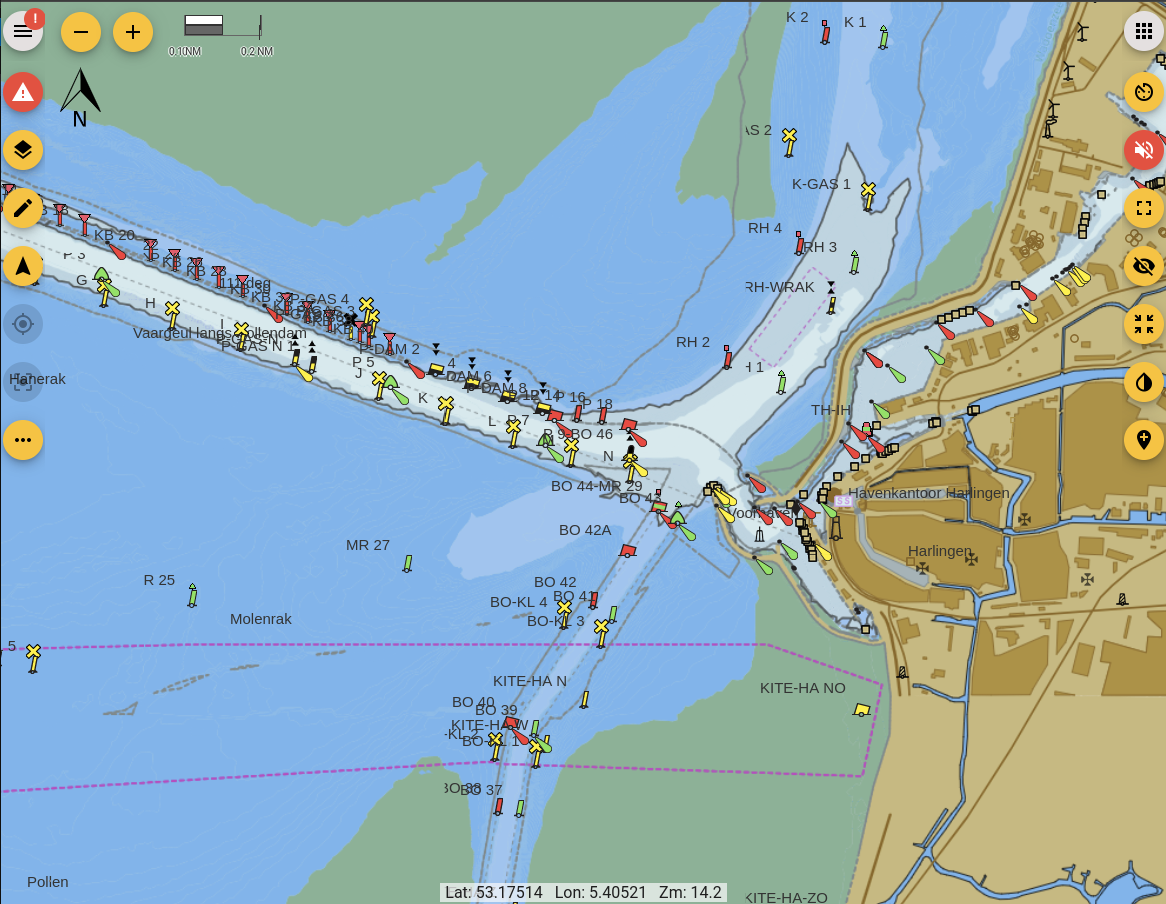
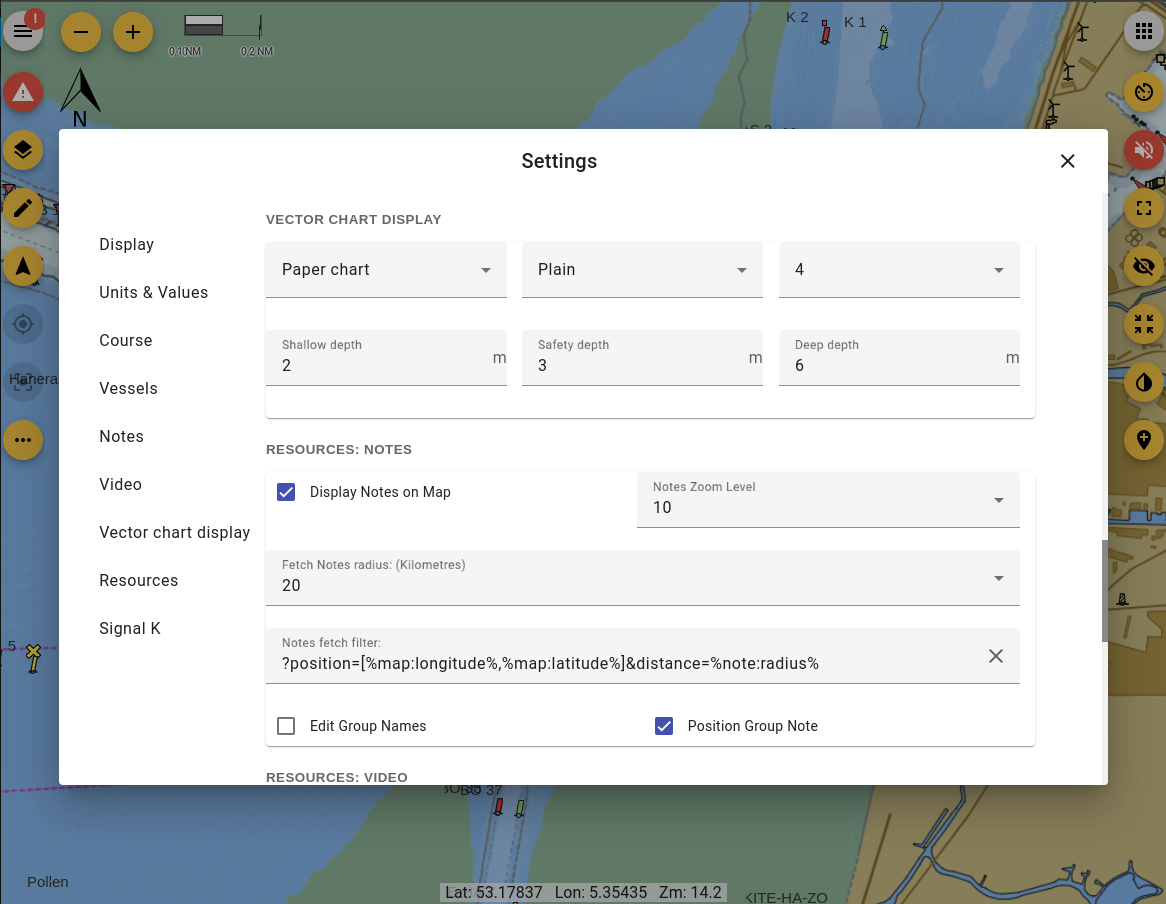
Rendering of the Shallow, safety and deep depths and can be configured in the settings dialog
_Note: This functionality is not a replacement for official navigational charts_
### Experiments:
Features that are not ready for "prime time" are made available as experiments.
To make experimental features available from within the Freeboard-SK user interface, you need to ensure the **Experimental Features** option is checked in **Settings**.
_Note: Some experiments will require configuration of Freeboard-SK via the _Plugin Config_ screen of the Signal K Server Admin UI._
## System Requirements:
**Freeboard-SK requires _Signal K Server Version 2.0 or above**.
The following features require that the Signal K server have plugins / providers installed to service the following paths:
- `resources/charts` - Ability to view charts.
- `navigation/anchor`, `notifications/navigation/anchor` - Ability to set anchor alarm and display notifications.
- `notifications/environment/depth` - Display depth notifications.
- `signalk/v1/playback` (Playback API) - Replay of recorded vessel data.
- `vessels/self/track` - Display of vessel track stored on server.
- `vessels/self/navigation/course/calcValues` - Display of calculated course values such as DTG, XTE, etc.
### Recommended Plugins:
The following plugins are recommended for installation on the Signal K Server to enable full functionality:
- @signalk/course-provider _(Course calculations e.g. XTE, DTG, etc.)_
- @signalk/charts-plugin *(Mapbox tiles chart provider)*
- signalk-pmtiles-plugin *(ProtoMaps chart provider)*
- signalk-anchoralarm-plugin _(Anchor alarm settings & notifications)_
- signalk-simple-notifications _(Depth alarm notifications)_
## Development:
Freeboard-SK is an Angular project.
It is recommended that the Angular CLI be installed globally `npm i -g @angular/cli@latest` prior to following the steps below.
1. Clone this repository.
2. Run `npm i` to install project dependencies.
3. Run `npm start` or `ng serve` to start a development web server and then navigate to `http://localhost:4200/` to load the application. The application will automatically reload once you save changes to any of the source files.
### Note:
The Freeboard-SK application will look to connect to a Signal K server at the *ip address:port* contained in the url of your browser.
In development mode you are able to specify the Signal K server host address and port you wish to connect to by editing the `DEV_SERVER` object in the `src/app/app.facade.ts` file.
```
DEV_SERVER {
host: '192.168.99.100',
port; 3000,
ssl: false
}
```
_Note: These settings apply in **Development Mode** only!_
_They will __NOT__ apply when using **Production Mode**, the generated application will attempt to connect to a Signal K api / stream on the hosting server._
### Building a Release:
__Building the Application:__
To build all components of the application _(plugin and webapp)_ ready for release use the `npm run build:prod` command.
__Building components individually:__
- To build only the _webapp_ use the command `npm run build:web`.
- To build only the _helper plugin_ use the command `npm run build:helper`.
Built files _(for deployment)_ are placed in the following folders:
- `/public` _(Freeboard-SK web app)_
- `/plugin` _(Freeboard-SK plugin)_
__Building the NPM package:__
To build the NPM package use the `npm pack` command to:
1. Execute `npm run build:prod`
1. Create the NPM package (`.tgz`) file in the root folder of the project.
_**Freeboard-SK** is a port of http://www.42.co.nz/freeboard for use with Signal K communication protocols and server features._