@salesforce/pwa-kit-mcp
Version:
MCP server that helps you build Salesforce Commerce Cloud PWA Kit Composable Storefront
132 lines (93 loc) • 5.32 kB
Markdown
# 🚀 PWA Kit MCP Server
An MCP server that enhances the entire development lifecycle of PWA Kit storefront apps — from project creation and management to AI-assisted coding, testing, and implementation of best practices — all within your IDE.
## 🔍 What is MCP?
**Model Context Protocol (MCP)** is an open protocol that enables secure, structured communication between host applications (like [Cursor IDE](https://www.cursor.so/) or other AI development tools) and external tools or data sources.
It allows AI agents to query context-aware services like this server to help developers build better software, faster.
👉 **[Read more at modelcontextprotocol.io](https://modelcontextprotocol.io/)**
## 🧰 Features
The PWA Kit MCP Server offers the following intelligent tools tailored to Salesforce Commerce Cloud PWA development:
* **`create_app_guidelines`**:
Guides agents and developers through creating a new PWA Kit project with `/pwa-kit-create-app`.
* **`create_new_sample_component`**:
Walks developers through a brief Q\&A to scaffold a component using the commerce data model, layout, and structure.
* **`create_sample_storefront_page`**:
Interactive tool to generate a new PWA storefront page with custom routing and components.
* **`development_guidelines`**:
Provides best practices and guidance for building PWA Kit storefronts.
* **`run_site_test`**:
Runs performance and accessibility audits on a provided site URL.
*Example: `https://pwa-kit.mobify-storefront.com`*
* **`git_version_control`**:
Manages the version control of your project using git.
If the project is not already a git repo, project files will be committed as a new local git repo together with a basic .gitignore. If the project is already a git repo, just commit the changes in the project.
## ▶️ Running the MCP Server
### 🖥️ From Cursor IDE
1. Open **Cursor**.
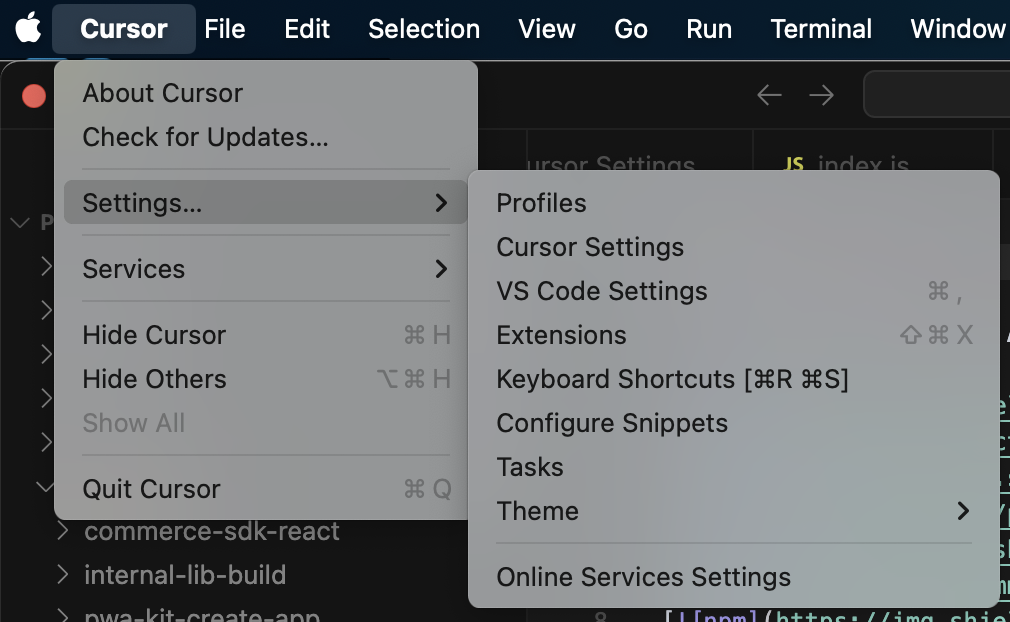
2. Navigate to **Settings > Cursor Settings...**
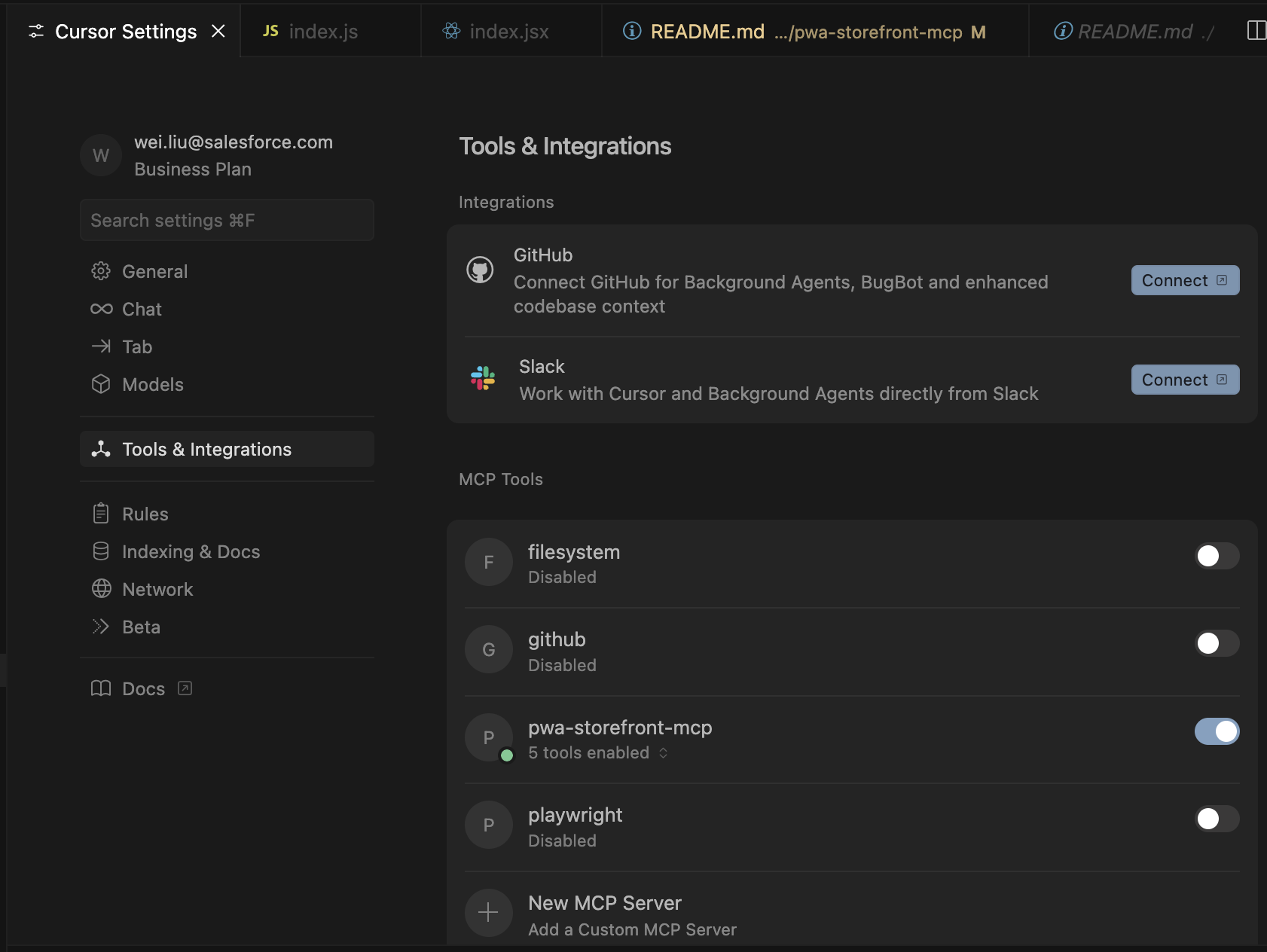
3. Go to **Tools & Integrations > MCP Tools > New MCP Server**
4. Update your `mcp.json` like this (edit the placeholders as needed):
```json
{
"mcpServers": {
"pwa-kit": {
"command": "npx",
"args": ["-y", "@salesforce/pwa-kit-mcp"],
"env": {
"PWA_STOREFRONT_APP_PATH": "{{path-to-app-directory}}"
}
}
}
}
```
_NOTE: Replace `{{path-to-app-directory}}` with the absolute path to your generated project's `app` subfolder. For example: `"/Users/username/mcp-server-folder/mystorefront/app"`._
Once saved, Cursor will:
* Launch the MCP server
* Connect to it as a client
* Display the available tools in the UI and how you can invoke them
You can return to **MCP Tools** anytime to enable or disable specific tools or servers.
### 🧪 From Other MCP Clients
We currently only support Cursor IDE, but if you wish to try it out with your AI agent enabled IDE, you can manually run the server be following the below steps. **NOTE:** This server communicates via **stdio**, so it is important to ensure your IDE can communicate in this manner.
```bash
cd {{dir-to-mcp}}
npm run start
```
Then send JSON-RPC requests like:
```json
{"jsonrpc": "2.0", "id": 1, "method": "tools/list", "params": {}}
{"jsonrpc": "2.0", "id": 2, "method": "tools/call", "params": {"name": "create_new_component", "arguments": {}}}
```
---
## 👩💻 Development
If you are actively developing features for the MCP server and want to get immediate feedback during testing, follow the below steps.
1. Update your Cursor IDE MCP server configuration so that you are referencing the local server. This can be done by opening the "View: Open MCP Settings"
from the command pallet and editing your `pwa-kit` entry to look like the entry below.
```json
{
"mcpServers": {
"pwa-kit": {
"command": "node",
"args": ["{{path-to-app-mono-repo}}/packages/pwa-kit-mcp/dist/server/server.js"],
"env": {
"PWA_STOREFRONT_APP_PATH": "{{path-to-app-directory}}"
}
}
}
}
```
2. Ensure that your server is built and will rebuild whenever changes are made you by running the following command in the `/pwa-kit-mcp` folder:
```bash
npm run build:watch
```
The server logs to `stderr` and communicates using MCP via `stdio`. You can view these logs in the `Output` section (shift + command + U) and filtering
the output on "MCP Logs".
### 🔹 File & Folder Overview
| Location | Purpose |
| -------------- | --------------------------------------------------------------------- |
| `package.json` | Node.js dependencies and project scripts |
| `mcp.json` | MCP client configuration (used by Cursor or other IDEs) |
| `src/server/` | Main server entry point (`server.js`) |
| `src/tools/` | Contains all MCP tools like `create-app-guideline`, `site-test`, etc. |
| `src/utils/` | Shared utility functions |
| `