@rent-the-runway/rtr-react-okta-auth
Version:
React hooks library for interacting with Okta. Lock out UI and Routes based on user authentication and the okta-user-groups the user belongs to. Can also lock out UI or Routes based on Claims.
598 lines (466 loc) • 22.3 kB
Markdown
# Rent the Runway - rtr-react-okta-auth





- [Rent the Runway - rtr-react-okta-auth](#rent-the-runway---rtr-react-okta-auth)
- [Install](#install)
- [What?](#what)
- [Scope](#scope)
- [API and Components](#api-and-components)
- [API](#api)
- [Okta Groups:](#okta-groups)
- [Okta Claims](#okta-claims)
- [authorizationStateKnown](#authorizationstateknown)
- [Component Summary](#component-summary)
- [Locking out Routes based on Groups](#locking-out-routes-based-on-groups)
- [Redirect for Unauthenticated or Unauthorized Route Access](#redirect-for-unauthenticated-or-unauthorized-route-access)
- [Locking out JSX based on Groups](#locking-out-jsx-based-on-groups)
- [The inverse of each is also available](#the-inverse-of-each-is-also-available)
- [Locking out Routes based on Claims](#locking-out-routes-based-on-claims)
- [Locking out JSX based on Claims](#locking-out-jsx-based-on-claims)
- [The inverse of each is also available](#the-inverse-of-each-is-also-available-1)
- [Locking out JSX based on application specific logic such as permissions / RBAC](#locking-out-jsx-based-on-application-specific-logic-such-as-permissions--rbac)
- [Waiting for authorization state to be known](#waiting-for-authorization-state-to-be-known)
- [Locking out Routes based on application specific logic such as permissions / RBAC](#locking-out-routes-based-on-application-specific-logic-such-as-permissions--rbac)
- [useWhenAuthenticatedAnd() Custom Hook (alias useWhen())](#usewhenauthenticatedand-custom-hook-alias-usewhen)
- [App Setup](#app-setup)
- [Okta Setup Summary](#okta-setup-summary)
- [Groups](#groups)
- [Claims](#claims)
- [Detailed Okta Setup](#detailed-okta-setup)
- [Setting up the Okta Application](#setting-up-the-okta-application)
- [Getting Okta to supply user groups](#getting-okta-to-supply-user-groups)
- [Getting Okta to supply Claims](#getting-okta-to-supply-claims)
## Install
`npm install @rent-the-runway/rtr-react-okta-auth @okta/okta-react@5.1.2`
-or-
`yarn add @rent-the-runway/rtr-react-okta-auth @okta/okta-react@5.1.2`
## What?
A library that allows a React application to interact with Okta.
It expands on the functionality of [okta-react](https://github.com/okta/okta-oidc-js/tree/master/packages/okta-react).
`okta-react` is detailed by example [here](https://developer.okta.com/quickstart/#/react/nodejs/express) however it only handles authentication, it does not provide for authorization.
`@rent-the-runway/rtr-react-okta-auth` provides for group-based authorization.
\
Specifically, access to Routes and JSX can be permitted to users
* who are members of particular Okta user groups or additionally
* who have specific claims or
* any other arbitrary condition such as application specific RBAC
The library can be used for both JavaScript and TypeScript.
More `okta-react` **version 5.1.2** documentation [here](https://www.npmjs.com/package/@okta/okta-react/v/5.1.2):
## Scope
This library is concerned with Okta's implicit flow. It's intent is to lock down UI fragments and react `<Route />`'s client side, i.e. within the browser.
This library is not directly concerned with securing server side API end points however it can assist in doing so.
If an API end point needs to be made secure it is the responsibility of the individual developers to make it so.
More information on this [here](https://developer.okta.com/blog/2020/01/13/kotlin-react-crud) and [here](https://github.com/okta/samples-java-spring/blob/master/resource-server/src/main/java/com/okta/spring/example/)
## API and Components
#### API
```JSX
const {
isMemberOf,
isMemberOfAll,
isMemberOfAny,
hasClaim,
hasAllClaims,
hasAnyClaims,
authorizationStateKnown,
authCtx,
} = useRtrOktaAuth();
```
Pretty much all that you need is the `hook` `useRtrOktaAuth()`
This gives you everything you need to lockdown components/JSX and routes.
##### Okta Groups:
- `isMemberOf('vampires'): boolean` - returns true if the user is a member of the specified group.
- `isMemberOfAll(['vampires', 'werewolves']): boolean` - returns true if the user is a member of `All` specified groups.
- `isMemberOfAny(['vampires', 'werewolves']): boolean` - returns true if the user is a member of `Any` specified groups.
##### Okta Claims
- `hasClaim('CanDoA'): boolean` - returns true if the user has the specified Claim.
- `isMemberOfAll(['vampires', 'werewolves']): boolean` - returns true if the user has `All` specified claims.
- `isMemberOfAny(['vampires', 'werewolves']): boolean` - returns true if the user has `Any` specified claims.
- `authCtx` is the native `okta-react' hook i.e.:
`import { useOktaAuth } from '@okta/okta-react';`
`const authCtx = useOktaAuth();`
##### authorizationStateKnown
- `authorizationStateKnown` - Once `authContext.isAuthenticated` becomes `true` this library makes a call to Okta to fetch the user object. It is only when the user has been acquired that we can determine which groups etc. a user belongs to. Once the user has been acquired `authorizationStateKnown` becomes `true`. You may in fact want to consider not rendering the content of your app until this is known. This will avoid any flicker as components appear; example:
````JSX
import * as React from 'react';
import { Route } from 'react-router';
import {
RouteWhenMemberOf,
RouteWhenMemberOfAny,
useRtrOktaAuth,
} from '@rent-the-runway/rtr-react-okta-auth';
import AdminBlog from './pages/AdminBlog';
import Home from './pages/Home';
import ReadBlog from './pages/ReadBlog';
interface Props {}
const AppRtrOktaAware: React.FC<Props> = () => {
const { authorizationStateKnown } = useRtrOktaAuth();
if (!authorizationStateKnown) return null;
return (
<>
<Route path="/" component={Home} exact />
<RouteWhenMemberOf
group="blog_Admin"
component={AdminBlog}
path="/admin"
exact
/>
<RouteWhenMemberOfAny
groups={['blog_read', 'blog_Admin']}
component={ReadBlog}
path="/read"
exact
/>
</>
);
};
export default AppRtrOktaAware;
````
That entire API will allow you do all that you need but for convenience and to save lots of boiler plate the following components are available:
### Component Summary
#### Locking out Routes based on Groups
```JSX
<RouteWhenMemberOf
group="admin"
path="/orders"
exact={true}
component={Standard}
unauthenticatedComponent={Unauthenticated} //optional
unauthorizedComponent={Unauthorized} //optional
/>
Authenticated users from the group "admin" will have access to /orders
```
```JSX
<RouteWhenMemberOfAny
groups={["standard", "admin"]}
path="/orders"
exact={true}
component={Standard}
unauthenticatedComponent={Unauthenticated} //optional
unauthorizedComponent={Unauthorized} //optional
/>
Authenticated users from groups "standard" OR "admin" will have access to /orders
```
```JSX
<RouteWhenMemberOfAll
groups={["standard", "admin"]}
path="/orders"
exact={true}
component={Standard}
unauthenticatedComponent={Unauthenticated} //optional
unauthorizedComponent={Unauthorized} //optional
/>
Authenticated users from groups "standard" AND "admin" will have access to /orders
```
If the user arrives unauthenticated at one of those `<Route />`'s either a default Unauthenticated page or the specified `unauthenticatedComponent` will render.
If the user arrives authenticated but not authorized (based on groups or claims) at one of those `<Route />`'s either the default Unauthorized page or the specified `unauthorizedComponent` will render.
##### Redirect for Unauthenticated or Unauthorized Route Access
The `unauthenticatedComponent` or `unauthorizedComponent` components can simply return a `<Redirect />` component, e.g.
```javascript
const ToUnauthorized = function() {
return <Redirect to="/unauthorized" />;
}
```
#### Locking out JSX based on Groups
```JSX
<WhenMemberOf group="admin">
<div>Rendered only when the user is authenticated and is a member of "admin"</div>
</WhenMemberOf>
```
```JSX
<WhenMemberOfAny groups={["standard", "admin"]}>
<div>Rendered only when the user is authenticated and is a member of "standard" OR "admin"</div>
</WhenMemberOfAny>
```
```JSX
<WhenMemberOfAll groups={["standard", "admin"]}>
<div>Rendered only when the user is authenticated and is a member of "standard" AND "admin"</div>
</WhenMemberOfAll>
```
##### The inverse of each is also available
```JSX
<WhenNotMemberOf group="admin">
<div>Rendered only when the user not authenticated or is not a member of "admin"</div>
</WhenNotMemberOf>
```
```JSX
<WhenNotMemberOfAny groups={["standard", "admin"]}>
<div>Rendered only when the user is not authenticated or is not a member of "standard" OR "admin"</div>
</WhenNotMemberOfAny>
```
```JSX
<WhenNotMemberOfAll groups={["standard", "admin"]}>
<div>Rendered only when the user is not authenticated or is not a member of "standard" AND "admin"</div>
</WhenNotMemberOfAll>
```
#### Locking out Routes based on Claims
```JSX
<RouteWhenHasClaim
claim={"CanDoA"}
path="/orders"
exact={true}
component={Admin}
unauthenticatedComponent={Unauthenticated} //optional
unauthorizedComponent={Unauthorized} //optional
/>
Authenticated users with claim "CanDoA" will have access to /orders
```
```JSX
<RouteWhenHasAnyClaims
claims={["CanDoA", "CanDoB"]}
path="/orders"
exact={true}
component={Admin}
unauthenticatedComponent={Unauthenticated} //optional
unauthorizedComponent={Unauthorized} //optional
/>
Authenticated users with claims "CanDoA" OR "CanDoB" will have access to /orders
```
```JSX
<RouteWhenHasAllClaims
claims={["CanDoA", "CanDoB"]}
path="/orders"
exact={true}
component={Admin}
/>
Authenticated users with claims "CanDoA" AND "CanDoB" will have access to /orders
```
#### Locking out JSX based on Claims
```JSX
<WhenHasClaim claim="CanDoA">
<div>Will be rendered only when the user is authenticated and has a claim called "CanDoA"</div>
</WhenHasClaim>
```
```JSX
<WhenHasAnyClaims claims={["CanDoA", "CanDoB"]}>
<div>Will be rendered only when the user is authenticated and has claims called "CanDoA" OR "CanDoB"</div>
</WhenHasClaims>
```
```JSX
<WhenHasAllClaims claims={["CanDoA", "CanDoB"]}>
<div>Will be rendered only when the user is authenticated and has claims called "CanDoA" AND "CanDoB"</div>
</WhenHasAllClaims>
```
##### The inverse of each is also available
```JSX
<WhenNotHasClaim claim="CanDoA">
<div>Will be rendered only when the user is not authenticated or not has a claim called "CanDoA"</div>
</WhenNotHasClaim>
```
```JSX
<WhenNotHasAnyClaims claims={["CanDoA", "CanDoB"]}>
<div>Will be rendered only when the user is not authenticated or not has claims called "CanDoA" OR "CanDoB"</div>
</WhenHasClaims>
```
```JSX
<WhenNotHasAllClaims claims={["CanDoA", "CanDoB"]}>
<div>Will be rendered only when the user is not authenticated or not has claims called "CanDoA" AND "CanDoB"</div>
</WhenNotHasAllClaims>
```
#### Locking out JSX based on application specific logic such as permissions / RBAC
*Note* Okta does not inherently provide any means to achieve RBAC. Permission management must take place in the application code.
With that in mind, this library provide a generic means of locking out Routes and JSX. **The following components are authentication aware**.
```JSX
<WhenAuthenticatedAnd isTrue={() => hasPermission(permissions.canViewOrder)}>
<li className="nav-item">
<Link to="/view-order" className={orderClazz}>
canViewOrder
</Link>
</li>
</WhenAuthenticatedAnd>
```
Alias `<When />`
The above example shows how RBAC can be achieved. `hasPermission` is application code and has nothing to do with this library.
However, `hasPermission` need not be concerned with authentication. It needs to be concerned with authorization only. This is because `isTrue` will first check authentication before invoking `hasPermission()`. If not authenticated `isTrue` returns false. `hasPermission()` must return a boolean.
#### Waiting for authorization state to be known
```JSX
<WhenAuthStatePending>
We are just waiting to see if the user is authorized or not, 1 moment...
</WhenAuthStatePending>
```
So in theory you can then combine components
```JSX
<WhenAuthStatePending>
<Spin />
</WhenAuthStatePending>
<WhenMemberOf group="admins">
<button onClick={doStuff}>Off We go</button>
</WhenMemberOf>
<WhenNotMemberOf group="admins">
<button disabled>Off We go</button>
</WhenNotMemberOf>
```
#### Locking out Routes based on application specific logic such as permissions / RBAC
```JSX
<RouteWhenAuthenticatedAnd
isTrue={() => hasPermission(permissions.canViewOrder)}
path="/view-order"
exact={true}
component={ViewOrder}
/>
```
Alias `<RouteWhen />`
Here the `isTrue` will check authentication before invoking `hasPermission()`. If not authenticated `isTrue` returns false. `hasPermission()` must return a boolean.
`<RouteWhen />` will redirect to the Okta login page is `isTrue` returns false.
As with the other `<RouteWhenXyZ />` components, `<RouteWhen />` takes an optional `unauthorizedComponent` and `unauthenticatedComponent` parameter (Which can render a `<Redirect />` if so desired>).
#### useWhenAuthenticatedAnd() Custom Hook (alias useWhen())
If we want to do something like disable a button based on some criteria the `useWhen` custom hook can be used.
```JSX
<button
disabled={!canIssueRefund}
className="btn btn-primary"
onClick={issueRefund}
>
Refund
</button>
```
```javascript
const { when } = useWhenAuthenticatedAnd();
const { userGroups } = useRtrOktaAuth();
const canIssueRefund = canRefund();
function canRefund() {
return when(() => hasPermission(permissions.canRefund));
function hasPermission(permission: string) {
const permissions = getPermissions(userGroups);
return permissions.includes(permission);
}
}
```
In this example, `hasPermission` and `canRefund` are arbitrary application code. Nothing to do with this library.
`when()` i.e. `return when(() => hasPermission(permissions.canRefund));` is authentication aware and checks the authentication state before invoking the function argument. If not authenticated the function argument is not invoked. `when(...)` simply returns false. Otherwise it returns the result of the function parameter (which must return a boolean)
`canRefund()` could in this case just return direct from `hasPermission(permissions.canRefund)`. `when(...)` might seem a little redundant but the key point is that `when()` is authentication aware and factors that into the result. i.e. if not authenticated, `false` is returned.
*Note* The reason for the generic arbitrary nature of...
```JSX
<WhenAuthenticatedAnd />
<RouteWhenAuthenticatedAnd />
```
and
```javascript
useWhen()
```
...is to accommodate such things as RBAC. **The application can manually match permissions to Okta groups**.
These components are authentication state aware.
## App Setup
There is a tiny bit of setup required, additional the the `okta-react` setup.
Begin with the standard `okta-react` [setup](https://github.com/okta/okta-react#usage).
````JSX
<Router>
<Security oktaAuth={oktaConfig} restoreOriginalUri={restoreOriginalUri}>
<AppOktaAware />
<Route path="/login/callback" component={LoginCallback} />
</Security>
</Router>
````
Note the `<AppOktaAware />` component. **You need to create this yourself**.
````JSX
import { useOktaAuth } from '@okta/okta-react';
import * as React from 'react';
import { RtrOktaAuth } from '@rent-the-runway/rtr-react-okta-auth';
import AppRtrOktaAware from './AppRtrOktaAware';
const AppOktaAware: React.FC = () => {
const authCtx = useOktaAuth();
return (
<RtrOktaAuth authCtx={authCtx}>
<AppRtrOktaAware />
</RtrOktaAuth>
);
};
export default AppOktaAware;
````
It must pass an instance of `useOktaAuth()` into `<RtrOktaAuth />` which provides `Context` for all the `rtr-react-okta-auth` components.
`<AppRtrOktaAware />` is pretty much your `App` which is now Okta aware so you can use all of the components this library offers.
Example:
````JSX
import * as React from 'react';
import { Route } from 'react-router';
import { RouteWhenMemberOf, RouteWhenMemberOfAny } from '@rent-the-runway/rtr-react-okta-auth';
import AdminBlog from './pages/AdminBlog';
import Home from './pages/Home';
import ReadBlog from './pages/ReadBlog';
const AppRtrOktaAware: React.FC = () => {
return (
<>
<Route path="/" component={Home} exact />
<RouteWhenMemberOf
group="blog_Admin"
component={AdminBlog}
path="/admin"
exact
/>
<RouteWhenMemberOfAny
groups={['blog_read', 'blog_Admin']}
component={ReadBlog}
path="/read"
exact
/>
</>
);
};
export default AppRtrOktaAware;
````
That's all there is to it.
## Okta Setup Summary
Setup your own Okta account as explained [here](https://github.com/okta/okta-oidc-js/tree/master/packages/okta-react).
You simply need to create `Groups` or `Claims` in Okta and add users to them. This documentation assumes two groups named `admin` and `standard`.
To get Okta to return the groups, you need to add a claim that returns them. There are different ways to do this. A simple way is to:
### Groups
1. Don't create a new scope
2. Create a new claim as so:
1. Name: `groups`
2. Include in token type: `ID Token`, `Always`
3. Value type: `Groups`
4. Filter: `Matches regex` `.*`
5. Include in: `Any scope`
3. Save
4. *More detail below*
### Claims
1. Create a new Claim giving it a name e.g. `CanDoA`
2. Include in the "ID Token" `Always`
3. Value Type `Groups`
4. Filter "Equals" <_the-group-name_>
5. Include in `Any Scope` or in a designated scope
6. Now these claims will be present in the `user` object (`const { user } = useContext(AuthContext)` details below )
## Detailed Okta Setup
### Setting up the Okta Application
Assuming access to an Okta account (you can create a dev account for free by signing up with Okta).
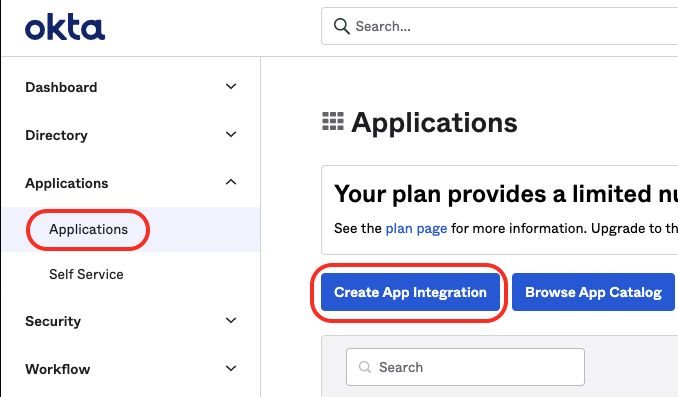
Within the Okta dashboard, click on the 'Applications' link in the main navigation menu.
1. Click the 'Create App Integration' button.
2. Choose OIDC - OpenID Connect.
3. Then Choose the 'Single Page App' option and hit Next
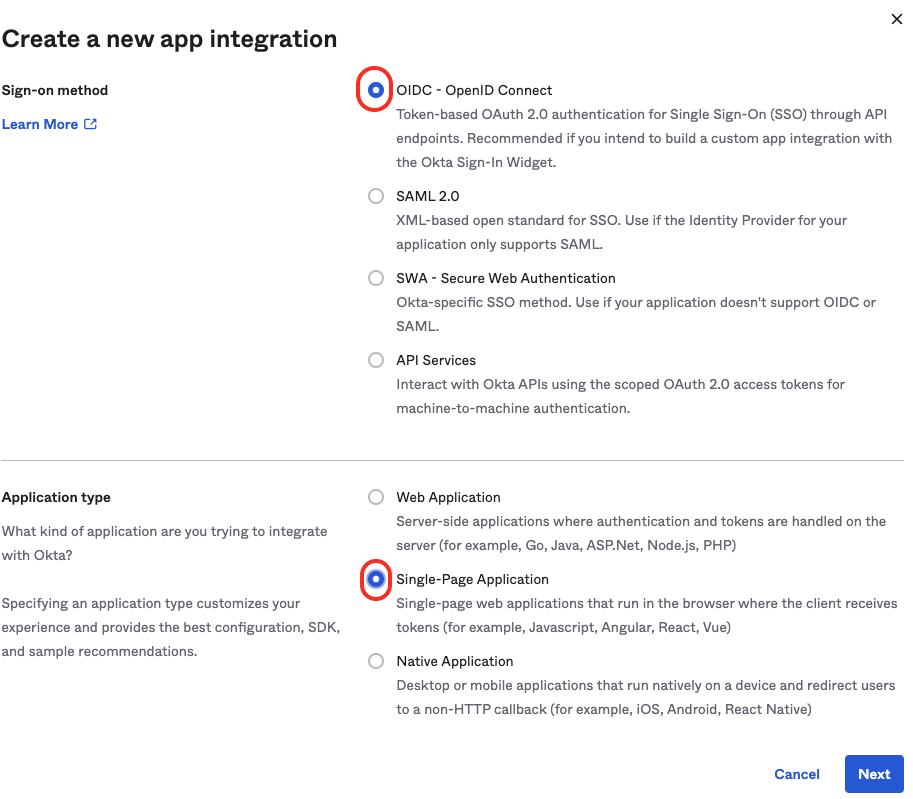
For 'Grant type' check the '**Implicit**' option and also check the '**Authorization Code**' option
1. Give it a suitable name (**Example SPA** for now).
2. Update the Sign-in redirect URI to http://localhost:**3000**/login/callback
3. Update the Sign-out redirect URIs also to http://localhost:**3000**
4. Optionally, add URI's for the different environments e.g. dev, staging, prod
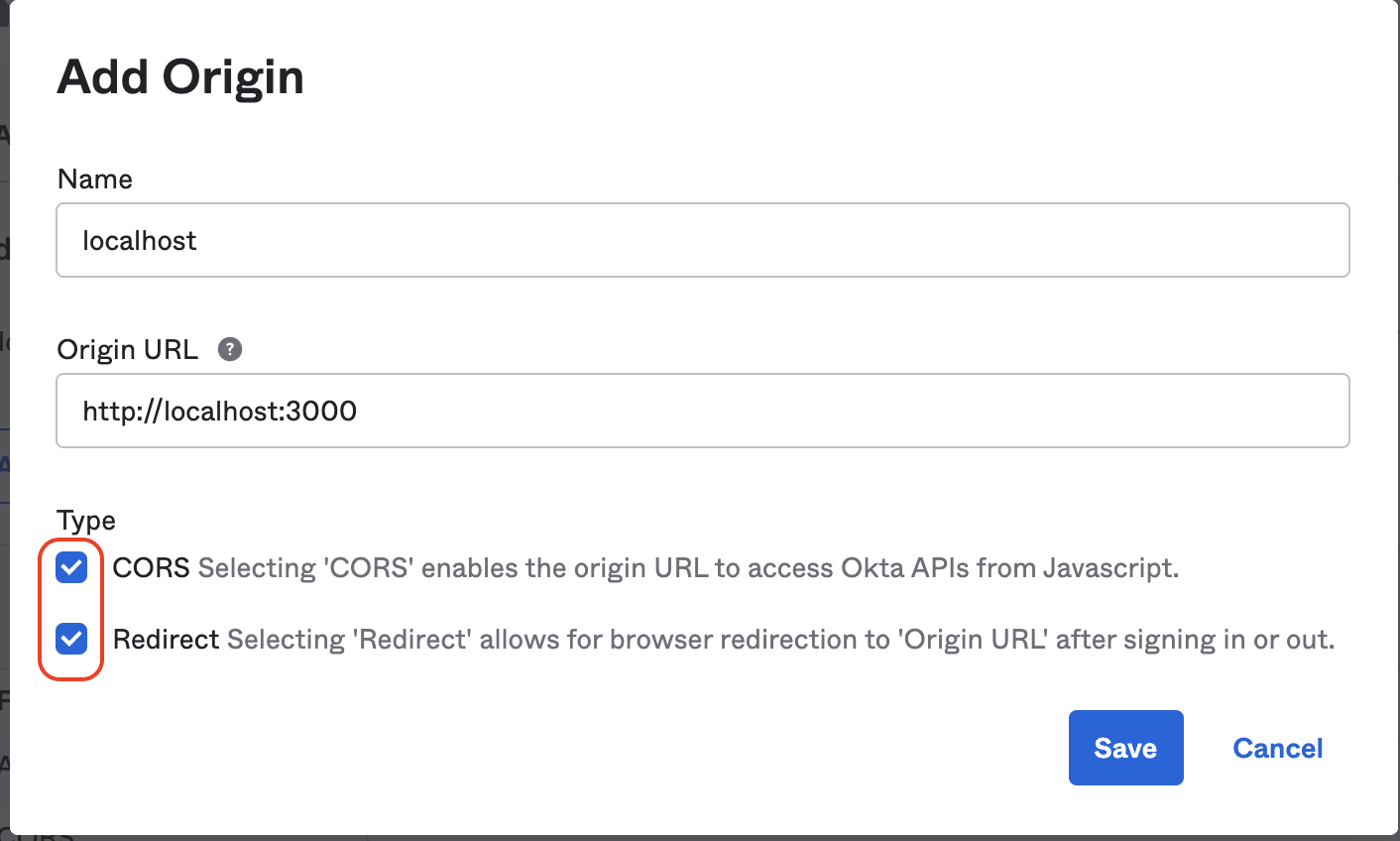
5. Trusted Origins **Base URIs** is generally required if you want to be able to logout. Add http://localhost:3000.
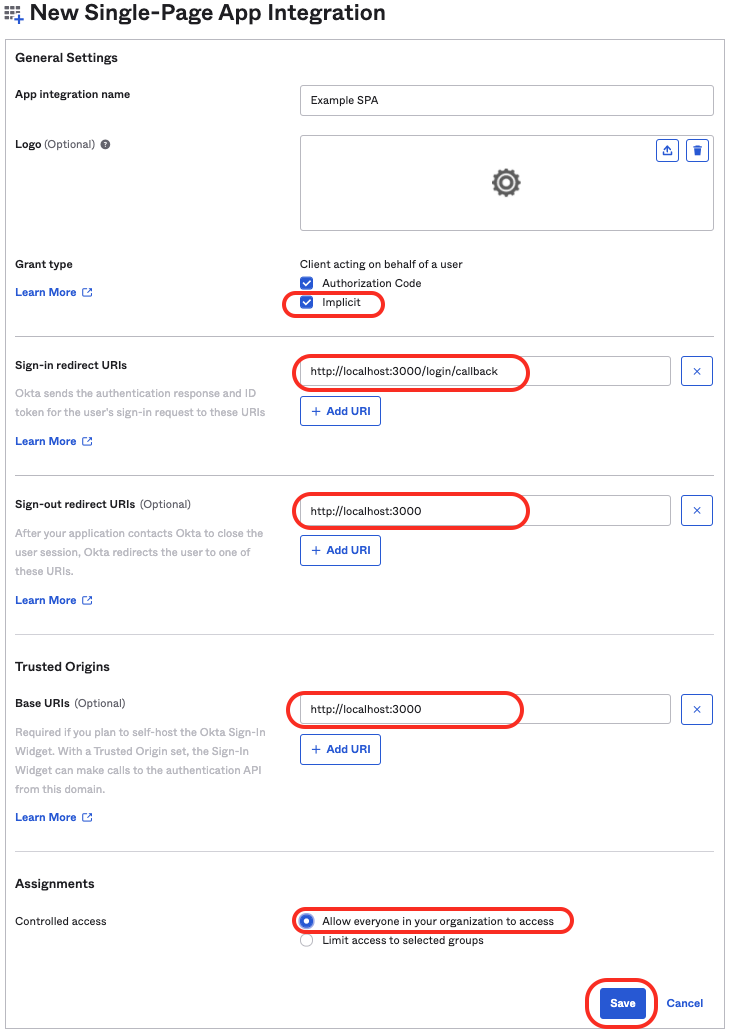
Hit Save
Note or copy the Client ID for later.
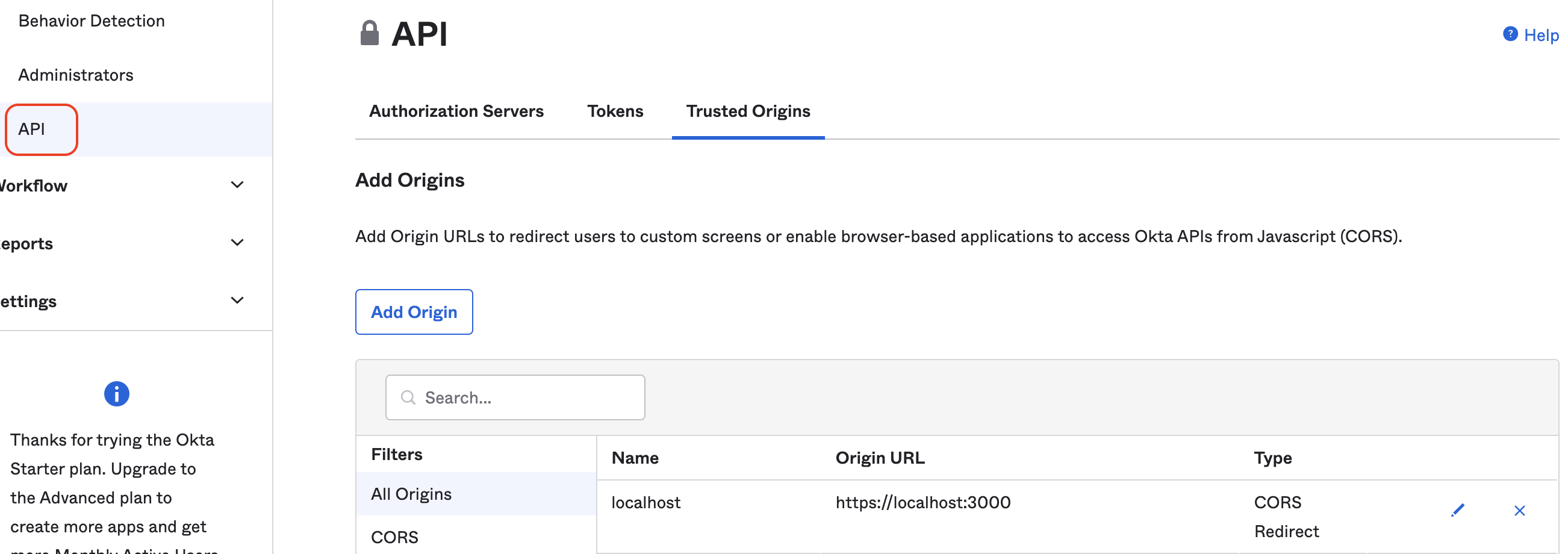
Navigate into 'Security` -> 'API' -> 'Authorization Servers' from the main navigation menu
\
In the 'Trusted Origins' tab add the various URL's that will need access to the Okta application. This is necessary in order to facilitate CORS.
### Getting Okta to supply user groups
Back on the 'Authorization Servers' tab click on 'default' to configure it.
In the 'Claims' tab, add a claim with the following values.
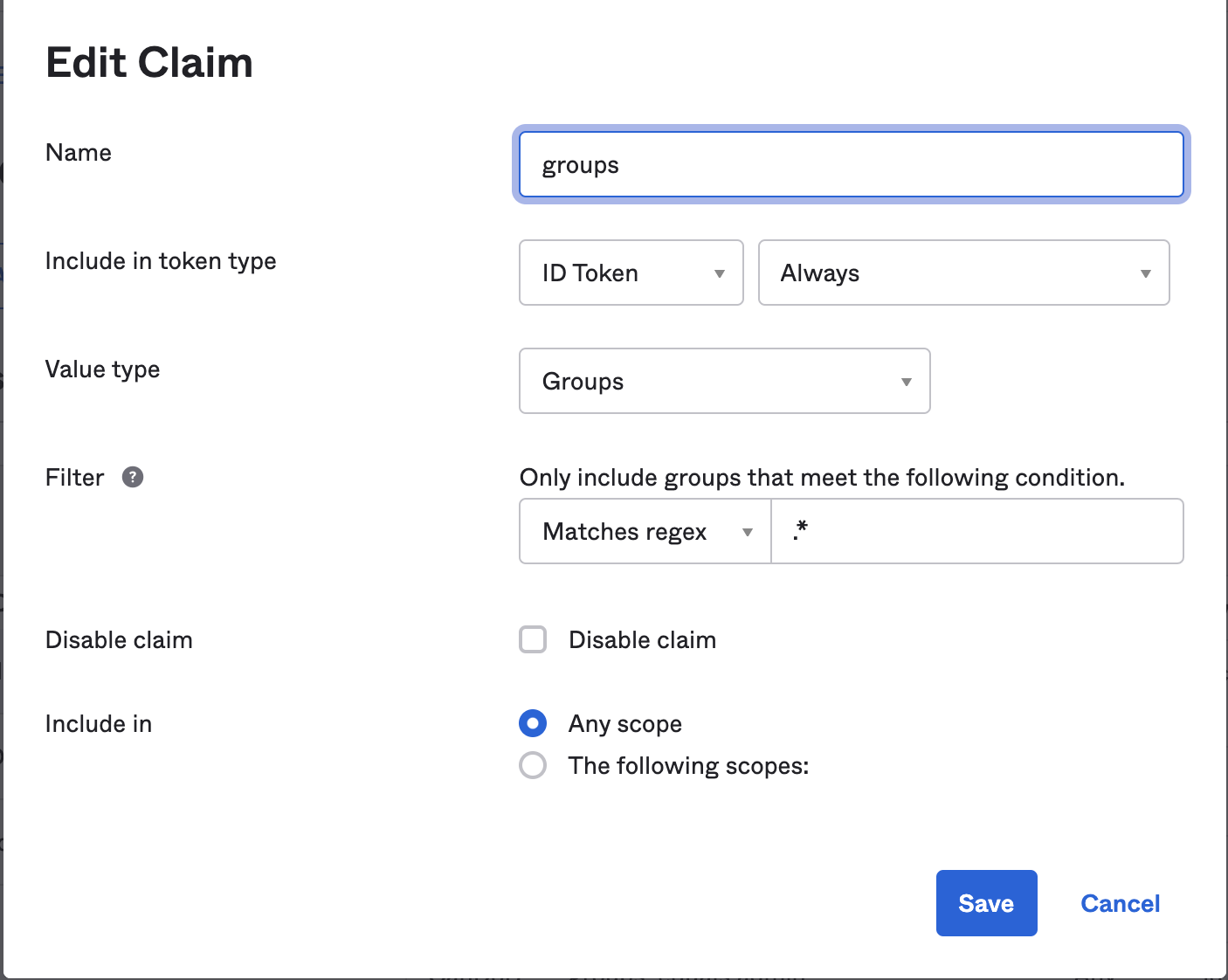
\
**Do this twice**. Once for the **ID Token** and once for the **Access Token**.
\
This will add a default claim called 'groups' that will return a list of Okta user groups for which the user is a member.
This is not the only way to achieve this but in order to work with the `@rent-the-runway/rtr-react-okta-auth` the claim `groups` should exist and its value should be the group names.
In the 'Access Policies' tab, enable access policy by adding a rule and configuring accordingly
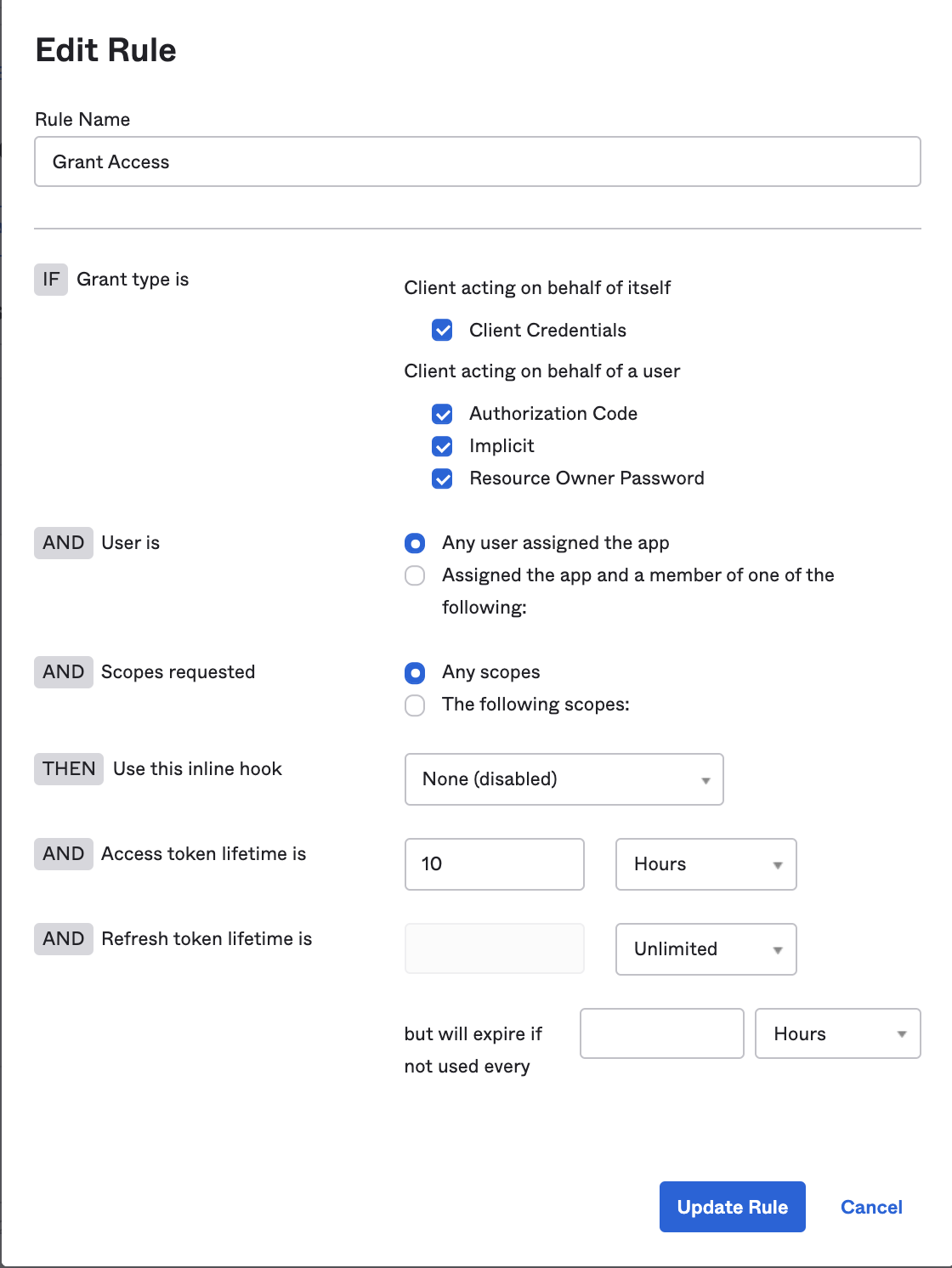
Now `const { user } = useRtrOktaAuth();` will include a `groups` property.
### Getting Okta to supply Claims
In the Okta admin we can create a claim and associate it with a user-group as so.
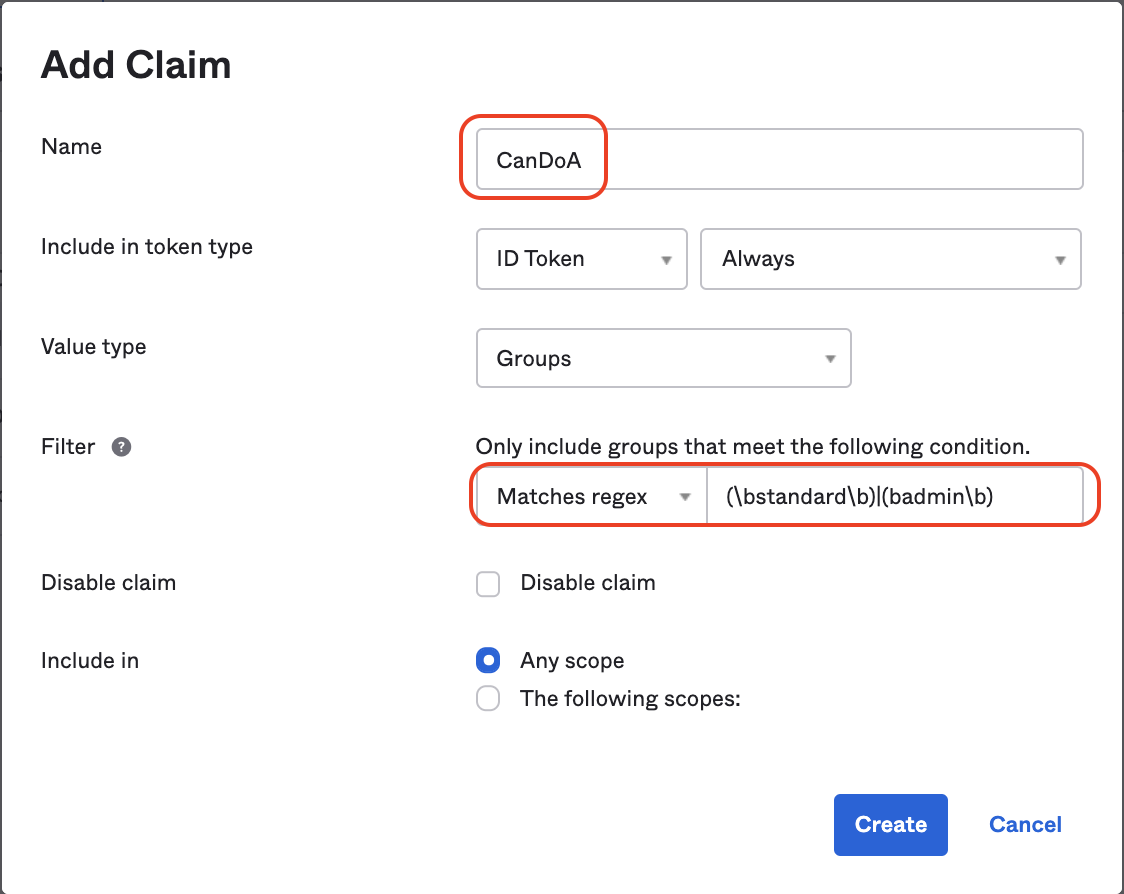
To associate a Claim with more than one group we can use regular expressions
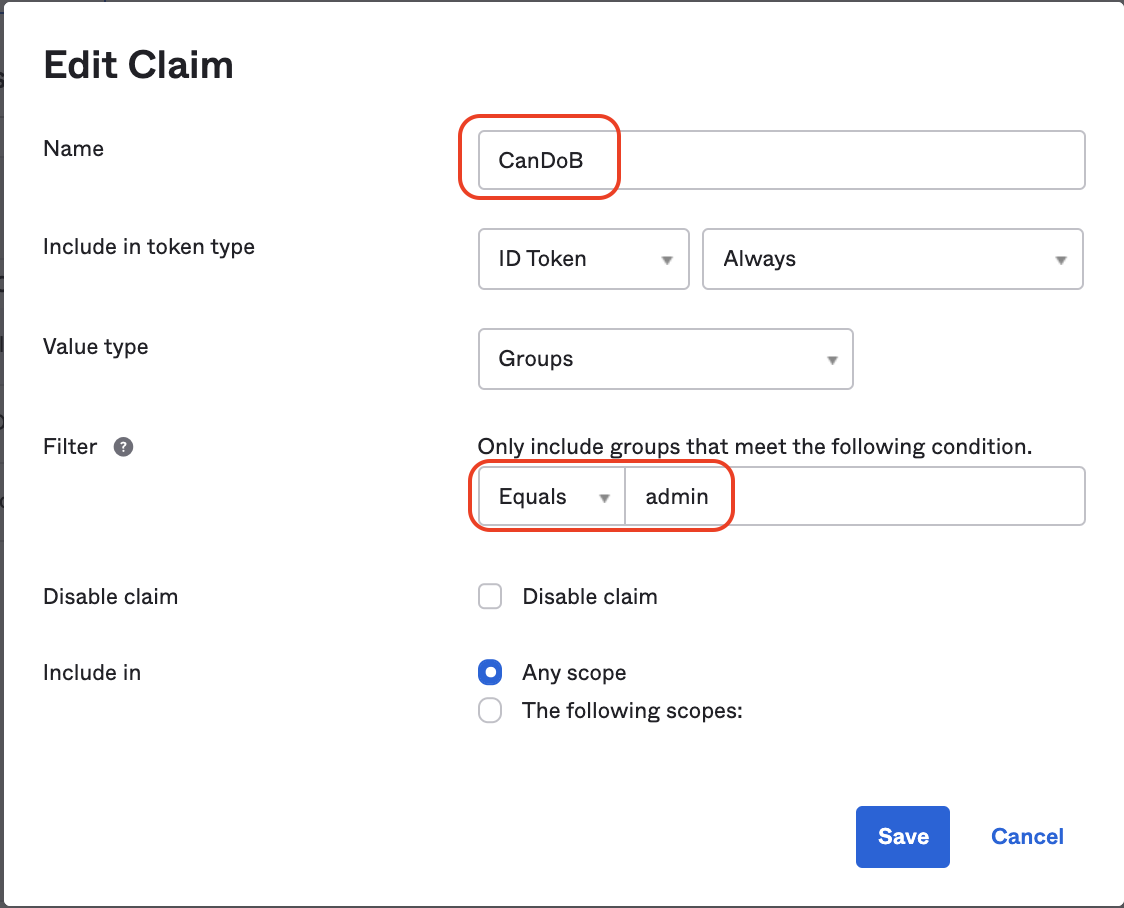
Now `const { user } = useRtrOktaAuth();` will include each claim as an individual property.
While the code for this library keeps `groups` and `claims` separate, setting Okta up this way makes `groups` feel like `roles` and `claims` feel like `permissions` within those `roles`.