@quickstart-ai/chatbot
Version:
Chatbot React
131 lines (83 loc) • 5.32 kB
Markdown
# Quickstart AI Chatbot
## Description
The **Quickstart AI Chatbot** is designed to provide answers based on the information you provide on our website. To get started, visit [Quickstart AI](https://quickstart-ai.me), sign up, and enter your business information. After completing the signup process, you will receive a token required to use the chatbot.
## Installation
To install the chatbot, run the following command in your project directory:
```bash
npm install @quickstart-ai/chatbot
```
## Usage
To utilize the chatbot in your React application, import the component and include it in your JSX. Here's an example:
```jsx
import React from 'react';
import { ChatBot } from '@quickstart-ai/chatbot';
function App() {
return (
<div>
<ChatBot token="YOUR_TOKEN" />
</div>
);
}
export default App;
```
## Token
To obtain your token:
1. Visit [Quickstart AI](https://quickstart-ai.me) and sign up.
2. Enter your business information.
3. After completing the signup, you will receive a token to use in the chatbot.
## Chatbot Output
Here is a preview of the chatbot interface

## Themes
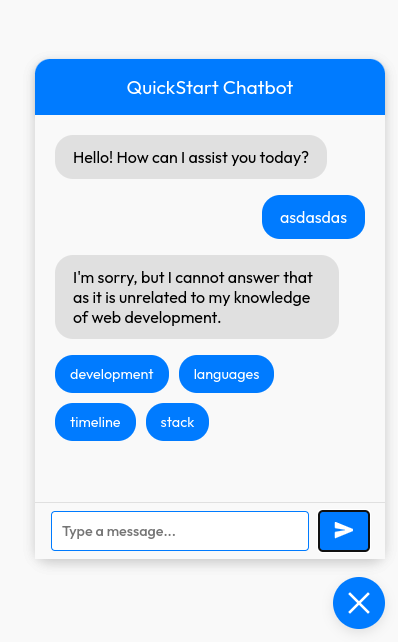
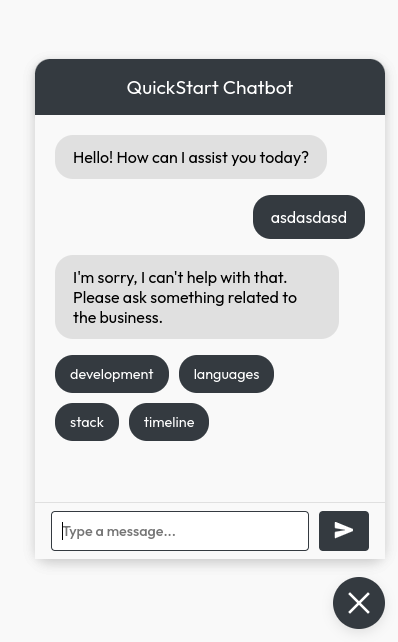
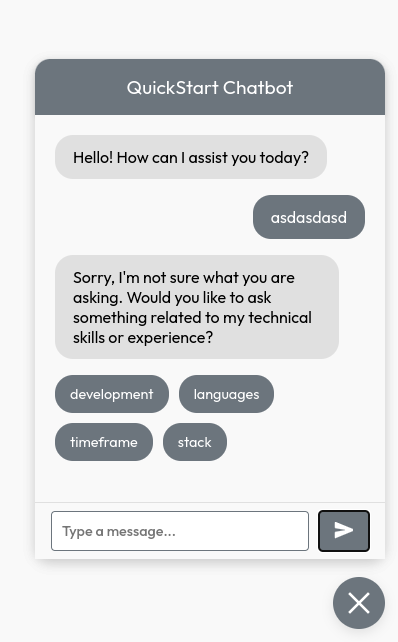
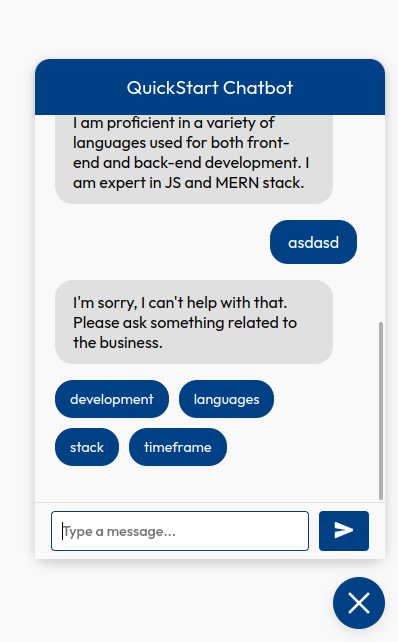
The chatbot comes with 4 themes. You can change the theme by passing the theme prop to the chatbot component. The available themes are:
### Primary Theme
### Secondary Theme
### Tech Theme
### Professional Theme
## Appearance Customization
Currently, the customization options for the chatbot's appearance are limited. However, we plan to enhance this functionality in the future. For now, you can use the following props to adjust the appearance:
| Prop Name | Type | Description |
|-----------|--------|----------------------------------------------------------|
| `toggleBtncolor` | string | The color of the chatbot (default: `#000000`). |
| `toggleBtnBgColor` | string | The background color of the chatbot (default: `#ffffff`).|
| `icon` | string | The icon of the chatbot (default: `fa fa-chatbot`). |
| `position`| string | The position of the chatbot on the screen (default: `bottom right`). |
| `animate` | boolean | The animation of the chatbot . |
| `theme` | string | The theme of the chatbot (default: `primary`). Total 4 themes are available. primary , secondary , tech and professional |
| `wantToShowSuggestions` | boolean | The suggestions of the chatbot (default: `true`). |
## Contributors
<!-- ALL-CONTRIBUTORS-LIST:START -->
<!-- prettier-ignore-start -->
<!-- markdownlint-disable -->
<table>
<tbody>
<tr>
<td align="center" valign="top" width="14.28%"><a href="https://portfolio-aqib-nine.vercel.app/"><img src="https://avatars.githubusercontent.com/u/115807186?v=4?s=100" width="100px;" alt="Aqib Nawab"/><br /><sub><b>Aqib Nawab</b></sub></a><br /><a href="https://github.com/AQIB-NAWAB/react-chatbot/commits?author=AQIB-NAWAB" title="Code">💻</a></td>
<td align="center" valign="top" width="14.28%"><a href="https://github.com/Abdul-Moiz31"><img src="https://avatars.githubusercontent.com/u/115508605?v=4?s=100" width="100px;" alt="Abdul Moiz "/><br /><sub><b>Abdul Moiz </b></sub></a><br /><a href="https://github.com/AQIB-NAWAB/react-chatbot/commits?author=Abdul-Moiz31" title="Code">💻</a></td>
<td align="center" valign="top" width="14.28%"><a href="https://github.com/Ahsan7714"><img src="https://avatars.githubusercontent.com/u/115989038?v=4?s=100" width="100px;" alt="AHSAN "/><br /><sub><b>AHSAN </b></sub></a><br /><a href="https://github.com/AQIB-NAWAB/react-chatbot/commits?author=Ahsan7714" title="Code">💻</a></td>
<td align="center" valign="top" width="14.28%"><a href="https://github.com/sheikh-Zulkifal"><img src="https://avatars.githubusercontent.com/u/126913851?v=4?s=100" width="100px;" alt="Zulkifal"/><br /><sub><b>Zulkifal</b></sub></a><br /><a href="https://github.com/AQIB-NAWAB/react-chatbot/commits?author=sheikh-Zulkifal" title="Code">💻</a></td>
</tr>
</tbody>
<tfoot>
<tr>
<td align="center" size="13px" colspan="7">
<img src="https://raw.githubusercontent.com/all-contributors/all-contributors-cli/1b8533af435da9854653492b1327a23a4dbd0a10/assets/logo-small.svg">
<a href="https://all-contributors.js.org/docs/en/bot/usage">Add your contributions</a>
</img>
</td>
</tr>
</tfoot>
</table>
<!-- markdownlint-restore -->
<!-- prettier-ignore-end -->
<!-- ALL-CONTRIBUTORS-LIST:END -->
## License
This project is licensed under the MIT License.
## Quick Links
- [My GitHub](https://github.com/Aqib-Nawab)
- [My LinkedIn](https://www.linkedin.com/in/aqib-nawab-5b383b1b3/)
```