@pinelab/vendure-plugin-metrics
Version:
Vendure plugin measuring and visualizing e-commerce metrics
113 lines (92 loc) • 3.36 kB
Markdown
[](https://plugins.pinelab.studio/plugin/vendure-plugin-metrics)
A plugin to visualize your shops most important metrics.
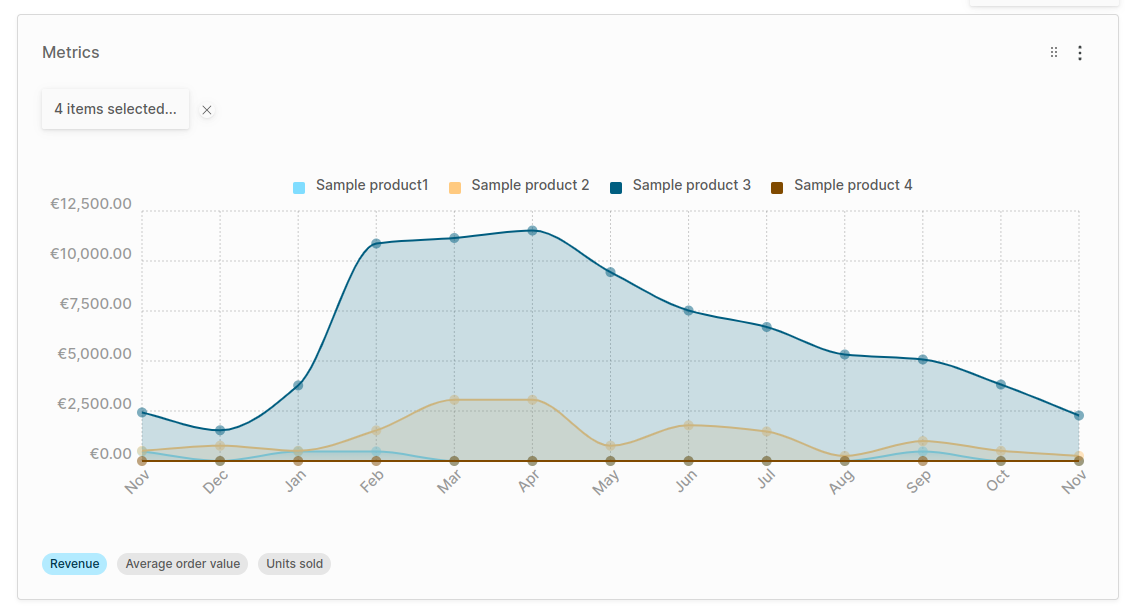
1. Configure the plugin in `vendure-config.ts`:
```ts
import { MetricsPlugin } from "@pinelab/vendure-plugin-metrics";
plugins: [
...
MetricsPlugin.init({
// Consider displaying fewer months for shops with a lot of orders
displayPastMonths: 13
}),
AdminUiPlugin.init({
port: 3002,
route: 'admin',
app: compileUiExtensions({
outputPath: path.join(__dirname, '__admin-ui'),
extensions: [MetricsPlugin.ui],
}),
}),
...
]
```
2. Rebuild your Admin UI
3. Run a database migration to add the necessary tables to your database.
4. Start your Vendure server and login as administrator
5. You should now be able to add the widget `Advanced Metrics` to your dashboard.
Metric results are cached in memory to prevent heavy database queries every time a user opens its dashboard.
1. Revenue (per product): The total revenue per month, or the revenue generated by specific variants if a variant is selected.
2. Average Order Value (AOV): The average of `order.totalWithTax` of the orders per month
3. Units sold: The number of units sold for the selected variant(s).
# Custom Metrics
You can implement the `MetricStrategy` interface and pass it to the `MetricsPlugin.init()` function to have your custom metric visible in the Widget.
Below is the implementation of the AOV metric, already included in the plugin, but it serves as an example of how to implement a custom metric.
```ts
// This is the existing Average Order Value metric, already included in the plugin
import { Order, RequestContext } from '@vendure/core';
import {
AdvancedMetricType,
MetricStrategy,
NamedDatapoint,
} from '@pinelab/vendure-plugin-metrics';
/**
* Calculates the average order value per month
*/
export class AverageOrderValueMetric implements MetricStrategy {
readonly metricType: AdvancedMetricType = AdvancedMetricType.Currency;
readonly code = 'aov';
readonly allowProductSelection = false;
getTitle(ctx: RequestContext): string {
return `Average order value`;
}
calculateDataPoints(
ctx: RequestContext,
entities: Order[]
): NamedDatapoint[] {
let legendLabel = 'Average order value';
if (ctx.channel.pricesIncludeTax) {
legendLabel += ' (incl. tax)';
} else {
legendLabel += ' (excl. tax)';
}
if (!entities.length) {
// Return 0 as average if no orders
return [
{
legendLabel,
value: 0,
},
];
}
const totalFieldName = ctx.channel.pricesIncludeTax
? 'totalWithTax'
: 'total';
const total = entities
.map((o) => o[totalFieldName])
.reduce((total, current) => total + current, 0);
const average = Math.round(total / entities.length) / 100;
return [
{
legendLabel,
value: average,
},
];
}
}
```
Special thanks to[@dalyathan](https://github.com/dalyathan) for his contributions on this plugin.