@picahq/ai
Version:
Pica AI SDK for Vercel AI SDK integration
113 lines (79 loc) • 5.13 kB
Markdown
# Pica AI SDK
[](https://npmjs.com/package/@picahq/ai)
<img src="https://assets.picaos.com/github/vercel-ai-sdk.svg" alt="Pica Vercel AI SDK Banner" style="border-radius: 5px;">
The Pica AI SDK is a TypeScript library for integrating Pica with [Vercel's AI SDK](https://www.npmjs.com/package/ai).
For detailed instructions and examples, view the [documentation](https://docs.picaos.com/sdk/vercel-ai).
## Installation
```bash
npm install @picahq/ai
```
## Setup
1. Create a new [Pica account](https://app.picaos.com)
2. Create a Connection via the [Pica Dashboard](https://app.picaos.com/connections)
3. Create a [Pica API key](https://app.picaos.com/settings/api-keys)
4. Set the API key as an environment variable: `PICA_SECRET_KEY=<your-api-key>`
## Configuration
The Pica SDK can be configured with the following options:
| Option | Type | Required | Default | Description |
|--------|------|----------|---------|-------------|
| serverUrl | String | No | https://api.picaos.com | URL for self-hosted Pica server |
| connectors | String[] | No | - | List of connector keys to filter by. Pass `["*"]` to initialize all available connectors, or specific connector keys to filter. If empty, no connections will be initialized |
| actions | String[] | No | All actions | List of action ids to filter by |
| permissions | `"read"` \| `"write"` \| `"admin"` | No | `"admin"` | Permissions for the Pica client. `"read"` will only allow GET requests, `"write"` will allow POST/PUT/PATCH requests, and `"admin"` will allow all methods. |
| identity | String | No | None | Filter connections by specific identifier |
| identityType | `"user"` \| `"team"` \| `"organization"` \| `"project"` | No | None | Filter connections by identity type |
| authkit | Boolean | No | false | If true, the SDK will use Authkit to connect to prompt the user to connect to a platform that they do not currently have access to |
| knowledgeAgent | Boolean | No | false | If true, the SDK will never execute actions, but will use Pica's knowledge to generate code. If true, use pica.intelligenceTool instead of pica.oneTool |
| knowledgeAgentConfig | Object | No | `{ includeEnvironmentVariables: true }` | Configuration for the Knowledge Agent. If `includeEnvironmentVariables` is true, the SDK will return a reminder to include environment variables in the output |
| headers | Record<string, string> | No | - | Additional headers to send with all requests (e.g., cookies, custom authentication headers) |
## Usage
The Pica AI SDK is designed to work seamlessly with [Vercel AI SDK](https://www.npmjs.com/package/ai). Here's an example implementation with Next.js:
```typescript
import { openai } from "@ai-sdk/openai";
import { convertToCoreMessages, streamText } from "ai";
import { Pica } from "@picahq/ai";
export async function POST(request: Request) {
const { messages } = await request.json();
const pica = new Pica(process.env.PICA_SECRET_KEY!, {
connectors: ["*"],
});
const systemPrompt = await pica.generateSystemPrompt();
const stream = streamText({
model: openai("gpt-4.1"),
system: systemPrompt,
tools: { ...pica.oneTool },
messages: convertToCoreMessages(messages),
maxSteps: 10,
});
return stream.toDataStreamResponse();
}
```
> ⭐️ You can see a full Next.js demo of the Pica AI SDK in action [here](https://github.com/picahq/onetool-demo)
Examples for streaming and creating an express server can be found in the [examples](examples) directory.
## 🚦 What can Pica do?
Once you've installed the SDK and connected your platforms in the [Pica dashboard](https://app.picaos.com/connections), you can seamlessly build your own AI agents to automate your workflows.
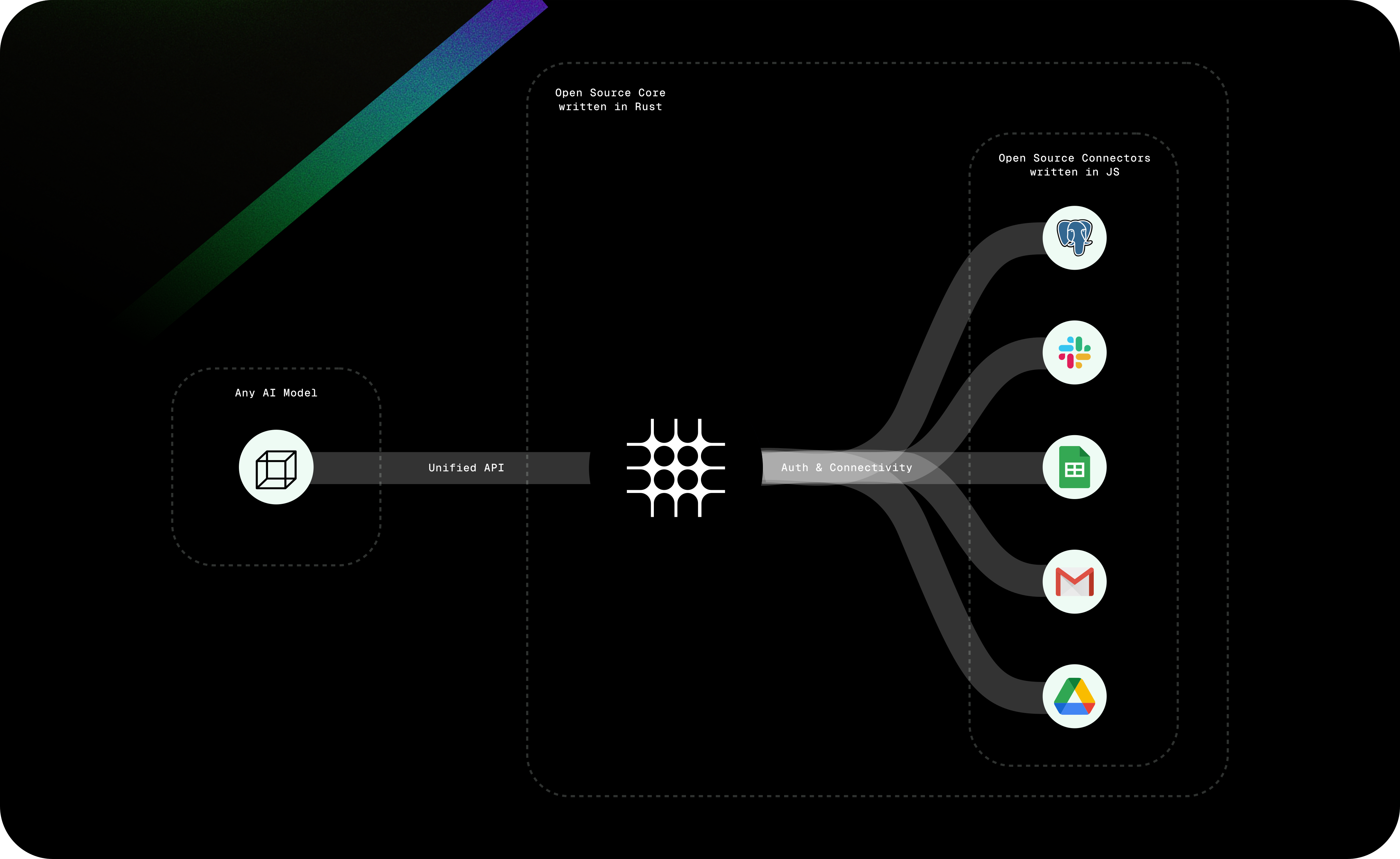
Here are some powerful examples of what you can build:
### Communication & Productivity
- Send an email using Gmail to a colleague with a meeting summary
- Create a calendar event in Google Calendar for next Tuesday at 2pm
- Send a message in Slack to the #marketing channel with the latest campaign metrics
- Find documents in Google Drive related to Q3 planning
### Data Access & Analysis
- List the top 10 customers from my PostgreSQL database
- Create a new sheet in Google Sheets with sales data
- Query Salesforce for opportunities closing this month
- Update a Notion database with project statuses
### Business Operations
- Create a support ticket in Zendesk from customer feedback
- Process a refund for a customer order in Stripe
- Add a new lead to HubSpot from a website inquiry
- Generate an invoice in QuickBooks for a client project
### AI & Content
- Generate an image with DALL-E based on product specifications
- Transcribe a meeting recording with ElevenLabs
- Research market trends using Tavily or SerpApi
- Analyze customer sentiment from support tickets
Got any cool examples? [Open a PR](https://github.com/picahq/awesome-pica) and share them!
## License
This project is licensed under the GPL-3.0 license. See the [LICENSE](LICENSE) file for details.