@pardnchiu/nanojson
Version:
A lightweight JSON editor built with pure JavaScript and native APIs. It features visual editing, dynamic type switching, and file import/export capabilities. Suitable for website embedding and JSON data editing.
289 lines (238 loc) • 7.33 kB
Markdown
<img src="https://nanojson.pardn.io/static/image/logo.png" width=80>
> 基於純 JavaScript 與原生 APIs 的輕量級 JSON 編輯器,具備可視化編輯、動態類型切換和檔案導入導出功能。適用於網站嵌入與 JSON 資料編輯。<br>
>
> 此專案於 2025/07/06 起改為 MIT 授權,並完整移除 `.git-crypt` 加密。

[](LICENSE)
[](https://www.npmjs.com/package/@pardnchiu/nanojson)
[](https://www.jsdelivr.com/package/npm/@pardnchiu/nanojson)<br>
[](README.md)
[](README.zh.md)
基於原生 DOM APIs 開發,無任何第三方依賴,可輕鬆嵌入任何網站專案。
採用樹狀結構顯示 JSON 資料,支援摺疊展開、動態新增刪除節點,提供直觀的編輯介面。
支援 5 種 JSON 資料類型(`string`、`number`、`boolean`、`array`、`object`),可即時切換類型並保持資料完整性。
```bash
npm install @pardnchiu/nanojson
```
```html
<script src="https://cdn.jsdelivr.net/npm/@pardnchiu/nanojson@[VERSION]/dist/NanoJSON.js"></script>
```
```javascript
import { JSONEditor } from "https://cdn.jsdelivr.net/npm/@pardnchiu/nanojson@[VERSION]/dist/NanoJSON.esm.js";
```
```javascript
// 基本初始化
const editor = new JSONEditor({
id: "json-editor-container", // 元素 ID
title: "JSON 編輯器", // 編輯器標題
description: "編輯您的 JSON", // 編輯器描述
fill: true, // 填滿父容器
json: { // 初始 JSON 資料
name: "NanoJSON",
version: "0.3.4",
features: ["輕量級", "純 JS", "視覺化編輯"]
}
});
// 進階配置
const advancedEditor = new JSONEditor({
id: "advanced-editor",
title: "進階 JSON 編輯器",
description: "全功能 JSON 編輯器",
fill: 1, // 填滿容器 (1 = true, 0 = false)
button: { // 功能按鈕配置
import: true, // 檔案導入
export: true, // 檔案導出
reset: true // 重置編輯器
},
when: { // 生命週期回調
rendered: () => {
console.log("編輯器已渲染");
},
updated: () => {
console.log("編輯器內容已更新");
}
}
});
// 從檔案初始化
const fileEditor = new JSONEditor({
id: "file-editor",
path: "/data/sample.json", // 從 URL 加載
// file: fileInput.files[0], // 從檔案物件加載
});
```
```javascript
const config = {
id: "container-id", // 目標容器元素 ID
title: "", // 編輯器標題 (預設: "")
description: "", // 編輯器描述 (預設: "")
fill: 1, // 填滿父容器 (預設: 1)
readonly: 0, // 只讀模式(預設: 0))
json: {}, // 初始 JSON 資料物件
file: null, // 檔案物件 (用於檔案上傳)
path: "", // JSON 檔案 URL 路徑
button: { // 功能按鈕開關
import: true, // 檔案導入按鈕 (預設: true)
export: true, // 檔案導出按鈕 (預設: true)
reset: true // 重置按鈕 (預設: true)
},
when: { // 生命週期事件
beforeRender: null, // 渲染前
rendered: null, // 渲染後
beforeUpdate: null, // 更新前
updated: null, // 更新後
beforeDestroy: null, // 銷毀前
destroyed: null // 銷毀後
}
};
```
```javascript
// 文本輸入框編輯
"Hello World"
```
```javascript
// 數字輸入框,自動過濾非數字字符
42
3.14159
-123
```
```javascript
// 下拉選擇
true
false
```
```javascript
// 支援嵌套結構,新增/刪除元素
[
"item1",
"item2",
123,
true,
{
"nested": "object"
}
]
```
```javascript
// 支援嵌套結構,新增/刪除屬性
{
"key1": "value1",
"key2": 456,
"nested": {
"deep": "value"
}
}
```
- **獲取 JSON 資料**
```javascript
const jsonString = editor.json; // 獲取格式化 JSON 字串
console.log(jsonString);
```
- **匯入資料**
```javascript
// 從物件匯入
await editor.import({
name: "新資料",
version: "1.0.0"
});
// 從檔案匯入
const fileInput = document.querySelector('input[type="file"]');
await editor.import(fileInput.files[0]);
// 從 URL 匯入
await editor.import('/path/to/data.json');
```
- **匯出檔案**
```javascript
editor.export(); // 自動下載 JSON 檔案
```
- **重置編輯器**
```javascript
editor.reset(); // 清除所有內容
```
- **新增根節點**
```javascript
editor.insert(); // 新增空的根節點
```
- **重新渲染**
```javascript
editor.render(); // 強制重新渲染編輯器
```
- **編輯模式**
```javascript
editor.enable();
```
- **只讀模式**
```javascript
editor.disable();
```
```javascript
const editor = new JSONEditor({
id: "editor",
when: {
beforeRender: () => {
console.log("即將渲染");
// 返回 false 可阻止渲染
},
rendered: () => {
console.log("渲染完成");
// 初始化後處理
},
beforeUpdate: () => {
console.log("即將更新內容");
// 返回 false 可阻止更新
},
updated: () => {
console.log("內容已更新");
// 更新後處理,例如同步到伺服器
},
beforeDestroy: () => {
console.log("即將銷毀編輯器");
},
destroyed: () => {
console.log("編輯器已銷毀");
}
}
});
```
- 僅支援 `.json` 檔案格式
- 自動驗證 JSON 語法正確性
- 自動格式化 JSON(4 空格縮排)
- 檔案命名格式:`JSONEditor-{timestamp}.json`
此專案採用 [MIT](LICENSE) 授權條款。
[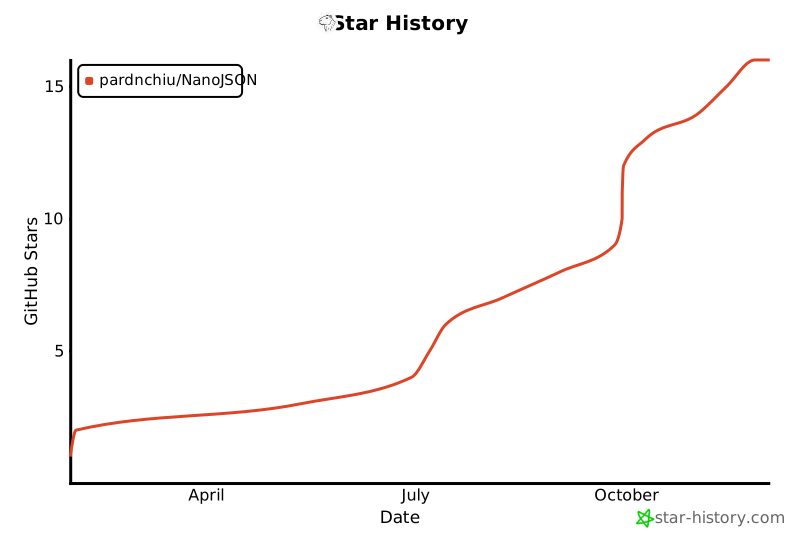](https://www.star-history.com/#pardnchiu/NanoJSON&Date)
<img src="https://avatars.githubusercontent.com/u/25631760" align="left" width="96" height="96" style="margin-right: 0.5rem;">
<h4 style="padding-top: 0">邱敬幃 Pardn Chiu</h4>
<a href="mailto:dev@pardn.io" target="_blank">
<img src="https://pardn.io/image/email.svg" width="48" height="48">
</a> <a href="https://linkedin.com/in/pardnchiu" target="_blank">
<img src="https://pardn.io/image/linkedin.svg" width="48" height="48">
</a>
***
©️ 2025 [邱敬幃 Pardn Chiu](https://pardn.io)