@pardnchiu/nanojson
Version:
A lightweight JSON editor built with pure JavaScript and native APIs. It features visual editing, dynamic type switching, and file import/export capabilities. Suitable for website embedding and JSON data editing.
289 lines (239 loc) • 7.64 kB
Markdown
> [!Note]
> This content is translated by LLM. Original text can be found [here](README.zh.md)
<img src="https://nanojson.pardn.io/static/image/logo.png" width=80>
> A lightweight JSON editor built with pure JavaScript and native APIs. It features visual editing, dynamic type switching, and file import/export capabilities. Suitable for website embedding and JSON data editing.<br>
>
> This project transitioned to MIT license on 2025/07/06, with `.git-crypt` encryption fully removed.

[](LICENSE)
[](https://www.npmjs.com/package/@pardnchiu/nanojson)
[](https://www.jsdelivr.com/package/npm/@pardnchiu/nanojson)<br>
[](README.md)
[](README.zh.md)
Developed using native DOM APIs without any third-party dependencies, making it easy to integrate into any web project.
Displays JSON data in a tree structure, supporting folding/unfolding, dynamic node addition/removal, and providing an intuitive editing interface.
Supports five JSON data types (`string`, `number`, `boolean`, `array`, `object`) with real-time type switching while maintaining data integrity.
## Installation
### Install via npm
```bash
npm install @pardnchiu/nanojson
```
### Include via CDN
#### UMD Version
```html
<script src="https://cdn.jsdelivr.net/npm/@pardnchiu/nanojson@[VERSION]/dist/NanoJSON.js"></script>
```
```javascript
import { JSONEditor } from "https://cdn.jsdelivr.net/npm/@pardnchiu/nanojson@[VERSION]/dist/NanoJSON.esm.js";
```
```javascript
// Basic initialization
const editor = new JSONEditor({
id: "json-editor-container", // Element ID
title: "JSON Editor", // Editor title
description: "Edit your JSON", // Editor description
fill: true, // Fill parent container
json: { // Initial JSON data
name: "NanoJSON",
version: "0.3.4",
features: ["Lightweight", "Pure JS", "Visual Editing"]
}
});
// Advanced configuration
const advancedEditor = new JSONEditor({
id: "advanced-editor",
title: "Advanced JSON Editor",
description: "Full-featured JSON editor",
fill: 1, // Fill container (1 = true, 0 = false)
button: { // Button configuration
import: true, // File import
export: true, // File export
reset: true // Reset editor
},
when: { // Lifecycle callbacks
rendered: () => {
console.log("Editor rendered");
},
updated: () => {
console.log("Editor content updated");
}
}
});
// Initialize from file
const fileEditor = new JSONEditor({
id: "file-editor",
path: "/data/sample.json", // Load from URL
// file: fileInput.files[0], // Load from file object
});
```
```javascript
const config = {
id: "container-id", // Target container element ID
title: "", // Editor title (default: "")
description: "", // Editor description (default: "")
readonly: 0, // Read-only mode (default: 0)
fill: 1, // Fill parent container (default: 1)
json: {}, // Initial JSON data object
file: null, // File object (for file upload)
path: "", // JSON file URL path
button: { // Button toggles
import: true, // File import button (default: true)
export: true, // File export button (default: true)
reset: true // Reset button (default: true)
},
when: { // Lifecycle events
beforeRender: null, // Before render
rendered: null, // After render
beforeUpdate: null, // Before update
updated: null, // After update
beforeDestroy: null, // Before destroy
destroyed: null // After destroy
}
};
```
```javascript
// Text input editing
"Hello World"
```
```javascript
// Numeric input, automatically filters non-numeric characters
42
3.14159
-123
```
```javascript
// Dropdown selection
true
false
```
```javascript
// Supports nested structures, add/remove elements
[
"item1",
"item2",
123,
true,
{
"nested": "object"
}
]
```
```javascript
// Supports nested structures, add/remove properties
{
"key1": "value1",
"key2": 456,
"nested": {
"deep": "value"
}
}
```
- **Get JSON Data**
```javascript
const jsonString = editor.json; // Get formatted JSON string
console.log(jsonString);
```
- **Import Data**
```javascript
// Import from object
await editor.import({
name: "New Data",
version: "1.0.0"
});
// Import from file
const fileInput = document.querySelector('input[type="file"]');
await editor.import(fileInput.files[0]);
// Import from URL
await editor.import('/path/to/data.json');
```
- **Export File**
```javascript
editor.export(); // Automatically download JSON file
```
- **Reset Editor**
```javascript
editor.reset(); // Clear all content
```
- **Add Root Node**
```javascript
editor.insert(); // Add an empty root node
```
- **Re-render**
```javascript
editor.render(); // Force re-render the editor
```
- **Enable Editing Mode**
```javascript
editor.enable();
```
- **Set Read-Only Mode**
```javascript
editor.disable();
```
```javascript
const editor = new JSONEditor({
id: "editor",
when: {
beforeRender: () => {
console.log("About to render");
// Return false to prevent rendering
},
rendered: () => {
console.log("Render complete");
// Post-initialization handling
},
beforeUpdate: () => {
console.log("About to update content");
// Return false to prevent update
},
updated: () => {
console.log("Content updated");
// Post-update handling, e.g., sync to server
},
beforeDestroy: () => {
console.log("About to destroy editor");
},
destroyed: () => {
console.log("Editor destroyed");
}
}
});
```
- Only `.json` file format supported
- Automatically validates JSON syntax correctness
- Automatically formats JSON (4-space indentation)
- File naming format: `JSONEditor-{timestamp}.json`
This project is licensed under [MIT](LICENSE).
[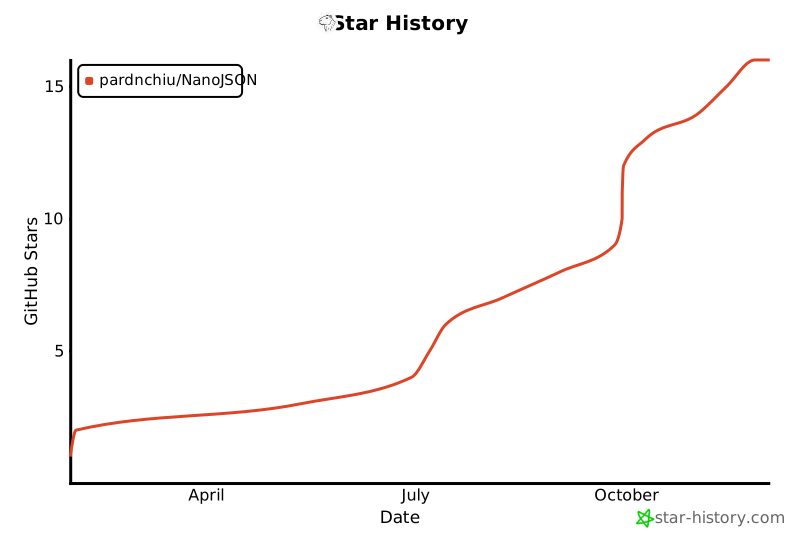](https://www.star-history.com/#pardnchiu/NanoJSON&Date)
<img src="https://avatars.githubusercontent.com/u/25631760" align="left" width="96" height="96" style="margin-right: 0.5rem;">
<h4 style="padding-top: 0">邱敬幃 Pardn Chiu</h4>
<a href="mailto:dev@pardn.io" target="_blank">
<img src="https://pardn.io/image/email.svg" width="48" height="48">
</a> <a href="https://linkedin.com/in/pardnchiu" target="_blank">
<img src="https://pardn.io/image/linkedin.svg" width="48" height="48">
</a>
***
©️ 2025 [邱敬幃 Pardn Chiu](https://pardn.io)