@origami-minecraft/stable
Version:
Origami is a terminal-first Minecraft launcher that supports authentication, installation, and launching of Minecraft versions — with built-in support for Microsoft accounts, mod loaders, profile management, and more. Designed for power users, modders, an
275 lines (176 loc) • 7.32 kB
Markdown
# 🌸 Origami
> ✨ Lightweight Minecraft CLI Launcher — beautiful, fast, and scriptable.
Origami is a terminal-first Minecraft launcher that supports authentication, installation, and launching of Minecraft versions — with built-in support for Microsoft accounts, mod loaders, profile management, and more. Designed for power users, modders, and anyone who loves minimalism and productivity.


[](https://github.com/merasugd/origami-launcher)
## 📥 Install Node.js
Before installing Origami, you need [Node.js](https://nodejs.org/) and [npm](https://www.npmjs.com/) (Node's package manager) installed.
### 🪟 Windows
1. Download the **LTS version** of Node.js from the [official website](https://nodejs.org/en/download).
2. Run the installer and follow the setup instructions.
3. Open **Command Prompt** and verify installation:
```bash
node -v
npm -v
```
### 🍎 macOS
You can use [Homebrew](https://brew.sh/):
```bash
brew install node
```
Or download the LTS installer from [nodejs.org](https://nodejs.org/en/download).
Verify installation:
```bash
node -v
npm -v
```
### 🐧 Linux (Ubuntu/Debian)
```bash
sudo apt update
sudo apt install nodejs npm
```
Alternatively, for newer versions:
```bash
curl -fsSL https://deb.nodesource.com/setup_lts.x | sudo -E bash -
sudo apt install -y nodejs
```
Then check versions:
```bash
node -v
npm -v
```
### 📦 Alternative: Using NVM (Node Version Manager)
NVM allows you to easily switch between Node.js versions:
#### macOS/Linux:
```bash
curl -o- https://raw.githubusercontent.com/nvm-sh/nvm/v0.39.7/install.sh | bash
source ~/.nvm/nvm.sh
nvm install --lts
```
#### Windows:
Use [nvm-windows](https://github.com/coreybutler/nvm-windows):
1. Download the latest `nvm-setup.exe` from the [releases](https://github.com/coreybutler/nvm-windows/releases) page.
2. Install and open Command Prompt:
```bash
nvm install lts
nvm use lts
node -v
npm -v
```
> ✅ Make sure you're using **Node.js v18 or higher** for best compatibility.
## 🚀 Installation
### 🔒 Stable (Recommended)
Install the latest stable version from NPM:
```bash
npm install -g @origami-minecraft/stable
```
Once installed, you can use the `origami` command anywhere in your terminal.
### 🧪 Development Builds
> 🚧 Development builds are experimental. These builds may include experimental features and are considered unstable.
You can install them directly from NPM:
#### Install the latest dev build:
```bash
npm install -g @origami-minecraft/devbuilds
```
### 🧶 Yarn Support
Prefer [Yarn](https://yarnpkg.com/) over npm? Origami supports it too!
Install with:
```bash
yarn global add @origami-minecraft/stable
```
Or for dev builds:
```bash
yarn global add @origami-minecraft/devbuilds
```
> ✅ Make sure Yarn is installed globally:
>
> ```bash
> corepack enable
> ```
## 🗒️ Changelog
See what's new in stable builds in the [Changelog](https://github.com/merasugd/origami-launcher/blob/main/wiki/CHANGELOG.MD).
⚠️ Dev builds are expermental — use them at your own risk!
⚠️ Check out the latest dev build updates on the [GitHub Actions page.](https://github.com/merasugd/origami-launcher/actions)
## 🎮 Features
* 🎨 **Beautiful terminal UI** with gradient animations and ASCII art
* 🔐 **Microsoft, Mojang & Custom Auth support** (Littleskin, Ely.by, etc)
* 📂 **Profile system** - create, select, and configure per-profile settings
* ⬇️ **Install and manage Minecraft versions** (Vanilla, Forge, NeoForge, Fabric, Quilt)
* 🧪 **Experimental Modpack Installer**
* Installs mods, sets up loaders automatically via `origami menu`
* 🌐 **Universal Game Directory Mode**
* Enable globally or per profile, great for switching between traditional `.minecraft` and isolated setups
* ⚙️ **Per-Profile JVM & Java Runtime config**
* Control memory, JVM flags, and choose Java binary per profile
* 📦 **Modrinth browser with filters**
* Browse mods, resource packs, and shaders with pagination and custom filters
* 💬 **Friendly error prompts and CLI feedback**
* Errors are shown clearly, with retry logic and detailed messages
* ✨ **Supports GraalVM, Zulu, Corretto, Temurin**, install JDKs right in the launcher
* 💨 **Launch Minecraft directly from terminal**
## 📦 Usage
After installation, just run:
```bash
origami menu
```
### 🖼️ Preview
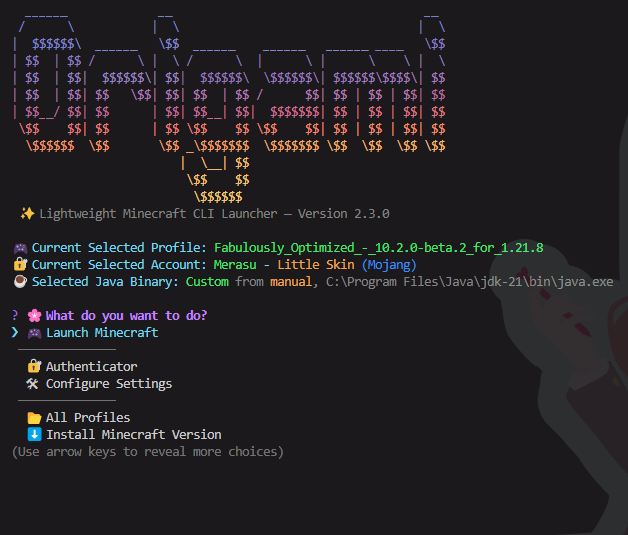
Navigate using your keyboard to log in, manage accounts, install versions, or launch the game.
<video width="720" controls>
<source src="https://github.com/merasugd/origami-launcher/raw/refs/heads/main/wiki/videos/preview.mp4" type="video/mp4">
Your browser does not support the video tag.
</video>
## [Demo Video](https://github.com/merasugd/origami-launcher/raw/refs/heads/main/wiki/videos/preview.mp4)
### ⚙️ Settings Guide
Curious what all those launcher settings actually do?
🧠 Check out the full settings breakdown in [Settings Guide](https://github.com/merasugd/origami-launcher/blob/main/wiki/SETTINGS.md)
It explains every toggle and feature, like memory usage, window modes, safe exit, and more!
### 📘 CLI Documentation
See the full CLI documentation here: [`📖 CLI.md`](https://github.com/merasugd/origami-launcher/blob/main/wiki/CLI.MD)
## 📝 License
This project is licensed under the **GPL-3.0-only** license.
## 🧪 Development
```bash
git clone https://github.com/merasugd/origami-launcher.git
cd origami-launcher
npm install
# testing
npm run compile
npm run origami
```
## 💖 Credits
- [Inquirer](https://github.com/SBoudrias/Inquirer.js) for interactive menus
- [Figlet](https://github.com/patorjk/figlet.js) for ASCII banners
- [Gradient-string](https://github.com/bokub/gradient-string) for rainbow text
- [MCLC](https://github.com/Pierce01/MinecraftLauncher-core) for the back bone of the launcher
- [Temurin](https://adoptium.net/) for JDK base
- Minecraft is copyright Mojang
## 🌐 Links
- 📁 GitHub: [Click Here](https://github.com/merasugd/origami-launcher)
- 📦 NPM Stable: [Click Here](https://www.npmjs.com/package/@origami-minecraft/stable)
- 📦 Yarn Stable: [Click Here](https://yarnpkg.com/package?q=%40origami-mine&name=%40origami-minecraft%2Fstable)
## 🙏 Support
Found a bug or want to suggest a feature? [Open an issue](https://github.com/merasugd/origami-launcher/issues) or submit a PR!
## 🤝 Contributing
We welcome contributions of all kinds — from bug fixes and documentation to new features.
- 📖 See our [CONTRIBUTING.md](https://github.com/merasugd/origami-launcher/blob/main/wiki/CONTRIBUTING.md) guide to get started.
- 📜 Please review our [Code of Conduct](https://github.com/merasugd/origami-launcher/blob/main/wiki/CODE_OF_CONDUCT.md) before participating in discussions or contributing.
_Enjoy the terminal. Happy crafting :D_ 🧵