@nxrocks/nx-flutter
Version:
Nx plugin adding first class support for Flutter in your Nx workspace
214 lines (157 loc) • 16.4 kB
Markdown
# nx-flutter
[](https://www.npmjs.com/package/@nxrocks/nx-flutter)
[](https://github.com/flutter/flutter/wiki/Flutter-build-release-channels#stable)
[](https://github.com/tinesoft/nxrocks/actions?query=workflow%3ARelease)
[](https://github.com/semantic-release/semantic-release)
> Nx Plugin adding first class support for [Flutter](https://flutter.dev) in your Nx workspace
<p align="center"><img src="https://raw.githubusercontent.com/tinesoft/nxrocks/master/images/nx-flutter.png" width="450"></p>
## Contents
- [Features](#features)
- [Setup](#setup)
- [Generators](#generators)
- [Executors](#executors)
- [Compatibility with Nx](#compatibility-with-nx)
## Features
Here is a list of some of the coolest features of the plugin:
- ✅ Generation of Flutter applications/packages/modules/plugins based on **Flutter cli** API
- ✅ Building, packaging, testing, etc your Flutter projects
- ✅ Integration with Nx's **dependency graph** (through `nx dep-graph` or `nx affected:dep-graph`): this allows you to **visualize** the dependencies of any Flutter projects inside your workspace, just like Nx natively does it for JS/TS-based projects!
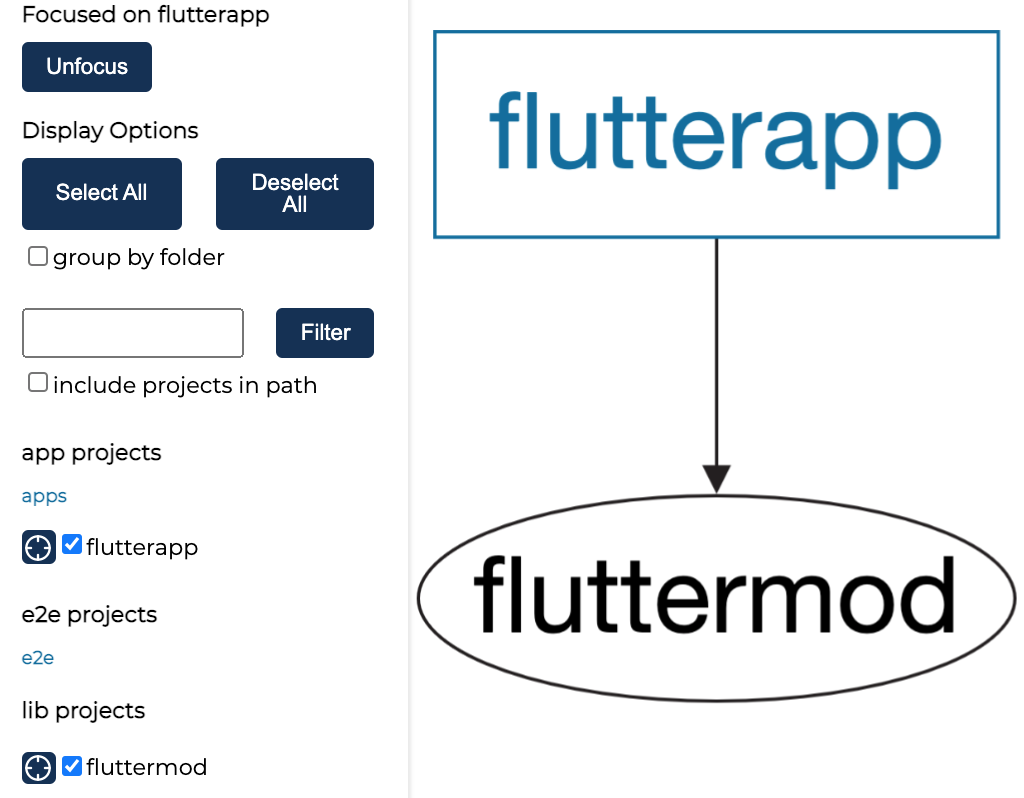
_Example of running the `nx dep-graph` command on a workspace with 2 Flutter projects inside_
- ...
## Setup
<details open>
<summary>📢 ℹ️ 🆕 <b>HEADS UP!</b> New <b>simplified</b> setup since <i>October 2023</i>, with our custom <b>CLI</b>!</summary>
> You can now use our own `create-nx-flutter` **CLI** to easily create a Nx workspace, that comes with this plugin pre-installed!
>
> Simply run:
>
> ```
> # npm
> npx create-nx-flutter@latest
> # or
> # yarn
> yarn create nx-flutter
> ```
>
> and you are good to go‧o‧o‧o! 🚀
>
> More information here: [create-nx-flutter](../create-nx-flutter/README.md)
</details>
Otherwise, this is the traditional way of setting things up:
### 1. Creating the Nx workspace
This plugin relies on [`flutter's command-line`](https://flutter.dev/docs/reference/flutter-cli) to do its job. So, you must have [`flutter`](https://flutter.dev) installed on your system. If not, head to [flutter.dev/docs/get-started/install](https://flutter.dev/docs/get-started/install) and follow installation instructions for your OS.
Then, if you have not already, [create an Nx workspace](https://github.com/nrwl/nx#creating-an-nx-workspace) with the following:
```
# npm
npx create-nx-workspace@latest
# yarn
yarn create nx-workspace@latest
```
### 2. Installing the Plugin
Then you need to install the plugin in order to generate Flutter applications later on.
```
# npm
npm install @nxrocks/nx-flutter --save-dev
# yarn
yarn add @nxrocks/nx-flutter --dev
```
## Generators
This plugin is composed of 1 main **generator**:
- `project` generator
### Generating Projects (`project` generator)
Simply run the `project` generator with the following command:
```
nx g @nxrocks/nx-flutter:project path/to/app-name
```
> you can also use the following aliases to call the generator: `prj`, `new`, or `create`
You will be prompted for entering the most commonly customized generation options (like application's `package`, `description`, `template`, etc).
To skip the interactive prompt, or if you want to customize all non-prompted options, you can pass them along directly when running the command, as such:
```
nx g @nxrocks/nx-flutter:project path/to/app-name --optionName1 optionValue1 ... --optionNameN optionValueN
```
#### Generation Options
Here the list of available generation options :
| Arguments | Description |
| ------------- | --------------------------------- |
| `<directory>` | The directory of the new project. |
| Option | Value | Description |
| ----------------- | -------------------------------------------------------------- | -------------------------------------------------------------------------------------------- |
| `org` | `string` | Name of the package |
| `description` | `string` | Description of the project |
| `androidLanguage` | `java` \| `kotlin` | Language to use for Android code |
| `iOSLanguage` | `objc` \| `swift` | Language to use for iOS code |
| `template` | `app` \| `module` \| `package` \| `plugin` | Template of Flutter project to generate |
| `sample` | `string` | Sample ID of the desired sample from the API documentation website (http://docs.flutter.dev) |
| `platforms` | `android` \| `ios` \| `linux` \| `macos` \| `windows` \| `web` | Platforms supported by the project to generate |
| `pub` | `boolean` | Whether to run "flutter pub get" after the project has been created |
| `offline` | `boolean` | Whether or not to run 'flutter pub get' in offline mode |
| `tags` | `string` | Tags to use for linting (comma-separated) |
| `directory` | `string` | Directory where the project is placed |
## Executors
Once your app is generated, you can now use **executors** to manage it.
Here the list of available executors<sup>1</sup>:
| Executor | Arguments | Description |
| ------------------- | --------------------------------------------------------------------------------------------- | ------------------------------------------------------------------------------------------------------------------------ |
| `analyze` | _see `flutter help analyze`_ | Analyze the project's Dart code |
| `assemble` | _see `flutter help assemble`_ | Assemble and build Flutter resources |
| `attach` | _see `flutter help attach`_ | Attach to a running app |
| `build-aar` | _see `flutter help build aar`_ | Build a repository containing an AAR and a POM file |
| `build-apk` | _see `flutter help build apk`_ | Build an Android APK file from your app |
| `build-appbundle` | _see `flutter help build appbundle`_ | Build an Android App Bundle file from your app |
| `build-bundle` | _see `flutter help build bundle`_ | Build the Flutter assets directory from your app |
| `build-ios` | _see `flutter help build ios`_ | Build an iOS application bundle (Mac OS X host only) |
| `buildIosframework` | _see `flutter help build ios-framework`_ | Produces a .framework directory for a Flutter module and its plugins for integration into existing, plain Xcode projects |
| `build-ipa` | _see `flutter help build ipa`_ | Build an iOS archive bundle (Mac OS X host only) |
| `clean` | _see `flutter help clean`_ | Delete the `build/` and `dart_tool/` directories |
| `drive` | _see `flutter help drive`_ | Run integration tests for the project on an attached device or emulator |
| `format` | _see `dart help format`_ | Format one or more Dart files |
| `gen-l10n` | _see `flutter help gen-l10n`_ | Generate localizations for the current project |
| `install` | _see `flutter help install`_ | Install a Flutter app on an attached device |
| `run` | _see `flutter help run`_ | Run your Flutter app on an attached device |
| `screenshot` | _see `flutter help screenshot`_ | Take a screenshot from a connected device |
| `symbolize` | _see `flutter help symbolize`_ | Symbolize a stack trace from an AOT-compiled Flutter app |
| `test` | _see `flutter help test`_ | Run Flutter unit tests for the current project |
| `pub-get` | _see `flutter help pub get`_ | Fetches and installs the dependencies listed in your `pubspec.yaml` file. |
| `pub-upgrade` | _see `flutter help pub upgrade`_ | Upgrades dependencies to the latest versions that match the constraints in `pubspec.yaml`. |
| `pub-downgrade` | _see `flutter help pub downgrade`_ | Downgrades dependencies to the earliest versions that match the constraints in `pubspec.yaml`. |
| `pub-outdated` | _see `flutter help pub outdated`_ | Lists outdated dependencies, showing current, upgradable, and latest versions. |
| `pub-add` | `--package=<pkg_name>` (required) _see `flutter help pub add`_ for the rest of options | Adds a new dependency to `pubspec.yaml` and fetches it. |
| `pub-remove` | `--package=<pkg_name>` (required) _see `flutter help pub remove`_ for the rest of options | Removes a dependency from `pubspec.yaml` and updates the package list. |
| `pub-run` | `--executable="<executable>"` (required) _see `flutter help pub run`_ for the rest of options | Runs an executable from one of your dependencies. |
| `pub-publish` | _see `flutter help pub publish`_ | Publishes your package to the Dart package repository (`pub.dev`). |
| `pub-deps` | _see `flutter help pub deps`_ | Displays a dependency graph of your package's dependencies. |
| `pub-version` | _see `flutter help pub version`_ | Shows the current version of the Dart SDK. |
<sup>1</sup> : _Actual executors in your `workspace.json` will depend on the type of `flutter` project (`template`), target `platforms` that you choose to generate._
Each executor is based on an original project-level `flutter` command. The name is just **kebab-cased** to match executors' naming conventions.
Besides, the addtional arguments accepted by each executor, are the same as the original `flutter` command they are based upon, and can be provided directly like in `--option=value`. Read this [guide](https://nx.dev/recipes/running-tasks/pass-args-to-commands#pass-args-when-running-the-command-in-the-terminal) for more about the syntax to pass arguments along.
For example:
```
$ flutter gen-l10n --header "/// my header"
$ flutter pub add builder_runner
$ flutter pub run build_runner build
become 👉🏾
$ nx gen-l10n your-flutterapp --header="/// my header"
$ nx pub-add your-flutterapp --package=build_runner
$ nx pub-run your-flutterapp --executable="build_runner build" // note the "" around the executable command, because it has spaces
or
$ nx run your-flutterapp:gen-l10n --header="/// my header"
$ nx run your-flutterapp:pub-add --package=build_runner
$ nx run your-flutterapp:pub-run --executabe="build_runner build" // note the "" around the executable command, because it has spaces
```
## Compatibility with Nx
Every Nx plugin relies on the underlying Nx Workspace/DevKit it runs on. This table provides the compatibility matrix between major versions of Nx workspace and this plugin.
| Plugin Version | Nx Workspace version |
| -------------- | -------------------- |
| `>=v10.x.x` | `>=v20.x.x` |
| `>=v9.x.x` | `>=v18.x.x` |
| `>=v8.x.x` | `>=v17.x.x` |
| `>=v7.x.x` | `>=v16.x.x` |
| `>=v6.x.x` | `>=v15.8.x` |
| `>=v5.x.x` | `>=v15.x.x` |
| `>=v3.1.x` | `>=v13.8.x` |
| `>=v3.x.x` | `>=v12.6.x` |
| `>=v2.x.x` | `>=v11.x.x` |
| `<=v1.3.1` | `<=v10.x.x` |
## License
Copyright (c) 2020-present Tine Kondo. Licensed under the MIT License (MIT)