@nocobase/plugin-verification
Version:
User identity verification management, including SMS, TOTP authenticator, with extensibility.
315 lines (274 loc) • 79.8 kB
TypeScript
import { AbstractClient } from "../../../common/abstract_client";
import { ClientConfig } from "../../../common/interface";
import { DescribePersonCertificateResponse, CreateSealRequest, ModifyIntegrationDepartmentResponse, CancelFlowResponse, DescribeFlowEvidenceReportRequest, UpdateIntegrationEmployeesResponse, CreatePreparedPersonalEsignRequest, DescribeIntegrationDepartmentsResponse, DeleteExtendedServiceAuthInfosResponse, CreateFlowApproversResponse, DescribeFileUrlsResponse, CreateExtendedServiceAuthInfosRequest, ModifyApplicationCallbackInfoResponse, CreateMultiFlowSignQRCodeResponse, DescribeThirdPartyAuthCodeResponse, DisableUserAutoSignResponse, CancelUserAutoSignEnableUrlResponse, BindEmployeeUserIdWithClientOpenIdResponse, CreateIntegrationEmployeesRequest, DescribeIntegrationRolesRequest, CreateFlowEvidenceReportRequest, StartFlowResponse, CreateBatchQuickSignUrlResponse, CreateIntegrationRoleRequest, DeleteIntegrationRoleUsersResponse, CreateConvertTaskApiRequest, DeleteIntegrationEmployeesResponse, CreateBatchSignUrlResponse, CreateFlowRemindsResponse, DescribeOrganizationGroupOrganizationsRequest, CreateFlowGroupByFilesRequest, DescribeFlowComponentsResponse, DescribeFlowEvidenceReportResponse, DeleteSealPoliciesRequest, CreateFlowGroupByTemplatesResponse, CreateDocumentResponse, DescribeIntegrationEmployeesRequest, CreateIntegrationUserRolesResponse, CreateFlowRequest, CreateSchemeUrlRequest, DeleteIntegrationDepartmentResponse, DescribeThirdPartyAuthCodeRequest, UnbindEmployeeUserIdWithClientOpenIdResponse, CreateReleaseFlowResponse, CreateWebThemeConfigResponse, BindEmployeeUserIdWithClientOpenIdRequest, CreateOrganizationInfoChangeUrlResponse, DescribeFlowBriefsResponse, CreateIntegrationDepartmentResponse, DescribeFlowTemplatesRequest, DeleteSealPoliciesResponse, DescribeUserAutoSignStatusResponse, CreateUserAutoSignSealUrlResponse, CreatePersonAuthCertificateImageResponse, CreateBatchCancelFlowUrlResponse, CreateSealPolicyResponse, DisableUserAutoSignRequest, DescribeIntegrationEmployeesResponse, CreateConvertTaskApiResponse, CreateFlowSignReviewRequest, UnbindEmployeeUserIdWithClientOpenIdRequest, CreateSchemeUrlResponse, CreateFlowByFilesRequest, CreateFlowSignUrlResponse, DescribeFileUrlsRequest, CreateUserAutoSignSealUrlRequest, CreateFlowApproversRequest, ModifyIntegrationRoleResponse, CreateFlowEvidenceReportResponse, CreateIntegrationRoleResponse, DescribeFlowComponentsRequest, CreateIntegrationDepartmentRequest, CreateDocumentRequest, CreatePreparedPersonalEsignResponse, DescribeOrganizationSealsResponse, CreateEmbedWebUrlRequest, DeleteIntegrationEmployeesRequest, GetTaskResultApiRequest, ModifyIntegrationRoleRequest, CreateFlowGroupByFilesResponse, CreateIntegrationEmployeesResponse, DeleteIntegrationRoleUsersRequest, CreateFlowSignUrlRequest, CreateReleaseFlowRequest, CreateIntegrationUserRolesRequest, CreatePersonAuthCertificateImageRequest, CreateFlowByFilesResponse, UploadFilesResponse, VerifyPdfRequest, CreateFlowSignReviewResponse, ModifyIntegrationDepartmentRequest, CreateUserAutoSignEnableUrlRequest, CreateOrganizationBatchSignUrlResponse, CancelUserAutoSignEnableUrlRequest, CreateExtendedServiceAuthInfosResponse, CreateWebThemeConfigRequest, CreateOrganizationBatchSignUrlRequest, CreatePrepareFlowResponse, GetTaskResultApiResponse, CancelMultiFlowSignQRCodeRequest, DeleteIntegrationDepartmentRequest, ModifyApplicationCallbackInfoRequest, StartFlowRequest, CreateSealResponse, CreatePrepareFlowRequest, CreateEmbedWebUrlResponse, CreateSealPolicyRequest, DescribeOrganizationSealsRequest, CancelFlowRequest, DescribeExtendedServiceAuthInfosRequest, DescribeIntegrationRolesResponse, CreateBatchSignUrlRequest, CreateFlowRemindsRequest, UpdateIntegrationEmployeesRequest, DescribeFlowBriefsRequest, CreateFlowGroupByTemplatesRequest, DescribeBillUsageDetailResponse, CreateUserAutoSignEnableUrlResponse, VerifyPdfResponse, DescribeBillUsageDetailRequest, DescribeFlowTemplatesResponse, UploadFilesRequest, DescribePersonCertificateRequest, CreateBatchCancelFlowUrlRequest, CreateMultiFlowSignQRCodeRequest, DescribeFlowInfoRequest, DeleteExtendedServiceAuthInfosRequest, DescribeIntegrationDepartmentsRequest, DescribeFlowInfoResponse, CancelMultiFlowSignQRCodeResponse, CreateFlowResponse, DescribeUserAutoSignStatusRequest, CreateBatchQuickSignUrlRequest, CreateOrganizationInfoChangeUrlRequest, DescribeOrganizationGroupOrganizationsResponse, DescribeExtendedServiceAuthInfosResponse } from "./ess_models";
/**
* ess client
* @class
*/
export declare class Client extends AbstractClient {
constructor(clientConfig: ClientConfig);
/**
* 该接口用于发起合同后,生成个人用户的批量签署链接, 暂时不支持企业端签署。
**注意:**
1. 该接口目前仅支持签署人类型是**个人签署方的批量签署场景**(ApproverType=1)。
2. 该接口可生成批量签署链接的C端签署人**必须仅有手写签名和时间类型的签署控件**,**不支持填写控件** 。
3. 请确保C端签署人在批量签署合同中**为待签署状态**,如需顺序签署请待前一位参与人签署完成后,再创建该C端用户的签署链接。
4. 该签署链接**有效期为30分钟**,过期后将失效,如需签署可重新创建批量签署链接 。
5. 该接口返回的签署链接适用于APP集成的场景,支持APP打开或浏览器直接打开,**不支持微信小程序嵌入**。
跳转到小程序的实现,参考微信官方文档(分为<a href="https://developers.weixin.qq.com/miniprogram/dev/api/navigate/wx.navigateToMiniProgram.html">全屏</a>、<a href="https://developers.weixin.qq.com/miniprogram/dev/framework/open-ability/openEmbeddedMiniProgram.html">半屏</a>两种方式),如何配置也可以请参考: <a href="https://qian.tencent.com/developers/company/openwxminiprogram">跳转电子签小程序配置</a>。
6. 因h5涉及人脸身份认证能力基于慧眼人脸核身,对Android和iOS系统均有一定要求, 因此<font color='red'>App嵌入H5签署合同需要按照慧眼提供的<a href="https://cloud.tencent.com/document/product/1007/61076">慧眼人脸核身兼容性文档</a>做兼容性适配</font>。
*/
CreateBatchQuickSignUrl(req: CreateBatchQuickSignUrlRequest, cb?: (error: string, rep: CreateBatchQuickSignUrlResponse) => void): Promise<CreateBatchQuickSignUrlResponse>;
/**
* 此接口用于查询合同流程的详情信息,支持查询多个(数量不能超过100)。
适用场景:可用于主动查询某个合同详情信息。
*/
DescribeFlowInfo(req: DescribeFlowInfoRequest, cb?: (error: string, rep: DescribeFlowInfoResponse) => void): Promise<DescribeFlowInfoResponse>;
/**
* 新增/删除企业应用集成中的回调配置。
新增回调配置只会增加不存在的CallbackUrl;删除操作将针对找到的相同CallbackUrl的配置进行删除。
请确保回调地址能够接收并处理 HTTP POST 请求,并返回状态码 200 以表示处理正常。
更多回调相关的说明参考文档[回调通知能力](https://qian.tencent.com/developers/company/callback_types_v2)
*/
ModifyApplicationCallbackInfo(req: ModifyApplicationCallbackInfoRequest, cb?: (error: string, rep: ModifyApplicationCallbackInfoResponse) => void): Promise<ModifyApplicationCallbackInfoResponse>;
/**
* 此接口用于启动流程。它是模板发起合同的最后一步。
在[创建签署流程](https://qian.tencent.com/developers/companyApis/startFlows/CreateFlow)和[创建电子文档](https://qian.tencent.com/developers/companyApis/startFlows/CreateDocument)之后,用于开始整个合同流程, 推进流程进入到签署环节。
<svg id="SvgjsSvg1077" width="304" height="505" xmlns="http://www.w3.org/2000/svg" version="1.1" xmlns:xlink="http://www.w3.org/1999/xlink" xmlns:svgjs="http://svgjs.com/svgjs"><defs id="SvgjsDefs1078"><pattern patternUnits="userSpaceOnUse" id="pattern_mark_0" width="300" height="300"><text x="150" y="100" fill="rgba(229,229,229,0.8)" font-size="18" transform="rotate(-45, 150, 150)" style="dominant-baseline: middle; text-anchor: middle;"></text></pattern><pattern patternUnits="userSpaceOnUse" id="pattern_mark_1" width="300" height="300"><text x="150" y="200" fill="rgba(229,229,229,0.8)" font-size="18" transform="rotate(-45, 150, 150)" style="dominant-baseline: middle; text-anchor: middle;"></text></pattern><marker id="SvgjsMarker1096" markerWidth="12" markerHeight="8" refX="9" refY="4" viewBox="0 0 12 8" orient="auto" markerUnits="userSpaceOnUse" stroke-dasharray="0,0"><path id="SvgjsPath1097" d="M0,0 L12,4 L0,8 L0,0" fill="#323232" stroke="#323232" stroke-width="1"></path></marker><marker id="SvgjsMarker1108" markerWidth="12" markerHeight="8" refX="9" refY="4" viewBox="0 0 12 8" orient="auto" markerUnits="userSpaceOnUse" stroke-dasharray="0,0"><path id="SvgjsPath1109" d="M0,0 L12,4 L0,8 L0,0" fill="#323232" stroke="#323232" stroke-width="1"></path></marker><marker id="SvgjsMarker1120" markerWidth="12" markerHeight="8" refX="9" refY="4" viewBox="0 0 12 8" orient="auto" markerUnits="userSpaceOnUse" stroke-dasharray="0,0"><path id="SvgjsPath1121" d="M0,0 L12,4 L0,8 L0,0" fill="#323232" stroke="#323232" stroke-width="1"></path></marker><marker id="SvgjsMarker1140" markerWidth="12" markerHeight="8" refX="9" refY="4" viewBox="0 0 12 8" orient="auto" markerUnits="userSpaceOnUse" stroke-dasharray="0,0"><path id="SvgjsPath1141" d="M0,0 L12,4 L0,8 L0,0" fill="#323232" stroke="#323232" stroke-width="1"></path></marker></defs><rect id="svgbackgroundid" width="304" height="505" fill="transparent"></rect><rect id="SvgjsRect1080" width="304" height="505" fill="url(#pattern_mark_0)"></rect><rect id="SvgjsRect1081" width="304" height="505" fill="url(#pattern_mark_1)"></rect><g id="SvgjsG1082" transform="translate(58,121)"><path id="SvgjsPath1083" d="M 0 0L 221 0L 221 262L 0 262Z" stroke-dasharray="3,4" stroke="rgba(33,41,48,1)" stroke-width="1" fill-opacity="1" fill="#ffffff"></path><g id="SvgjsG1084"><text id="SvgjsText1085" font-family="微软雅黑" text-anchor="middle" font-size="13px" width="201px" fill="#323232" font-weight="400" align="middle" lineHeight="125%" anchor="middle" family="微软雅黑" size="13px" weight="400" font-style="" opacity="1" y="120.375" transform="rotate(0)"></text></g></g><g id="SvgjsG1086" transform="translate(88,140.00000000000006)"><path id="SvgjsPath1087" d="M 0 0L 161 0L 161 48L 0 48Z" stroke="rgba(86,146,48,1)" stroke-width="1" fill-opacity="1" fill="#e7ebed"></path><g id="SvgjsG1088"><text id="SvgjsText1089" font-family="微软雅黑" text-anchor="middle" font-size="13px" width="141px" fill="#323232" font-weight="400" align="middle" lineHeight="125%" anchor="middle" family="微软雅黑" size="13px" weight="400" font-style="" opacity="1" y="4.875" transform="rotate(0)"><tspan id="SvgjsTspan1090" dy="16" x="80.5"><tspan id="SvgjsTspan1091" style="text-decoration:;fill: rgb(28, 30, 33);">CreateFlow</tspan></tspan><tspan id="SvgjsTspan1092" dy="16" x="80.5"><tspan id="SvgjsTspan1093" style="text-decoration:;">创建签署流程</tspan></tspan></text></g></g><g id="SvgjsG1094"><path id="SvgjsPath1095" d="M168.5 188.50000000000006L168.5 200.83333333333337L168.5 200.83333333333337L168.5 211.86666666666667" stroke="#323232" stroke-width="1" fill="none" marker-end="url(#SvgjsMarker1096)"></path></g><g id="SvgjsG1098" transform="translate(104.25,213.66666666666669)"><path id="SvgjsPath1099" d="M 0 0L 128.5 0L 128.5 55L 0 55Z" stroke="rgba(86,146,48,1)" stroke-width="1" fill-opacity="1" fill="#e7ebed"></path><g id="SvgjsG1100"><text id="SvgjsText1101" font-family="微软雅黑" text-anchor="middle" font-size="13px" width="109px" fill="#323232" font-weight="400" align="middle" lineHeight="125%" anchor="middle" family="微软雅黑" size="13px" weight="400" font-style="" opacity="1" y="8.375" transform="rotate(0)"><tspan id="SvgjsTspan1102" dy="16" x="64.5"><tspan id="SvgjsTspan1103" style="text-decoration:;fill: rgb(28, 30, 33);">CreateDocument</tspan></tspan><tspan id="SvgjsTspan1104" dy="16" x="64.5"><tspan id="SvgjsTspan1105" style="text-decoration:;">创建电子文档</tspan></tspan></text></g></g><g id="SvgjsG1106"><path id="SvgjsPath1107" d="M168.5 269.16666666666674L168.5 281.5L168.5 281.5L168.5 292.5333333333334" stroke="#323232" stroke-width="1" fill="none" marker-end="url(#SvgjsMarker1108)"></path></g><g id="SvgjsG1110" transform="translate(96.75,294.33333333333337)"><path id="SvgjsPath1111" d="M 0 0L 143.5 0L 143.5 65L 0 65Z" stroke="rgba(86,146,48,1)" stroke-width="1" fill-opacity="1" fill="#e7ebed"></path><g id="SvgjsG1112"><text id="SvgjsText1113" font-family="微软雅黑" text-anchor="middle" font-size="13px" width="124px" fill="#323232" font-weight="400" align="middle" lineHeight="125%" anchor="middle" family="微软雅黑" size="13px" weight="400" font-style="" opacity="1" y="13.375" transform="rotate(0)"><tspan id="SvgjsTspan1114" dy="16" x="72"><tspan id="SvgjsTspan1115" style="text-decoration:;fill: rgb(28, 30, 33);">StartFlow</tspan></tspan><tspan id="SvgjsTspan1116" dy="16" x="72"><tspan id="SvgjsTspan1117" style="text-decoration:;">发起签署流程</tspan></tspan></text></g></g><g id="SvgjsG1118"><path id="SvgjsPath1119" d="M168.5 359.83333333333337L168.5 392.16666666666674L168.5 392.16666666666674L168.5 423.20000000000005" stroke="#323232" stroke-width="1" fill="none" marker-end="url(#SvgjsMarker1120)"></path></g><g id="SvgjsG1122" transform="translate(106.25,425)"><path id="SvgjsPath1123" d="M 0 0L 124.5 0L 124.5 55L 0 55Z" stroke="rgba(33,41,48,1)" stroke-width="1" fill-opacity="1" fill="#ffffff"></path><g id="SvgjsG1124"><text id="SvgjsText1125" font-family="微软雅黑" text-anchor="middle" font-size="13px" width="105px" fill="#323232" font-weight="400" align="middle" lineHeight="125%" anchor="middle" family="微软雅黑" size="13px" weight="400" font-style="" opacity="1" y="8.375" transform="rotate(0)"><tspan id="SvgjsTspan1126" dy="16" x="62.5"><tspan id="SvgjsTspan1127" style="text-decoration:;">开始签署</tspan></tspan><tspan id="SvgjsTspan1128" dy="16" x="62.5"><tspan id="SvgjsTspan1129" style="text-decoration:;">(小程序/H5等)</tspan></tspan></text></g></g><g id="SvgjsG1130" transform="translate(120.5,25)"><path id="SvgjsPath1131" d="M 0 0L 96 0L 96 54L 0 54Z" stroke="rgba(33,41,48,1)" stroke-width="1" fill-opacity="1" fill="#ffffff"></path><g id="SvgjsG1132"><text id="SvgjsText1133" font-family="微软雅黑" text-anchor="middle" font-size="13px" width="76px" fill="#323232" font-weight="400" align="middle" lineHeight="125%" anchor="middle" family="微软雅黑" size="13px" weight="400" font-style="" opacity="1" y="7.875" transform="rotate(0)"><tspan id="SvgjsTspan1134" dy="16" x="48"><tspan id="SvgjsTspan1135" style="text-decoration:;">控制台创建</tspan></tspan><tspan id="SvgjsTspan1136" dy="16" x="48"><tspan id="SvgjsTspan1137" style="text-decoration:;">模板</tspan></tspan></text></g></g><g id="SvgjsG1138"><path id="SvgjsPath1139" d="M168.5 79.5L168.5 109.5L168.5 109.5L168.5 138.20000000000005" stroke="#323232" stroke-width="1" fill="none" marker-end="url(#SvgjsMarker1140)"></path></g><g id="SvgjsG1142" transform="translate(25,114)"><path id="SvgjsPath1143" d="M 0 0L 100 0L 100 40L 0 40Z" stroke="none" fill="none"></path><g id="SvgjsG1144"><text id="SvgjsText1145" font-family="微软雅黑" text-anchor="middle" font-size="13px" width="100px" fill="#323232" font-weight="400" align="middle" lineHeight="125%" anchor="middle" family="微软雅黑" size="13px" weight="400" font-style="" opacity="1" y="9.375" transform="rotate(0)"><tspan id="SvgjsTspan1146" dy="16" x="50"><tspan id="SvgjsTspan1147" style="text-decoration:;">API</tspan></tspan></text></g></g></svg>
*/
StartFlow(req: StartFlowRequest, cb?: (error: string, rep: StartFlowResponse) => void): Promise<StartFlowResponse>;
/**
* 用于撤销合同流程<br/>
适用场景:如果某个合同流程当前至少还有一方没有签署,则可通过该接口取消该合同流程。常用于合同发错、内容填错,需要及时撤销的场景。<br/>
注:
`如果合同流程中的参与方均已签署完毕,则无法通过该接口撤销合同,`签署完毕的合同需要双方走解除流程将合同作废,可以参考<a href="https://qian.tencent.com/developers/companyApis/operateFlows/CreateReleaseFlow" target="_blank">发起解除合同流程</a>接口。
*/
CancelFlow(req: CancelFlowRequest, cb?: (error: string, rep: CancelFlowResponse) => void): Promise<CancelFlowResponse>;
/**
* 此接口(DescribeFlowTemplates)用于查询本企业模板列表信息。
**适用场景**
该接口常用来配合<a href="https://qian.tencent.com/developers/companyApis/startFlows/CreateDocument" target="_blank">模板发起合同-创建电子文档</a>接口,作为创建电子文档的前置接口使用。
通过此接口查询到模板信息后,再通过调用创建电子文档接口,指定模板ID,指定模板中需要的填写控件内容等,完成电子文档的创建。
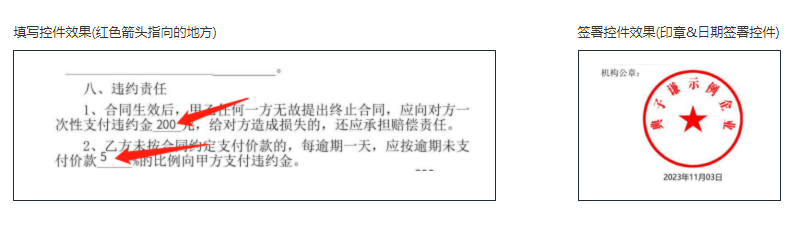
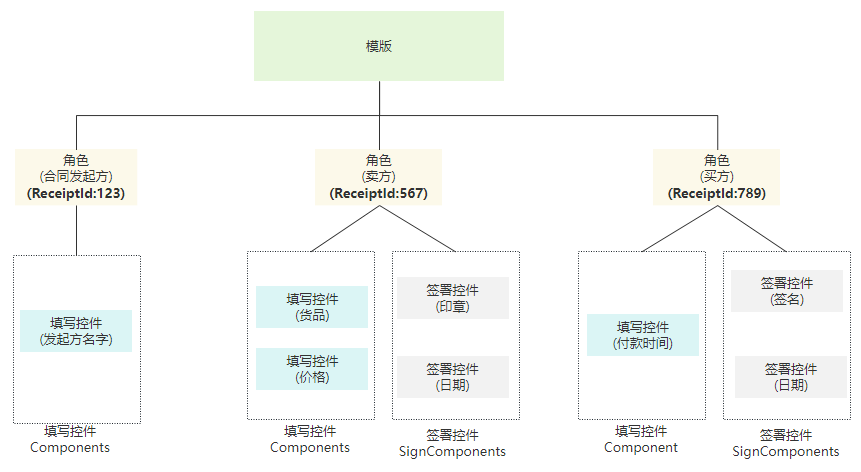
**一个模板通常会包含以下结构信息**
- 模板模板ID, 模板名字等基本信息
- 发起方参与信息Promoter、签署参与方 Recipients,后者会在模板发起合同时用于指定参与方
- 发起方和签署方的填写控件 Components
- 签署方的签署控件 SignComponents
模板中各元素的层级关系, 所有的填写控件和签署控件都归属某一个角色(通过控件的ComponentRecipientId来关联)
*/
DescribeFlowTemplates(req: DescribeFlowTemplatesRequest, cb?: (error: string, rep: DescribeFlowTemplatesResponse) => void): Promise<DescribeFlowTemplatesResponse>;
/**
* 本接口(DeleteSealPolicies)用于撤销企业员工持有的印章权限
*/
DeleteSealPolicies(req: DeleteSealPoliciesRequest, cb?: (error: string, rep: DeleteSealPoliciesResponse) => void): Promise<DeleteSealPoliciesResponse>;
/**
* 本接口(DescribeFileUrls)用于查询文件的下载URL。
适用场景:通过传参合同流程编号,下载对应的合同PDF文件流到本地。
*/
DescribeFileUrls(req: DescribeFileUrlsRequest, cb?: (error: string, rep: DescribeFileUrlsResponse) => void): Promise<DescribeFileUrlsResponse>;
/**
* 获取设置自动签印章小程序链接。
注意:
<ul><li>需要<code>企业开通自动签</code>后使用。</li>
<li>仅支持<code>已经开通了自动签的个人</code>更换自动签印章。</li>
<li>链接有效期默认7天,<code>最多30天</code>。</li>
<li>该接口的链接适用于<code>小程序</code>端。</li>
<li>该接口不会扣除您的合同套餐,暂不参与计费。</li></ul>
*/
CreateUserAutoSignSealUrl(req: CreateUserAutoSignSealUrlRequest, cb?: (error: string, rep: CreateUserAutoSignSealUrlResponse) => void): Promise<CreateUserAutoSignSealUrlResponse>;
/**
* 获取个人用户自动签的开通链接。
注意: `处方单等特殊场景专用,此接口为白名单功能,使用前请联系对接的客户经理沟通。`
*/
CreateUserAutoSignEnableUrl(req: CreateUserAutoSignEnableUrlRequest, cb?: (error: string, rep: CreateUserAutoSignEnableUrlResponse) => void): Promise<CreateUserAutoSignEnableUrlResponse>;
/**
* 此接口(CreateIntegrationRole)用来创建企业自定义的SaaS角色或集团角色。
适用场景1:创建当前企业的自定义SaaS角色或集团角色,并且创建时不进行权限的设置(PermissionGroups 参数不传),角色中的权限内容可通过控制台编辑角色或通过接口 ModifyIntegrationRole 完成更新。
适用场景2:创建当前企业的自定义SaaS角色或集团角色,并且创建时进行权限的设置(PermissionGroups 参数要传),权限树内容 PermissionGroups 可参考接口 DescribeIntegrationRoles 的输出。此处注意权限树内容可能会更新,需尽量拉取最新的权限树内容,并且权限树内容 PermissionGroups 必须是一颗完整的权限树。
适用场景3:创建集团角色时可同时设置角色管理的子企业列表,可通过设置 SubOrganizationIds 参数达到此效果。
适用场景4:主企业代理子企业操作的场景,需要设置Agent参数,并且ProxyOrganizationId设置为子企业的id即可。
注意事项:SaaS角色和集团角色对应的权限树是不一样的。
*/
CreateIntegrationRole(req: CreateIntegrationRoleRequest, cb?: (error: string, rep: CreateIntegrationRoleResponse) => void): Promise<CreateIntegrationRoleResponse>;
/**
* 本接口(CreateEmbedWebUrl)用于创建嵌入Web的链接,支持以下类型的Web链接创建:
1. 创建印章
2. 创建模板
3. 修改模板
4. 预览模板
5. 预览合同流程
用户可以通过这些链接快速将其集成到自己的系统中。
*/
CreateEmbedWebUrl(req: CreateEmbedWebUrlRequest, cb?: (error: string, rep: CreateEmbedWebUrlResponse) => void): Promise<CreateEmbedWebUrlResponse>;
/**
* 对合同流程文件进行数字签名验证,判断数字签名是否有效,合同文件内容是否被篡改。
*/
VerifyPdf(req: VerifyPdfRequest, cb?: (error: string, rep: VerifyPdfResponse) => void): Promise<VerifyPdfResponse>;
/**
* 此接口(UnbindEmployeeUserIdWithClientOpenId)用于解除电子签系统员工UserId与客户系统员工OpenId之间的绑定关系。
注:`在调用此接口时,需确保OpenId已通过调用`<a href="https://qian.tencent.com/developers/companyApis/staffs/BindEmployeeUserIdWithClientOpenId" target="_blank">BindEmployeeUserIdWithClientOpenId</a>`接口与电子签系统的UserId绑定过。若OpenId未经过绑定,则无法使用此接口进行解绑操作。`
*/
UnbindEmployeeUserIdWithClientOpenId(req: UnbindEmployeeUserIdWithClientOpenIdRequest, cb?: (error: string, rep: UnbindEmployeeUserIdWithClientOpenIdResponse) => void): Promise<UnbindEmployeeUserIdWithClientOpenIdResponse>;
/**
* 注:此接口将会废弃,请使用撤销单个签署流程(CancelFlow)接口。
指定需要批量撤回的签署流程Id,获取批量撤销链接。
客户指定需要撤回的签署流程Id,最多100个,超过100不处理;接口调用成功返回批量撤回合同的链接,通过链接跳转到电子签小程序完成批量撤回。
*/
CreateBatchCancelFlowUrl(req: CreateBatchCancelFlowUrlRequest, cb?: (error: string, rep: CreateBatchCancelFlowUrlResponse) => void): Promise<CreateBatchCancelFlowUrlResponse>;
/**
* 此接口(DeleteIntegrationDepartment)用于删除企业的部门信息。
*/
DeleteIntegrationDepartment(req: DeleteIntegrationDepartmentRequest, cb?: (error: string, rep: DeleteIntegrationDepartmentResponse) => void): Promise<DeleteIntegrationDepartmentResponse>;
/**
* 此接口(BindEmployeeUserIdWithClientOpenId)用于将电子签系统员工UserId与客户系统员工OpenId进行绑定。
*/
BindEmployeeUserIdWithClientOpenId(req: BindEmployeeUserIdWithClientOpenIdRequest, cb?: (error: string, rep: BindEmployeeUserIdWithClientOpenIdResponse) => void): Promise<BindEmployeeUserIdWithClientOpenIdResponse>;
/**
* 本接口(CreatePreparedPersonalEsign)用于创建导入个人印章(处方单场景专用,使用此接口请与客户经理确认)。
*/
CreatePreparedPersonalEsign(req: CreatePreparedPersonalEsignRequest, cb?: (error: string, rep: CreatePreparedPersonalEsignResponse) => void): Promise<CreatePreparedPersonalEsignResponse>;
/**
* 适用场景:
当通过模板或文件发起合同时,若未指定企业签署人信息,则可调用此接口补充或添加签署人。同一签署人可补充多个员工作为或签署人,最终实际签署人取决于谁先领取合同完成签署。
限制条件:
1. 本企业(发起方企业)企业微信签署人仅支持通过企业微信UserId或姓名+手机号进行补充。
2. 本企业(发起方企业)非企业微信签署人仅支持通过姓名+手机号进行补充。
3. 他方企业仅支持通过姓名+手机号进行补充。
*/
CreateFlowApprovers(req: CreateFlowApproversRequest, cb?: (error: string, rep: CreateFlowApproversResponse) => void): Promise<CreateFlowApproversResponse>;
/**
* 此接口(ModifyIntegrationDepartment)用于更新企业的部门信息,支持更新部门名称、客户系统部门ID和部门序号等信息。
*/
ModifyIntegrationDepartment(req: ModifyIntegrationDepartmentRequest, cb?: (error: string, rep: ModifyIntegrationDepartmentResponse) => void): Promise<ModifyIntegrationDepartmentResponse>;
/**
* 解绑员工与对应角色的关系,如需绑定请使用 CreateIntegrationUserRoles 接口。
*/
DeleteIntegrationRoleUsers(req: DeleteIntegrationRoleUsersRequest, cb?: (error: string, rep: DeleteIntegrationRoleUsersResponse) => void): Promise<DeleteIntegrationRoleUsersResponse>;
/**
* 提交签署流程审批结果的适用场景包括:
1. 在使用模板(CreateFlow)或文件(CreateFlowByFiles)创建签署流程时,若指定了参数NeedSignReview为true,且发起方企业作为签署方参与了流程签署,则可以调用此接口提交企业内部签署审批结果。自动签署也需要进行审核通过才会进行签署。
2. 若签署流程状态正常,同一签署流程可以多次提交签署审批结果,签署时的最后一个“审批结果”有效。
*/
CreateFlowSignReview(req: CreateFlowSignReviewRequest, cb?: (error: string, rep: CreateFlowSignReviewResponse) => void): Promise<CreateFlowSignReviewResponse>;
/**
* 创建发起流程web页面
<br/>适用场景:通过该接口(CreatePrepareFlow)传入合同文件/模板编号及签署人信息,可获得发起流程的可嵌入页面,在页面完成签署控件等信息的编辑与确认后,快速发起流程。
<br/>注:该接口包含模板/文件发起流程的全部功能,调用接口后不会立即发起,需在可嵌入页面点击按钮进行发起流程。
*/
CreatePrepareFlow(req: CreatePrepareFlowRequest, cb?: (error: string, rep: CreatePrepareFlowResponse) => void): Promise<CreatePrepareFlowResponse>;
/**
* 创建签署流程电子文档<br />
适用场景:见创建签署流程接口。<br />
点击查看<a href="https://qian.tencent.com/developers/startFlows/CreateFlow" target="_blank">通过模板创建签署流程</a>
<a href="https://qian.tencent.com/developers/startFlows/CreateFlowByFiles" target="_blank">用PDF文件创建签署流程</a>。<br />
注:该接口需要给对应的流程指定一个模板id,并且填充该模板中需要补充的信息。需要配置<a href="https://qian.tencent.com/developers/companyApis/startFlows/CreateFlow" target="_blank">创建签署流程</a>和<a href="https://qian.tencent.com/developers/companyApis/startFlows/StartFlow" target="_blank">发起签署流程</a>接口使用。具体逻辑可以参考下图:
<svg id="SvgjsSvg1077" width="304" height="505" xmlns="http://www.w3.org/2000/svg" version="1.1" xmlns:xlink="http://www.w3.org/1999/xlink" xmlns:svgjs="http://svgjs.com/svgjs"><defs id="SvgjsDefs1078"><pattern patternUnits="userSpaceOnUse" id="pattern_mark_0" width="300" height="300"><text x="150" y="100" fill="rgba(229,229,229,0.8)" font-size="18" transform="rotate(-45, 150, 150)" style="dominant-baseline: middle; text-anchor: middle;"></text></pattern><pattern patternUnits="userSpaceOnUse" id="pattern_mark_1" width="300" height="300"><text x="150" y="200" fill="rgba(229,229,229,0.8)" font-size="18" transform="rotate(-45, 150, 150)" style="dominant-baseline: middle; text-anchor: middle;"></text></pattern><marker id="SvgjsMarker1096" markerWidth="12" markerHeight="8" refX="9" refY="4" viewBox="0 0 12 8" orient="auto" markerUnits="userSpaceOnUse" stroke-dasharray="0,0"><path id="SvgjsPath1097" d="M0,0 L12,4 L0,8 L0,0" fill="#323232" stroke="#323232" stroke-width="1"></path></marker><marker id="SvgjsMarker1108" markerWidth="12" markerHeight="8" refX="9" refY="4" viewBox="0 0 12 8" orient="auto" markerUnits="userSpaceOnUse" stroke-dasharray="0,0"><path id="SvgjsPath1109" d="M0,0 L12,4 L0,8 L0,0" fill="#323232" stroke="#323232" stroke-width="1"></path></marker><marker id="SvgjsMarker1120" markerWidth="12" markerHeight="8" refX="9" refY="4" viewBox="0 0 12 8" orient="auto" markerUnits="userSpaceOnUse" stroke-dasharray="0,0"><path id="SvgjsPath1121" d="M0,0 L12,4 L0,8 L0,0" fill="#323232" stroke="#323232" stroke-width="1"></path></marker><marker id="SvgjsMarker1140" markerWidth="12" markerHeight="8" refX="9" refY="4" viewBox="0 0 12 8" orient="auto" markerUnits="userSpaceOnUse" stroke-dasharray="0,0"><path id="SvgjsPath1141" d="M0,0 L12,4 L0,8 L0,0" fill="#323232" stroke="#323232" stroke-width="1"></path></marker></defs><rect id="svgbackgroundid" width="304" height="505" fill="transparent"></rect><rect id="SvgjsRect1080" width="304" height="505" fill="url(#pattern_mark_0)"></rect><rect id="SvgjsRect1081" width="304" height="505" fill="url(#pattern_mark_1)"></rect><g id="SvgjsG1082" transform="translate(58,121)"><path id="SvgjsPath1083" d="M 0 0L 221 0L 221 262L 0 262Z" stroke-dasharray="3,4" stroke="rgba(33,41,48,1)" stroke-width="1" fill-opacity="1" fill="#ffffff"></path><g id="SvgjsG1084"><text id="SvgjsText1085" font-family="微软雅黑" text-anchor="middle" font-size="13px" width="201px" fill="#323232" font-weight="400" align="middle" lineHeight="125%" anchor="middle" family="微软雅黑" size="13px" weight="400" font-style="" opacity="1" y="120.375" transform="rotate(0)"></text></g></g><g id="SvgjsG1086" transform="translate(88,140.00000000000006)"><path id="SvgjsPath1087" d="M 0 0L 161 0L 161 48L 0 48Z" stroke="rgba(86,146,48,1)" stroke-width="1" fill-opacity="1" fill="#e7ebed"></path><g id="SvgjsG1088"><text id="SvgjsText1089" font-family="微软雅黑" text-anchor="middle" font-size="13px" width="141px" fill="#323232" font-weight="400" align="middle" lineHeight="125%" anchor="middle" family="微软雅黑" size="13px" weight="400" font-style="" opacity="1" y="4.875" transform="rotate(0)"><tspan id="SvgjsTspan1090" dy="16" x="80.5"><tspan id="SvgjsTspan1091" style="text-decoration:;fill: rgb(28, 30, 33);">CreateFlow</tspan></tspan><tspan id="SvgjsTspan1092" dy="16" x="80.5"><tspan id="SvgjsTspan1093" style="text-decoration:;">创建签署流程</tspan></tspan></text></g></g><g id="SvgjsG1094"><path id="SvgjsPath1095" d="M168.5 188.50000000000006L168.5 200.83333333333337L168.5 200.83333333333337L168.5 211.86666666666667" stroke="#323232" stroke-width="1" fill="none" marker-end="url(#SvgjsMarker1096)"></path></g><g id="SvgjsG1098" transform="translate(104.25,213.66666666666669)"><path id="SvgjsPath1099" d="M 0 0L 128.5 0L 128.5 55L 0 55Z" stroke="rgba(86,146,48,1)" stroke-width="1" fill-opacity="1" fill="#e7ebed"></path><g id="SvgjsG1100"><text id="SvgjsText1101" font-family="微软雅黑" text-anchor="middle" font-size="13px" width="109px" fill="#323232" font-weight="400" align="middle" lineHeight="125%" anchor="middle" family="微软雅黑" size="13px" weight="400" font-style="" opacity="1" y="8.375" transform="rotate(0)"><tspan id="SvgjsTspan1102" dy="16" x="64.5"><tspan id="SvgjsTspan1103" style="text-decoration:;fill: rgb(28, 30, 33);">CreateDocument</tspan></tspan><tspan id="SvgjsTspan1104" dy="16" x="64.5"><tspan id="SvgjsTspan1105" style="text-decoration:;">创建电子文档</tspan></tspan></text></g></g><g id="SvgjsG1106"><path id="SvgjsPath1107" d="M168.5 269.16666666666674L168.5 281.5L168.5 281.5L168.5 292.5333333333334" stroke="#323232" stroke-width="1" fill="none" marker-end="url(#SvgjsMarker1108)"></path></g><g id="SvgjsG1110" transform="translate(96.75,294.33333333333337)"><path id="SvgjsPath1111" d="M 0 0L 143.5 0L 143.5 65L 0 65Z" stroke="rgba(86,146,48,1)" stroke-width="1" fill-opacity="1" fill="#e7ebed"></path><g id="SvgjsG1112"><text id="SvgjsText1113" font-family="微软雅黑" text-anchor="middle" font-size="13px" width="124px" fill="#323232" font-weight="400" align="middle" lineHeight="125%" anchor="middle" family="微软雅黑" size="13px" weight="400" font-style="" opacity="1" y="13.375" transform="rotate(0)"><tspan id="SvgjsTspan1114" dy="16" x="72"><tspan id="SvgjsTspan1115" style="text-decoration:;fill: rgb(28, 30, 33);">StartFlow</tspan></tspan><tspan id="SvgjsTspan1116" dy="16" x="72"><tspan id="SvgjsTspan1117" style="text-decoration:;">发起签署流程</tspan></tspan></text></g></g><g id="SvgjsG1118"><path id="SvgjsPath1119" d="M168.5 359.83333333333337L168.5 392.16666666666674L168.5 392.16666666666674L168.5 423.20000000000005" stroke="#323232" stroke-width="1" fill="none" marker-end="url(#SvgjsMarker1120)"></path></g><g id="SvgjsG1122" transform="translate(106.25,425)"><path id="SvgjsPath1123" d="M 0 0L 124.5 0L 124.5 55L 0 55Z" stroke="rgba(33,41,48,1)" stroke-width="1" fill-opacity="1" fill="#ffffff"></path><g id="SvgjsG1124"><text id="SvgjsText1125" font-family="微软雅黑" text-anchor="middle" font-size="13px" width="105px" fill="#323232" font-weight="400" align="middle" lineHeight="125%" anchor="middle" family="微软雅黑" size="13px" weight="400" font-style="" opacity="1" y="8.375" transform="rotate(0)"><tspan id="SvgjsTspan1126" dy="16" x="62.5"><tspan id="SvgjsTspan1127" style="text-decoration:;">开始签署</tspan></tspan><tspan id="SvgjsTspan1128" dy="16" x="62.5"><tspan id="SvgjsTspan1129" style="text-decoration:;">(小程序/H5等)</tspan></tspan></text></g></g><g id="SvgjsG1130" transform="translate(120.5,25)"><path id="SvgjsPath1131" d="M 0 0L 96 0L 96 54L 0 54Z" stroke="rgba(33,41,48,1)" stroke-width="1" fill-opacity="1" fill="#ffffff"></path><g id="SvgjsG1132"><text id="SvgjsText1133" font-family="微软雅黑" text-anchor="middle" font-size="13px" width="76px" fill="#323232" font-weight="400" align="middle" lineHeight="125%" anchor="middle" family="微软雅黑" size="13px" weight="400" font-style="" opacity="1" y="7.875" transform="rotate(0)"><tspan id="SvgjsTspan1134" dy="16" x="48"><tspan id="SvgjsTspan1135" style="text-decoration:;">控制台创建</tspan></tspan><tspan id="SvgjsTspan1136" dy="16" x="48"><tspan id="SvgjsTspan1137" style="text-decoration:;">模板</tspan></tspan></text></g></g><g id="SvgjsG1138"><path id="SvgjsPath1139" d="M168.5 79.5L168.5 109.5L168.5 109.5L168.5 138.20000000000005" stroke="#323232" stroke-width="1" fill="none" marker-end="url(#SvgjsMarker1140)"></path></g><g id="SvgjsG1142" transform="translate(25,114)"><path id="SvgjsPath1143" d="M 0 0L 100 0L 100 40L 0 40Z" stroke="none" fill="none"></path><g id="SvgjsG1144"><text id="SvgjsText1145" font-family="微软雅黑" text-anchor="middle" font-size="13px" width="100px" fill="#323232" font-weight="400" align="middle" lineHeight="125%" anchor="middle" family="微软雅黑" size="13px" weight="400" font-style="" opacity="1" y="9.375" transform="rotate(0)"><tspan id="SvgjsTspan1146" dy="16" x="50"><tspan id="SvgjsTspan1147" style="text-decoration:;">API</tspan></tspan></text></g></g></svg>
*/
CreateDocument(req: CreateDocumentRequest, cb?: (error: string, rep: CreateDocumentResponse) => void): Promise<CreateDocumentResponse>;
/**
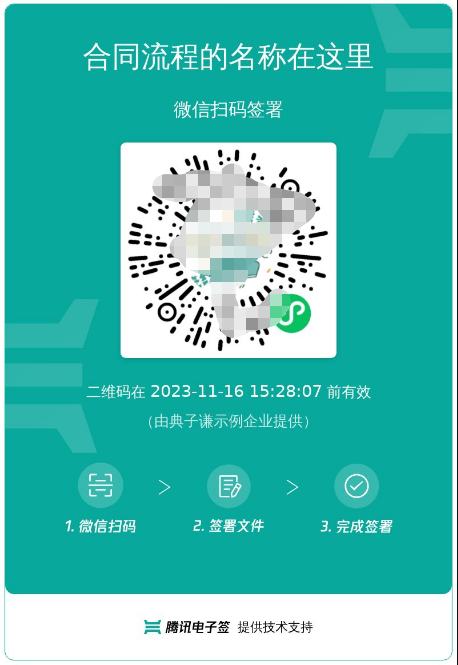
* 此接口(CreateMultiFlowSignQRCode)用于创建一码多扫流程签署二维码。
**适用场景**:
签署人可通过扫描二维码补充签署信息进行实名签署。常用于提前不知道签署人的身份信息场景,例如:劳务工招工、大批量员工入职等场景。
**注意**:
1. 本接口适用于**发起方没有填写控件的 B2C或者单C模板**, 若是B2C模板,还要满足以下任意一个条件
- 模板中配置的签署顺序是无序
- B端企业的签署方式是静默签署
- B端企业是非首位签署
2. 通过一码多扫二维码发起的合同,合同涉及到的回调消息可参考文档[合同发起及签署相关回调
]( https://qian.tencent.com/developers/company/callback_types_contracts_sign)
3. 用户通过签署二维码发起合同时,因企业额度不足导致失败 会触发签署二维码相关回调,具体参考文档[签署二维码相关回调](https://qian.tencent.com/developers/company/callback_types_commons#%E7%AD%BE%E7%BD%B2%E4%BA%8C%E7%BB%B4%E7%A0%81%E7%9B%B8%E5%85%B3%E5%9B%9E%E8%B0%83)
二维码的样式如下图:
*/
CreateMultiFlowSignQRCode(req: CreateMultiFlowSignQRCodeRequest, cb?: (error: string, rep: CreateMultiFlowSignQRCodeResponse) => void): Promise<CreateMultiFlowSignQRCodeResponse>;
/**
* 提交申请出证报告任务并返回报告ID。
注意:
<ul><li>使用此功能`需搭配出证套餐` ,使用前请联系对接的客户经理沟通。</li>
<li>操作人必须是`发起方或者签署方企业的(非走授权书认证)法人或者超管`。</li>
<li>合同流程必须所有参与方`已经签署完成`。</li>
<li>出证过程需一定时间,建议在`提交出证任务后的24小时之后`,通过<a href="https://qian.tencent.com/developers/companyApis/certificate/DescribeFlowEvidenceReport" target="_blank">获取出证报告任务执行结果</a>接口进行查询执行结果和出证报告的下载URL。</li></ul>
<svg id="SvgjsSvg1006" width="262" height="229" xmlns="http://www.w3.org/2000/svg" version="1.1" xmlns:xlink="http://www.w3.org/1999/xlink" xmlns:svgjs="http://svgjs.com/svgjs"><defs id="SvgjsDefs1007"><pattern patternUnits="userSpaceOnUse" id="pattern_mark_0" width="300" height="300"><text x="150" y="100" fill="rgba(229,229,229,0.8)" font-size="18" transform="rotate(-45, 150, 150)" style="dominant-baseline: middle; text-anchor: middle;"></text></pattern><pattern patternUnits="userSpaceOnUse" id="pattern_mark_1" width="300" height="300"><text x="150" y="200" fill="rgba(229,229,229,0.8)" font-size="18" transform="rotate(-45, 150, 150)" style="dominant-baseline: middle; text-anchor: middle;"></text></pattern><marker id="SvgjsMarker1021" markerWidth="12" markerHeight="8" refX="9" refY="4" viewBox="0 0 12 8" orient="auto" markerUnits="userSpaceOnUse" stroke-dasharray="0,0"><path id="SvgjsPath1022" d="M0,0 L12,4 L0,8 L0,0" fill="#323232" stroke="#323232" stroke-width="1"></path></marker></defs><rect id="svgbackgroundid" width="262" height="229" fill="transparent"></rect><rect id="SvgjsRect1009" width="262" height="229" fill="url(#pattern_mark_0)"></rect><rect id="SvgjsRect1010" width="262" height="229" fill="url(#pattern_mark_1)"></rect><g id="SvgjsG1011" transform="translate(31.75,25)"><path id="SvgjsPath1012" d="M 0 0L 198 0L 198 59L 0 59Z" stroke="rgba(86,146,48,1)" stroke-width="1" fill-opacity="1" fill="#e7ebed"></path><g id="SvgjsG1013"><text id="SvgjsText1014" font-family="微软雅黑" text-anchor="middle" font-size="13px" width="178px" fill="#323232" font-weight="400" align="middle" lineHeight="125%" anchor="middle" family="微软雅黑" size="13px" weight="400" font-style="" opacity="1" y="10.375" transform="rotate(0)"><tspan id="SvgjsTspan1015" dy="16" x="99"><tspan id="SvgjsTspan1016" style="text-decoration:;fill: rgb(28, 30, 33);">CreateFlowEvidenceReport</tspan></tspan><tspan id="SvgjsTspan1017" dy="16" x="99"><tspan id="SvgjsTspan1018" style="text-decoration:;fill: rgb(51, 51, 51);">提交申请出证报告任务</tspan></tspan></text></g></g><g id="SvgjsG1019"><path id="SvgjsPath1020" d="M130.75 84.5L130.75 114.5L130.75 114.5L130.75 143.2" stroke="#323232" stroke-width="1" fill="none" marker-end="url(#SvgjsMarker1021)"></path></g><g id="SvgjsG1023" transform="translate(25,145)"><path id="SvgjsPath1024" d="M 0 0L 211.5 0L 211.5 59L 0 59Z" stroke="rgba(86,146,48,1)" stroke-width="1" fill-opacity="1" fill="#e7ebed"></path><g id="SvgjsG1025"><text id="SvgjsText1026" font-family="微软雅黑" text-anchor="middle" font-size="13px" width="192px" fill="#323232" font-weight="400" align="middle" lineHeight="125%" anchor="middle" family="微软雅黑" size="13px" weight="400" font-style="" opacity="1" y="10.375" transform="rotate(0)"><tspan id="SvgjsTspan1027" dy="16" x="106"><tspan id="SvgjsTspan1028" style="text-decoration:;fill: rgb(28, 30, 33);">DescribeFlowEvidenceReport</tspan></tspan><tspan id="SvgjsTspan1029" dy="16" x="106"><tspan id="SvgjsTspan1030" style="text-decoration:;fill: rgb(51, 51, 51);">获取出证报告任务执行结果</tspan></tspan></text></g></g></svg>
*/
CreateFlowEvidenceReport(req: CreateFlowEvidenceReportRequest, cb?: (error: string, rep: CreateFlowEvidenceReportResponse) => void): Promise<CreateFlowEvidenceReportResponse>;
/**
* 通过模板创建签署流程<br/>
适用场景:在标准制式的合同场景中,可通过提前预制好模板文件,每次调用模板文件的id,补充合同内容信息及签署信息生成电子合同。
注:配合<a href="https://qian.tencent.com/developers/companyApis/startFlows/CreateDocument" target="_blank">创建电子文档</a>和<a href="https://qian.tencent.com/developers/companyApis/startFlows/StartFlow" target="_blank">发起签署流程</a>接口使用。整体的逻辑如下图
<svg id="SvgjsSvg1077" width="304" height="505" xmlns="http://www.w3.org/2000/svg" version="1.1" xmlns:xlink="http://www.w3.org/1999/xlink" xmlns:svgjs="http://svgjs.com/svgjs"><defs id="SvgjsDefs1078"><pattern patternUnits="userSpaceOnUse" id="pattern_mark_0" width="300" height="300"><text x="150" y="100" fill="rgba(229,229,229,0.8)" font-size="18" transform="rotate(-45, 150, 150)" style="dominant-baseline: middle; text-anchor: middle;"></text></pattern><pattern patternUnits="userSpaceOnUse" id="pattern_mark_1" width="300" height="300"><text x="150" y="200" fill="rgba(229,229,229,0.8)" font-size="18" transform="rotate(-45, 150, 150)" style="dominant-baseline: middle; text-anchor: middle;"></text></pattern><marker id="SvgjsMarker1096" markerWidth="12" markerHeight="8" refX="9" refY="4" viewBox="0 0 12 8" orient="auto" markerUnits="userSpaceOnUse" stroke-dasharray="0,0"><path id="SvgjsPath1097" d="M0,0 L12,4 L0,8 L0,0" fill="#323232" stroke="#323232" stroke-width="1"></path></marker><marker id="SvgjsMarker1108" markerWidth="12" markerHeight="8" refX="9" refY="4" viewBox="0 0 12 8" orient="auto" markerUnits="userSpaceOnUse" stroke-dasharray="0,0"><path id="SvgjsPath1109" d="M0,0 L12,4 L0,8 L0,0" fill="#323232" stroke="#323232" stroke-width="1"></path></marker><marker id="SvgjsMarker1120" markerWidth="12" markerHeight="8" refX="9" refY="4" viewBox="0 0 12 8" orient="auto" markerUnits="userSpaceOnUse" stroke-dasharray="0,0"><path id="SvgjsPath1121" d="M0,0 L12,4 L0,8 L0,0" fill="#323232" stroke="#323232" stroke-width="1"></path></marker><marker id="SvgjsMarker1140" markerWidth="12" markerHeight="8" refX="9" refY="4" viewBox="0 0 12 8" orient="auto" markerUnits="userSpaceOnUse" stroke-dasharray="0,0"><path id="SvgjsPath1141" d="M0,0 L12,4 L0,8 L0,0" fill="#323232" stroke="#323232" stroke-width="1"></path></marker></defs><rect id="svgbackgroundid" width="304" height="505" fill="transparent"></rect><rect id="SvgjsRect1080" width="304" height="505" fill="url(#pattern_mark_0)"></rect><rect id="SvgjsRect1081" width="304" height="505" fill="url(#pattern_mark_1)"></rect><g id="SvgjsG1082" transform="translate(58,121)"><path id="SvgjsPath1083" d="M 0 0L 221 0L 221 262L 0 262Z" stroke-dasharray="3,4" stroke="rgba(33,41,48,1)" stroke-width="1" fill-opacity="1" fill="#ffffff"></path><g id="SvgjsG1084"><text id="SvgjsText1085" font-family="微软雅黑" text-anchor="middle" font-size="13px" width="201px" fill="#323232" font-weight="400" align="middle" lineHeight="125%" anchor="middle" family="微软雅黑" size="13px" weight="400" font-style="" opacity="1" y="120.375" transform="rotate(0)"></text></g></g><g id="SvgjsG1086" transform="translate(88,140.00000000000006)"><path id="SvgjsPath1087" d="M 0 0L 161 0L 161 48L 0 48Z" stroke="rgba(86,146,48,1)" stroke-width="1" fill-opacity="1" fill="#e7ebed"></path><g id="SvgjsG1088"><text id="SvgjsText1089" font-family="微软雅黑" text-anchor="middle" font-size="13px" width="141px" fill="#323232" font-weight="400" align="middle" lineHeight="125%" anchor="middle" family="微软雅黑" size="13px" weight="400" font-style="" opacity="1" y="4.875" transform="rotate(0)"><tspan id="SvgjsTspan1090" dy="16" x="80.5"><tspan id="SvgjsTspan1091" style="text-decoration:;fill: rgb(28, 30, 33);">CreateFlow</tspan></tspan><tspan id="SvgjsTspan1092" dy="16" x="80.5"><tspan id="SvgjsTspan1093" style="text-decoration:;">创建签署流程</tspan></tspan></text></g></g><g id="SvgjsG1094"><path id="SvgjsPath1095" d="M168.5 188.50000000000006L168.5 200.83333333333337L168.5 200.83333333333337L168.5 211.86666666666667" stroke="#323232" stroke-width="1" fill="none" marker-end="url(#SvgjsMarker1096)"></path></g><g id="SvgjsG1098" transform="translate(104.25,213.66666666666669)"><path id="SvgjsPath1099" d="M 0 0L 128.5 0L 128.5 55L 0 55Z" stroke="rgba(86,146,48,1)" stroke-width="1" fill-opacity="1" fill="#e7ebed"></path><g id="SvgjsG1100"><text id="SvgjsText1101" font-family="微软雅黑" text-anchor="middle" font-size="13px" width="109px" fill="#323232" font-weight="400" align="middle" lineHeight="125%" anchor="middle" family="微软雅黑" size="13px" weight="400" font-style="" opacity="1" y="8.375" transform="rotate(0)"><tspan id="SvgjsTspan1102" dy="16" x="64.5"><tspan id="SvgjsTspan1103" style="text-decoration:;fill: rgb(28, 30, 33);">CreateDocument</tspan></tspan><tspan id="SvgjsTspan1104" dy="16" x="64.5"><tspan id="SvgjsTspan1105" style="text-decoration:;">创建电子文档</tspan></tspan></text></g></g><g id="SvgjsG1106"><path id="SvgjsPath1107" d="M168.5 269.16666666666674L168.5 281.5L168.5 281.5L168.5 292.5333333333334" stroke="#323232" stroke-width="1" fill="none" marker-end="url(#SvgjsMarker1108)"></path></g><g id="SvgjsG1110" transform="translate(96.75,294.33333333333337)"><path id="SvgjsPath1111" d="M 0 0L 143.5 0L 143.5 65L 0 65Z" stroke="rgba(86,146,48,1)" stroke-width="1" fill-opacity="1" fill="#e7ebed"></path><g id="SvgjsG1112"><text id="SvgjsText1113" font-family="微软雅黑" text-anchor="middle" font-size="13px" width="124px" fill="#323232" font-weight="400" align="middle" lineHeight="125%" anchor="middle" family="微软雅黑" size="13px" weight="400" font-style="" opacity="1" y="13.375" transform="rotate(0)"><tspan id="SvgjsTspan1114" dy="16" x="72"><tspan id="SvgjsTspan1115" style="text-decoration:;fill: rgb(28, 30, 33);">StartFlow</tspan></tspan><tspan id="SvgjsTspan1116" dy="16" x="72"><tspan id="SvgjsTspan1117" style="text-decoration:;">发起签署流程</tspan></tspan></text></g></g><g id="SvgjsG1118"><path id="SvgjsPath1119" d="M168.5 359.83333333333337L168.5 392.16666666666674L168.5 392.16666666666674L168.5 423.20000000000005" stroke="#323232" stroke-width="1" fill="none" marker-end="url(#SvgjsMarker1120)"></path></g><g id="SvgjsG1122" transform="translate(106.25,425)"><path id="SvgjsPath1123" d="M 0 0L 124.5 0L 124.5 55L 0 55Z" stroke="rgba(33,41,48,1)" stroke-width="1" fill-opacity="1" fill="#ffffff"></path><g id="SvgjsG1124"><text id="SvgjsText1125" font-family="微软雅黑" text-anchor="middle" font-size="13px" width="105px" fill="#323232" font-weight="400" align="middle" lineHeight="125%" anchor="middle" family="微软雅黑" size="13px" weight="400" font-style="" opacity="1" y="8.375" transform="rotate(0)"><tspan id="SvgjsTspan1126" dy="16" x="62.5"><tspan id="SvgjsTspan1127" style="text-decoration:;">开始签署</tspan></tspan><tspan id="SvgjsTspan1128" dy="16" x="62.5"><tspan id="SvgjsTspan1129" style="text-decoration:;">(小程序/H5等)</tspan></tspan></text></g></g><g id="SvgjsG1130" transform="translate(120.5,25)"><path id="SvgjsPath1131" d="M 0 0L 96 0L 96 54L 0 54Z" stroke="rgba(33,41,48,1)" stroke-width="1" fill-opacity="1" fill="#ffffff"></path><g id="SvgjsG1132"><text id="SvgjsText1133" font-family="微软雅黑" text-anchor="middle" font-size="13px" width="76px" fill="#323232" font-weight="400" align="middle" lineHeight="125%" anchor="middle" family="微软雅黑" size="13px" weight="400" font-style="" opacity="1" y="7.875" transform="rotate(0)"><tspan id="SvgjsTspan1134" dy="16" x="48"><tspan id="SvgjsTspan1135" style="text-decoration:;">控制台创建</tspan></tspan><tspan id="SvgjsTspan1136" dy="16" x="48"><tspan id="SvgjsTspan1137" style="text-decoration:;">模板</tspan></tspan></text></g></g><g id="SvgjsG1138"><path id="SvgjsPath1139" d="M168.5 79.5L168.5 109.5L168.5 109.5L168.5 138.20000000000005" stroke="#323232" stroke-width="1" fill="none" marker-end="url(#SvgjsMarker1140)"></path></g><g id="SvgjsG1142" transform="translate(25,114)"><path id="SvgjsPath1143" d="M 0 0L 100 0L 100 40L 0 40Z" stroke="none" fill="none"></path><g id="SvgjsG1144"><text id="SvgjsText1145" font-family="微软雅黑" text-anchor="middle" font-size="13px" width="100px" fill="#323232" font-weight="400" align="middle" lineHeight="125%" anchor="middle" family="微软雅黑" size="13px" weight="400" font-style="" opacity="1" y="9.375" transform="rotate(0)"><tspan id="SvgjsTspan1146" dy="16" x="50"><tspan id="SvgjsTspan1147" style="text-decoration:;">API</tspan></tspan></text></g></g></svg>
*/
CreateFlow(req: CreateFlowRequest, cb?: (error: string, rep: CreateFlowResponse) => void): Promise<CreateFlowResponse>;
/**
* 发起解除协议的主要应用场景为:基于一份已经签署的合同(签署流程),进行解除操作。
解除协议的模板是官方提供 ,经过提供法务审核,暂不支持自定义。
注意:
<ul><li><code>原合同必须签署完</code>成后才能发起解除协议。</li>
<li>只有原合同企业类型的参与人才能发起解除协议,<code>个人参与方不能发起解除协议</code>。</li>
<li>原合同个人类型参与人必须是解除协议的参与人,<code>不能更换其他第三方个人</code>参与解除协议。</li>
<li>如果原合同企业参与人无法参与解除协议,可以指定同企业具有同等权限的<code>企业员工代为处理</code>。</li>
<li>发起解除协议同发起其他企业合同一样,也会参与合同<code>扣费</code>,扣费标准同其他类型合同。</li>
<li>在解除协议发起之后,原合同的状态将转变为解除中。一旦解除协议签署完毕,原合同及解除协议均变为已解除状态。</li></ul>
*/
CreateReleaseFlow(req: CreateReleaseFlowRequest, cb?: (error: string, rep: CreateReleaseFlowResponse) => void): Promise<CreateReleaseFlowResponse>;
/**
* 获取跳转至腾讯电子签小程序的签署链接
适用场景:如果需要签署人在自己的APP、小程序、H5应用中签署,可以通过此接口获取跳转腾讯电子签小程序的签署跳转链接。
跳转到小程序的实现,参考微信官方文档(分为<a href="https://developers.weixin.qq.com/miniprogram/dev/api/navigate/wx.navigateToMiniProgram.html">全屏</a>、<a href="https://developers.weixin.qq.com/miniprogram/dev/framework/open-ability/openEmbeddedMiniProgram.html">半屏</a>两种方式),如何配置也可以请参考: <a href="https://qian.tencent.com/developers/company/openwxminiprogram">跳转电子签小程序配置</a>
注:
`1. 如果签署人是在PC端扫码签署,可以通过生成跳转链接自主转换成二维码,让签署人在PC端扫码签署`
`2. 签署链接的有效期为90天,超过有效期链接不可用`
`3. 如果需跳转详情页(即PathType值为1)进行填写或签署合同,需指定签署方信息:姓名、手机号码、企业名称等,才能生成正确的跳转链接`
其中小程序的原始Id如下,或者查看小程序信息自助获取。
| 小程序 | AppID | 原始ID |
| ------------ | ------------ | ------------ |
| 腾讯电子签(正式版) | wxa023b292fd19d41d | gh_da88f6188665 |
| 腾讯电子签Demo | wx371151823f6f3edf | gh_39a5d3de69fa |
*/
CreateSchemeUrl(req: CreateSchemeUrlRequest, cb?: (error: string, rep: CreateSchemeUrlResponse) => void): Promise<CreateSchemeUrlResponse>;
/**
* 通过此接口获取个人用户自动签的开通状态。
注意: `处方单等特殊场景专用,此接口为白名单功能,使用前请联系对接的客户经理沟通。`
*/
DescribeUserAutoSignStatus(req: DescribeUserAutoSignStatusRequest, cb?: (error: string, rep: DescribeUserAutoSignStatusResponse) => void): Promise<DescribeUserAutoSignStatusResponse>;
/**
* 此接口(CreateFlowGroupByTemplates)可用于通过多个模板创建合同组签署流程。
适用场景:该接口适用于需要一次性完成多份合同签署的情况,多份合同一般具有关联性,用户以目录的形式查看合同。
*/
CreateFlowGroupByTemplates(req: CreateFlowGroupByTemplatesRequest, cb?: (error: string, rep: CreateFlowGroupByTemplatesResponse) => void): Promise<CreateFlowGroupByTemplatesResponse>;
/**
* 查询企业扩展服务的开通和授权情况,当前支持查询以下内容:
1. 企业自动签
2. 企业与港澳台居民签署合同
3. 使用手机号验证签署方身份
4. 骑缝章
5. 批量签署能力
6. 拓宽签署方年龄限制
*/
DescribeExtendedServiceAuthInfos(req: DescribeExtendedServiceAuthInfosRequest, cb?: (error: string, rep: DescribeExtendedServiceAuthInfosResponse) => void): Promise<DescribeExtendedServiceAuthInfosResponse>;
/**
* 此接口(UploadFiles)文件上传。<br/>
适用场景:用于合同,印章的文件上传。文件上传以后,
如果是PDF格式文件可配合<a href="https://qian.tencent.com/developers/companyApis/startFlows/CreateFlowByFiles" target="_blank">用PDF文件创建签署流程</a>接口进行合同流程的发起
如果是其他类型可以配合<a href="https://qian.tencent.com/developers/companyApis/templatesAndFiles/CreateConvertTaskApi" target="_blank">创建文件转换任务</a>接口转换成PDF文件
注:
1. `图片类型(png/jpg/jpeg)限制大小为5M以下, PDF/word/excel等其他格式限制大小为60M以下`
2. `联调开发环境调用时需要设置Domain接口请求域名为 file.test.ess.tencent.cn,正式环境需要设置为file.ess.tencent.cn,代码示例`
```
HttpProfile httpProfile = new HttpProfile();
httpProfile.setEndpoint("file.test.ess.tencent.cn");
```
*/
UploadFiles(req: UploadFilesRequest, cb?: (error: string, rep: UploadFilesResponse) => void): Promise<UploadFilesResponse>;
/**
* 获取出证报告任务执行结果,返回报告 URL。
注意:
<ul><li>使用此功能`需搭配出证套餐` ,使用前请联系对接的客户经理沟通。</li>
<li>需调用创建并返回出证报告接口<a href="https://qian.tencent.com/developers/companyApis/certificate/CreateFlowEvidenceReport" target="_blank">提交申请出证报告任务</a>获取报告编号后调用当前接口获取报告链接。</li></ul>
<svg id="SvgjsSvg1006" width="262" height="229" xmlns="http://www.w3.org/2000/svg" version="1.1" xmlns:xlink="http://www.w3.org/1999/xlink" xmlns:svgjs="http://svgjs.com/svgjs"><defs id="SvgjsDefs1007"><pattern patternUnits="userSpaceOnUse" id="pattern_mark_0" width="300" height="300"><text x="150" y="100" fill="rgba(229,229,229,0.8)" font-size="18" transform="rotate(-45, 150, 150)" style="dominant-baseline: middle; text-anchor: middle;"></text></pattern><pattern patternUnits="userSpaceOnUse" id="pattern_mark_1" width="300" height="300"><text x="150" y="200" fill="rgba(229,229,229,0.8)" font-size="18" transform="rotate(-45, 150, 150)" style="dominant-baseline: middle; text-anchor: middle;"></text></pattern><marker id="SvgjsMarker1021" markerWidth="12" markerHeight="8" refX="9" refY="4" viewBox="0 0 12 8" orient="auto" markerUnits="userSpaceOnUse" stroke-dasharray="0,0"><path id="SvgjsPath1022" d="M0,0 L12,4 L0,8 L0,0" fill="#323232" stroke="#323232" stroke-width="1"></path></marker></defs><rect id="svgbackgroundid" width="262" height="229" fill="transparent"></rect><rect id="SvgjsRect1009" width="262" height="229" fill="url(#pattern_mark_0)"></rect><rect id="SvgjsRect1010" width="262" height="229" fill="url(#pattern_mark_1)"></rect><g id="SvgjsG1011" transform="translate(31.75,25)"><path id="SvgjsPath1012" d="M 0 0L 198 0L 198 59L 0 59Z" stroke="rgba(86,146,48,1)" stroke-width="1" fill-opacity="1" fill="#e7ebed"></path><g id="SvgjsG1013"><text id="SvgjsText1014" font-family="微软雅黑" text-anchor="middle" font-size="13px" width="178px" fill="#323232" font-weight="400" align="middle" lineHeight="125%" anchor="middle" family="微软雅黑" size="13px" weight="400" font-style="" opacity="1" y="10.375" transform="rotate(0)"><tspan id="SvgjsTspan1015" dy="16" x="99"><tspan id="SvgjsTspan1016" style="text-decoration:;fill: rgb(28, 30, 33);">CreateFlowEvidenceReport</tspan></tspan><tspan id="SvgjsTspan1017" dy="16" x="99"><tspan id="SvgjsTspan1018" style="text-decoration:;fill: rgb(51, 51, 51);">提交申请出证报告任务</tspan></tspan></text></g></g><g id="SvgjsG1019"><path id="SvgjsPath1020" d="M130.75 84.5L130.75 114.5L130.75 114.5L130.75 143.2" stroke="#323232" stroke-width="1" fill="none" marker-end="url(#SvgjsMarker1021)"></path></g><g id="SvgjsG1023" transform="translate(25,145)"><path id="SvgjsPath1024" d="M 0 0L 211.5 0L 211.5 59L 0 59Z" stroke="rgba(86,146,48,1)" stroke-width="1" fill-opacity="1" fill="#e7ebed"></path><g id="SvgjsG1025"><text id="SvgjsText1026" font-family="微软雅黑" text-anchor="middle" font-size="13px" width="192px" fill="#323232" font-weight="400" align="middle" lineHeight="125%" anchor="middle" family="微软雅黑" size="13px" weight="400" font-style="" opacity="1" y="10.375" transform="rotate(0)"><tspan id="SvgjsTspan1027" dy="16" x="106"><tspan id="SvgjsTspan1028" style="text-decoration:;fill: rgb(28, 30, 33);">DescribeFlowEvidenceReport</tspan></tspan><tspan id="SvgjsTspan1029" dy="16" x="106"><tspan id="SvgjsTspan1030" style="text-decoration:;fill: rgb(51, 51, 51);">获取出证报告任务执行结果</tspan></tspan></text></g></g></svg>
*/
DescribeFlowEvidenceReport(req: DescribeFlowEvidenceReportRequest, cb?: (error: string, rep: DescribeFlowEvidenceReportResponse) => void): Promise<DescribeFlowEvidenceReportResponse>;
/**
* 此接口(CreateFlowByFiles)用来通过上传后的pdf资源编号来创建待签署的合同流程。<br/>
适用场景1:适用非制式的合同文件签