@ngx-file-upload/ui
Version:
Angular 16 file upload components for @ngx-file-upload/core
292 lines (214 loc) • 9.91 kB
Markdown
# ngx file upload / ui
[](https://www.npmjs.com/package/@ngx-file-upload/ui)

[](https://www.codacy.com/app/r-hannuschka/ngx-fileupload?utm_source=github.com&utm_medium=referral&utm_content=r-hannuschka/ngx-fileupload&utm_campaign=Badge_Grade)
[](https://deepscan.io/dashboard#view=project&tid=6017&pid=7879&bid=86957)
[](https://codecov.io/gh/r-hannuschka/ngx-fileupload)
[](https://david-dm.org/r-hannuschka/ngx-fileupload?path=src)
[](https://www.youtube.com/watch?v=_dLyu2wceak&list=PL8Y_IacQr6GLyAVCQ12g5J04cY1DL0eSI&index=1)
Angular 16 components for @ngx-file-upload / core to create a UI. All components were packed in separate modules which can be integrated and used separately as required.
### Angular 9
Use [ngx-file-upload/ui v2.2.1](https://www.npmjs.com/package/@ngx-file-upload/ui/v/2.2.1).
This package is build with angular 9 and typescript ^3.7.5 which is not supported by angular 8 by default. Typings for 3.5.5 and 3.7.5 are diffrent, if u want use this package in Angular 8 Project update your Angular 8 Project to Typescript ^3.7.5.
We also change all namespaces to have NgxFileUpload as prefix [@see breaking change 1.1.2 to 2.0.0](https://github.com/r-hannuschka/ngx-fileupload/commit/3bcf0be5d36609215af28bdeac7961e4602f88ad)
### Angular 8
Use [ngx-file-upload/ui v1.1.2](https://www.npmjs.com/package/@ngx-file-upload/ui/v/1.1.2), compiled with typescript 3.5.x which is used default by angular 8.
### @dependencies
[](https://github.com/r-hannuschka/ngx-fileupload/tree/master/src/projects/core) [](https://www.npmjs.com/package/@ngx-file-upload/core)
### @Install
```bash
npm i --save @ngx-file-upload/ui @ngx-file-upload/core
```
### Language Support
To add a specific language to @ngx-file-upload/ui components create a new language file where you define custom translations which will only
work for predefined components we provide with @ngx-file-upload/ui.
```ts
import { NGX_FILE_UPLOAD_UI_I18N, NgxFileUploadUiI18n } from "@ngx-file-upload/ui";
/**
* define translation json data all sections are optional
* if not set it will take default value
*/
const ngxFileUploadI18n: NgxFileUploadUiI18n = {
common: {
SELECT_FILES: "Select File"
},
item: {
UPLOADED: "uploaded"
},
toolbar: {
CLEAN_UP: "Remove invalid and completed",
REMOVE_ALL: "Remove all",
UPLOADS: "Progessing File Uploads",
UPLOAD_ALL: "Upload All"
}
};
@NgModule({
...
providers: [
...
/**
* @optional bind language data to injection token
* if not provided it will use default text labels
*/
{ provide: NGX_FILE_UPLOAD_UI_I18N, useValue: ngxFileUploadI18n },
...
})
export class AppModule {
}
```
Read Docs for more Informations: [Language Support](https://github.com/r-hannuschka/ngx-fileupload/blob/master/docs/ui/i18n.md)
### @Modules
#### NgxFileUploadUiModule
containing all UI modules, should imported if all resources should be used.
---
#### NgxFileUploadUiCommonModule
Includes following Pipes
- StateToStringPipe - converts NgxFileUploadState to string value
- FileSizePipe - converts file size into human readable value
- IsCancelAblePipe - returns true if upload can canceled
app.module.ts
```ts
import { NgModule } from "@angular/core";
import { CommonModule } from "@angular/common";
import { NgxFileUploadCoreModule } from "@ngx-file-upload/core";
import { NgxFileUploadUiCommonModule } from "@ngx-file-upload/ui";
@NgModule({
imports: [
CommonModule,
NgxFileUploadCoreModule
NgxFileUploadUiCommonModule,
])],
declarations: [...],
entryComponents: [...],
providers: [],
})
export class AppModule { }
```
app.component.html
```html
<ul>
<!-- array of UploadRequests -->
<li *ngFor="upload of uploads">
<div>State: {{upload.data.state | stateToString }}</div>
<div>Uploaded: {{upload.data.uploaded | fileSize }}</div>
<div>Size: {{upload.data.size | fileSize }}</div>
<button [disabled]="!(upload.data.state | isCancelAble)">Cancel</div>
</li>
</ul>
```
Read Docs for more Informations: [Pipes](https://github.com/r-hannuschka/ngx-fileupload/blob/master/docs/ui/pipes.md)
---
#### NgxFileUploadUiProgressbarModule
Contains progress bars for visualization of the upload progress.
#### CircleProgressbar
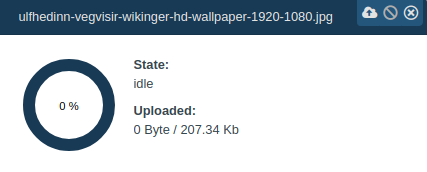
Circle Progressbar which can be split into parts with gap or display completly as one. Can be animated by css.
#### Progressbar

Progressbar which can be split into parts with gap or display completly as one. Could not animated via css but animation is included and can
turned off.
Read Docs for more Informations: [ProgressbarModule](https://github.com/r-hannuschka/ngx-fileupload/blob/master/docs/ui/progressbar.md)
---
#### NgxFileUploadUiItemModule

Contains customize able upload item
app.module.ts
```ts
import { NgModule } from "@angular/core";
import { CommonModule } from "@angular/common";
import { NgxFileUploadCoreModule } from "@ngx-file-upload/core";
import { NgxFileUploadUiItemModule } from "@ngx-file-upload/ui";
@NgModule({
imports: [
CommonModule,
NgxFileUploadCoreModule
NgxFileUploadUiItemModule,
])],
declarations: [...],
entryComponents: [...],
providers: [],
})
export class AppModule { }
```
app.component.html
```html
<ul>
<!-- array of UploadRequests -->
<li *ngFor="upload of uploads" class="upload-item">
<ngx-file-upload-ui--item [upload]="upload">
</ngx-file-upload-ui--item>
</li>
</ul>
```
Read Docs for more Informations: [Upload Item](https://github.com/r-hannuschka/ngx-fileupload/blob/master/docs/ui/upload-item.md)
---
#### NgxFileUploadUiToolbarModule

Contains UploadToolbar for visualisation of current upload progress and control to start, stop or clean up uploads.
app.module.ts
```ts
import { NgModule } from "@angular/core";
import { CommonModule } from "@angular/common";
import { NgxFileUploadCoreModule } from "@ngx-file-upload/core";
import { NgxFileUploadUiToolbarModule } from "@ngx-file-upload/ui";
@NgModule({
imports: [
CommonModule,
NgxFileUploadCoreModule
NgxFileUploadUiToolbarModule,
])],
declarations: [...],
entryComponents: [...],
providers: [],
})
export class AppModule { }
```
app.component.html
```html
<ngx-file-upload-ui--toolbar [storage]="uploadStorage"></ngx-file-upload-ui--toolbar>
<ul>
<!-- array of UploadRequests -->
<li *ngFor="upload of uploads" class="upload-item">
<!-- display upload data -->
</li>
</ul>
```
---
#### NgxFileUploadUiFileBrowserModule
Simple directive for browse or drop files.
```ts
import { NgModule } from "@angular/core";
import { CommonModule } from "@angular/common";
import { NgxFileUploadCoreModule } from "@ngx-file-upload/core";
import { NgxFileUploadUiFileBrowserModule } from "@ngx-file-upload/ui";
@NgModule({
imports: [
CommonModule,
NgxFileUploadCoreModule
NgxFileUploadUiFileBrowserModule,
])],
declarations: [...],
entryComponents: [...],
providers: [],
})
export class AppModule { }
```
app.component.html
```html
<div ngxFileUpload (add)="dropFiles($event)">
<div class="file-browser">
<span>Drop or Browse</span>
</div>
</div>
```
Read Docs for more Informations: [Upload File Browser](https://github.com/r-hannuschka/ngx-fileupload/blob/master/docs/ui/upload-directive.md)
---
### @Demo
[Demo](https://r-hannuschka.github.io/ngx-fileupload/#/) can be found here.
### @Credits
Special thanks for code reviews, great improvements and ideas to
||||
|:-:|:-:|:-:|
|[](https://github.com/konne)<br />Konrad Mattheis| [<img src="https://avatars3.githubusercontent.com/u/17725886?s=60&v=4" width=60 alt="Thomas Haenig" />](https://github.com/thomashaenig)<br />Thomas Haenig| [](https://github.com/AlexanderGoerlich) <br />Alexander Görlich|
### Author
Ralf Hannuschka [Github](https://github.com/r-hannuschka)