@ng-web-apis/audio
Version:
This is a library for declarative use of Web Audio API with Angular
396 lines (312 loc) • 19.2 kB
Markdown
#  Web Audio API for Angular
[](https://npmjs.com/package/@ng-web-apis/audio)
[](https://bundlephobia.com/result?p=@ng-web-apis/audio)
[](https://codecov.io/github/taiga-family/ng-web-apis/tree/main/libs/audio)
This is a library for declarative use of [Web Audio API](https://developer.mozilla.org/en-US/docs/Web/API/Web_Audio_API)
with Angular 7+. It is a complete conversion to declarative Angular directives, if you find any inconsistencies or
errors, please [file an issue](https://github.com/taiga-family/ng-web-apis/issues). Watch out for 💡 emoji in this
README for additional features and special use cases.
## How to use
> After you installed the package, you **can** add `@ng-web-apis/audio/polyfills` to your `polyfills.ts`. It helps to
> normalize things like `webkitAudioContext`, otherwise your code might fail.
You can build audio graph with directives. For example, here's a typical echo feedback loop:
```html
<audio
src="/demo.wav"
waMediaElementAudioSourceNode
>
<ng-container
#node="AudioNode"
waDelayNode
[delayTime]="delayTime"
>
<ng-container
waGainNode
[gain]="gain"
>
<ng-container [waOutput]="node"></ng-container>
<ng-container waAudioDestinationNode></ng-container>
</ng-container>
</ng-container>
<ng-container waAudioDestinationNode></ng-container>
</audio>
```
## 💡 WaAudioBufferService
This library has `WaAudioBufferService` with `fetch` method, returning
[Promise](https://developer.mozilla.org/en-US/docs/Web/JavaScript/Reference/Global_Objects/Promise) which allows you to
easily turn your hosted audio file into [AudioBuffer](https://developer.mozilla.org/en-US/docs/Web/API/AudioBuffer)
through GET requests. Result is stored in service's cache so same file is not requested again while application is
running.
This service is also used within directives that have
[AudioBuffer](https://developer.mozilla.org/en-US/docs/Web/API/AudioBuffer) inputs (such as
[AudioBufferSourceNode](https://developer.mozilla.org/en-US/docs/Web/API/AudioBufferSourceNode) or
[ConvolverNode](https://developer.mozilla.org/en-US/docs/Web/API/ConvolverNode)) so you can just pass string URL, as
well as an actual [AudioBuffer](https://developer.mozilla.org/en-US/docs/Web/API/AudioBuffer). For example:
```html
<button
#source="AudioNode"
buffer="/demo.wav"
waAudioBufferSourceNode
(click)="source.start()"
>
Play
<ng-container waAudioDestinationNode></ng-container>
</button>
```
## Supported nodes
You can use following audio nodes through directives of the same name (**prefixed with `wa`** standing for Web API):
### Terminal nodes
- [AudioContext](https://developer.mozilla.org/en-US/docs/Web/API/AudioContext)
💡 Not required if you only need one, global context will be created when needed
💡 Also gives you access to [AudioListener](https://developer.mozilla.org/en-US/docs/Web/API/AudioListener) parameters
such as [positionX](https://developer.mozilla.org/en-US/docs/Web/API/AudioListener/positionX)
- [OfflineAudioContext](https://developer.mozilla.org/en-US/docs/Web/API/OfflineAudioContext)
💡 Additionally supports empty `autoplay` attribute similar to `audio` tag so it would start rendering immediately
💡 Also gives you access to [AudioListener](https://developer.mozilla.org/en-US/docs/Web/API/AudioListener) parameters
such as [positionX](https://developer.mozilla.org/en-US/docs/Web/API/AudioListener/positionX)
- [AudioDestinationNode](https://developer.mozilla.org/en-US/docs/Web/API/AudioDestinationNode)
💡 Use it to terminate branch of your graph
💡 can be used multiple times inside single
[BaseAudioContext](https://developer.mozilla.org/en-US/docs/Web/API/BaseAudioContext) referencing the same
[BaseAudioContext.destination](https://developer.mozilla.org/en-US/docs/Web/API/BaseAudioContext/destination)
💡 Has `(quiet)` output to watch for particular graph branch going _almost_ silent for 5 seconds straight so you can
remove branch after all effects played out to silence to free up resources
- [MediaStreamAudioDestinationNode](https://developer.mozilla.org/en-US/docs/Web/API/MediaStreamAudioDestinationNode)
### Sources
- [AudioBufferSourceNode](https://developer.mozilla.org/en-US/docs/Web/API/AudioBufferSourceNode)
💡 Additionally supports setting URL to media file as
[buffer](https://developer.mozilla.org/en-US/docs/Web/API/AudioBufferSourceNode/buffer) so it will be fetched and
turned into [AudioBuffer](https://developer.mozilla.org/en-US/docs/Web/API/AudioBuffer)
💡 Additionally supports empty `autoplay` attribute similar to `audio` tag so it would start playing immediately
- [ConstantSourceNode](https://developer.mozilla.org/en-US/docs/Web/API/ConstantSourceNode)
💡 Additionally supports empty `autoplay` attribute similar to `audio` tag so it would start playing immediately
- [MediaElementAudioSourceNode](https://developer.mozilla.org/en-US/docs/Web/API/MediaElementAudioSourceNode)
- [MediaStreamAudioSourceNode](https://developer.mozilla.org/en-US/docs/Web/API/MediaStreamAudioSourceNode)
- [OscillatorNode](https://developer.mozilla.org/en-US/docs/Web/API/OscillatorNode)
💡 Additionally supports empty `autoplay` attribute similar to `audio` tag so it would start playing immediately
### Processors
- [BiquadFilterNode](https://developer.mozilla.org/en-US/docs/Web/API/BiquadFilterNode)
- [ChannelMergerNode](https://developer.mozilla.org/en-US/docs/Web/API/ChannelMergerNode)
💡 Use `Channel` directive to merge channels, see example in **Special cases** section
- [ChannelSplitterNode](https://developer.mozilla.org/en-US/docs/Web/API/ChannelSplitterNode)
- [ConvolverNode](https://developer.mozilla.org/en-US/docs/Web/API/ConvolverNode)
💡 Additionally supports setting URL to media file as
[buffer](https://developer.mozilla.org/en-US/docs/Web/API/ConvolverNode/buffer) so it will be fetched and turned into
[AudioBuffer](https://developer.mozilla.org/en-US/docs/Web/API/AudioBuffer)
- [DelayNode](https://developer.mozilla.org/en-US/docs/Web/API/DelayNode)
- [GainNode](https://developer.mozilla.org/en-US/docs/Web/API/GainNode)
- [IIRFilterNode](https://developer.mozilla.org/en-US/docs/Web/API/IIRFilterNode)
- [PannerNode](https://developer.mozilla.org/en-US/docs/Web/API/PannerNode)
- [ScriptProcessorNode](https://developer.mozilla.org/en-US/docs/Web/API/ScriptProcessorNode)
- [StereoPannerNode](https://developer.mozilla.org/en-US/docs/Web/API/StereoPannerNode)
- [WaveShaperNode](https://developer.mozilla.org/en-US/docs/Web/API/WaveShaperNode)
## [AudioWorkletNode](https://developer.mozilla.org/en-US/docs/Web/API/AudioWorkletNode)
You can use [AudioWorkletNode](https://developer.mozilla.org/en-US/docs/Web/API/AudioWorkletNode) in supporting
browsers. To register your
[AudioWorkletProcessors](https://developer.mozilla.org/en-US/docs/Web/API/AudioWorkletProcessor) in a global default
[AudioContext](https://developer.mozilla.org/en-US/docs/Web/API/AudioContext) you can use tokens:
```ts
@NgModule({
bootstrap: [AppComponent],
declarations: [AppComponent],
providers: [
{
provide: WA_AUDIO_WORKLET_PROCESSORS,
useValue: 'assets/my-processor.js',
multi: true,
},
],
})
export class AppModule {}
```
```ts
@Component({
selector: 'app',
templateUrl: './app.component.html',
})
export class App {
constructor(@Inject(WA_AUDIO_WORKLET_PROCESSORS_READY) readonly processorsReady: Promise<boolean>) {}
// ...
}
```
You can then instantiate your [AudioWorkletNode](https://developer.mozilla.org/en-US/docs/Web/API/AudioWorkletNode):
```html
<ng-container
*ngIf="processorsReady | async"
waAudioWorkletNode
name="my-processor"
>
<ng-container waAudioDestinationNode></ng-container>
</ng-container>
```
If you need to create your own node with custom
[AudioParam](https://developer.mozilla.org/en-US/docs/Web/API/AudioParam) and control it declaratively you can extend
`WaWorklet` class and add `audioParam` decorator to new component's inputs:
```ts
@Directive({
selector: '[my-worklet-node]',
inputs: ['paramSetter: param'],
exportAs: 'AudioNode',
providers: [asAudioNode(MyWorklet)],
})
export class MyWorklet extends WaWorklet {
set paramSetter(value: AudioParamInput) {
audioParam(this.param, value, this.context.currentTime);
}
}
```
## 💡 [AudioParam](https://developer.mozilla.org/en-US/docs/Web/API/AudioParam)
Since work with [AudioParam](https://developer.mozilla.org/en-US/docs/Web/API/AudioParam) is imperative in its nature,
there are difference to native API when working with declarative inputs and directives.
> **NOTE**: You can always access directives through
> [template reference variables](https://angular.io/guide/template-syntax#ref-var) /
> [@ViewChild](https://angular.io/api/core/ViewChild) and since they extend native nodes work with
> [AudioParam](https://developer.mozilla.org/en-US/docs/Web/API/AudioParam) in traditional Web Audio fashion
[AudioParam](https://developer.mozilla.org/en-US/docs/Web/API/AudioParam) inputs for directives accept following
arguments:
- `number` to set in instantly, equivalent to setting
[AudioParam.value](https://developer.mozilla.org/en-US/docs/Web/API/AudioParam/value)
- `AudioParamCurve` to set array of values over given duration, equivalent to
[AudioParam.setValueCurveAtTime](https://developer.mozilla.org/en-US/docs/Web/API/AudioParam/setValueCurveAtTime)
called with [AudioContext.currentTime](https://developer.mozilla.org/en-US/docs/Web/API/BaseAudioContext/currentTime)
export type AudioParamCurve = {
readonly value: number[];
readonly duration: number;
}
- `AudioParamAutomation` to linearly or exponentially ramp to given value starting from
[AudioContext.currentTime](https://developer.mozilla.org/en-US/docs/Web/API/BaseAudioContext/currentTime)
export type AudioParamAutomation = {
readonly value: number;
readonly duration: number;
readonly mode: 'instant' | 'linear' | 'exponential';
};
- `AudioParamAutomation[]` to schedule multiple changes in value, stacking one after another
You can use `waAudioParam` pipe to turn your number values into `AudioParamAutomation` (default mode is `exponential`,
so last argument can be omitted) or number arrays to `AudioParamCurve` (second argument `duration` is in **seconds**):
```html
<ng-container
waGainNode
gain="0"
[gain]="gain | waAudioParam : 0.1 : 'linear'"
></ng-container>
```
This way values would change smoothly rather than abruptly, causing audio artifacts.
**NOTE:** You can set initial value for [AudioParam](https://developer.mozilla.org/en-US/docs/Web/API/AudioParam)
through argument binding combined with dynamic property binding as seen above.
To schedule an audio envelope looking something like this:
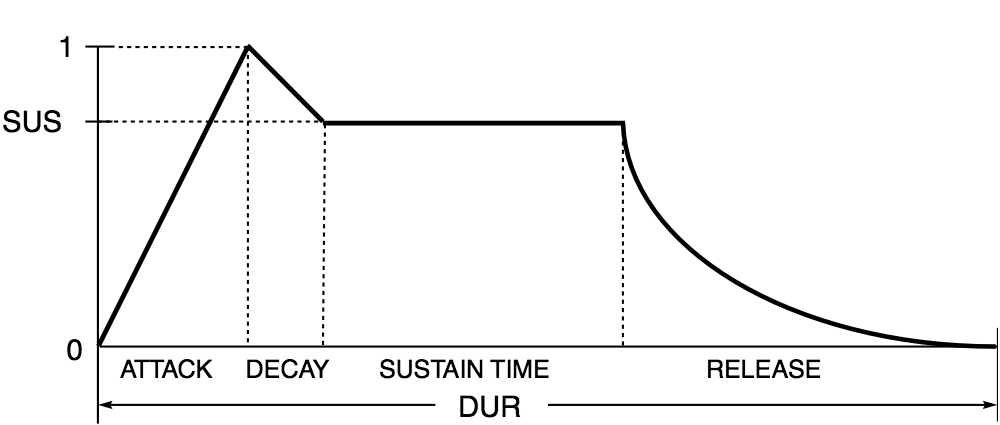
You would need to pass the following array of `AudioParamAutomation` items:
```ts
const envelope = [
{
value: 0,
duration: 0,
mode: 'instant',
},
{
value: 1,
duration: ATTACK_TIME,
mode: 'linear',
},
{
value: SUS,
duration: DECAY_TIME,
mode: 'linear',
},
{
value: SUS,
duration: SUSTAIN_TIME,
mode: 'instant',
},
{
value: 0,
duration: RELEASE_TIME,
mode: 'exponential',
},
];
```
## 💡 Special cases
- Use `waOutput` directive when you need non-linear graph (see feedback loop example above) or to manually connect
[AudioNode](https://developer.mozilla.org/en-US/docs/Web/API/AudioNode) to
[AudioNode](https://developer.mozilla.org/en-US/docs/Web/API/AudioNode) or
[AudioParam](https://developer.mozilla.org/en-US/docs/Web/API/AudioParam)
- Use `waPeriodicWave` pipe to create [PeriodicWave](https://developer.mozilla.org/en-US/docs/Web/API/PeriodicWave) for
[OscillatorNode](https://developer.mozilla.org/en-US/docs/Web/API/OscillatorNode)
- All node directives are exported as `AudioNode` so you can use them with
[template reference variables](https://angular.io/guide/template-syntax#ref-var) (see feedback loop example above)
- Use `waChannel` directive within
[ChannelMergerNode](https://developer.mozilla.org/en-US/docs/Web/API/ChannelMergerNode) and direct `waOutput`
directive to it in order to perform channel merging:
```html
<!-- Inverting left and right channel -->
<audio
src="/demo.wav"
waMediaElementAudioSourceNode
>
<ng-container waChannelSplitterNode>
<ng-container [waOutput]="right"></ng-container>
<ng-container [waOutput]="left"></ng-container>
</ng-container>
<ng-container waChannelMergerNode>
<ng-container
#left="AudioNode"
waChannel
></ng-container>
<ng-container
#right="AudioNode"
waChannel
></ng-container>
<ng-container waAudioDestinationNode></ng-container>
</ng-container>
</audio>
```
## 💡 Tokens
- You can check [Web Audio API](https://developer.mozilla.org/en-US/docs/Web/API/Web_Audio_API) support in current
browser by injecting `WA_WEB_AUDIO_SUPPORT` token
- You can inject [BaseAudioContext](https://developer.mozilla.org/en-US/docs/Web/API/BaseAudioContext) through
`WA_AUDIO_CONTEXT` token
- [AudioContext](https://developer.mozilla.org/en-US/docs/Web/API/AudioContext) is created by default with default
options when token is requested
- You can also provide custom [BaseAudioContext](https://developer.mozilla.org/en-US/docs/Web/API/BaseAudioContext)
through that token
- Provide `WA_FEEDBACK_COEFFICIENTS` and `WA_FEEDFORWARD_COEFFICIENTS` tokens to be able to create
[IIRFilterNode](https://developer.mozilla.org/en-US/docs/Web/API/IIRFilterNode)
- Provide `WA_MEDIA_STREAM` token to be able to create
[MediaStreamAudioSourceNode](https://developer.mozilla.org/en-US/docs/Web/API/MediaStreamAudioSourceNode)
- All node directives provide underlying [AudioNode](https://developer.mozilla.org/en-US/docs/Web/API/AudioNode) as
`WA_AUDIO_NODE` token
- Use `WA_AUDIO_WORKLET_PROCESSORS` token to declare array of
[AudioWorkletProcessors](https://developer.mozilla.org/en-US/docs/Web/API/AudioWorkletProcessor) to be added to
default [AudioContext](https://developer.mozilla.org/en-US/docs/Web/API/AudioContext)
- Inject `WA_AUDIO_WORKLET_PROCESSORS_READY` token to initialize provided
[AudioWorkletProcessors](https://developer.mozilla.org/en-US/docs/Web/API/AudioWorkletProcessor) loading and watch for
[Promise](https://developer.mozilla.org/en-US/docs/Web/JavaScript/Reference/Global_Objects/Promise) resolution before
instantiating dependent [AudioWorkletNodes](https://developer.mozilla.org/en-US/docs/Web/API/AudioWorkletNode)
## Browser support
| [<img src="https://raw.githubusercontent.com/alrra/browser-logos/master/src/edge/edge_48x48.png" alt="IE / Edge" width="24px" height="24px" />](http://godban.github.io/browsers-support-badges/) | [<img src="https://raw.githubusercontent.com/alrra/browser-logos/master/src/firefox/firefox_48x48.png" alt="Firefox" width="24px" height="24px" />](http://godban.github.io/browsers-support-badges/) | [<img src="https://raw.githubusercontent.com/alrra/browser-logos/master/src/chrome/chrome_48x48.png" alt="Chrome" width="24px" height="24px" />](http://godban.github.io/browsers-support-badges/) | [<img src="https://raw.githubusercontent.com/alrra/browser-logos/master/src/safari/safari_48x48.png" alt="Safari" width="24px" height="24px" />](http://godban.github.io/browsers-support-badges/) |
| :-----------------------------------------------------------------------------------------------------------------------------------------------------------------------------------------------: | :---------------------------------------------------------------------------------------------------------------------------------------------------------------------------------------------------: | :------------------------------------------------------------------------------------------------------------------------------------------------------------------------------------------------: | :------------------------------------------------------------------------------------------------------------------------------------------------------------------------------------------------: |
| 79+ | 76+ | 66+ | 14+ |
> Note that some features ([AudioWorklet](https://developer.mozilla.org/en-US/docs/Web/API/AudioWorklet) etc.) were
> added later and are supported only by more recent versions
_**IMPORTANT**: You must add `@ng-web-apis/audio/polyfill` to your `polyfills.ts`, otherwise you will get
`ReferenceError: X is not defined` in browsers for entities they do not support_
💡 [StereoPannerNode](https://developer.mozilla.org/en-US/docs/Web/API/StereoPannerNode) is emulated with
[PannerNode](https://developer.mozilla.org/en-US/docs/Web/API/PannerNode) in browsers that do not support it yet
💡 [positionX](https://developer.mozilla.org/en-US/docs/Web/API/AudioListener/positionX)
([orientationX](https://developer.mozilla.org/en-US/docs/Web/API/AudioListener/orientationX)) and other similar
properties of [AudioListener](https://developer.mozilla.org/en-US/docs/Web/API/AudioListener) and
[PannerNode](https://developer.mozilla.org/en-US/docs/Web/API/PannerNode) fall back to
[setPosition](https://developer.mozilla.org/en-US/docs/Web/API/AudioListener/setPosition)
([setOrientation](https://developer.mozilla.org/en-US/docs/Web/API/AudioListener/setOrientation)) method if browser does
not support it
## Angular Universal
If you want to use this package with SSR, you need to mock native Web Audio API classes on the server:
```ts
import '@ng-web-apis/audio/polyfill';
```
> It is recommended to keep the import statement at the top of your `server.ts` or `main.server.ts` file.
## Demo
You can [try online demo here](https://taiga-family.github.io/ng-web-apis/audio)
## See also
Other [Web APIs for Angular](https://taiga-family.github.io/ng-web-apis/) by
[@ng-web-apis](https://github.com/taiga-family/ng-web-apis)