@nextcloud/l10n
Version:
Nextcloud localization and translation helpers for apps and libraries
168 lines (127 loc) • 5.99 kB
Markdown
<!--
- SPDX-FileCopyrightText: 2019 Nextcloud GmbH and Nextcloud contributors
- SPDX-License-Identifier: GPL-3.0-or-later
-->
[](https://api.reuse.software/info/github.com/nextcloud-libraries/nextcloud-l10n)
[](https://github.com/nextcloud-libraries/nextcloud-l10n/actions/workflows/node-test.yml)
[](https://www.npmjs.com/package/@nextcloud/l10n)
[](https://nextcloud-libraries.github.io/nextcloud-l10n/)
Nextcloud L10n helpers for apps and libraries.
```
npm i -S @nextcloud/l10n
```
Apps normally use the Nextcloud provided translation mechanism which allows to translate backend (PHP) strings together with the frontend.
This can either be done using the Nextcloud Transifex automatization or translations can be done manually.
See the [localization docs](https://docs.nextcloud.com/server/stable/developer_manual/basics/front-end/l10n.html) for how to setup.
When using the Nextcloud translation system (manually or with automated Transifex) Nextcloud will automatically
register the translations on the frontend.
In this case all you have to do is to import the translation functions from this package like shown below:
```js
import { t, n } from '@nextcloud/l10n'
// Or
import { translate as t, translatePlural as n } from '@nextcloud/l10n'
```
> [!NOTE]
> In order to not break the l10n string extraction scripts, make sure to use the aliases `t` and `n`.
```js
t('myapp', 'Hello!')
```
#### Translate singular string with placeholders
```js
t('myapp', 'Hello {name}!', { name: 'Jane' })
```
By default placeholders are sanitized and escaped to prevent XSS.
But you can disable this behavior if you trust the user input:
```js
t(
'myapp',
'See also the {linkStart}documentation{linkEnd}.',
{
linkStart: '<a href="http://example.com">'
linkEnd: '</a>',
},
undefined, // this would be a number replacement
{ escape: false },
)
```
#### Translate plural string
```js
n('myapp', '%n cloud', '%n clouds', 100)
```
Of course also placeholders are possible:
```js
n('myapp', '{name} owns %n file', '{name} owns %n files', 100, { name: 'Jane' })
```
### Independent translation
It is also possible to use this package for Nextcloud independent translations.
This is mostly useful for libraries that provide translated strings.
Independent means you can use this without Nextcloud registered translations buy just providing your `.po` files.
If you decide to use this way you have to extract the translation strings manually, for example using the [gettext-extractor](https://github.com/lukasgeiter/gettext-extractor).
```js
import { getGettextBuilder } from '@nextcloud/l10n/gettext'
const po = ... // Use https://github.com/smhg/gettext-parser to read and convert your .po(t) file
// When using this for a Nextcloud app you can auto-detect the language
const gt = getGettextBuilder()
.detectLocale()
.addTranslation('sv', po)
.build()
// But it is also possible to force a language
const gt = getGettextBuilder()
.setLocale('sv')
.addTranslation('sv', po)
.build()
```
To make things easier you could also create aliases for this in a module and reuse it in your code:
```ts
// When using JavaScript
export const t = (...args) => gt.gettext(...args)
export const n = (...args) => gt.ngettext(...args)
// When using Typescript
export const t = (...args: Parameters<typeof gt.gettext>) => gt.gettext(...args)
export const n = (...args: Parameters<typeof gt.ngettext>) => gt.ngettext(...args)
```
```js
gt.gettext('my source string')
// or if you are using the aliases mentioned above:
t('my source string')
```
```js
gt.gettext('this is a {placeholder}. and this is {key2}', {
placeholder: 'test',
key2: 'also a test',
})
```
```js
gt.ngettext('%n Mississippi', '%n Mississippi', 3)
// or if you are using the aliases mentioned above:
n('%n Mississippi', '%n Mississippi', 3)
```
- Pull the latest changes from `main` or `stableX`
- Checkout a new branch with the tag name (e.g `v4.0.1`): `git checkout -b v<version>`
- Run `npm version patch --no-git-tag-version` (`npm version minor --no-git-tag-version` if minor).
This will return a new version name, make sure it matches what you expect
- Generate the changelog content from the [release](https://github.com/nextcloud-libraries/nextcloud-l10n/releases) page.
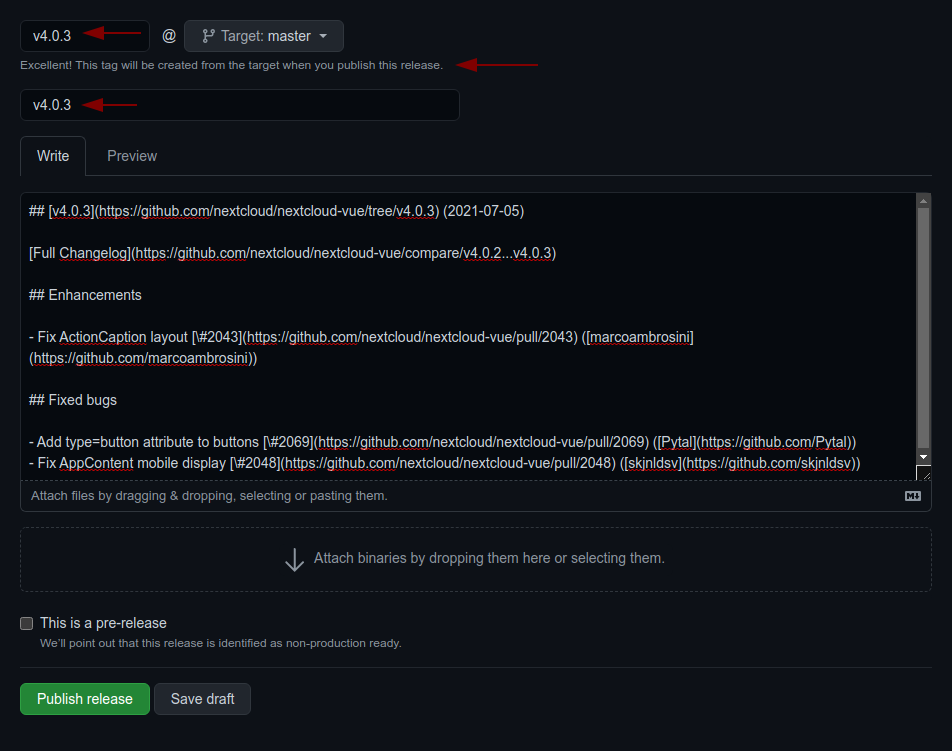
Create a draft release, select the previous tag, click `generate` then paste the content to the `CHANGELOG.md` file
1. adjust the links to the merged pull requests and authors so that the changelog also works outside of GitHub
by running `npm run prerelease:format-changelog`.
This will apply this regex: `by @([^ ]+) in ((https://github.com/)nextcloud-libraries/nextcloud-l10n/pull/(\d+))`
Which this as the replacement: `[\#$4]($2) \([$1]($3$1)\)`
2. use the the version as tag AND title (e.g `v4.0.1`)
3. add the changelog content as description (https://github.com/nextcloud-libraries/nextcloud-l10n/releases)
- Commit, push and create PR
- Get your PR reviewed and merged
- Create a milestone with the follow-up version at https://github.com/nextcloud-libraries/nextcloud-l10n/milestones
- Move all open tickets and PRs to the follow-up
- Close the milestone of the version you release
- Publish the previously drafted release on GitHub