@nexssp/logdebug
Version:
Just log/debug for not only the Nexss Programmer..
120 lines (83 loc) • 3.5 kB
Markdown
**25.06.2024 TypeScript Support** - Added TypeScript type definitions for better development experience.
**15.01.2022 Upgrade** - Now works also with `import` as module.
- New **1.0.17**: tracking functions. `--debug:all` or `--debug:tracker` more below
Note: **1.0.15** Now by default all logs and debug funcs goes to stdout - except error one. To move all of them to stderr: `--output:stderr`
Note: **1.0.12+**
Now **header** function is size of terminal window.
Note: **1.0.11+ See new time functions below ..**
Easy loging/debuging. Going to stderr if `--debug`. You can change from stderr to stdout easy by another option `--debug:stdout`. You can disable logs just by adding `--quiet`. Maybe you need just debug information, combine it with `--quiet --debug`.
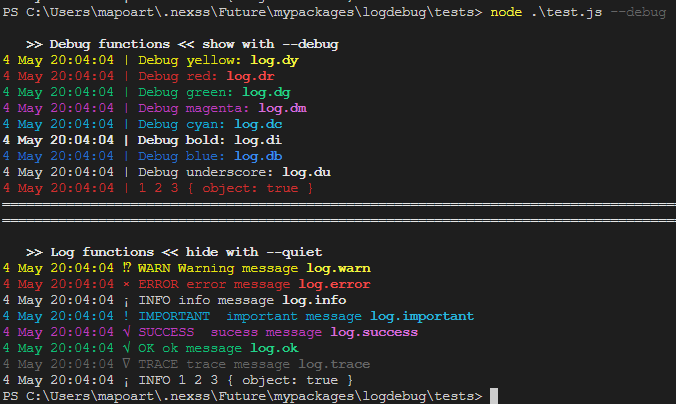
This library is designed just to use cli process.argv directly.
- **yourprogram.js --debug**
- **yourprogram.js --debug:stdout**
- **yourprogram.js --quiet**
note: below must be run with `--debug` or `--debug:stdio` . if you add `--quiet`, logs will not be displayed.
```js
const log = require('@nexssp/log')
const { bold } = require('@nexssp/ansi')
// You can display debug infor by --debug or --debug:stdout
log.dy('\t Debug yellow: ' + bold('log.dy'))
log.dr('\t Debug red: ' + bold('log.dr'))
log.dg('\t Debug green: ' + bold('log.dg'))
log.di('\t Debug bold: ' + bold('log.di'))
log.db('\t Debug blue: ' + bold('log.db'))
log.du('\t Debug underscore: ' + bold('log.du'))
// You can bellow hide by --quiet
log.warn('\t Warning message ' + bold('log.warn'))
log.error('\t error message ' + bold('log.error'))
log.info('\t info message ' + bold('log.info'))
log.success('sucess message ' + bold('log.success'))
log.ok('\t ok message ' + bold('log.ok'))
log.trace('\t trace message ' + bold('log.trace'))
```
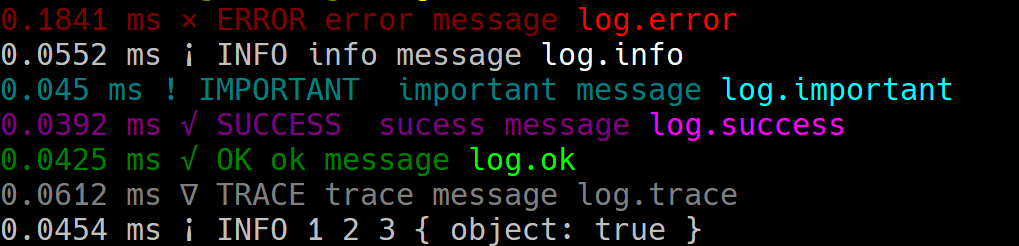
displays time from the begining.

Displays difference between each log.
```js
const o = {
run, // tracker will be only added to the functions
start,
var1, //Will not be added, only functions
}
const { applyTracker } = require('@nexssp/logdebug/tracker')
applyTracker(o, null)
```
```js
const { functionTracker } = require('../tracker')
function myComposite(a, b, { option1, option2 } = {}) {
const _a = a
const _b = b
const trackFunction = functionTracker('mytitle')
let myfunc2 = (param2) => {
console.log(`${_b}`, param2)
}
let myfunc1 = (param1) => {
console.log(`${_a}: ${param1}`)
myfunc2(`${_a}: ${param1}`, 'works!')
}
myfunc1 = trackFunction(myfunc1)
myfunc2 = trackFunction(myfunc2)
let o = {
myfunc1,
myfunc2,
}
// applyTracker(o)
return o
}
const compo = myComposite(1, 'string')
compo.myfunc1(1, 2, 3)
compo.myfunc2(1, 2, 3)
```