@needle-tools/engine
Version:
Needle Engine is a web-based runtime for 3D apps. It runs on your machine for development with great integrations into editors like Unity or Blender - and can be deployed onto any device! It is flexible, extensible and networking and XR are built-in.
317 lines (316 loc) • 15 kB
TypeScript
import { Box3, Object3D, Plane, Ray, Vector3 } from "three";
export type { IDragConstraint, IDragConstraintContext } from "./DragControlsConstraints.js";
export { AxisRotationConstraint, GridSnapConstraint, GrabPointPlaneConstraint, KeepRotationConstraint, KeepScaleConstraint, ScaleLimitConstraint, RotationAxis, FixedRotationAxesConstraint, PlaneHeightLockConstraint, SnapToSurfaceConstraint, applyFollowObjectConstraints } from "./DragControlsConstraints.js";
import { IDragConstraint, IDragConstraintContext } from "./DragControlsConstraints.js";
import { Context } from "../engine/engine_setup.js";
import { type IGameObject } from "../engine/engine_types.js";
import { Behaviour, GameObject } from "./Component.js";
import { EventList } from "./EventList.js";
import type { IPointerEventHandler, PointerEventData } from "./ui/PointerEvents.js";
/**
* The DragMode determines how an object is dragged around in the scene.
*/
export declare enum DragMode {
/** Object stays at the same horizontal plane as it started. Commonly used for objects on the floor */
XZPlane = 0,
/** Object is dragged as if it was attached to the pointer. In 2D, that means it's dragged along the camera screen plane. In XR, it's dragged by the controller/hand. */
Attached = 1,
/** Object is dragged along the initial raycast hit normal. */
HitNormal = 2,
/** Combination of XZ and Screen based on the viewing angle. Low angles result in Screen dragging and higher angles in XZ dragging. */
DynamicViewAngle = 3,
/** The drag plane is snapped to surfaces in the scene while dragging. */
SnapToSurfaces = 4,
/** Don't allow dragging the object */
None = 5
}
/**
* Runtime view over the active drag settings for one input type (screen or XR).
* `DragControls` constructs one instance per input type (`screenProfile` / `xrProfile`).
* All properties are lazy getters over the flat serialized fields on the owning `DragControls`,
* so runtime writes to those fields are reflected immediately without any extra bookkeeping.
*/
export declare class DragProfile {
private readonly _dc;
private readonly _xr;
/** @internal — use {@link DragControls.screenProfile} or {@link DragControls.xrProfile} */
constructor(_dc: DragControls, _xr: boolean);
/** Active drag mode for this input type. */
get dragMode(): DragMode;
/** Whether the dragged object's rotation is frozen during drag. */
get keepRotation(): boolean;
/** Whether the dragged object's scale is frozen during two-pointer drag. */
get keepScale(): boolean;
/** Multiplier for push/pull distance in XR; always 1 for screen input. */
get distanceDragFactor(): number;
}
/**
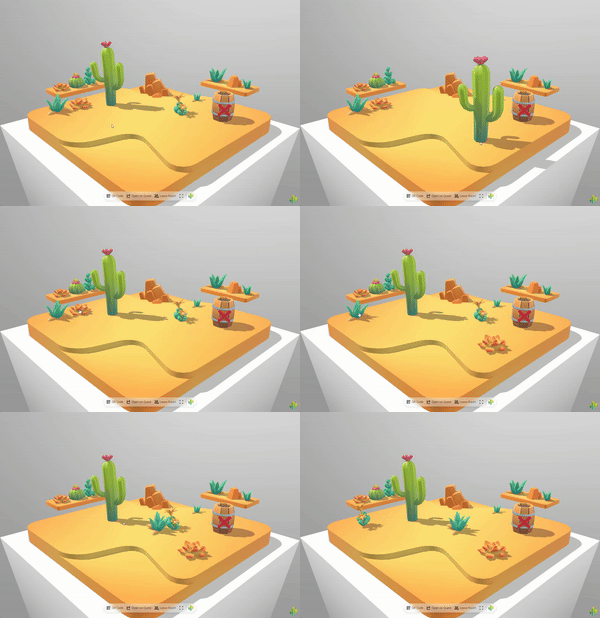
* [DragControls](https://engine.needle.tools/docs/api/DragControls) enables interactive dragging of objects in 2D (screen space) or 3D (world space).
*
* 
*
* **Drag modes:**
* - `XZPlane` - Drag on horizontal plane (good for floor objects)
* - `Attached` - Follow pointer directly (screen plane in 2D, controller in XR)
* - `HitNormal` - Drag along the surface normal where clicked
* - `DynamicViewAngle` - Auto-switch between XZ and screen based on view angle
* - `SnapToSurfaces` - Snap to scene geometry while dragging
*
* **Features:**
* - Works across desktop, mobile, VR, and AR
* - Optional grid snapping (`snapGridResolution`)
* - Rotation preservation (`keepRotation`)
* - Automatic networking with {@link SyncedTransform}
*
*
* **Debug:** Use `?debugdrag` URL parameter for visual helpers.
*
* @example Basic draggable object
* ```ts
* const drag = myObject.addComponent(DragControls);
* drag.dragMode = DragMode.XZPlane;
* drag.snapGridResolution = 0.5; // Snap to 0.5 unit grid
* ```
*
* - Example: https://engine.needle.tools/samples/collaborative-sandbox
*
* @summary Enables dragging of objects in 2D or 3D space
* @category Interactivity
* @group Components
* @see {@link DragMode} for available drag behaviors
* @see {@link Duplicatable} for drag-to-duplicate functionality
* @see {@link SyncedTransform} for networked dragging
* @see {@link ObjectRaycaster} for pointer detection
*/
export declare class DragControls extends Behaviour implements IPointerEventHandler {
/**
* Checks if any DragControls component is currently active with selected objects
* @returns True if any DragControls component is currently active
*/
static get HasAnySelected(): boolean;
/** Tracks individual pointer spaces that are currently dragging, preventing counter desync on missed pointer-up events. */
private static _activePointers;
/**
* Retrieves a list of all DragControl components that are currently dragging objects.
* @returns Array of currently active DragControls components
*/
static get CurrentlySelected(): DragControls[];
/** Registry of currently active and enabled DragControls components */
private static _instances;
/**
* Determines how and where the object is dragged along. Different modes include
* dragging along a plane, attached to the pointer, or following surface normals.
*/
dragMode: DragMode;
/**
* Snaps dragged objects to a 3D grid with the specified resolution.
* Set to 0 to disable snapping.
*/
snapGridResolution: number;
/**
* When true, maintains the original rotation of the dragged object while moving it.
* When false, allows the object to rotate freely during dragging.
*/
keepRotation: boolean;
/**
* When true, maintains the original scale of the dragged object while dragging it with two XR inputs.
* When false, allows the object to scale freely during dragging with two XR inputs.
*/
keepScale: boolean;
/**
* Determines how and where the object is dragged along while dragging in XR.
* Uses a separate setting from regular drag mode for better XR interaction.
*/
xrDragMode: DragMode;
/**
* When true, maintains the original rotation of the dragged object during XR dragging.
* When false, allows the object to rotate freely during XR dragging.
*/
xrKeepRotation: boolean;
/**
* When true, maintains the original scale of the dragged object while dragging it with two XR inputs.
* When false, allows the object to scale freely during dragging with two XR inputs.
*/
xrKeepScale: boolean;
/**
* Multiplier that affects how quickly objects move closer or further away when dragging in XR.
* Higher values make distance changes more pronounced.
* This is similar to mouse acceleration on a screen.
*/
xrDistanceDragFactor: number;
/**
* When enabled, draws a visual line from the dragged object downwards to the next raycast hit,
* providing visual feedback about the object's position relative to surfaces below it.
*/
showGizmo: boolean;
/** Drag profile for screen / touch / mouse input. Reads live from the flat serialized fields. */
readonly screenProfile: DragProfile;
/** Drag profile for XR tracked-pointer and transient-pointer input. Reads live from the flat `xr*` serialized fields. */
readonly xrProfile: DragProfile;
/** Invoked once when a drag begins (after the minimum drag distance threshold is met). */
dragStarted: EventList;
/** Invoked every frame while the object is being dragged. */
dragUpdated: EventList;
/** Invoked once when the last pointer is released and the drag ends. */
dragEnded: EventList;
/**
* Returns the object currently being dragged by this DragControls component, if any.
* @returns The object being dragged or null if no object is currently dragged
*/
get draggedObject(): Object3D<import("three").Object3DEventMap> | null;
/**
* Updates the object that is being dragged by the DragControls.
* This can be used to change the target during a drag operation.
* @param obj The new object to drag, or null to stop dragging
*/
setTargetObject(obj: Object3D | null): void;
private _rigidbody;
/** The object to be dragged – we pass this to handlers when they are created */
private _targetObject;
private static lastHovered;
private _draggingRigidbodies;
private _potentialDragStartEvt;
private _dragHandlers;
private _totalMovement;
/** A marker is attached to components that are currently interacted with, to e.g. prevent them from being deleted. */
private _marker;
private _isDragging;
private _didDrag;
/** @internal */
awake(): void;
/** @internal */
start(): void;
/** @internal */
onEnable(): void;
/** @internal */
onDisable(): void;
onDestroy(): void;
/**
* Checks if editing is allowed for the current networking connection.
* @param _obj Optional object to check edit permissions for
* @returns True if editing is allowed
*/
private allowEdit;
/**
* Handles pointer enter events. Sets the cursor style and tracks the hovered object.
* @param evt Pointer event data containing information about the interaction
* @internal
*/
onPointerEnter?(evt: PointerEventData): void;
/**
* Handles pointer movement events. Marks the event as used if dragging is active.
* @param args Pointer event data containing information about the movement
* @internal
*/
onPointerMove?(args: PointerEventData): void;
/**
* Handles pointer exit events. Resets the cursor style when the pointer leaves a draggable object.
* @param evt Pointer event data containing information about the interaction
* @internal
*/
onPointerExit?(evt: PointerEventData): void;
/**
* Handles pointer down events. Initiates the potential drag operation if conditions are met.
* @param args Pointer event data containing information about the interaction
* @internal
*/
onPointerDown(args: PointerEventData): void;
/**
* Handles pointer up events. Finalizes or cancels the drag operation.
* @param args Pointer event data containing information about the interaction
* @internal
*/
onPointerUp(args: PointerEventData): void;
/**
* Updates the drag operation every frame. Processes pointer movement, accumulates drag distance
* and triggers drag start once there's enough movement.
* @internal
*/
update(): void;
/**
* Called when the first pointer starts dragging on this object.
* Sets up network synchronization and marks rigidbodies for dragging.
* Not called for subsequent pointers on the same object.
* @param evt Pointer event data that initiated the drag
*/
private onFirstDragStart;
/**
* Called each frame as long as any pointer is dragging this object.
* Keeps rigidbodies awake and fires the dragUpdated event.
*/
private onAnyDragUpdate;
/** Releases all active drag handlers and pointer tracking, then fires the drag-end lifecycle. */
private _cancelDrag;
/**
* Called when the last pointer has been removed from this object.
* Cleans up drag state and applies final velocities to rigidbodies.
* @param evt Pointer event data for the last pointer that was lifted
*/
private onLastDragEnd;
}
/**
* Mutable context bag passed to an {@link IDragPlaneStrategy} on every frame update.
* All object-typed properties are shared references — mutations made by the strategy
* are immediately reflected in the owning {@link DragPointerHandler}.
*/
export interface IDragStrategyContext {
readonly context: Context;
/** The intermediate object whose position drives the dragged object. */
readonly followObject: GameObject;
/** Current dragged / target object. Refreshed before each strategy update call. */
gameObject: Object3D | null;
/** Accumulated world-space movement since drag start. */
readonly totalMovement: Vector3;
/** Local-space bounding box computed once at drag start. */
readonly bounds: Box3;
/** Active drag plane. Mutate in-place (e.g. setFromNormalAndCoplanarPoint). */
readonly dragPlane: Plane;
/** Drag-attachment hit point in the dragged object's local space. Mutate to reposition. */
readonly hitPointInLocalSpace: Vector3;
/** Surface normal at the drag-attachment point in the dragged object's local space. */
readonly hitNormalInLocalSpace: Vector3;
/** Realigns the drag plane to the current view direction. */
setPlaneViewAligned(worldPoint: Vector3, useUpAngle: boolean): boolean;
}
/**
* Extension point for per-mode drag plane setup and per-frame updates.
* All built-in modes have a registered strategy in `_dragStrategyRegistry`.
* {@link SnapToSurfacesDragStrategy} is the stateful reference implementation.
*/
export interface IDragPlaneStrategy {
/**
* Whether the handler should ray-cast into `dragPlane` to position the follow object.
* Return `false` for modes (e.g. Attached) that move the follow object by another means.
*/
readonly requiresPlaneIntersection: boolean;
/**
* Set the initial drag plane at drag start. Called once per drag.
* @param context Mutable handler state bag.
* @param hitWP World-space point where the pointer hit the object.
* @param rayDirection World-space forward direction of the drag source.
*/
initialize(context: IDragStrategyContext, hitWP: Vector3, rayDirection: Vector3): void;
/** Reset all per-drag state. Called internally by initialize(). */
reset(): void;
/**
* Update the drag plane for the current frame. Most modes are a no-op.
* @returns `true` if a surface hit was found, `false` if not, `null` to abort
* the remainder of the frame's position update (drag hasn't started yet).
*/
update(context: IDragStrategyContext, ray: Ray, dragSource: IGameObject, draggedObject: Object3D | null): boolean | null;
/**
* Optional: return the constraints this strategy needs injected into the pipeline.
* Called once per drag in onDragStart (for single-pointer) and at multi-touch drag
* start (for two-pointer). Each call must return **fresh** constraint instances so
* callers do not share internal state.
* @param cx Snapshot of the dragged object and attachment point at drag start.
*/
getConstraints?(cx: IDragConstraintContext): IDragConstraint[];
/**
* Optional: called by {@link MultiTouchDragHandler} every frame with the current
* pinch/two-pointer scale ratio. Strategies that adjust constraints based on scale
* (e.g. {@link XZPlaneDragStrategy} keeping the bounds bottom grounded) should
* implement this. Pass `1` when `keepScale` is true so the correction is a no-op.
*/
onTwoPointerScaleUpdate?(ratio: number): void;
}