@needle-tools/engine
Version:
Needle Engine is a web-based runtime for 3D apps. It runs on your machine for development with great integrations into editors like Unity or Blender - and can be deployed onto any device! It is flexible, extensible and networking and XR are built-in.
362 lines (361 loc) • 14.7 kB
TypeScript
import { Object3D, Vector3Like } from "three";
import { OrbitControls as ThreeOrbitControls } from "three/examples/jsm/controls/OrbitControls.js";
import { FitCameraOptions } from "../engine/engine_camera.fit.js";
import type { ICameraController } from "../engine/engine_types.js";
import { Camera } from "./Camera.js";
import { Behaviour } from "./Component.js";
export declare enum OrbitControlsEventsType {
/** Invoked with a CameraTargetReachedEvent */
CameraTargetReached = "target-reached"
}
export declare class CameraTargetReachedEvent extends CustomEvent<{
controls: OrbitControls;
type: "camera" | "lookat";
}> {
constructor(ctrls: OrbitControls, type: "camera" | "lookat");
}
declare module 'three/examples/jsm/controls/OrbitControls.js' {
interface OrbitControls {
_sphericalDelta: import("three").Spherical;
_rotateLeft: (angleInRadians: number) => void;
_rotateUp: (angleInRadians: number) => void;
_pan: (dx: number, dy: number) => void;
_dollyIn: (dollyScale: number) => void;
_dollyOut: (dollyScale: number) => void;
}
interface OrbitControlsEventMap {
endMovement: Event;
}
}
/**
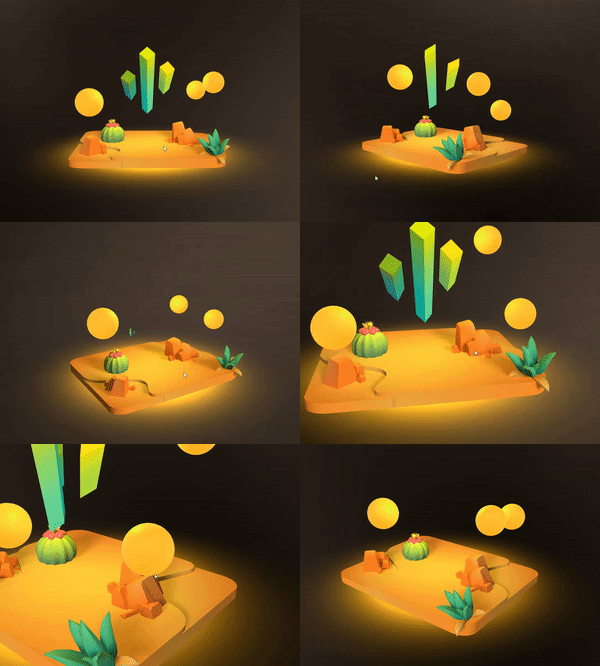
* [OrbitControls](https://engine.needle.tools/docs/api/OrbitControls) provides interactive camera control using three.js OrbitControls.
* Users can rotate, pan, and zoom the camera to explore 3D scenes.
*
* **Features:**
* - Rotation around a target point (orbit)
* - Panning to move the view
* - Zooming via scroll or pinch
* - Auto-rotation for showcases
* - Configurable angle and distance limits
* - Smooth damping for natural feel
*
* 
*
* **Access underlying controls:**
* - `controls` - The three.js OrbitControls instance
* - `controllerObject` - The object being controlled (usually the camera)
*
* **Debug options:**
* - `?debugorbit` - Log orbit control events
* - `?freecam` - Enable unrestricted camera movement
*
* @example Basic setup
* ```ts
* const orbitControls = camera.getComponent(OrbitControls);
* orbitControls.autoRotate = true;
* orbitControls.autoRotateSpeed = 2;
* ```
*
* @example Set look-at target
* ```ts
* orbitControls.setLookTargetPosition(new Vector3(0, 1, 0), true);
* // Or move both camera and target
* orbitControls.setCameraTargetPosition(new Vector3(5, 2, 5), new Vector3(0, 0, 0));
* ```
*
* @summary Camera controller using three.js OrbitControls
* @category Camera and Controls
* @group Components
* @see {@link SmoothFollow} for smooth camera following
* @see {@link Camera} for camera configuration
* @link https://threejs.org/docs/#examples/en/controls/OrbitControls
* @link https://engine.needle.tools/samples/panorama-controls alternative controls in samples
*/
export declare class OrbitControls extends Behaviour implements ICameraController {
/**
* @inheritdoc
*/
get isCameraController(): boolean;
/** The underlying three.js OrbitControls.
* See {@link https://threejs.org/docs/#examples/en/controls/OrbitControls}
* @returns {@type ThreeOrbitControls | null}
*/
get controls(): ThreeOrbitControls | null;
/** The object being controlled by the OrbitControls (usually the camera)
* See {@link https://threejs.org/docs/#examples/en/controls/OrbitControls.object}
* @returns {@type Object3D | null}
*/
get controllerObject(): Object3D | null;
/** Register callback when user starts interacting with the orbit controls */
onStartInteraction(callback: Function): void;
/** When enabled OrbitControls will automatically raycast find a look at target in start
* @default true
*/
autoTarget: boolean;
/** When enabled the scene will be automatically fitted into the camera view in onEnable
* @default false
*/
autoFit: boolean;
/** When enabled the camera can be rotated
* @default true
*/
enableRotate: boolean;
/** When enabled the camera will rotate automatically
* @default false
*/
autoRotate: boolean;
/** The speed at which the camera will rotate automatically. Will only be used when `autoRotate` is enabled
* @default 1.0
*/
autoRotateSpeed: number;
/** The minimum azimuth angle in radians */
minAzimuthAngle: number;
/** The maximum azimuth angle in radians */
maxAzimuthAngle: number;
/** The minimum polar angle in radians
* @default 0
*/
minPolarAngle: number;
/** The maximum polar angle in radians
* @default Math.PI
*/
maxPolarAngle: number;
/** When enabled the camera can be moved using keyboard keys. The keys are defined in the `controls.keys` property
* @default false
*/
enableKeys: boolean;
/** When enabled the camera movement will be damped
* @default true
*/
enableDamping: boolean;
/** The damping factor for the camera movement. For more information see the [three.js documentation](https://threejs.org/docs/#examples/en/controls/OrbitControls.dampingFactor)
* @default 0.1
*/
dampingFactor: number;
/** When enabled the camera can be zoomed
* @default true
*/
enableZoom: boolean;
/** The minimum zoom level
* @default 0
*/
minZoom: number;
/** The maximum zoom level
* @default Infinity
*/
maxZoom: number;
/**
* Sets the zoom speed of the OrbitControls
* @default 1
*/
zoomSpeed: number;
/**
* Set to true to enable zooming to the cursor position.
* @default false
*/
zoomToCursor: boolean;
/** When enabled the camera can be panned
* @default true
*/
enablePan: boolean;
/** Assigning an Object3D will make the camera look at this target's position.
* The camera will orbit around this target.
* @default null
*/
lookAtTarget: Object3D | null;
/** When enabled the camera will continuously follow the lookAtTarget's position every frame.
* When disabled the target is only used for the initial look direction.
* @default true
*/
lockLookAtTarget: boolean;
/** The weight for the lookAtTarget interpolation
* @default 1
*/
lookAtConstraint01: number;
private lookAtConstraint?;
/** If true user input interrupts the camera from animating to a target
* @default true
*/
allowInterrupt: boolean;
/** If true the camera will focus on the target when the middle mouse button is clicked */
middleClickToFocus: boolean;
/** If true the camera will focus on the target when the left mouse button is double clicked
* @default true
*/
doubleClickToFocus: boolean;
/**
* When enabled the camera will fit the scene to the camera view when the background is clicked the specified number of times within a short time
* @default 2
*/
clickBackgroundToFitScene: number;
/**
* This is the DOM element that the OrbitControls will listen to for input events. By default this is the renderer's canvas element.
* Set this to a different element to make the OrbitControls listen to that element instead.
*/
get targetElement(): HTMLElement | null;
set targetElement(value: HTMLElement | null);
private _targetElement;
/**
* @internal If true debug information will be logged to the console
* @default false
*/
debugLog: boolean;
/**
* @deprecated use `targetLerpDuration` instead
* ~~The speed at which the camera target and the camera will be lerping to their destinations (if set via script or user input)~~
* */
get targetLerpSpeed(): number;
set targetLerpSpeed(v: number);
/** The duration in seconds it takes for the camera look ad and position lerp to reach their destination (when set via `setCameraTargetPosition` and `setLookTargetPosition`)
* @default 1
*/
get targetLerpDuration(): number;
set targetLerpDuration(v: number);
private _lookTargetLerpDuration;
/**
* When set, the camera's look at target will be clamped within the bounds of the specified Object3D. The bounds are defined by the world position and world scale of the assigned Object3D.
* @default null
*/
targetBounds: Object3D | null;
/**
* Rotate the camera left (or right) by the specified angle in radians.
* For positive angles the camera will rotate to the left, for negative angles it will rotate to the right.
* Tip: Use Mathf to convert between degrees and radians.
* @param angleInRadians The angle in radians to rotate the camera left
* @example
* ```typescript
* // Rotate the camera left by 0.1 radians
* orbitControls.rotateLeft(0.1);
* ```
*/
rotateLeft(angleInRadians: number): void;
/**
* Rotate the camera up (or down) by the specified angle in radians.
* For positive angles the camera will rotate up, for negative angles it will rotate down.
* Tip: Use Mathf to convert between degrees and radians.
* @param angleInRadians The angle in radians to rotate the camera up
* @example
* ```typescript
* // Rotate the camera up by 0.1 radians
* orbitControls.rotateUp(0.1);
* ```
*/
rotateUp(angleInRadians: number): void;
/**
* Pan the camera by the specified amount in the x and y direction in pixels.
* @param dx The amount to pan the camera in the x direction in pixels.
* @param dy The amount to pan the camera in the y direction in pixels.
*/
pan(dx: number, dy: number): void;
/**
* Zoom the camera in or out by the specified scale factor. The factor is applied to the current zoom radius / distance.
* If the scale is greater than 0 then the camera will zoom in, if it is less than 0 then the camera will zoom out.
* @param scale The scale factor to zoom the camera in or out. Expected range is between -1 and 1, where 0 means no zoom.
* @example
* ```typescript
* // Zoom in by 0.1
* orbitControls.zoomIn(0.1);
* // Zoom out by 0.1
* orbitControls.zoomIn(-0.1);
* ```
*/
zoomIn(scale: number): void;
private _controls;
private _cameraObject;
private _lookTargetLerpActive;
private _lookTargetStartPosition;
private _lookTargetEndPosition;
private _lookTargetLerp01;
private _cameraLerpActive;
private _cameraStartPosition;
private _cameraEndPosition;
private _cameraLerp01;
private _cameraLerpDuration;
private _fovLerpActive;
private _fovLerpStartValue;
private _fovLerpEndValue;
private _fovLerp01;
private _fovLerpDuration;
private _inputs;
private _enableTime;
private _startedListeningToKeyEvents;
private _eventSystem?;
private _afterHandleInputFn?;
private _camera;
private _syncedTransform?;
private _didSetTarget;
private _didApplyLookAtTarget;
/** @internal */
awake(): void;
/** @internal */
start(): void;
/** @internal */
onDestroy(): void;
/** @internal */
onEnable(): void;
/** @internal */
onDisable(): void;
private _activePointerEvents;
private _lastTimeClickOnBackground;
private _clickOnBackgroundCount;
private _onPointerDown;
private _onPointerDownLate;
private _onPointerUp;
private _onPointerUpLate;
private updateTargetNow;
private _orbitStartAngle;
private _zoomStartDistance;
private onControlsChangeStarted;
private onControlsChangeEnded;
private _shouldDisable;
private afterHandleInput;
onPausedChanged(isPaused: boolean): void;
/** @internal */
onBeforeRender(): void;
private __onPreRender;
/**
* Sets camera target position and look direction using a raycast in forward direction of the object.
*
* @param source The object to raycast from. If a camera is passed in the camera position will be used as the source.
* @param immediateOrDuration If true the camera target will move immediately to the new position, otherwise it will lerp. If a number is passed in it will be used as the duration of the lerp.
*
* This is useful for example if you want to align your camera with an object in your scene (or another camera). Simply pass in this other camera object
* @returns true if the target was set successfully
*/
setCameraAndLookTarget(source: Object3D | Camera, immediateOrDuration?: number | boolean): boolean;
/** Moves the camera to position smoothly.
* @param position The position in local space of the controllerObject to move the camera to. If null the camera will stop lerping to the target.
* @param immediateOrDuration If true the camera will move immediately to the new position, otherwise it will lerp. If a number is passed in it will be used as the duration of the lerp.
*/
setCameraTargetPosition(position?: Object3D | Vector3Like | null, immediateOrDuration?: boolean | number): void;
/** True while the camera position is being lerped */
get cameraLerpActive(): boolean;
/** Call to stop camera position lerping */
stopCameraLerp(): void;
setFieldOfView(fov: number | undefined, immediateOrDuration?: boolean | number): void;
/** Moves the camera look-at target to a position smoothly.
* @param position The position in world space to move the camera target to. If null the camera will stop lerping to the target.
* @param immediateOrDuration If true the camera target will move immediately to the new position, otherwise it will lerp. If a number is passed in it will be used as the duration of the lerp.
*/
setLookTargetPosition(position?: Object3D | Vector3Like | null, immediateOrDuration?: boolean | number): void;
/** True while the camera look target is being lerped */
get lookTargetLerpActive(): boolean;
/** Call to stop camera look target lerping */
stopLookTargetLerp(): void;
/** Sets the look at target from the assigned lookAtTarget Object3D
* @param t The interpolation factor between the current look at target and the new target
*/
private setLookTargetFromConstraint;
private lerpLookTarget;
private setTargetFromRaycast;
/**
* Fits the camera to show the objects provided (defaults to the scene if no objects are passed in)
* @param options The options for fitting the camera. Use to provide objects to fit to, fit direction and size and other settings.
*/
fitCamera(options?: OrbitFitCameraOptions): any;
private _haveAttachedKeyboardEvents;
}
type OrbitFitCameraOptions = FitCameraOptions & {
immediate?: boolean;
};
export {};