@needle-tools/engine
Version:
Needle Engine is a web-based runtime for 3D apps. It runs on your machine for development with great integrations into editors like Unity or Blender - and can be deployed onto any device! It is flexible, extensible and networking and XR are built-in.
194 lines (193 loc) • 8.08 kB
TypeScript
import { Material, Mesh, Object3D } from "three";
import { Behaviour } from "../../Component.js";
import { EventList } from "../../EventList.js";
import type { IUSDExporterExtension } from "./Extension.js";
/**
* Custom branding for the QuickLook overlay, used by {@link USDZExporter}.
*/
export declare class CustomBranding {
/** The call to action button text. If not set, the button will close the QuickLook overlay. */
callToAction?: string;
/** The title of the overlay. */
checkoutTitle?: string;
/** The subtitle of the overlay. */
checkoutSubtitle?: string;
/** if assigned the call to action button in quicklook will open the URL. Otherwise it will just close quicklook. */
callToActionURL?: string;
}
type BeforeLODExportArguments = {
readonly exporter: USDZExporter;
/** The type of LOD being exported, either a texture or a mesh */
readonly type: "texture" | "mesh";
/** The Renderer gameobject */
readonly object: Object3D;
/** The mesh being exported, if applicable */
readonly mesh?: Mesh;
/** The material being exported, if applicable */
readonly material?: Material;
/** By default LOD 0 will be exported (highest quality).
* Set to a different LOD level if needed.
* Set to -1 to disable LOD export and simply export the current version.
*/
overrideLevel?: number;
};
/**
* USDZExporter creates USDZ files and opens them in Apple QuickLook on iOS/iPadOS/visionOS.
* Enables "View in AR" functionality for Apple devices directly from web experiences.
*
* **Key features:**
* - Auto-exports animations and audio sources
* - Interactive behaviors via Needle's "Everywhere Actions" system
* - RealityKit physics support (iOS 18+, visionOS 1+)
* - Custom QuickLook overlay with call-to-action buttons
* - Progressive texture/mesh LOD handling
*
* [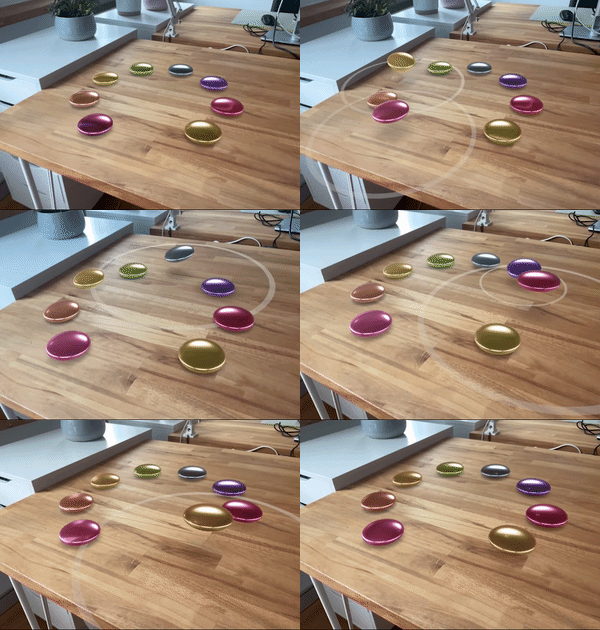](https://engine.needle.tools/samples/?overlay=samples&tag=usdz)
*
* **Automatic setup:**
* - Creates QuickLook button on compatible devices
* - Respects {@link XRFlag} for AR-specific visibility
* - Handles {@link WebARSessionRoot} scale
*
* **Custom extensions:**
* Add custom behaviors by implementing {@link IUSDExporterExtension} and adding to {@link extensions} array.
*
* **Debug:** Use `?debugusdz` URL parameter. Press 'T' to trigger export.
*
* @example Basic USDZ export
* ```ts
* const exporter = myObject.addComponent(USDZExporter);
* exporter.objectToExport = productModel;
* exporter.autoExportAnimations = true;
* exporter.interactive = true; // Enable QuickLook behaviors
*
* // Trigger export
* await exporter.exportAndOpen();
* ```
*
* @example Custom branding
* ```ts
* exporter.customBranding = {
* callToAction: "Buy Now",
* checkoutTitle: "Product Name",
* callToActionURL: "https://shop.example.com"
* };
* ```
*
* @summary Export 3D objects as USDZ files for Apple QuickLook AR
* @category XR
* @group Components
* @see {@link WebXR} for WebXR-based AR/VR
* @see {@link WebARSessionRoot} for AR placement and scaling
* @see {@link XRFlag} for AR-specific object visibility
* @see {@link CustomBranding} for QuickLook overlay customization
* @link https://engine.needle.tools/samples/?overlay=samples&tag=usdz
*/
export declare class USDZExporter extends Behaviour {
/** Called before the USDZ file is exported */
static readonly beforeExport: EventList<{
readonly exporter: USDZExporter;
}>;
/** Called after the USDZ file has been exported */
static readonly afterExport: EventList<{
readonly exporter: USDZExporter;
}>;
/** Called before LOD level are exported. Can be used to override the LOD export settings */
static readonly beforeLODExport: EventList<BeforeLODExportArguments>;
/**
* Assign the object to export as USDZ file. If undefined or null, the whole scene will be exported.
*/
objectToExport: Object3D | null | undefined;
/** Collect all Animations/Animators automatically on export and emit them as playing at the start.
* Animator state chains and loops will automatically be collected and exported in order as well.
* If this setting is off, Animators need to be registered by components – for example from PlayAnimationOnClick.
*/
autoExportAnimations: boolean;
/** Collect all AudioSources automatically on export and emit them as playing at the start.
* They will loop according to their settings.
* If this setting is off, Audio Sources need to be registered by components – for example from PlayAudioOnClick.
*/
autoExportAudioSources: boolean;
exportFileName: string | null | undefined;
customUsdzFile: string | null | undefined;
customBranding?: CustomBranding;
anchoringType: "plane" | "image" | "face" | "none";
maxTextureSize: 256 | 512 | 1024 | 2048 | 4096 | 8192;
planeAnchoringAlignment: "horizontal" | "vertical" | "any";
/** Enabling this option will export QuickLook-specific preliminary behaviours along with the USDZ files.
* These extensions are only supported on QuickLook on iOS/visionOS/MacOS.
* Keep this option off for general USDZ usage.
*/
interactive: boolean;
/** Enabling this option will export the USDZ file with RealityKit physics components.
* Rigidbody and Collider components will be converted to their RealityKit counterparts.
* Physics are supported on QuickLook in iOS 18+ and VisionOS 1+.
* Physics export is automatically turned off when there are no Rigidbody components anywhere on the exported object.
*/
physics: boolean;
allowCreateQuicklookButton: boolean;
quickLookCompatible: boolean;
/**
* Extensions to add custom behaviors and interactions to the USDZ file.
* You can add your own extensions here by extending {@link IUSDExporterExtension}.
*/
extensions: IUSDExporterExtension[];
private link;
private button?;
/** @internal */
start(): void;
/** @internal */
onEnable(): void;
/** @internal */
onDisable(): void;
private onClickedOpenInARElement;
/**
* Creates an USDZ file from the current scene or assigned objectToExport and opens it in QuickLook.
* Use the various public properties of USDZExporter to customize export behaviour.
* @deprecated use {@link exportAndOpen} instead
*/
exportAsync(): Promise<Blob | null>;
/**
* Creates an USDZ file from the current scene or assigned objectToExport and opens it in QuickLook.
* @returns a Promise<Blob> containing the USDZ file
*/
exportAndOpen(): Promise<Blob | null>;
/**
* Creates an USDZ file from the current scene or assigned objectToExport and opens it in QuickLook.
* @returns a Promise<Blob> containing the USDZ file
*/
export(objectToExport: Object3D | undefined): Promise<Blob | null>;
private readonly _currentExportTasks;
private _previousTimeScale;
private internalExport;
/**
* Opens QuickLook on iOS/iPadOS/visionOS with the given content in AR mode.
* @param content The URL to the .usdz or .reality file or a blob containing an USDZ file.
* @param name Download filename
*/
openInQuickLook(content: Blob | string, name: string): void;
/**
* Downloads the given blob as a file.
*/
download(blob: Blob, name: string): void;
private static save;
private lastCallback?;
private quicklookCallback;
private buildQuicklookOverlay;
private static invertForwardMatrix;
private static invertForwardQuaternion;
private _rootSessionRootWasAppliedTo;
private _rootPositionBeforeExport;
private _rootRotationBeforeExport;
private _rootScaleBeforeExport;
getARScaleAndTarget(): {
scale: number;
_invertForward: boolean;
target: Object3D;
sessionRoot: Object3D | null;
};
private applyWebARSessionRoot;
private revertWebARSessionRoot;
private createQuicklookButton;
}
export {};