@needle-tools/engine
Version:
Needle Engine is a web-based runtime for 3D apps. It runs on your machine for development with great integrations into editors like Unity or Blender - and can be deployed onto any device! It is flexible, extensible and networking and XR are built-in.
904 lines (801 loc) • 39.3 kB
text/typescript
import { ImageBitmapLoader, Matrix4, Object3D, Quaternion, Vector3 } from "three";
import { Object3DEventMap } from "three";
import { isDevEnvironment, showBalloonMessage, showBalloonWarning } from "../../engine/debug/index.js";
import { AssetReference } from "../../engine/engine_addressables.js";
import { Context } from "../../engine/engine_context.js";
import { serializable } from "../../engine/engine_serialization.js";
import { IGameObject } from "../../engine/engine_types.js";
import { CircularBuffer, delay, DeviceUtilities, getParam } from "../../engine/engine_utils.js";
import { type NeedleXREventArgs, NeedleXRSession } from "../../engine/xr/api.js";
import { IUSDExporterExtension } from "../../engine-components/export/usdz/Extension.js";
import { imageToCanvas, USDObject, USDWriter, USDZExporterContext } from "../../engine-components/export/usdz/ThreeUSDZExporter.js";
import { USDZExporter } from "../../engine-components/export/usdz/USDZExporter.js";
import { Behaviour, GameObject } from "../Component.js";
import { Renderer } from "../Renderer.js";
// https://github.com/immersive-web/marker-tracking/blob/main/explainer.md
const debug = getParam("debugimagetracking");
// #region WebXRTrackedImage
/**
* Represents a tracked image detected during a WebXR session.
* Contains position, rotation, and tracking state information for a detected marker image.
*
* **Properties:**
* - Access image URL and physical dimensions
* - Get current position and rotation in world space
* - Check tracking state (tracked vs emulated)
* - Apply transform to 3D objects
*
* @summary Runtime data for a detected marker image in WebXR
* @category XR
*/
export class WebXRTrackedImage {
/** URL of the tracked marker image */
get url(): string { return this._trackedImage.image ?? ""; }
/** Physical width of the marker in meters */
get widthInMeters() { return this._trackedImage.widthInMeters ?? undefined; }
/** The ImageBitmap used for tracking */
get bitmap(): ImageBitmap { return this._bitmap; }
/** The {@link WebXRImageTrackingModel} configuration for this tracked image */
get model(): WebXRImageTrackingModel { return this._trackedImage; }
/**
* The measured size of the detected image in the real world.
* May differ from `widthInMeters` if the physical marker doesn't match the configured size.
*/
readonly measuredSize: number;
/**
* Current tracking state of the image:
* - `tracked` - Image is currently being tracked by the system
* - `emulated` - Tracking is being emulated (less accurate)
*/
readonly state: "tracked" | "emulated";
/**
* Copy the current world position of the tracked image to a Vector3.
* @param vec The vector to store the position in
* @returns The input vector with the position copied to it
*/
getPosition(vec: Vector3) {
this.ensureTransformData();
vec.copy(this._position);
return vec;
}
/**
* Copy the current world rotation of the tracked image to a Quaternion.
* @param quat The quaternion to store the rotation in
* @returns The input quaternion with the rotation copied to it
*/
getQuaternion(quat: Quaternion) {
this.ensureTransformData();
quat.copy(this._rotation);
return quat;
}
/**
* Apply the tracked image's position and rotation to a 3D object.
* Optionally applies smoothing to reduce jitter.
*
* @param object The 3D object to update
* @param t01 Interpolation factor (0-1) for smoothing. If undefined or >= 1, no smoothing is applied. When smoothing is enabled, larger position/rotation changes will automatically reduce the smoothing to prevent lag.
*/
applyToObject(object: Object3D, t01: number | undefined = undefined) {
this.ensureTransformData();
// check if position/_position or rotation/_rotation changed more than just a little bit and adjust smoothing accordingly
const changeAmount = object.position.distanceToSquared(this._position) / 0.05 + object.quaternion.angleTo(this._rotation) / 0.05;
if (t01) t01 *= Math.max(1, changeAmount);
if (t01 === undefined || t01 >= 1) {
object.position.copy(this._position);
object.quaternion.copy(this._rotation);
// InstancingUtil.markDirty(object);
}
else {
t01 = Math.max(0, Math.min(1, t01));
object.position.lerp(this._position, t01);
object.quaternion.slerp(this._rotation, t01);
// InstancingUtil.markDirty(object);
}
}
private static _positionBuffer: CircularBuffer<Vector3> = new CircularBuffer(() => new Vector3(), 20);
private static _rotationBuffer: CircularBuffer<Quaternion> = new CircularBuffer(() => new Quaternion(), 20);
private _position!: Vector3;
private _rotation!: Quaternion;
private ensureTransformData() {
if (!this._position) {
this._position = WebXRTrackedImage._positionBuffer.get();
this._rotation = WebXRTrackedImage._rotationBuffer.get();
const t = this._pose.transform as XRRigidTransform;
const converted = NeedleXRSession.active!.convertSpace(t);
this._position.copy(converted?.position);
this._rotation.copy(converted?.quaternion);
}
}
private readonly _trackingComponent: WebXRImageTracking;
private readonly _trackedImage: WebXRImageTrackingModel;
private readonly _bitmap: ImageBitmap;
private readonly _pose: any;
constructor(context: WebXRImageTracking, trackedImage: WebXRImageTrackingModel, bitmap: ImageBitmap, measuredSize: number, state: "tracked" | "emulated", pose: any) {
this._trackingComponent = context;;
this._trackedImage = trackedImage;
this._bitmap = bitmap;
this.measuredSize = measuredSize;
this.state = state;
this._pose = pose;
}
}
/**
* Event callback type for image tracking updates.
* @param images Array of currently tracked images
*/
declare type WebXRImageTrackingEvent = (images: WebXRImageTrackingEvent[]) => void;
/**
* Initial state of tracked image objects before entering an XR session.
* Used to restore objects to their original state when the WebXR session ends.
*/
declare type InitialTrackedObjectState = {
/** Original visibility state */
visible: boolean;
/** Original parent object in the scene hierarchy */
parent: Object3D | undefined | null;
/** Original transformation matrix */
matrix: Matrix4;
}
// #region Model
/**
* Configuration model for a tracked image marker.
* Defines which image to track, its physical size, and which 3D content to display when detected.
*
* **Important:** The physical size (`widthInMeters`) must match your printed marker size for accurate tracking.
* Mismatched sizes cause the tracked object to appear to "float" above or below the marker.
*
* **Best practices for marker images:**
* - Use high-contrast images with distinct features
* - Avoid repetitive patterns or solid colors
* - Test images at intended viewing distances
* - Ensure good lighting conditions
*
* @summary Configuration for a single trackable image marker
* @category XR
* @see {@link WebXRImageTracking} for the component that uses these models
* @link https://engine.needle.tools/docs/xr.html#image-tracking
* @link https://engine.needle.tools/samples/image-tracking
*/
export class WebXRImageTrackingModel {
/**
* Creates a new image tracking configuration.
*
* @param params Configuration parameters
* @param params.url URL to the marker image to track
* @param params.widthInMeters Physical width of the printed marker in meters (must match real size!)
* @param params.object The 3D object or AssetReference to display when this image is detected
* @param params.createObjectInstance If true, creates a new instance for each detection (useful for tracking multiple instances of the same marker)
* @param params.imageDoesNotMove Enable for static markers (floor/wall mounted) to improve tracking stability
* @param params.hideWhenTrackingIsLost If true, hides the object when tracking is lost; if false, leaves it at the last known position
*/
constructor(params: { url: string, widthInMeters: number, /** Object to track */ object: AssetReference | Object3D, createObjectInstance?: boolean, imageDoesNotMove?: boolean, hideWhenTrackingIsLost?: boolean }) {
this.image = params.url;
this.widthInMeters = params.widthInMeters;
if (params.object instanceof Object3D) {
this.object = new AssetReference({ asset: params.object });
}
else this.object = params.object;
if (params.createObjectInstance !== undefined) this.createObjectInstance = params.createObjectInstance;
if (params.imageDoesNotMove !== undefined) this.imageDoesNotMove = params.imageDoesNotMove;
if (params.hideWhenTrackingIsLost !== undefined) this.hideWhenTrackingIsLost = params.hideWhenTrackingIsLost;
}
/**
* URL to the marker image to track.
* **Important:** Use images with high contrast and unique features to improve tracking quality.
* Avoid repetitive patterns, solid colors, or low-contrast images.
*/
image?: string;
/**
* Physical width of the printed marker in meters.
* **Critical:** This must match your actual printed marker size!
* If mismatched, the tracked object will appear to "float" above or below the marker.
*
* @default 0.25 (25cm)
* @example
* ```ts
* // For a business card sized marker (9cm wide)
* widthInMeters = 0.09;
*
* // For an A4 page width (21cm)
* widthInMeters = 0.21;
* ```
*/
widthInMeters: number = .25;
/**
* The 3D object or prefab to display when this marker is detected.
* The object will be positioned and rotated to match the tracked image in the real world.
*
* **Note:** Scale your 3D content appropriately relative to `widthInMeters`.
*/
object?: AssetReference;
/**
* When enabled, creates a new instance of the referenced object each time this image is detected.
* Enable this if you want to track multiple instances of the same marker simultaneously,
* or if the same object is used for multiple different markers.
*
* @default false
*/
createObjectInstance: boolean = false;
/**
* Enable for static markers that don't move (e.g., posters on walls or markers on the floor).
* When enabled, only the first few tracking frames are used to position the object,
* resulting in more stable tracking by ignoring subsequent minor position changes.
*
* **Use cases:**
* - Wall-mounted posters or artwork
* - Floor markers for persistent AR content
* - Product packaging on shelves
*
* **Don't use for:**
* - Handheld cards or objects
* - Moving markers
*
* @default false
*/
imageDoesNotMove: boolean = false;
/**
* Controls visibility behavior when tracking is lost.
* - When `true`: Object is hidden when the marker is no longer visible
* - When `false`: Object remains visible at its last tracked position
*
* @default true
*/
hideWhenTrackingIsLost: boolean = true;
/**
* Extracts the filename from the marker image URL.
* @returns The filename (last part of the URL path), or null if no image URL is set
* @example
* ```ts
* // URL: "https://example.com/markers/business-card.png"
* // Returns: "business-card.png"
* ```
*/
getNameFromUrl() {
if (this.image) {
const parts = this.image.split("/");
return parts[parts.length - 1];
}
return null;
}
}
// #region USDZ Extension
class ImageTrackingExtension implements IUSDExporterExtension {
readonly isImageTrackingExtension = true;
get extensionName() { return "image-tracking"; }
constructor(private readonly exporter: USDZExporter, private readonly component: WebXRImageTracking) {
if (debug) console.log(this);
this.exporter.anchoringType = "image";
}
// set during export
private shouldExport: boolean = true;
private filename: string | null = null;
private imageModel: WebXRImageTrackingModel | null = null;
onBeforeBuildDocument(_context: USDZExporterContext) {
// check if this extension is the first image tracking extension in the list
// since iOS can only track one image at a time we only allow one image tracking extension to be active
// we have to determine this at the earlierst export callback
// all subsequent export callbacks should then check is shouldExport is set to true
// this should only be the case for exactly one extension
const index = this.exporter.extensions
.filter(e => {
const ext = (e as ImageTrackingExtension);
return ext.isImageTrackingExtension && ext.component.activeAndEnabled && ext.component.trackedImages?.length > 0;
})
.indexOf(this);
this.shouldExport = index === 0;
if (!this.shouldExport) return;
// Warn if more than one tracked image is used for USDZ; that's not supported at the moment.
if (this.component.trackedImages?.length > 1) {
if (debug || isDevEnvironment()) {
showBalloonWarning("USDZ: Only one tracked image is supported.");
console.warn("USDZ: Only one tracked image is supported. Will choose the first one in the trackedImages list");
}
}
}
onAfterHierarchy(_context: USDZExporterContext, writer: USDWriter) {
if (!this.shouldExport) return;
const iOSVersion = DeviceUtilities.getiOSVersion();
const majorVersion = iOSVersion ? parseInt(iOSVersion.split(".")[0]) : 18;
const workaroundForFB16119331 = majorVersion >= 18;
const multiplier = workaroundForFB16119331 ? 1 : 100;
writer.beginBlock(`def Preliminary_ReferenceImage "AnchoringReferenceImage"`);
writer.appendLine(`uniform asset image = /` + this.filename + `@`);
writer.appendLine(`uniform double physicalWidth = ` + (this.imageModel!.widthInMeters * multiplier).toFixed(8));
writer.closeBlock();
}
async onAfterSerialize(context: USDZExporterContext) {
if (!this.shouldExport) return;
const imageModel = this.imageModel;
const img = _imageElements.get(imageModel!.image!)!;
const canvas = await imageToCanvas(img);
const blob = await canvas.convertToBlob({ type: 'image/png' });
const arrayBuffer = await blob.arrayBuffer();
context.files['image_tracking/' + this.filename] = new Uint8Array(arrayBuffer);
}
onExportObject(object: Object3D<Object3DEventMap>, model: USDObject, _context: USDZExporterContext) {
if (!this.shouldExport) return;
const imageTracking = this.component;
if (!imageTracking || !imageTracking.trackedImages?.length || !imageTracking.activeAndEnabled) return;
// we only care about the first image
// We can only apply this to the first tracked image, more are not supported by QuickLook.
const trackedImage = imageTracking.trackedImages[0];
if (trackedImage.object?.asset === object) {
this.imageModel = trackedImage;
this.filename = trackedImage.getNameFromUrl() || "marker.png";
const { scale, target } = this.exporter.getARScaleAndTarget();
// We have to reset the image tracking object's position and rotation, because QuickLook applies them.
// On Android WebXR they're replaced by the tracked data
let parent = object;
const relativeMatrix = new Matrix4();
if (object !== target) {
while (parent && parent.parent && parent.parent !== target) {
parent = parent.parent;
relativeMatrix.premultiply(parent.matrix);
}
}
const mat = relativeMatrix
.clone()
.invert()
// apply session root scale again after undoing the world transformation
model.setMatrix(mat.scale(new Vector3(scale, scale, scale)));
// Unfortunately looks like Apple's docs are incomplete:
// https://developer.apple.com/documentation/realitykit/preliminary_anchoringapi#Nest-and-Layer-Anchorable-Prims
// In practice, it seems that nesting is not allowed – no image tracking will be applied to nested objects.
// Thus, we can't have separate transforms for "regularly placing content" and "placing content with an image marker".
// model.extraSchemas.push("Preliminary_AnchoringAPI");
// model.addEventListener("serialize", (_writer: USDWriter, _context: USDZExporterContext) => {
// writer.appendLine( `token preliminary:anchoring:type = "image"` );
// writer.appendLine( `rel preliminary:imageAnchoring:referenceImage = </${context.document.name}/Scenes/Scene/AnchoringReferenceImage>` );
// });
}
}
}
// #region Tracking Component
/**
* Create powerful AR image tracking experiences with just a few lines of code!
* WebXRImageTracking makes it incredibly easy to detect marker images in the real world and anchor 3D content to them.
* Needle Engine automatically handles all the complexity across different platforms and fallback modes for you.
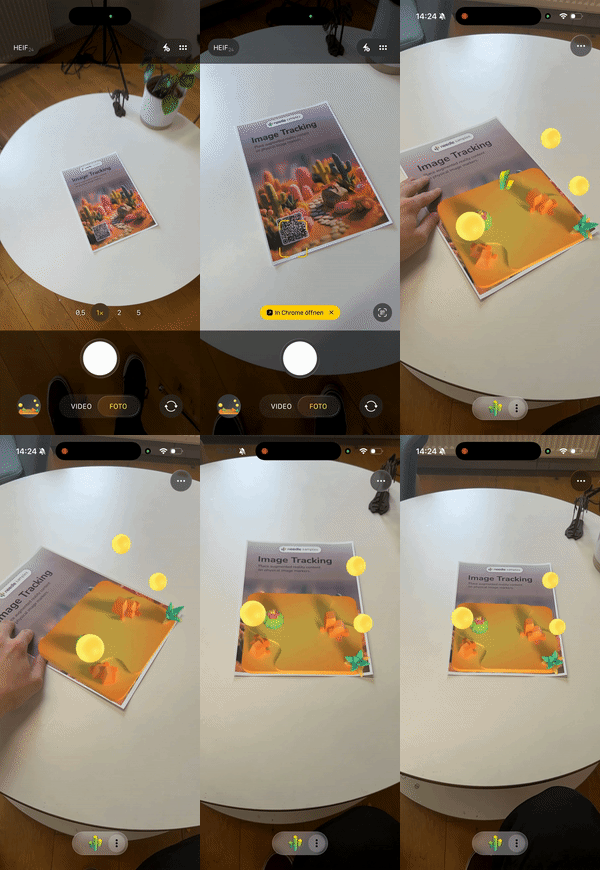
*
* [](https://engine.needle.tools/samples/image-tracking)
*
* **What makes Needle Engine special:**
* - **Write once, run everywhere**: The same code works across iOS, Android, and visionOS
* - **Automatic platform optimization**: Seamlessly switches between WebXR, ARKit, and QuickLook
* - **Flexible deployment options**: From full WebXR with unlimited markers to QuickLook fallback
* - **Production ready**: Battle-tested tracking with adaptive smoothing and stability features
*
* **Platform Support & Options:**
* - **iOS (WebXR via AppClip)**: Full WebXR support - track unlimited markers simultaneously via native ARKit!
* - **iOS (QuickLook mode)**: Instant AR without app installation - perfect for quick demos (tracks first marker)
* - **Android (WebXR)**: Native WebXR Image Tracking API - unlimited markers (requires browser flag during early access)
* - **visionOS (QuickLook)**: Spatial image anchoring with Apple's AR QuickLook
*
* **Simple 3-Step Setup:**
* 1. Add this component to any GameObject in your scene
* 2. Configure your markers in the `trackedImages` array:
* - `image`: URL to your marker image
* - `widthInMeters`: Physical size of your printed marker
* - `object`: The 3D content to display
* 3. Export and test - Needle handles the rest!
*
* **Pro Tips for Best Results:**
* - Use high-contrast markers with unique features for reliable tracking
* - Match `widthInMeters` to your actual physical marker size for accurate positioning
* - Enable `imageDoesNotMove` for wall posters or floor markers - significantly improves stability
* - Use `smooth` (enabled by default) for professional-looking, jitter-free tracking
* - Test with different marker sizes and lighting - Needle's adaptive tracking handles various conditions
*
* 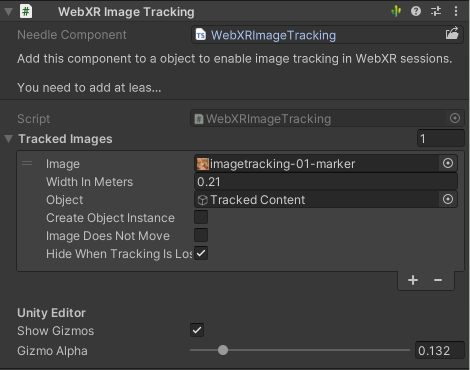
* *WebXRImageTracking component in Unity Editor*
*
* 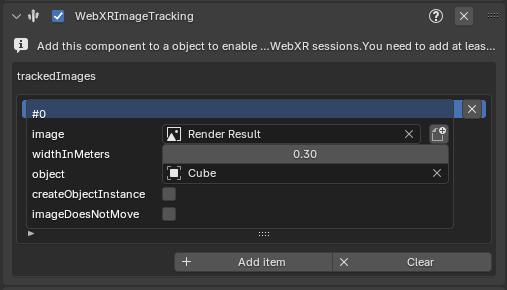
* *WebXRImageTracking panel/component in Blender*
*
* @example Getting started - it's this easy!
* ```ts
* // Just add markers and Needle handles everything else
* const imageTracking = myObject.addComponent(WebXRImageTracking);
* const marker = new WebXRImageTrackingModel({
* url: "https://example.com/my-poster.png",
* widthInMeters: 0.3, // 30cm poster
* object: my3DContent
* });
* imageTracking.addImage(marker);
* // Done! Works on iOS, Android, and visionOS automatically
* ```
*
* @example Track multiple markers (WebXR mode)
* ```ts
* const imageTracking = myObject.addComponent(WebXRImageTracking);
*
* // In WebXR mode (iOS AppClip, Android), all markers work simultaneously!
* const productBox = new WebXRImageTrackingModel({ url: "product-box.png", widthInMeters: 0.15, object: productInfo });
* const businessCard = new WebXRImageTrackingModel({ url: "business-card.png", widthInMeters: 0.09, object: contactCard });
* const poster = new WebXRImageTrackingModel({ url: "poster.png", widthInMeters: 0.5, object: videoPlayer });
*
* imageTracking.addImage(productBox);
* imageTracking.addImage(businessCard);
* imageTracking.addImage(poster);
*
* // For QuickLook fallback mode, optionally set which marker is primary
* imageTracking.setPrimaryImage(poster); // This will be used in QuickLook
* ```
*
* @example Professional setup for static markers
* ```ts
* // Perfect for museums, retail displays, or permanent installations
* const wallArt = new WebXRImageTrackingModel({
* url: "gallery-painting.png",
* widthInMeters: 0.6,
* object: interactiveExplanation,
* imageDoesNotMove: true, // Rock-solid tracking for static markers!
* hideWhenTrackingIsLost: false // Content stays visible even if temporarily occluded
* });
* ```
*
* **Why developers love Needle's image tracking:**
* - Zero platform-specific code required
* - Automatic graceful degradation across deployment modes
* - Built-in jitter reduction and stability features
* - Works with any image - posters, packaging, business cards, artwork
* - Export once, deploy everywhere
*
* @summary The easiest way to create cross-platform AR image tracking experiences
* @category XR
* @group Components
* @see {@link WebXRImageTrackingModel} for marker configuration options
* @see {@link WebXRTrackedImage} for runtime tracking data and events
* @see {@link WebXR} for general WebXR setup and session management
* @link https://engine.needle.tools/docs/xr.html#image-tracking - Full Documentation
* @link https://engine.needle.tools/samples/image-tracking - Try Live Demo
* @link https://github.com/immersive-web/marker-tracking/blob/main/explainer.md - WebXR Marker Tracking Specification
*/
export class WebXRImageTracking extends Behaviour {
/**
* Set which marker should be primary (first in the list).
* Useful when deploying to QuickLook mode where one marker is tracked at a time.
* In full WebXR mode (iOS AppClip, Android), all markers track simultaneously regardless of order.
*
* **Note:** Needle Engine automatically adapts - in WebXR all markers work, in QuickLook the primary is used.
*
* @param image The marker model to set as primary
*
* @example
* ```ts
* // Great for offering different AR experiences from one deployment
* imageTracking.setPrimaryImage(businessCardMarker); // Use this for QuickLook
* // In WebXR mode, all markers still work simultaneously!
* ```
*/
setPrimaryImage(image: WebXRImageTrackingModel) {
const index = this.trackedImages.indexOf(image);
if (index >= 0) {
const current = this.trackedImages[0];
if (current !== image) {
this.trackedImages[0] = image;
this.trackedImages[index] = current;
}
}
else console.warn(`[WebXRImageTracking] Can not set primary: image not found in 'trackedImages' array ${image.image}`);
}
/**
* Add a marker to track - it's that simple!
* Needle Engine handles all the platform differences automatically.
*
* **Tip:** Add all your markers upfront. In WebXR mode they all work simultaneously.
* In QuickLook mode, the first (primary) marker is used.
*
* @param image The marker configuration to add
* @param asPrimary Set to true to make this the primary marker (for QuickLook fallback)
*
* @example
* ```ts
* // Super simple - works across all platforms
* const marker = new WebXRImageTrackingModel({
* url: "https://mysite.com/poster.png",
* widthInMeters: 0.42, // A3 poster width
* object: cool3DModel
* });
* imageTracking.addImage(marker);
* // That's it! Needle does the rest.
* ```
*/
addImage(image: WebXRImageTrackingModel, asPrimary: boolean = false) {
if (!this.trackedImages.includes(image)) {
this.trackedImages.push(image);
loadImage(image.image!);
}
if (asPrimary) this.setPrimaryImage(image);
}
/**
* Your list of markers to track. Add as many as you need!
*
* **How it works across platforms:**
* - **WebXR mode** (iOS AppClip, Android): All markers are tracked simultaneously - amazing for multi-marker experiences!
* - **QuickLook mode** (iOS fallback, visionOS): First marker is used - perfect for quick demos without app installation
*
* **Needle's smart deployment:** Configure all your markers once, and Needle automatically uses the best
* tracking mode available on each platform. No platform-specific code needed!
*
* @see {@link WebXRImageTrackingModel} for marker configuration
* @see {@link addImage} and {@link setPrimaryImage} for runtime management
*/
readonly trackedImages: WebXRImageTrackingModel[] = [];
/**
* Enable Needle's professional-grade adaptive smoothing for rock-solid tracking.
* Automatically reduces jitter while staying responsive to real movement.
*
* **Pro tip:** Keep this enabled (default) for production experiences!
*
* @default true
*/
smooth: boolean = true;
private readonly trackedImageIndexMap: Map<number, WebXRImageTrackingModel> = new Map();
/**
* Check if image tracking is available on this device right now.
*
* **Note:** On Android Chrome, WebXR Image Tracking is currently behind a flag during the early access period.
* Needle automatically falls back to other modes when needed, so your experience keeps working!
*/
get supported() { return this._supported; }
private _supported: boolean = true;
/** @internal */
awake(): void {
if (debug) console.log(this)
if (!this.trackedImages) return;
for (const trackedImage of this.trackedImages) {
if (trackedImage.image) {
loadImage(trackedImage.image);
}
}
}
/** @internal */
onEnable() {
USDZExporter.beforeExport.addEventListener(this.onBeforeUSDZExport);
}
/** @internal */
onDisable(): void {
USDZExporter.beforeExport.removeEventListener(this.onBeforeUSDZExport);
}
private onBeforeUSDZExport = (args: { exporter: USDZExporter }) => {
if (this.activeAndEnabled && this.trackedImages?.length) {
args.exporter.extensions.push(new ImageTrackingExtension(args.exporter, this));
}
}
/** @internal */
onBeforeXR(_mode: XRSessionMode, args: XRSessionInit & { trackedImages: Array<any> }): void {
// console.log("onXRRequested", args, this.trackedImages)
if (this.trackedImages) {
args.optionalFeatures = args.optionalFeatures || [];
if (!args.optionalFeatures.includes("image-tracking"))
args.optionalFeatures.push("image-tracking");
if(!args.trackedImages) args.trackedImages = [];
for (const trackedImage of this.trackedImages) {
if (trackedImage.image?.length && trackedImage.widthInMeters > 0) {
const bitmap = _imageElements.get(trackedImage.image);
if (bitmap) {
this.trackedImageIndexMap.set(args.trackedImages.length, trackedImage);
args.trackedImages.push({
image: bitmap,
widthInMeters: trackedImage.widthInMeters
});
}
}
}
}
}
/** @internal */
onEnterXR(_args: NeedleXREventArgs): void {
if (this.trackedImages) {
for (const trackedImage of this.trackedImages) {
if (trackedImage.object?.asset) {
// capture the initial state of tracked images in the scene to restore them when the session ends
const obj = trackedImage.object.asset as Object3D;
if (!obj.userData) obj.userData = {};
const state: InitialTrackedObjectState = {
visible: obj.visible,
parent: obj.parent,
matrix: obj.matrix.clone()
};
obj.userData["image-tracking"] = state;
}
}
}
// clear out all frame counters for tracking
for (const trackedData of this.imageToObjectMap.values()) {
trackedData.frames = 0;
}
};
/** @internal */
onLeaveXR(_args: NeedleXREventArgs): void {
if (!this.supported && DeviceUtilities.isAndroidDevice()) {
showBalloonWarning(this.webXRIncubationsWarning);
}
if (this.trackedImages) {
for (const trackedImage of this.trackedImages) {
if (trackedImage.object?.asset) {
const obj = trackedImage.object.asset as Object3D;
if (obj.userData) {
// restore the initial state of tracked images in the scene
const state = obj.userData["image-tracking"] as InitialTrackedObjectState | undefined;
if (state) {
obj.visible = state.visible;
state.parent?.add(obj);
obj.matrix.copy(state.matrix);
obj.matrix.decompose(obj.position, obj.quaternion, obj.scale);
}
delete obj.userData["image-tracking"];
}
}
}
}
}
private readonly imageToObjectMap = new Map<WebXRImageTrackingModel, { object: Object3D | null, frames: number, lastTrackingTime: number }>();
private readonly currentImages: WebXRTrackedImage[] = [];
private readonly webXRIncubationsWarning = "Image tracking is currently not supported on this device. On Chrome for Android, you can enable the <a target=\"_blank\" href=\"#\" onclick=\"() => console.log('I')\">chrome://flags/#webxr-incubations</a> flag.";
/** @internal */
onUpdateXR(args: NeedleXREventArgs): void {
this.currentImages.length = 0;
const frame = args.xr.frame;
if (!frame) return;
if (!("getImageTrackingResults" in frame)) {
if (!this["didPrintWarning"]) {
this["didPrintWarning"] = true;
console.log(this.webXRIncubationsWarning);
}
this._supported = false;
showBalloonWarning(this.webXRIncubationsWarning);
return;
}
// Check if enabled features (if available) contains image tracking - if it's not available this statement should not catch
// This handles mobile VR with image tracking. Seems like the "getImageTrackingResults" is available on the frame object but then we get runtime exceptions because the feature is (in VR) not enabled
else if (args.xr.session.enabledFeatures?.includes("image-tracking") === false) {
// Image tracking is not enabled for this session
return;
}
else if (frame.session && typeof frame.getImageTrackingResults === "function") {
const results = frame.getImageTrackingResults();
if (results.length > 0) {
const space = this.context.renderer.xr.getReferenceSpace();
if (space) {
for (const result of results) {
const state = result.trackingState;
const imageIndex = result.index;
const trackedImage = this.trackedImageIndexMap.get(imageIndex);
if (trackedImage) {
const pose = frame.getPose(result.imageSpace, space);
const imageData = new WebXRTrackedImage(this, trackedImage, result.image, result.measuredSize, state, pose);
this.currentImages.push(imageData);
}
else {
if (debug) {
console.warn("No tracked image for index", imageIndex);
}
}
}
if (this.currentImages.length > 0) {
try {
this.dispatchEvent(new CustomEvent("image-tracking", { detail: this.currentImages }));
this.onImageTrackingUpdate(this.currentImages);
}
catch (e) {
console.error(e);
}
}
}
}
}
// disable any objects that are no longer tracked
/** time in millis */
const hysteresis = 1000;
for (const [key, value] of this.imageToObjectMap) {
if (!value.object || !key) continue;
// If the user disallowed hiding the object when tracking is lost, skip this
if (key.hideWhenTrackingIsLost === false) continue;
let found = false;
for (const trackedImage of this.currentImages) {
if (trackedImage.model === key) {
// Make sure to keep the object visible if it's marked as static OR is tracked OR was tracked very recently (e.g. low framerate or bad tracking on device)
const timeSinceLastTracking = Date.now() - value.lastTrackingTime;
if(debug) showBalloonMessage(key.image + ", State: " + trackedImage.state + (key.imageDoesNotMove ? " (static)" : "") + (timeSinceLastTracking <= hysteresis ? " (hysteresis)" : ""));
if (key.imageDoesNotMove || trackedImage.state === "tracked" || timeSinceLastTracking <= hysteresis) {
found = true;
break;
}
}
}
if (!found) {
GameObject.setActive(value.object, false);
}
}
}
private onImageTrackingUpdate = (images: WebXRTrackedImage[]) => {
const xr = NeedleXRSession.active;
if (!xr) return;
for (const image of images) {
const model = image.model;
const isTracked = image.state === "tracked";
// don't do anything if we don't have an object to track - can be handled externally through events
if (!model.object) continue;
let trackedData = this.imageToObjectMap.get(model);
if (trackedData === undefined) {
trackedData = { object: null, frames: 0, lastTrackingTime: Date.now() };
this.imageToObjectMap.set(model, trackedData);
model.object.loadAssetAsync().then((asset: Object3D | null) => {
if (model.createObjectInstance && asset) {
asset = GameObject.instantiate(asset);
}
if (asset) {
trackedData!.object = asset;
// workaround for instancing currently not properly updating
// instanced objects become visible when the image is recognized for the second time
// we need to look into this further https://linear.app/needle/issue/NE-3936
for (const rend of asset.getComponentsInChildren(Renderer)) {
rend.setInstancingEnabled(false);
}
// make sure to parent to the WebXR.rig
if (xr.rig) {
xr.rig.gameObject.add(asset);
image.applyToObject(asset);
if (!(asset as IGameObject).activeSelf)
GameObject.setActive(asset, true);
// InstancingUtil.markDirty(asset);
}
else {
console.warn("XRImageTracking: missing XRRig");
}
}
});
}
else {
trackedData.frames++;
if (isTracked)
trackedData.lastTrackingTime = Date.now();
// TODO we could do a bit more here: e.g. sample for the first 1s or so of getting pose data
// to improve the tracking quality a bit.
if (model.imageDoesNotMove && trackedData.frames > 10)
continue;
if (!trackedData.object) continue;
if (xr.rig) {
xr.rig.gameObject.add(trackedData.object);
image.applyToObject(trackedData.object, this.smooth ? this.context.time.deltaTimeUnscaled * 3 : undefined);
if (!(trackedData.object as IGameObject).activeSelf) {
GameObject.setActive(trackedData.object, true);
}
// InstancingUtil.markDirty(trackedData.object);
}
}
}
}
}
const _imageElements: Map<string, ImageBitmap | null> = new Map();
const _imageLoadingPromises: Map<string, Promise<boolean>> = new Map();
async function loadImage(url: string) {
if (_imageElements.has(url)) {
if (_imageLoadingPromises.has(url)) return _imageLoadingPromises.get(url);
return Promise.resolve(true);
}
const promise = new Promise<boolean>(res => {
_imageElements.set(url, null);
const imageElement = document.createElement("img") as HTMLImageElement;
imageElement.src = url;
imageElement.addEventListener("load", async () => {
const img = await createImageBitmap(imageElement);
_imageElements.set(url, img);
res(true);
});
});
_imageLoadingPromises.set(url, promise);
promise.finally(() => {
_imageLoadingPromises.delete(url);
});
return promise;
}