@needle-tools/engine
Version:
Needle Engine is a web-based runtime for 3D apps. It runs on your machine for development with great integrations into editors like Unity or Blender - and can be deployed onto any device! It is flexible, extensible and networking and XR are built-in.
427 lines (378 loc) • 19.2 kB
text/typescript
import { Camera, Matrix4, PerspectiveCamera, Vector3 } from "three";
import { isDevEnvironment } from "../../engine/debug/debug.js";
// Type-only imports for TSDoc @see links
import type { Context } from "../../engine/engine_context.js";
import { Gizmos } from "../../engine/engine_gizmos.js";
import { serializable } from "../../engine/engine_serialization_decorator.js";
import { getTempVector } from "../../engine/engine_three_utils.js";
import { registerType } from "../../engine/engine_typestore.js";
import { getParam } from "../../engine/engine_utils.js";
import { RGBAColor } from "../../engine/js-extensions/RGBAColor.js";
import type { Camera as CameraComponent } from "../Camera.js";
import { Behaviour } from "../Component.js";
import type { DragControls } from "../DragControls.js";
import type { OrbitControls } from "../OrbitControls.js";
import type { SceneSwitcher } from "../SceneSwitcher.js";
const debugParam = getParam("debugviewbox");
const disabledGizmoColor = new RGBAColor(.5, .5, .5, .5);
/**
* Defines how the {@link ViewBox} component applies camera framing adjustments.
*
* - `"continuous"`: Camera framing is continuously updated while the ViewBox is active. Use for animated or dynamic ViewBoxes.
* - `"once"`: Camera framing is applied once when the ViewBox becomes active, then updates stop. Use for initial framing with subsequent user control.
*/
export type ViewBoxMode = "continuous" | "once";
/**
* [ViewBox](https://engine.needle.tools/docs/api/ViewBox) automatically fits a defined box area into the camera view regardless of screen size or aspect ratio.
* This component is useful for framing characters, objects, or scenes in the center of the view while ensuring they remain fully visible.
* You can animate or scale the viewbox to create dynamic zoom effects, cinematic transitions, or responsive framing.
*
* [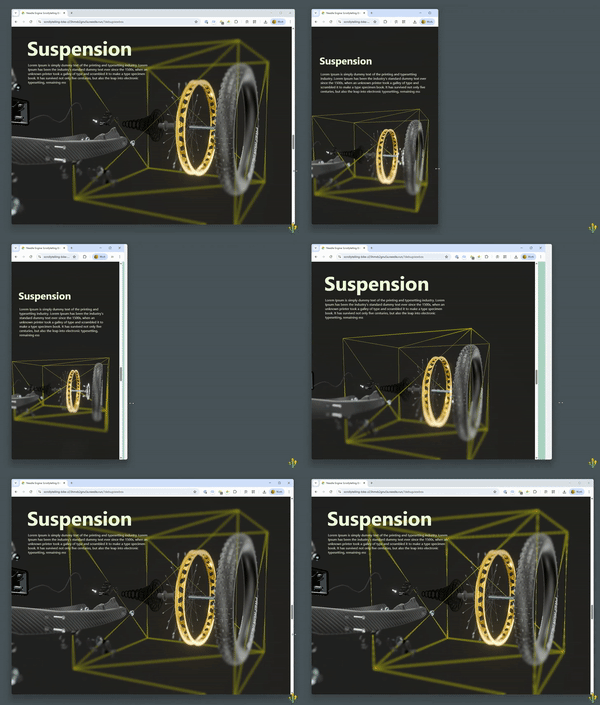](https://engine.needle.tools/samples/bike-scrollytelling-responsive-3d)
*
* The ViewBox component works by adjusting the camera's focus rect settings (offset and zoom) to ensure that the box defined by the
* GameObject's position, rotation, and scale fits perfectly within the visible viewport. It supports different modes for one-time
* fitting or continuous adjustment, making it versatile for both static compositions and animated sequences.
*
* **Key Features:**
* - Automatically adjusts camera framing to fit the box area
* - Works with any screen size and aspect ratio
* - Supports one-time fitting or continuous updates
* - Can be animated for dynamic zoom and framing effects
* - Multiple ViewBoxes can be active, with the most recently enabled taking priority
* - Handles camera positioning to ensure the box is visible (moves camera if inside the box)
*
* **Common Use Cases:**
* - Character framing in cutscenes or dialogue
* - Product showcases with guaranteed visibility
* - Scrollytelling experiences with animated camera movements
* - Responsive layouts that adapt to different screen sizes
* - UI-driven camera transitions
*
* - [Example on needle.run](https://viewbox-demo-z23hmxbz2gkayo-z1nyzm6.needle.run/)
* - [Scrollytelling Demo using animated Viewbox](https://scrollytelling-bike-z23hmxb2gnu5a.needle.run/)
* - [Example on Stackblitz](https://stackblitz.com/edit/needle-engine-view-box-example)
*
* @example Basic setup - Add a ViewBox component to frame an object
* ```ts
* const viewBox = new Object3D();
* viewBox.position.set(0, 1, 0); // Position the viewbox center
* viewBox.scale.set(2, 2, 2); // Define the box size
* viewBox.addComponent(ViewBox, { debug: true });
* scene.add(viewBox);
* ```
*
* @example Animated ViewBox for zoom effects
* ```ts
* const viewBox = new Object3D();
* viewBox.addComponent(ViewBox, { mode: "continuous" });
* scene.add(viewBox);
*
* // Animate the viewbox scale over time
* function update() {
* const scale = 1 + Math.sin(Date.now() * 0.001) * 0.5;
* viewBox.scale.setScalar(scale);
* }
* ```
*
* @example One-time fitting with user control afterwards
* ```ts
* const viewBox = new Object3D();
* viewBox.addComponent(ViewBox, {
* mode: "once", // Fit once, then allow free camera control
* referenceFieldOfView: 60
* });
* scene.add(viewBox);
* ```
*
* @see {@link CameraComponent} - The camera component that ViewBox controls
* @see {@link OrbitControls} - Camera controls that work alongside ViewBox
* @see {@link DragControls} - Alternative camera controls compatible with ViewBox
* @see {@link SceneSwitcher} - Can be combined with ViewBox for scene transitions
* @see {@link Context.setCameraFocusRect} - The underlying focus rect API used by ViewBox
* @see {@link Context.focusRectSettings} - Manual control of focus rect settings
* @see {@link ViewBoxMode} - The mode type for controlling ViewBox behavior
*
* @summary Automatically fits a box area into the camera view
* @category Camera and Controls
* @group Components
* @component
*/
export class ViewBox extends Behaviour {
/**
* Array of all active ViewBox instances in the scene.
* When multiple ViewBoxes are enabled, the last one in the array (most recently enabled) takes priority and controls the camera.
* Other ViewBoxes remain registered but inactive, displayed with a dimmed gizmo color when debug visualization is enabled.
*/
static readonly instances: ViewBox[] = [];
/**
* The reference field of view (in degrees) used to calculate how the box should fit within the camera view.
* This determines the baseline camera FOV for fitting calculations.
*
* **Behavior:**
* - If set to `-1` (default), the component will automatically use the camera's FOV on the first frame
* - Should typically match your camera's FOV for predictable framing
* - Can be set to a different value to create specific framing effects
*
* **Example:**
* If your camera has an FOV of 60° and you set `referenceFieldOfView` to 60, the ViewBox will fit objects
* as they would appear with that field of view. Setting it to a wider FOV (e.g., 90) makes objects appear
* smaller, while a narrower FOV (e.g., 30) makes them appear larger.
*
* @see {@link CameraComponent} for the camera component and its FOV property
* @default -1 (automatically uses the camera's FOV on the first frame)
*/
referenceFieldOfView: number = -1;
/**
* Controls how the ViewBox applies camera adjustments.
*
* **Modes:**
* - `"once"`: Applies the framing adjustment once when the ViewBox becomes active, then stops updating.
* This is ideal when you want to frame the view initially but allow users to freely zoom, pan, or orbit afterwards.
* Perfect for interactive scenes where you want a good starting view but full user control.
*
* - `"continuous"`: Continuously updates the camera framing while this ViewBox is active.
* Use this when animating or scaling the ViewBox over time, or when you need the framing to constantly adjust.
* Great for cutscenes, scrollytelling, or any scenario with animated ViewBoxes.
*
* **Example Use Cases:**
* - Set to `"once"` for: Initial scene framing, product showcases where users explore freely after initial framing
* - Set to `"continuous"` for: Animated zoom effects, scrollytelling sequences, dynamic camera movements tied to ViewBox transforms
*
* @see {@link ViewBoxMode} for the type definition
* @default "continuous"
*/
get mode() { return this._mode; }
set mode(v: ViewBoxMode) {
if (v === this._mode) return;
this._mode = v;
if (v === "once") this._applyCount = 0;
if (debugParam || this.debug) console.debug("[ViewBox] Set mode:", v);
}
private _mode: ViewBoxMode = "continuous";
/**
* Enables debug visualization and logging for this ViewBox instance.
*
* **When enabled, you will see:**
* - A yellow wireframe box showing the active ViewBox bounds in 3D space
* - Gray wireframe boxes for inactive ViewBox instances
* - A red dashed outline on screen showing the projected box in 2D (when using `?debugviewbox` URL parameter)
* - Console logs for mode changes, FOV settings, and camera adjustments
*
* **Tip:** You can also enable debug visualization globally for all ViewBoxes by adding `?debugviewbox` to your URL.
*
* @see {@link Gizmos} for the gizmo rendering system used for debug visualization
* @default false
*/
debug: boolean = false;
/** @internal */
onEnable(): void {
if (debugParam || this.debug || isDevEnvironment()) console.debug("[ViewBox] Using camera fov:", this.referenceFieldOfView);
// register instance
ViewBox.instances.push(this);
this._applyCount = 0;
this.removeUpdateCallback();
this.context.pre_render_callbacks.push(this.internalUpdate);
}
/** @internal */
onDisable(): void {
if (debugParam || this.debug) console.debug("[ViewBox] Disabled");
// unregister instance
const idx = ViewBox.instances.indexOf(this);
if (idx !== -1) ViewBox.instances.splice(idx, 1);
this._projectedBoxElement?.remove();
this.removeUpdateCallback();
}
private removeUpdateCallback() {
// remove prerender callback
const cbIdx = this.context.pre_render_callbacks.indexOf(this.internalUpdate);
if (cbIdx !== -1) this.context.pre_render_callbacks.splice(cbIdx, 1);
}
private static readonly _tempProjectionMatrix: Matrix4 = new Matrix4();
private static readonly _tempProjectionMatrixInverse: Matrix4 = new Matrix4();
private _applyCount = 0;
private internalUpdate = () => {
if (this.context.isInXR) return;
if (this.destroyed || !this.activeAndEnabled) return;
const isActive = ViewBox.instances[ViewBox.instances.length - 1] === this;
if (!isActive) {
if (debugParam || this.debug) {
Gizmos.DrawWireBox(this.gameObject.worldPosition, this.gameObject.worldScale, disabledGizmoColor);
}
return;
}
if (debugParam || this.debug) Gizmos.DrawWireBox(this.gameObject.worldPosition, this.gameObject.worldScale, 0xdddd00, 0, true, this.gameObject.worldQuaternion);
// calculate box size to fit the camera frustrum size at the current position (just scale)
const camera = this.context.mainCamera;
if (!camera) return;
if (!(camera instanceof PerspectiveCamera)) {
// TODO: support orthographic camera
return;
}
if (this.referenceFieldOfView === undefined || this.referenceFieldOfView === -1) {
this.referenceFieldOfView = camera.fov;
console.debug("[ViewBox] No referenceFieldOfView set, using camera fov:", this.referenceFieldOfView);
}
if (this.referenceFieldOfView === undefined || this.referenceFieldOfView <= 0) {
if (debugParam || this.debug) console.warn("[ViewBox] No valid referenceFieldOfView set, cannot adjust box size:", this.referenceFieldOfView);
return;
}
if (this._applyCount >= 1 && this.mode === "once") {
return;
}
this._applyCount++;
const domWidth = this.context.domWidth;
const domHeight = this.context.domHeight;
let rectWidth = domWidth;
let rectHeight = domHeight;
let diffWidth = 1;
let diffHeight = 1;
// use focus rect if available
const focusRectSize = this.context.focusRectSize;
if (focusRectSize) {
rectWidth = focusRectSize.width;
rectHeight = focusRectSize.height;
diffWidth = domWidth / rectWidth;
diffHeight = domHeight / rectHeight;
}
// Copy the projection matrix and restore values so we can reset it later
ViewBox._tempProjectionMatrix.copy(camera.projectionMatrix);
ViewBox._tempProjectionMatrixInverse.copy(camera.projectionMatrixInverse);
const view = camera.view;
const cameraZoom = camera.zoom;
const aspect = camera.aspect;
const fov = camera.fov;
// Set values to default so we can calculate the box size correctly
camera.view = null;
camera.zoom = 1;
camera.fov = this.referenceFieldOfView;
camera.updateProjectionMatrix();
const boxPosition = this.gameObject.worldPosition;
const boxScale = this.gameObject.worldScale;
const cameraPosition = camera.worldPosition;
const distance = cameraPosition.distanceTo(boxPosition);
// #region camera fixes
// If the camera is inside the box, move it out
const boxSizeMax = Math.max(boxScale.x, boxScale.y, boxScale.z);
const direction = getTempVector(cameraPosition).sub(boxPosition);
if (distance < boxSizeMax) {
// move camera out of bounds
if (this.debug || debugParam) console.warn("[ViewBox] Moving camera out of bounds", distance, "<", boxSizeMax);
const positionDirection = getTempVector(direction);
positionDirection.y *= .00000001; // stay on horizontal plane mostly
positionDirection.normalize();
const lengthToMove = (boxSizeMax - distance);
const newPosition = cameraPosition.add(positionDirection.multiplyScalar(lengthToMove));
camera.worldPosition = newPosition.lerp(cameraPosition, 1 - this.context.time.deltaTime);
}
// Ensure the camera looks at the ViewBox
// TOOD: smooth lookat over multiple frames if we have multiple viewboxes
// const dot = direction.normalize().dot(camera.worldForward);
// if (dot < .9) {
// console.log(dot);
// const targetRotation = direction;
// const rotation = getTempQuaternion();
// rotation.setFromUnitVectors(camera.worldForward.multiplyScalar(-1), targetRotation);
// camera.worldQuaternion = rotation;
// camera.updateMatrixWorld();
// }
const boxPositionInCameraSpace = getTempVector(boxPosition);
camera.worldToLocal(boxPositionInCameraSpace);
camera.lookAt(boxPosition);
camera.updateMatrixWorld();
// #region calculate fit
const vFOV = this.referenceFieldOfView * Math.PI / 180; // convert vertical fov to radians
const height = 2 * Math.tan(vFOV / 2) * distance; // visible height
const width = height * camera.aspect; // visible width
const projectedBox = this.projectBoxIntoCamera(camera, 1);
// return
const boxWidth = (projectedBox.maxX - projectedBox.minX);
const boxHeight = (projectedBox.maxY - projectedBox.minY);
const scale = this.fit(
boxWidth * camera.aspect,
boxHeight,
width / diffWidth,
height / diffHeight
);
const zoom = scale / (height * .5);
// console.log({ scale, width, height, boxWidth: boxWidth * camera.aspect, boxHeight, diffWidth, diffHeight, aspect: camera.aspect, distance })
// this.context.focusRectSettings.zoom = 1.39;
// if (!this.context.focusRect) this.context.setCameraFocusRect(this.context.domElement);
// return
const vec = getTempVector(boxPosition);
vec.project(camera);
this.context.focusRectSettings.offsetX = vec.x;
this.context.focusRectSettings.offsetY = vec.y;
this.context.focusRectSettings.zoom = zoom;
// if we don't have a focus rect yet, set it to the dom element
if (!this.context.focusRect) this.context.setCameraFocusRect(this.context.domElement);
// Reset values
camera.view = view;
camera.zoom = cameraZoom;
camera.aspect = aspect;
camera.fov = fov;
camera.projectionMatrix.copy(ViewBox._tempProjectionMatrix);
camera.projectionMatrixInverse.copy(ViewBox._tempProjectionMatrixInverse);
// BACKLOG: some code for box scale of an object (different component)
// this.gameObject.worldScale = getTempVector(width, height, worldscale.z);
// this.gameObject.scale.multiplyScalar(.98)
// const minscale = Math.min(width, height);
// console.log(width, height);
// this.gameObject.worldScale = getTempVector(scale, scale, scale);
}
/**
* Cover fit
*/
private fit(width1: number, height1: number, width2: number, height2: number) {
const scaleX = width2 / width1;
const scaleY = height2 / height1;
return Math.min(scaleX, scaleY);
}
private projectBoxIntoCamera(camera: Camera, _factor: number) {
const factor = .5 * _factor;
const corners = [
getTempVector(-factor, -factor, -factor),
getTempVector(factor, -factor, -factor),
getTempVector(-factor, factor, -factor),
getTempVector(factor, factor, -factor),
getTempVector(-factor, -factor, factor),
getTempVector(factor, -factor, factor),
getTempVector(-factor, factor, factor),
getTempVector(factor, factor, factor),
];
let minX = Number.POSITIVE_INFINITY;
let maxX = Number.NEGATIVE_INFINITY;
let minY = Number.POSITIVE_INFINITY;
let maxY = Number.NEGATIVE_INFINITY;
for (let i = 0; i < corners.length; i++) {
const c = corners[i];
c.applyMatrix4(this.gameObject.matrixWorld);
c.project(camera);
if (c.x < minX) minX = c.x;
if (c.x > maxX) maxX = c.x;
if (c.y < minY) minY = c.y;
if (c.y > maxY) maxY = c.y;
}
if (debugParam) {
if (!this._projectedBoxElement) {
this._projectedBoxElement = document.createElement("div");
}
if (this._projectedBoxElement.parentElement !== this.context.domElement)
this.context.domElement.appendChild(this._projectedBoxElement);
this._projectedBoxElement.style.position = "fixed";
// dotted but with larger gaps
this._projectedBoxElement.style.outline = "2px dashed rgba(255,0,0,.5)";
this._projectedBoxElement.style.left = ((minX * .5 + .5) * this.context.domWidth) + "px";
this._projectedBoxElement.style.top = ((-maxY * .5 + .5) * this.context.domHeight) + "px";
this._projectedBoxElement.style.width = ((maxX - minX) * .5 * this.context.domWidth) + "px";
this._projectedBoxElement.style.height = ((maxY - minY) * .5 * this.context.domHeight) + "px";
this._projectedBoxElement.style.pointerEvents = "none";
this._projectedBoxElement.style.zIndex = "1000";
}
return { minX, maxX, minY, maxY };
}
private _projectedBoxElement: HTMLElement | null = null;
}