@needle-tools/engine
Version:
Needle Engine is a web-based runtime for 3D apps. It runs on your machine for development with great integrations into editors like Unity or Blender - and can be deployed onto any device! It is flexible, extensible and networking and XR are built-in.
136 lines (135 loc) • 5.28 kB
TypeScript
import { Behaviour } from "../Component.js";
/**
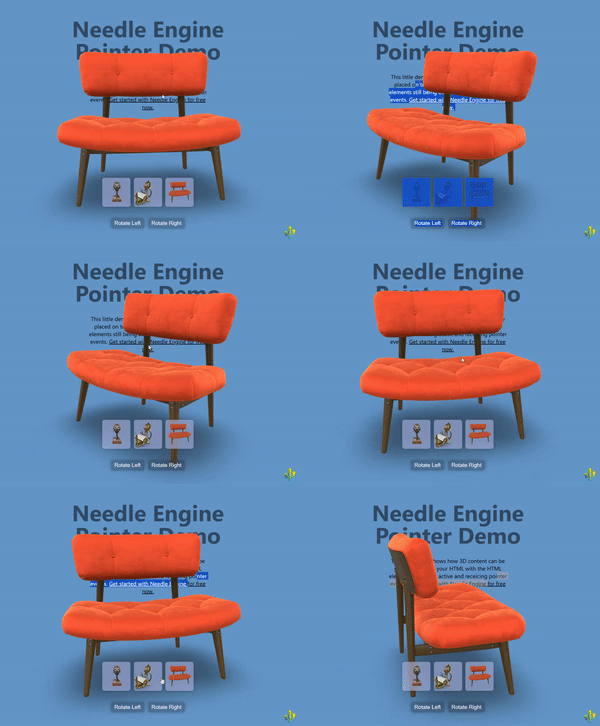
* [ClickThrough](https://engine.needle.tools/docs/api/ClickThrough) enables pointer events to pass through the 3D canvas to HTML elements positioned behind it.
* This component dynamically toggles `pointer-events: none` on the canvas when no 3D objects are hit by raycasts, allowing interaction with underlying HTML content.
*
* 
*
* **How It Works:**
* The component listens to pointer events and performs raycasts to detect if any 3D objects are under the cursor:
* - **When 3D objects are hit**: Canvas has `pointer-events: all` (normal 3D interaction)
* - **When nothing is hit**: Canvas has `pointer-events: none` (clicks pass through to HTML)
*
* This creates a seamless experience where users can interact with both 3D objects and underlying HTML elements
* through the same canvas area, depending on what's under the cursor.
*
* **Key Features:**
* - Automatic pointer event routing based on 3D hit detection
* - Works with both mouse and touch input
* - Supports transparent or semi-transparent canvases
* - Can be enabled via component or HTML attribute
* - No performance impact when disabled
* - Handles multi-touch scenarios correctly
*
* **Common Use Cases:**
* - Overlaying 3D elements on top of HTML content (headers, hero sections)
* - Creating "floating" 3D objects that don't block underlying UI
* - Mixed 2D/3D interfaces where both need to be interactive
* - Transparent 3D overlays on websites
* - Product showcases with clickable text/buttons beneath the 3D view
* - Interactive storytelling with mixed HTML and 3D content
*
* **Setup Options:**
*
* **Option 1: Component-based** (programmatic setup)
* ```ts
* // Add to any GameObject in your scene
* scene.addComponent(ClickThrough);
* ```
*
* **Option 2: HTML attribute** (declarative setup, recommended)
* ```html
* <!-- Enable clickthrough via HTML attribute -->
* <needle-engine clickthrough></needle-engine>
*
* <!-- Dynamically toggle clickthrough -->
* <needle-engine id="engine" clickthrough="true"></needle-engine>
* <script>
* // Disable clickthrough
* document.getElementById('engine').setAttribute('clickthrough', 'false');
* </script>
* ```
*
* @example Basic transparent canvas over HTML
* ```html
* <style>
* .container { position: relative; }
* needle-engine { position: absolute; top: 0; left: 0; }
* .html-content { position: absolute; top: 0; left: 0; }
* </style>
*
* <div class="container">
* <div class="html-content">
* <h1>Click me!</h1>
* <button>I'm clickable through the 3D canvas</button>
* </div>
* <needle-engine clickthrough src="scene.glb"></needle-engine>
* </div>
* ```
*
* @example Programmatic setup with toggle
* ```ts
* const clickthrough = scene.addComponent(ClickThrough);
*
* // Toggle clickthrough based on some condition
* function setInteractiveMode(mode: 'html' | '3d' | 'mixed') {
* switch(mode) {
* case 'html':
* clickthrough.enabled = false; // 3D blocks HTML
* break;
* case '3d':
* clickthrough.enabled = false; // 3D only
* break;
* case 'mixed':
* clickthrough.enabled = true; // Smart switching
* break;
* }
* }
* ```
*
* @example 3D header with clickable logo beneath
* ```html
* <!-- 3D animated object over a clickable logo -->
* <div class="header">
* <a href="/" class="logo">My Brand</a>
* <needle-engine clickthrough src="header-animation.glb"></needle-engine>
* </div>
* ```
*
* **Technical Notes:**
* - The component uses `pointer-events` CSS property for passthrough
* - Touch events are handled separately with a special timing mechanism
* - Only pointer ID 0 is tracked to avoid multi-touch issues
* - The component stores the previous `pointer-events` value and restores it on disable
* - Raycasts are performed on both `pointerdown` and `pointermove` events
*
* **Troubleshooting:**
* - Ensure your canvas has a transparent background if you want to see HTML beneath
* - Make sure 3D objects have colliders or are raycastable
* - If clicks aren't passing through, check that no invisible objects are blocking raycasts
* - HTML elements must be properly positioned (z-index) behind the canvas
*
* **Live Example:**
* - [3D Over HTML Sample on Stackblitz](https://stackblitz.com/~/github.com/needle-engine/sample-3d-over-html)
*
* @see {@link Context.input} - The input system used for pointer event detection
* @see {@link Context.physics.raycast} - Used to detect 3D object hits
* @see {@link ObjectRaycaster} - Controls which objects are raycastable
* @see {@link PointerEvents} - For more complex pointer interaction handling
* @see {@link NEPointerEvent} - The pointer event type used internally
*
* @summary Enables pointer events to pass through canvas to HTML elements behind it
* @category Web
* @group Components
* @component
*/
export declare class ClickThrough extends Behaviour {
private _previousPointerEvents;
onEnable(): void;
onDisable(): void;
onPointerEnter(): void;
private onPointerEvent;
private _touchDidHitAnything;
private onTouchStart;
private onTouchEnd;
}