@needle-tools/engine
Version:
Needle Engine is a web-based runtime for 3D apps. It runs on your machine for development with great integrations into editors like Unity or Blender - and can be deployed onto any device! It is flexible, extensible and networking and XR are built-in.
284 lines (283 loc) • 11 kB
TypeScript
import { Object3D, Quaternion, Vector3 } from 'three';
import type { GuidsMap } from '../../engine/engine_types.js';
import { Behaviour } from '../Component.js';
import * as Models from "./TimelineModels.js";
import * as Tracks from "./TimelineTracks.js";
/**
* Controls how the {@link PlayableDirector} behaves when playback reaches the end.
* @see {@link PlayableDirector.extrapolationMode}
*/
export declare enum DirectorWrapMode {
/** Hold the last frame when playback reaches the end of the timeline. */
Hold = 0,
/** Loop back to the start and continue playing indefinitely. */
Loop = 1,
/** Stop playback when the end is reached. The timeline will not loop. */
None = 2
}
/** How the clip handles time outside its start and end range. */
export declare enum ClipExtrapolation {
/** No extrapolation is applied. */
None = 0,
/** Hold the time at the end value of the clip. */
Hold = 1,
/** Repeat time values outside the start/end range. */
Loop = 2,
/** Repeat time values outside the start/end range, reversing direction at each loop */
PingPong = 3,
/** Time values are passed in without modification, extending beyond the clips range */
Continue = 4
}
/** @internal */
export type CreateTrackFunction = (director: PlayableDirector, track: Models.TrackModel) => Tracks.TrackHandler | undefined | null;
/**
* PlayableDirector is the main component for controlling timelines in Needle Engine.
* It orchestrates playback of TimelineAssets containing animation, audio, signal,
* control, and activation tracks.
*
* 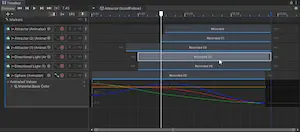
* *Screenshot: Timeline in Unity*
*
* **Supported track types:**
* - Animation tracks - animate objects using AnimationClips
* - Audio tracks - play synchronized audio
* - Activation tracks - show/hide objects at specific times
* - Signal tracks - trigger events at specific points
* - Control tracks - control nested timelines or prefab instances
* - Marker tracks - add metadata and navigation points
*
* [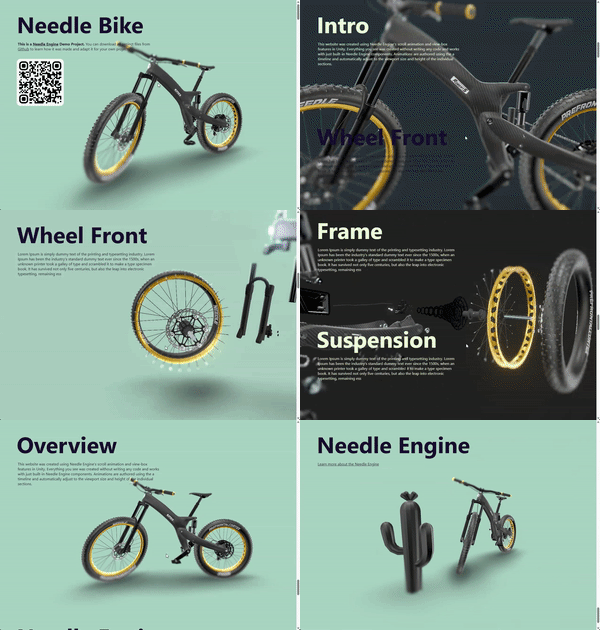](https://engine.needle.tools/samples/bike-scrollytelling-responsive-3d)
*
* [](https://app.songsofcultures.com/?scene=little-brother)
*
* **Playback control:**
* Use `play()`, `pause()`, `stop()` for basic control.
* Set `time` directly and call `evaluate()` for scrubbing.
* Adjust `speed` for playback rate and `weight` for blending.
*
* @example Basic timeline playback
* ```ts
* const director = myObject.getComponent(PlayableDirector);
* director.play();
* // Jump to specific time
* director.time = 2.5;
* director.evaluate();
* ```
*
* @example Control playback speed
* ```ts
* director.speed = 0.5; // Half speed
* director.speed = -1; // Reverse playback
* ```
*
* - Example: https://engine.needle.tools/samples-uploads/product-flyover/
*
* @summary Controls and plays TimelineAssets
* @category Animation and Sequencing
* @group Components
* @see {@link Animator} for playing individual AnimationClips
* @see {@link AudioSource} for standalone audio playback
* @see {@link SignalReceiver} for handling timeline signals
* @link https://engine.needle.tools/samples/?overlay=samples&tag=animation
* @link https://app.songsofcultures.com/
* @link https://engine.needle.tools/docs/blender/animation.html Blender timeline and animation export
*/
export declare class PlayableDirector extends Behaviour {
private static createTrackFunctions;
/**
* Register a function to create a track handler for a custom track type.
* This allows you to extend the timeline system with your own track types and handlers.
*/
static registerCreateTrack(type: string, fn: CreateTrackFunction): void;
/**
* The timeline asset containing tracks, clips, and markers that this director will play.
* Assign a timeline asset exported from Unity or Blender to enable playback.
*/
playableAsset?: Models.TimelineAssetModel;
/**
* When true, the timeline starts playing automatically when the component awakens.
* Set to false to control playback manually via `play()`.
* @default false
*/
playOnAwake?: boolean;
/**
* Determines how the timeline behaves when it reaches the end of its duration.
* @default DirectorWrapMode.Loop
*/
extrapolationMode: DirectorWrapMode;
/** Returns true if the timeline is currently playing (not paused or stopped). */
get isPlaying(): boolean;
/** Returns true if the timeline is currently paused. */
get isPaused(): boolean;
/**
* The current playback time in seconds. Set this and call `evaluate()` to scrub.
* @example Scrub to a specific time
* ```ts
* director.time = 5.0;
* director.evaluate();
* ```
*/
get time(): number;
set time(value: number);
/** The total duration of the timeline in seconds (read from the longest track/clip). */
get duration(): number;
set duration(value: number);
/**
* The blend weight of the timeline (0-1). Use values below 1 to blend
* timeline animations with other animations like those from an Animator.
*/
get weight(): number;
set weight(value: number);
/**
* The playback speed multiplier. Set to negative values for reverse playback.
* @example Reverse playback at double speed
* ```ts
* director.speed = -2;
* ```
*/
get speed(): number;
set speed(value: number);
/**
* When true, `play()` will wait for audio tracks to load and for user interaction
* before starting playback. Web browsers require user interaction (click/tap) before
* allowing audio to play - this ensures audio is synchronized with the timeline.
* Set to false if you need immediate visual playback and can tolerate audio delay.
* @default true
*/
waitForAudio: boolean;
private _visibilityChangeEvt?;
private _clonedPlayableAsset;
private _speed;
/** @internal */
awake(): void;
/** @internal */
onEnable(): void;
/** @internal */
onDisable(): void;
/** @internal */
onDestroy(): void;
/** @internal */
rebuildGraph(): void;
/**
* Play the timeline from the current time.
* If the timeline is already playing this method does nothing.
*/
play(): Promise<void>;
/**
* Pause the timeline.
*/
pause(): void;
/**
* Stop the timeline.
*/
stop(): void;
/**
* Evaluate the timeline at the current time. This is useful when you want to manually update the timeline e.g. when the timeline is paused and you set `time` to a new value.
*/
evaluate(): void;
/**
* @returns true if the timeline is valid and has tracks
*/
isValid(): boolean | undefined;
/** Iterates over all tracks of the timeline
* @returns all tracks of the timeline
*/
forEachTrack(): Generator<Tracks.TrackHandler, void, unknown>;
/**
* @returns all animation tracks of the timeline
*/
get animationTracks(): Tracks.AnimationTrackHandler[];
/**
* @returns all audio tracks of the timeline
*/
get audioTracks(): Tracks.AudioTrackHandler[];
/**
* @returns all signal tracks of the timeline
*/
get signalTracks(): Tracks.SignalTrackHandler[];
/**
* @returns all marker tracks of the timeline
*/
get markerTracks(): Tracks.MarkerTrackHandler[];
/**
* Iterates over all markers of the timeline, optionally filtering by type
*
* @example
* ```ts
* // Iterate over all ScrollMarkers in the timeline
* for (const marker of director.foreachMarker<{selector:string}>("ScrollMarker")) {
* console.log(marker.time, marker.selector);
* }
* ```
*
*/
foreachMarker<T extends Record<string, any>>(type?: string | null): Generator<(T & Models.MarkerModel)>;
private _guidsMap?;
/** @internal */
resolveGuids(map: GuidsMap): void;
private _isPlaying;
private _internalUpdateRoutine;
private _isPaused;
/** internal, true during the time stop() is being processed */
private _isStopping;
private _time;
private _duration;
private _weight;
private readonly _animationTracks;
private readonly _audioTracks;
private readonly _signalTracks;
private readonly _markerTracks;
private readonly _controlTracks;
private readonly _customTracks;
private readonly _tracksArray;
private get _allTracks();
/** should be called after evaluate if the director was playing */
private invokePauseChangedMethodsOnTracks;
private invokeStateChangedMethodsOnTracks;
private internalUpdate;
/**
* PlayableDirector lifecycle should always call this instead of "evaluate"
* @param called_by_user If true the evaluation is called by the user (e.g. via evaluate())
*/
private internalEvaluate;
private resolveBindings;
private findRoot;
private updateTimelineDuration;
private setupAndCreateTrackHandlers;
private setAudioTracksAllowPlaying;
/** Experimental support for overriding timeline animation data (position or rotation) */
readonly animationCallbackReceivers: ITimelineAnimationCallbacks[];
/** Experimental: Receive callbacks for timeline animation. Allows modification of final value */
registerAnimationCallback(receiver: ITimelineAnimationCallbacks): void;
/** Experimental: Unregister callbacks for timeline animation. Allows modification of final value */
unregisterAnimationCallback(receiver: ITimelineAnimationCallbacks): void;
}
/**
* Interface for receiving callbacks during timeline animation evaluation.
* Allows modification of position/rotation values before they are applied.
*
* **Registration:**
* ```ts
* director.registerAnimationCallback(this);
* // Later: director.unregisterAnimationCallback(this);
* ```
*
* @experimental This interface may change in future versions
* @see {@link PlayableDirector.registerAnimationCallback}
*/
export interface ITimelineAnimationCallbacks {
/**
* @param director The director that is playing the timeline
* @param target The target object that is being animated
* @param time The current time of the timeline
* @param rotation The evaluated rotation of the target object at the current time
*/
onTimelineRotation?(director: PlayableDirector, target: Object3D, time: number, rotation: Quaternion): any;
/**
* @param director The director that is playing the timeline
* @param target The target object that is being animated
* @param time The current time of the timeline
* @param position The evaluated position of the target object at the current time
*/
onTimelinePosition?(director: PlayableDirector, target: Object3D, time: number, position: Vector3): any;
}