@needle-tools/engine
Version:
Needle Engine is a web-based runtime for 3D apps. It runs on your machine for development with great integrations into editors like Unity or Blender - and can be deployed onto any device! It is flexible, extensible and networking and XR are built-in.
88 lines (87 loc) • 3.75 kB
TypeScript
import { RGBAColor } from "../engine/js-extensions/index.js";
import { Behaviour } from "./Component.js";
/**
* The mode of the ShadowCatcher.
* - ShadowMask: only renders shadows.
* - Additive: renders shadows additively.
* - Occluder: occludes light.
*/
declare enum ShadowMode {
ShadowMask = 0,
Additive = 1,
Occluder = 2
}
/**
* ShadowCatcher renders real-time shadows cast by lights onto a mesh surface.
* Captures actual shadow data from the scene's lighting system (directional lights, point lights, spot lights).
*
* If the GameObject is a Mesh, it applies a shadow-catching material to it.
* Otherwise, it creates a quad mesh with the shadow-catching material automatically.
*
* [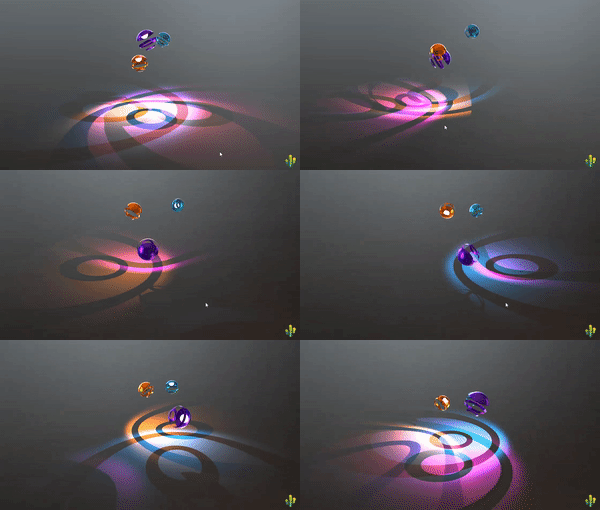](https://engine.needle.tools/samples/shadow-catcher/)
* *Additive ShadowCatcher mode with point light shadows*
*
* [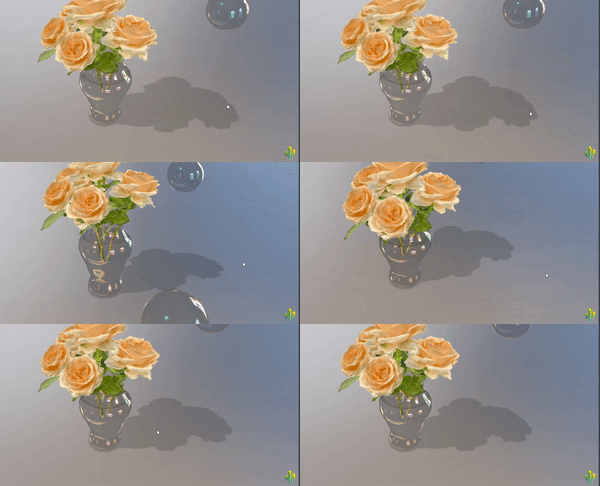](https://engine.needle.tools/samples/transmission/)
* *ShadowCatcher with directional light shadows*
*
* **Shadow Modes:**
* - `ShadowMask` - Only renders shadows (works best with directional lights)
* - `Additive` - Renders light additively (works best with point/spot lights)
* - `Occluder` - Occludes light without rendering shadows
*
* **ShadowCatcher vs ContactShadows:**
* - **ShadowCatcher**: Real-time shadows from actual lights. Accurate directional shadows that match light sources. Requires lights with shadows enabled. Updates every frame.
* - **{@link ContactShadows}**: Proximity-based ambient occlusion-style shadows. Extremely soft and diffuse, ideal for subtle grounding. Better performance, works without lights.
*
* **When to use ShadowCatcher:**
* - You need accurate shadows that match specific light directions
* - Scene has real-time lighting with shadow-casting lights
* - Shadows need to follow light attenuation and angles
* - AR/VR scenarios where light estimation is available
* - Hard or semi-hard shadow edges are desired
*
* **When to use ContactShadows instead:**
* - You want very soft, ambient occlusion-style ground shadows
* - Performance is critical (no per-frame shadow rendering)
* - Scene doesn't have shadow-casting lights
* - Product visualization or configurators (subtle grounding effect)
* - Soft, diffuse shadows are more visually appealing than accurate ones
*
* **Note:** ShadowCatcher meshes are not raycastable by default (layer 2). Change layers in `onEnable()` if raycasting is needed.
*
* @example Basic shadow catcher plane
* ```ts
* const plane = new Object3D();
* const catcher = addComponent(plane, ShadowCatcher);
* catcher.mode = ShadowMode.ShadowMask;
* catcher.shadowColor = new RGBAColor(0, 0, 0, 0.8);
* ```
*
* @example Apply to existing mesh
* ```ts
* const mesh = this.gameObject.getComponent(Mesh);
* const catcher = addComponent(mesh, ShadowCatcher);
* // The mesh will now catch shadows from scene lights
* ```
*
* @summary Renders real-time shadows from lights onto surfaces
* @category Rendering
* @group Components
* @see {@link ContactShadows} for proximity-based fake shadows (better performance)
* @see {@link Light} for shadow-casting light configuration
* @see {@link Renderer} for shadow receiving settings
* @link https://engine.needle.tools/samples/shadow-catcher/
* @link https://engine.needle.tools/samples/transmission/
*/
export declare class ShadowCatcher extends Behaviour {
mode: ShadowMode;
shadowColor: RGBAColor;
private targetMesh?;
/** @internal */
start(): void;
applyLightBlendMaterial(): void;
applyShadowMaterial(): void;
applyOccluderMaterial(): void;
private applyMaterialOptions;
}
export {};