@needle-tools/engine
Version:
Needle Engine is a web-based runtime for 3D apps. It runs on your machine for development with great integrations into editors like Unity or Blender - and can be deployed onto any device! It is flexible, extensible and networking and XR are built-in.
135 lines (134 loc) • 4.51 kB
TypeScript
import { Object3D, Vector3Like } from "three";
import { Context } from "../engine/engine_context.js";
import { Vec3 } from "../engine/engine_types.js";
import { Behaviour } from "./Component.js";
type FitParameters = {
object?: Object3D | Object3D[];
positionOffset?: Partial<Vector3Like>;
scaleFactor?: Partial<Vector3Like>;
};
/**
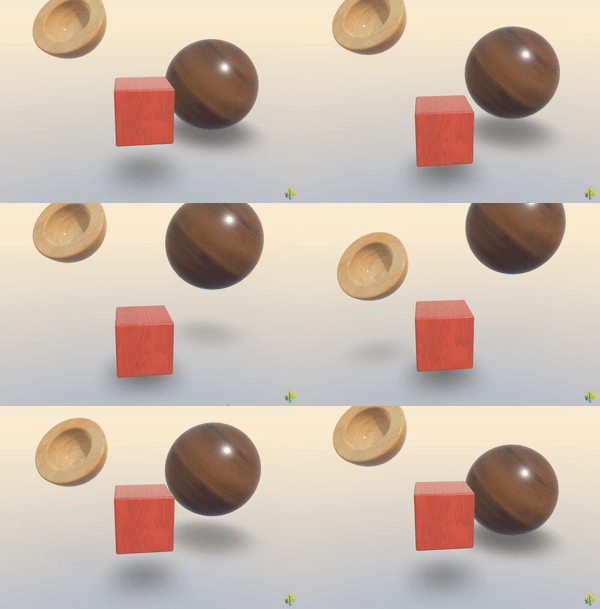
* [ContactShadows](https://engine.needle.tools/docs/api/ContactShadows) renders proximity-based soft shadows on flat surfaces.
* Ideal for products or objects that need visual grounding without real-time shadows.
* Produces soft, blurred shadows that hug the ground, giving a sense of contact and depth.
*
* 
*
* **Setup options:**
* 1. `ContactShadows.auto(context)` - Auto-create and fit to scene
* 2. Add component manually to control position and scale
* 3. HTML attribute: `<needle-engine contactshadows="0.7">`
*
* **Properties:**
* - `opacity` / `darkness` - Shadow intensity
* - `blur` - Softness of shadow edges
* - Object scale defines shadow area size
*
* **Debug:** Use `?debugcontactshadows` URL parameter.
*
*
* @example Auto-create contact shadows
* ```ts
* const shadows = ContactShadows.auto(this.context);
* shadows.opacity = 0.5;
* shadows.darkness = 0.8;
* ```
*
* @summary Display contact shadows on the ground
* @category Rendering
* @group Components
* @see {@link ShadowCatcher} for real-time shadows from lights (more accurate, higher performance cost)
* @see {@link Light} for real-time shadow casting
* @see {@link Renderer} for material/rendering control
* @link https://engine.needle.tools/samples/contact-shadows for a demo of contact shadows
*/
export declare class ContactShadows extends Behaviour {
private static readonly _instances;
/**
* Create contact shadows for the scene. Automatically fits the shadows to the scene.
* The instance of contact shadows will be created only once.
* @param context The context to create the contact shadows in.
* @returns The instance of the contact shadows.
*/
static auto(context?: Context, params?: FitParameters): ContactShadows;
/**
* When enabled the contact shadows component will be created to fit the whole scene.
* @default false
*/
autoFit: boolean;
/**
* Darkness of the shadows.
* @default 0.5
*/
darkness: number;
/**
* Opacity of the shadows.
* @default 0.5
*/
opacity: number;
/**
* Blur of the shadows.
* @default 4.0
*/
blur: number;
/**
* When enabled objects will not be visible below the shadow plane
* @default false
*/
occludeBelowGround: boolean;
/**
* When enabled the backfaces of objects will cast shadows as well.
* @default true
*/
backfaceShadows: boolean;
/**
* The minimum size of the shadows box
* @default undefined
*/
minSize?: Partial<Vec3>;
/**
* When enabled the shadows will not be updated automatically. Use `needsUpdate()` to update the shadows manually.
* This is useful when you want to update the shadows only when the scene changes.
* @default false
*/
manualUpdate: boolean;
/**
* Call this method to update the shadows manually. The update will be done in the next frame.
*/
set needsUpdate(val: boolean);
get needsUpdate(): boolean;
private _needsUpdate;
/** All shadow objects are parented to this object.
* The gameObject itself should not be transformed because we want the ContactShadows object e.g. also have a GroundProjectedEnv component
* in which case ContactShadows scale would affect the projection
**/
private readonly shadowsRoot;
private shadowCamera?;
private readonly shadowGroup;
private renderTarget?;
private renderTargetBlur?;
private plane?;
private occluderMesh?;
private blurPlane?;
private planeMaterial?;
private depthMaterial?;
private horizontalBlurMaterial?;
private verticalBlurMaterial?;
private textureSize;
/**
* Call to fit the shadows to the scene.
*/
fitShadows(params?: FitParameters): void;
/** @internal */
awake(): void;
/** @internal */
start(): void;
onEnable(): void;
/** @internal */
onDestroy(): void;
/** @internal */
onBeforeRender(_frame: XRFrame | null): void;
private blurShadow;
private applyMinSize;
}
export {};