@needle-tools/engine
Version:
Needle Engine is a web-based runtime for 3D apps. It runs on your machine for development with great integrations into editors like Unity or Blender - and can be deployed onto any device! It is flexible, extensible and networking and XR are built-in.
460 lines (459 loc) • 17.4 kB
TypeScript
import { Curve, Quaternion, Vector3 } from "three";
import { Behaviour } from "../Component.js";
/**
* Represents a single knot (control point) in a spline curve.
*
* Each knot defines a point along the spline with its position, rotation, and tangent handles
* that control the curve's shape entering and leaving the knot.
*
* **Properties:**
* - **position**: The 3D position of this knot in local space
* - **rotation**: The orientation at this knot (useful for rotating objects along the spline)
* - **tangentIn**: The incoming tangent handle controlling the curve shape before this knot
* - **tangentOut**: The outgoing tangent handle controlling the curve shape after this knot
*
* @see {@link SplineContainer} for the container that holds and manages multiple knots
*/
export declare class SplineData {
/**
* The 3D position of this knot in local space relative to the SplineContainer.
*/
position: Vector3;
/**
* The orientation at this knot. Can be used to rotate objects following the spline.
*/
rotation: Quaternion;
/**
* The incoming tangent handle controlling the curve shape as it approaches this knot.
* The magnitude and direction affect the smoothness and curvature of the spline.
*/
tangentIn: Vector3;
/**
* The outgoing tangent handle controlling the curve shape as it leaves this knot.
* The magnitude and direction affect the smoothness and curvature of the spline.
*/
tangentOut: Vector3;
}
/**
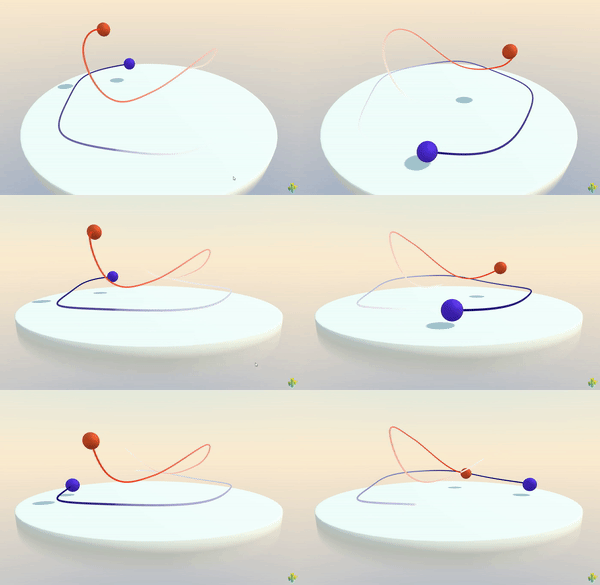
* [SplineContainer](https://engine.needle.tools/docs/api/SplineContainer) manages spline curves defined by a series of knots (control points).
* This component stores spline data and generates smooth curves that can be used for animation paths, camera paths, racing tracks, or any curved path in 3D space.
*
* 
*
* **How It Works:**
* The spline is defined by an array of {@link SplineData} knots. Each knot contains:
* - **Position**: The location of the control point
* - **Rotation**: Orientation at that point (useful for banking/tilting objects along the path)
* - **Tangents**: Handles that control the curve's smoothness and shape
*
* The component uses Catmull-Rom interpolation to create smooth curves between knots. The curve is automatically
* rebuilt when knots are added, removed, or marked dirty, and all sampling methods return positions in world space.
*
* **Key Features:**
* - Smooth Catmull-Rom curve interpolation
* - Support for open and closed curves
* - Dynamic knot management (add/remove at runtime)
* - World-space sampling with {@link getPointAt} and {@link getTangentAt}
* - Automatic curve regeneration when modified
* - Built-in debug visualization
* - Integrates seamlessly with {@link SplineWalker}
*
* **Common Use Cases:**
* - Camera paths and cinematics
* - Object movement along curved paths
* - Racing game tracks and racing lines
* - Character patrol routes
* - Procedural road/path generation
* - Animation curves for complex motion
* - Cable/rope visualization
*
* @example Basic spline setup with knots
* ```ts
* const splineObj = new Object3D();
* const spline = splineObj.addComponent(SplineContainer);
*
* // Add knots to define the path
* spline.addKnot({ position: new Vector3(0, 0, 0) });
* spline.addKnot({ position: new Vector3(2, 1, 0) });
* spline.addKnot({ position: new Vector3(4, 0, 2) });
* spline.addKnot({ position: new Vector3(6, -1, 1) });
*
* // Sample a point halfway along the spline
* const midpoint = spline.getPointAt(0.5);
* console.log("Midpoint:", midpoint);
* ```
*
* @example Creating a closed loop spline
* ```ts
* const loopSpline = gameObject.addComponent(SplineContainer);
* loopSpline.closed = true; // Makes the spline loop back to the start
*
* // Add circular path knots
* for (let i = 0; i < 8; i++) {
* const angle = (i / 8) * Math.PI * 2;
* const pos = new Vector3(Math.cos(angle) * 5, 0, Math.sin(angle) * 5);
* loopSpline.addKnot({ position: pos });
* }
* ```
*
* @example Sampling points along a spline
* ```ts
* const spline = gameObject.getComponent(SplineContainer);
*
* // Sample 10 points along the spline
* const points: Vector3[] = [];
* for (let i = 0; i <= 10; i++) {
* const t = i / 10; // 0 to 1
* const point = spline.getPointAt(t);
* points.push(point);
* }
*
* // Get tangent (direction) at 75% along the spline
* const tangent = spline.getTangentAt(0.75);
* console.log("Direction at 75%:", tangent);
* ```
*
* @example Dynamic knot manipulation
* ```ts
* const spline = gameObject.getComponent(SplineContainer);
*
* // Add a new knot dynamically
* const newKnot = new SplineData();
* newKnot.position.set(10, 5, 0);
* spline.addKnot(newKnot);
*
* // Remove the first knot
* spline.removeKnot(0);
*
* // Modify existing knot
* spline.spline[1].position.y += 2;
* spline.markDirty(); // Tell the spline to rebuild
* ```
*
* @example Using with SplineWalker for animation
* ```ts
* // Set up spline path
* const spline = pathObject.addComponent(SplineContainer);
* spline.addKnot({ position: new Vector3(0, 0, 0) });
* spline.addKnot({ position: new Vector3(5, 2, 5) });
* spline.addKnot({ position: new Vector3(10, 0, 0) });
*
* // Make object follow the spline
* const walker = movingObject.addComponent(SplineWalker);
* walker.spline = spline;
* walker.speed = 2; // Units per second
* walker.loop = true;
* ```
*
* **Debug Visualization:**
* Add `?debugsplines` to your URL to enable debug visualization, which draws the spline curve as a purple line.
* You can also enable it programmatically:
* ```ts
* spline.debug = true; // Show debug visualization
* ```
*
* @see {@link SplineWalker} - Component for moving objects along a spline path
* @see {@link SplineData} - The knot data structure used to define spline points
* @see {@link getPointAt} - Sample positions along the spline
* @see {@link getTangentAt} - Get direction vectors along the spline
* @see {@link addKnot} - Add control points to the spline
* @see {@link removeKnot} - Remove control points from the spline
*
* @summary Manages smooth spline curves defined by control point knots
* @category Splines
* @group Components
* @component
*/
export declare class SplineContainer extends Behaviour {
/**
* Adds a knot (control point) to the end of the spline.
*
* You can pass either a full {@link SplineData} object or a simple object with just a position.
* When passing a simple object, default values are used for rotation and tangents.
*
* The spline curve is automatically marked dirty and will be rebuilt on the next update.
*
* @param knot - Either a SplineData object or an object with at least a `position` property
* @returns This SplineContainer for method chaining
*
* @example Add knots with positions only
* ```ts
* spline.addKnot({ position: new Vector3(0, 0, 0) })
* .addKnot({ position: new Vector3(5, 0, 0) })
* .addKnot({ position: new Vector3(5, 0, 5) });
* ```
*
* @example Add a full SplineData knot
* ```ts
* const knot = new SplineData();
* knot.position.set(10, 2, 5);
* knot.rotation.setFromEuler(new Euler(0, Math.PI / 4, 0));
* spline.addKnot(knot);
* ```
*/
addKnot(knot: SplineData | {
position: Vector3;
}): SplineContainer;
/**
* Removes a knot (control point) from the spline.
*
* You can remove a knot either by its numeric index in the spline array or by passing
* a reference to the SplineData object itself.
*
* The spline curve is automatically marked dirty and will be rebuilt on the next update.
*
* @param index - Either the numeric index of the knot to remove, or the SplineData object reference
* @returns This SplineContainer for method chaining
*
* @example Remove knot by index
* ```ts
* spline.removeKnot(0); // Remove first knot
* spline.removeKnot(spline.spline.length - 1); // Remove last knot
* ```
*
* @example Remove knot by reference
* ```ts
* const knotToRemove = spline.spline[2];
* spline.removeKnot(knotToRemove);
* ```
*/
removeKnot(index: number | SplineData): SplineContainer;
/**
* Samples a point on the spline at a given parametric position (in world space).
*
* The parameter `t` ranges from 0 to 1, where:
* - `0` = start of the spline
* - `0.5` = middle of the spline
* - `1` = end of the spline
*
* The returned position is in world space, accounting for the SplineContainer's transform.
* Values outside 0-1 are clamped to the valid range.
*
* @param to01 - Parametric position along the spline (0 to 1)
* @param target - Optional Vector3 to store the result (avoids allocation)
* @returns The world-space position at parameter `t`
*
* @example Sample multiple points along the spline
* ```ts
* // Sample 20 evenly-spaced points
* const points: Vector3[] = [];
* for (let i = 0; i <= 20; i++) {
* const t = i / 20;
* points.push(spline.getPointAt(t));
* }
* ```
*
* @example Using a target vector for efficiency
* ```ts
* const reusableVector = new Vector3();
* for (let i = 0; i < 100; i++) {
* const point = spline.getPointAt(i / 100, reusableVector);
* // Use point...
* }
* ```
*
* @see {@link getTangentAt} to get the direction at a point
*/
getPointAt(to01: number, target?: Vector3): Vector3;
/**
* Marks the spline as dirty, causing it to be rebuilt on the next update frame.
*
* Call this method whenever you manually modify the spline data (knot positions, rotations, or tangents)
* to ensure the curve is regenerated. This is done automatically when using {@link addKnot} or {@link removeKnot}.
*
* @example Modifying knots and marking dirty
* ```ts
* // Modify existing knot positions
* spline.spline[0].position.y += 2;
* spline.spline[1].position.x -= 1;
*
* // Tell the spline to rebuild
* spline.markDirty();
* ```
*
* @example Animating knot positions
* ```ts
* update() {
* const time = this.context.time.time;
* // Animate knot positions
* for (let i = 0; i < spline.spline.length; i++) {
* spline.spline[i].position.y = Math.sin(time + i) * 2;
* }
* spline.markDirty(); // Rebuild curve each frame
* }
* ```
*/
markDirty(): void;
/**
* Samples the tangent (direction) vector on the spline at a given parametric position (in world space).
*
* The tangent represents the forward direction of the curve at point `t`. This is useful for:
* - Orienting objects along the spline (facing the direction of travel)
* - Calculating banking/tilting for vehicles on the path
* - Understanding the curve's direction at any point
*
* The parameter `t` ranges from 0 to 1 (same as {@link getPointAt}).
* The returned vector is normalized and in world space, accounting for the SplineContainer's rotation.
*
* @param t - Parametric position along the spline (0 to 1)
* @param target - Optional Vector3 to store the result (avoids allocation)
* @returns The normalized tangent vector in world space at parameter `t`
*
* @example Orient an object along the spline
* ```ts
* const position = spline.getPointAt(0.5);
* const tangent = spline.getTangentAt(0.5);
*
* object.position.copy(position);
* object.lookAt(position.clone().add(tangent)); // Face along the spline
* ```
*
* @example Calculate velocity direction for a moving object
* ```ts
* let t = 0;
* update() {
* t += this.context.time.deltaTime * 0.2; // Speed
* if (t > 1) t = 0; // Loop
*
* const pos = spline.getPointAt(t);
* const direction = spline.getTangentAt(t);
*
* movingObject.position.copy(pos);
* movingObject.quaternion.setFromUnitVectors(
* new Vector3(0, 0, 1),
* direction
* );
* }
* ```
*
* @see {@link getPointAt} to get the position at a point
*/
getTangentAt(t: number, target?: Vector3): Vector3;
/**
* Whether the spline forms a closed loop.
*
* **When `true`:**
* - The spline connects the last knot back to the first knot, forming a continuous loop
* - Perfect for racing tracks, patrol routes, or any circular path
* - Parameter `t=1` will smoothly connect back to `t=0`
*
* **When `false` (default):**
* - The spline is open, with distinct start and end points
* - Suitable for one-way paths, camera movements, or linear progressions
*
* Changing this property marks the spline as dirty and triggers a rebuild.
*
* @example Create a circular patrol route
* ```ts
* const patrol = gameObject.addComponent(SplineContainer);
* patrol.closed = true; // Loop back to start
*
* // Add points in a circle
* for (let i = 0; i < 8; i++) {
* const angle = (i / 8) * Math.PI * 2;
* patrol.addKnot({
* position: new Vector3(Math.cos(angle) * 10, 0, Math.sin(angle) * 10)
* });
* }
* ```
*
* @default false
*/
set closed(value: boolean);
get closed(): boolean;
private _closed;
/**
* Array of knots (control points) that define the spline curve.
*
* Each element is a {@link SplineData} object containing position, rotation, and tangent information.
* You can directly access and modify this array, but remember to call {@link markDirty} afterwards
* to trigger a curve rebuild.
*
* **Best practices:**
* - Use {@link addKnot} and {@link removeKnot} methods for automatic dirty marking
* - If modifying knots directly, always call {@link markDirty} afterwards
* - The order of knots determines the path direction
*
* @example Direct array access
* ```ts
* console.log(`Spline has ${spline.spline.length} knots`);
*
* // Access first knot
* const firstKnot = spline.spline[0];
* console.log("Start position:", firstKnot.position);
*
* // Modify and mark dirty
* spline.spline[2].position.y += 5;
* spline.markDirty();
* ```
*
* @see {@link SplineData} for the knot data structure
* @see {@link addKnot} for adding knots (auto marks dirty)
* @see {@link removeKnot} for removing knots (auto marks dirty)
* @see {@link markDirty} to trigger rebuild after manual modifications
*/
spline: SplineData[];
/**
* Enables visual debug rendering of the spline curve.
*
* When enabled, the spline is rendered as a purple line in the scene, making it easy to
* visualize the path during development. The debug line automatically updates when the spline is modified.
*
* **Debug visualization:**
* - Purple line showing the complete curve path
* - Automatically rebuilds when spline changes
* - Line resolution based on number of knots (10 segments per knot)
*
* **Tip:** You can also enable debug visualization globally for all splines by adding `?debugsplines`
* to your URL.
*
* @example Enable debug visualization
* ```ts
* const spline = gameObject.addComponent(SplineContainer);
* spline.debug = true; // Show purple debug line
*
* // Add some knots to see the visualization
* spline.addKnot({ position: new Vector3(0, 0, 0) });
* spline.addKnot({ position: new Vector3(5, 2, 0) });
* spline.addKnot({ position: new Vector3(10, 0, 5) });
* ```
*/
set debug(debug: boolean);
/**
* The Three.js Curve object generated from the spline knots.
*
* This is the underlying curve implementation (typically a CatmullRomCurve3) that's used for
* all position and tangent sampling. The curve is automatically regenerated when the spline
* is marked dirty.
*
* **Note:** This curve is in local space relative to the SplineContainer. Use {@link getPointAt}
* and {@link getTangentAt} methods to get world-space results.
*
* @returns The generated Three.js Curve, or null if not yet built
*/
get curve(): Curve<Vector3> | null;
/**
* Whether the spline needs to be rebuilt due to modifications.
*
* The spline is marked dirty when:
* - Knots are added via {@link addKnot}
* - Knots are removed via {@link removeKnot}
* - {@link markDirty} is called manually
* - The {@link closed} property is changed
*
* The curve is automatically rebuilt on the next update frame when dirty.
*
* @returns `true` if the spline needs rebuilding, `false` otherwise
*/
get isDirty(): boolean;
private _isDirty;
private _curve;
private _builtCurve;
private _debugLine;
/** @internal */
awake(): void;
/** @internal */
update(): void;
private buildCurve;
private buildDebugCurve;
}