@needle-tools/engine
Version:
Needle Engine is a web-based runtime for 3D apps. It runs on your machine for development with great integrations into editors like Unity or Blender - and can be deployed onto any device! It is flexible, extensible and networking and XR are built-in.
214 lines (213 loc) • 6.52 kB
TypeScript
import { Material, VideoTexture } from "three";
import { Behaviour } from "./Component.js";
export declare enum AspectMode {
None = 0,
AdjustHeight = 1,
AdjustWidth = 2
}
export declare enum VideoSource {
VideoClip = 0,
Url = 1
}
export declare enum VideoAudioOutputMode {
None = 0,
AudioSource = 1,
Direct = 2,
APIOnly = 3
}
export declare enum VideoRenderMode {
CameraFarPlane = 0,
CameraNearPlane = 1,
RenderTexture = 2,
MaterialOverride = 3
}
/**
* [VideoPlayer](https://engine.needle.tools/docs/api/VideoPlayer) plays video clips from URLs, media streams, or HLS playlists (m3u8 livestreams).
*
* **Supported formats:**
* - Standard video files (MP4, WebM, etc.)
* - Media streams (from webcam, screen capture, etc.)
* - HLS playlists (m3u8) for livestreaming
*
* [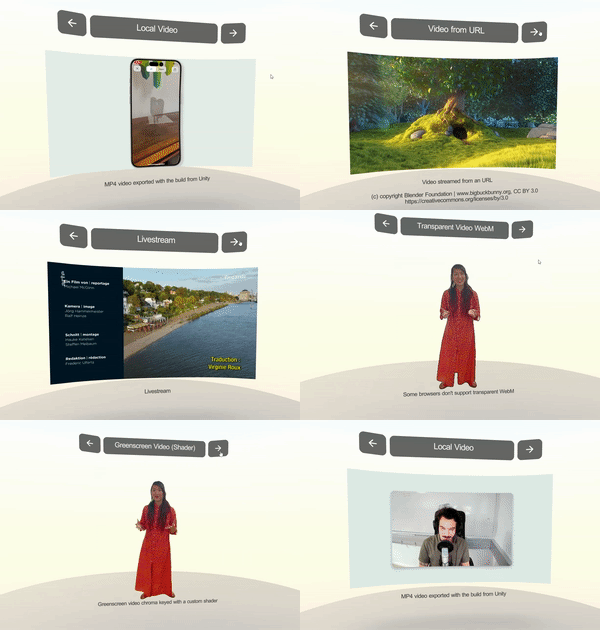](https://engine.needle.tools/samples/video-playback/)
*
* **Rendering modes:**
* Video can be rendered to a material texture, render texture, or camera planes.
* Set `targetMaterialRenderer` to apply video to a specific mesh's material.
*
* **Browser autoplay:**
* Videos may require user interaction to play with audio.
* Set `playOnAwake = true` for automatic playback (muted if needed).
*
* @example Basic video playback
* ```ts
* const videoPlayer = addComponent(obj, VideoPlayer, {
* url: "https://example.com/video.mp4",
* playOnAwake: true,
* loop: true,
* });
* ```
*
* @example Play video on a 3D surface
* ```ts
* const video = myScreen.getComponent(VideoPlayer);
* video.targetMaterialRenderer = myScreen.getComponent(Renderer);
* video.play();
* ```
*
* @summary Plays video clips from URLs or streams
* @category Multimedia
* @group Components
* @see {@link AudioSource} for audio-only playback
* @see {@link ScreenCapture} for capturing and sharing video
* @see {@link Renderer} for video texture targets
*/
export declare class VideoPlayer extends Behaviour {
/**
* When true the video will start playing as soon as the component is enabled
*/
playOnAwake: boolean;
/**
* The aspect mode to use for the video. If
*/
aspectMode: AspectMode;
private clip?;
private source;
/**
* The video clip url to play.
*/
get url(): string | null;
/**
* The video clip to play.
*/
set url(val: string | null);
private _url;
private renderMode;
private targetMaterialProperty?;
private targetMaterialRenderer?;
private targetTexture?;
private time;
private _playbackSpeed;
/**
* Get the video playback speed. Increasing this value will speed up the video, decreasing it will slow it down.
* @default 1
*/
get playbackSpeed(): number;
/**
* Set the video playback speed. Increasing this value will speed up the video, decreasing it will slow it down.
*/
set playbackSpeed(val: number);
private _isLooping;
get isLooping(): boolean;
set isLooping(val: boolean);
/**
* @returns the current time of the video in seconds
*/
get currentTime(): number;
/**
* set the current time of the video in seconds
*/
set currentTime(val: number);
/**
* @returns true if the video is currently playing
*/
get isPlaying(): boolean;
get crossOrigin(): string | null;
set crossOrigin(val: string | null);
/**
* the material that is used to render the video
*/
get videoMaterial(): Material | null;
/**
* the video texture that is used to render the video
*/
get videoTexture(): VideoTexture | null;
/**
* the HTMLVideoElement that is used to play the video
*/
get videoElement(): HTMLVideoElement | null;
/**
* Request the browser to enter picture in picture mode
* @link https://developer.mozilla.org/en-US/docs/Web/API/Picture-in-Picture_API
* @returns the promise returned by the browser
*/
requestPictureInPicture(): Promise<PictureInPictureWindow> | null;
/**
* @returns true if the video is muted
*/
get muted(): boolean;
/**
* set the video to be muted
*/
set muted(val: boolean);
private _muted;
/**
* The current video clip that is being played
*/
get currentVideo(): string | MediaStream | null | undefined;
private set audioOutputMode(value);
private get audioOutputMode();
private _audioOutputMode;
/** Set this to false to pause video playback while the tab is not active
* @default true
*/
playInBackground: boolean;
private _crossOrigin;
private _videoElement;
private _videoTexture;
private _videoMaterial;
private _isPlaying;
private wasPlaying;
/** ensure's the video element has been created and will start loading the clip */
preloadVideo(): void;
/** @deprecated use `preloadVideo()` */
preload(): void;
/** Set a new video stream
* starts to play automatically if the videoplayer hasnt been active before and playOnAwake is true */
setVideo(video: MediaStream): void;
setClipURL(url: string): void;
/** @internal */
onEnable(): void;
/** @internal */
onDisable(): void;
private visibilityChanged;
/** @internal */
onDestroy(): void;
private _receivedInput;
/**
* @internal
*/
constructor();
private _playErrors;
/** start playing the video source */
play(): void;
/**
* Stop the video playback. This will reset the video to the beginning
*/
stop(): void;
/**
* Pause the video playback
*/
pause(): void;
/** create the video element and assign the video source url or stream */
create(playAutomatically: boolean): boolean;
updateAspect(): void;
private _overlay;
/**
* If true the video will be rendered in screenspace mode and overlayed on top of the scene.
* Alternatively you can also request the video to be played in PictureInPicture mode by calling `requestPictureInPicture()`
*/
get screenspace(): boolean;
set screenspace(val: boolean);
private _targetObjects;
private createVideoElement;
private handleBeginPlaying;
private updateVideoElementSettings;
private updateVideoElementStyles;
private _updateAspectRoutineId;
private updateAspectImpl;
private get shouldUseM3U();
private ensureM3UCanBePlayed;
private _hls?;
private onHlsAvailable;
}