@needle-tools/engine
Version:
Needle Engine is a web-based runtime for 3D apps. It runs on your machine for development with great integrations into editors like Unity or Blender - and can be deployed onto any device! It is flexible, extensible and networking and XR are built-in.
179 lines (178 loc) • 6.53 kB
TypeScript
import { Behaviour } from "./Component.js";
import type { IPointerClickHandler, PointerEventData } from "./ui/PointerEvents.js";
import { VideoPlayer } from "./VideoPlayer.js";
/**
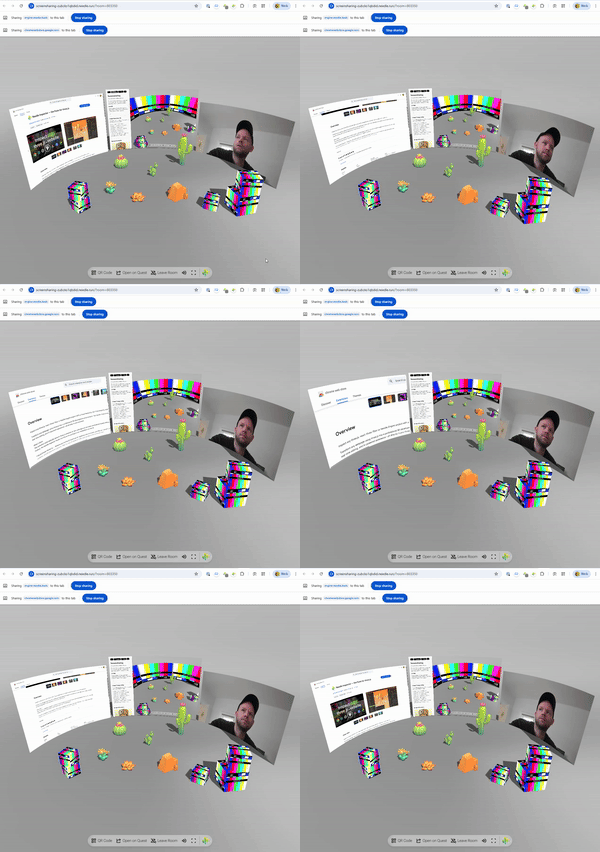
* ScreenCapture component allows you to share your screen, camera or microphone with other users in the networked room.
*/
export declare enum ScreenCaptureDevice {
/**
* Capture the screen of the user.
*/
Screen = 0,
/**
* Capture the camera of the user.
*/
Camera = 1,
/** Please note that canvas streaming might not work reliably on chrome: https://bugs.chromium.org/p/chromium/issues/detail?id=1156408 */
Canvas = 2,
/** When using Microphone only the voice will be send */
Microphone = 3
}
/**
* {@link ScreenCapture} allows you to share your screen, camera or microphone with other users in the networked room.
*/
declare type ScreenCaptureDeviceTypes = keyof typeof ScreenCaptureDevice;
/**
* The current mode of the {@link ScreenCapture} component.
*/
export declare enum ScreenCaptureMode {
Idle = 0,
Sending = 1,
Receiving = 2
}
/**
* Options for the {@link ScreenCapture} component when starting to share a stream by calling the {@link ScreenCapture.share}.
*/
export declare type ScreenCaptureOptions = {
/**
* You can specify the device type to capture (e.g. Screen, Camera, Microphone)
*/
device?: ScreenCaptureDeviceTypes;
/**
* Constraints for the media stream like resolution, frame rate, etc.
* @see https://developer.mozilla.org/en-US/docs/Web/API/MediaStreamConstraints
*/
constraints?: MediaTrackConstraints;
/** Filter video device by id. Alternatively pass in a deviceFilter callback to manually filter available devices */
deviceId?: string;
/** Return false to skip the available device */
deviceFilter?: (device: MediaDeviceInfo) => boolean;
};
/**
* ScreenCapture enables sharing screen, camera, or microphone with users in a networked room.
* The stream is displayed via a {@link VideoPlayer} component on the same GameObject.
*
* **Supported capture devices:**
* - `Screen` - Share desktop/window/tab
* - `Camera` - Share webcam feed
* - `Microphone` - Audio only
* - `Canvas` - Share the 3D canvas (experimental)
*
* 
*
* **How it works:**
* - Click the object to start/stop sharing (if `allowStartOnClick` is true)
* - Or call `share()` / `close()` programmatically
* - Stream is sent to all users in the same room via WebRTC
* - Receiving clients see the video on their VideoPlayer
*
* **Debug:** Append `?debugscreensharing` to the URL for console logging.
*
* @example Start screen sharing programmatically
* ```ts
* const capture = myScreen.getComponent(ScreenCapture);
* await capture?.share({ device: "Screen" });
*
* // Later, stop sharing
* capture?.close();
* ```
*
* @example Share webcam with constraints
* ```ts
* await capture?.share({
* device: "Camera",
* constraints: { width: 1280, height: 720 }
* });
* ```
*
* @summary Share screen, camera or microphone in a networked room
* @category Networking
* @category Multimedia
* @group Components
* @see {@link VideoPlayer} for displaying the received stream
* @see {@link Voip} for voice-only communication
* @see {@link SyncedRoom} for room management
* @link https://engine.needle.tools/docs/networking.html
*/
export declare class ScreenCapture extends Behaviour implements IPointerClickHandler {
/**
* When enabled the stream will start when the user clicks on the object this component is attached to
* It is also possible to start the stream manually from your code by calling the {@link share} method
* To modify what type of device is shared you can set the {@link device} property.
* @default true
*/
allowStartOnClick: boolean;
/** @internal */
onPointerEnter(): void;
/** @internal */
onPointerExit(): void;
/** @internal */
onPointerClick(evt: PointerEventData): void;
/** When enabled the stream will start when this component becomes active (enabled in the scene) */
autoConnect: boolean;
/**
* If a VideoPlayer component is assigned to this property the video will be displayed on the VideoPlayer component.
*/
set videoPlayer(val: VideoPlayer | undefined);
get videoPlayer(): VideoPlayer | undefined;
private _videoPlayer?;
private _audioSource?;
/**
* When enabled the video will be displayed in the screenspace of the VideoPlayer component.
*/
get screenspace(): boolean;
set screenspace(v: boolean);
/**
* Which streaming device type should be used when starting to share (if {@link share} is called without a device option). Options are Screen, Camera, Microphone.
* This is e.g. used if `allowStartOnClick` is enabled and the user clicks on the object.
* @default Screen
*/
device: ScreenCaptureDeviceTypes;
/**
* If assigned the device the device will be selected by this id or label when starting to share.
* Note: This is only supported for `Camera` devices
*/
deviceName?: string;
/**
* Filter which device should be chosen for sharing by id or label.
* Assign a method to this property to manually filter the available devices.
*/
deviceFilter?: (device: MediaDeviceInfo) => boolean;
/**
* the current stream that is being shared or received
* @link https://developer.mozilla.org/en-US/docs/Web/API/MediaStream
*/
get currentScream(): MediaStream | null;
get currentMode(): ScreenCaptureMode;
/**
* @returns true if the component is currently sending a stream
*/
get isSending(): boolean | undefined;
/**
* @returns true if the component is currently receiving a stream
*/
get isReceiving(): boolean;
private get requiresVideoPlayer();
private _net?;
private _requestOpen;
private _currentStream;
private _currentMode;
/** @internal */
awake(): void;
/** @internal */
onEnable(): void;
/** @internal */
onDisable(): void;
private onJoinedRoom;
private _ensureVideoPlayer;
private _activeShareRequest;
/** Call to begin screensharing */
share(opts?: ScreenCaptureOptions): Promise<void | null>;
private internalShare;
close(): void;
private setStream;
private onReceiveStream;
private onCallEnded;
private tryShareUserCamera;
}
export {};