@needle-tools/engine
Version:
Needle Engine is a web-based runtime for 3D apps. It runs on your machine for development with great integrations into editors like Unity or Blender - and can be deployed onto any device! It is flexible, extensible and networking and XR are built-in.
355 lines (354 loc) • 14.5 kB
TypeScript
import { Object3D, Vector3Like } from "three";
import { OrbitControls as ThreeOrbitControls } from "three/examples/jsm/controls/OrbitControls.js";
import { FitCameraOptions } from "../engine/engine_camera.fit.js";
import type { ICameraController } from "../engine/engine_types.js";
import { Camera } from "./Camera.js";
import { Behaviour } from "./Component.js";
import { LookAtConstraint } from "./LookAtConstraint.js";
export declare enum OrbitControlsEventsType {
/** Invoked with a CameraTargetReachedEvent */
CameraTargetReached = "target-reached"
}
export declare class CameraTargetReachedEvent extends CustomEvent<{
controls: OrbitControls;
type: "camera" | "lookat";
}> {
constructor(ctrls: OrbitControls, type: "camera" | "lookat");
}
declare module 'three/examples/jsm/controls/OrbitControls.js' {
interface OrbitControls {
_sphericalDelta: import("three").Spherical;
_rotateLeft: (angleInRadians: number) => void;
_rotateUp: (angleInRadians: number) => void;
_pan: (dx: number, dy: number) => void;
_dollyIn: (dollyScale: number) => void;
_dollyOut: (dollyScale: number) => void;
}
interface OrbitControlsEventMap {
endMovement: Event;
}
}
/**
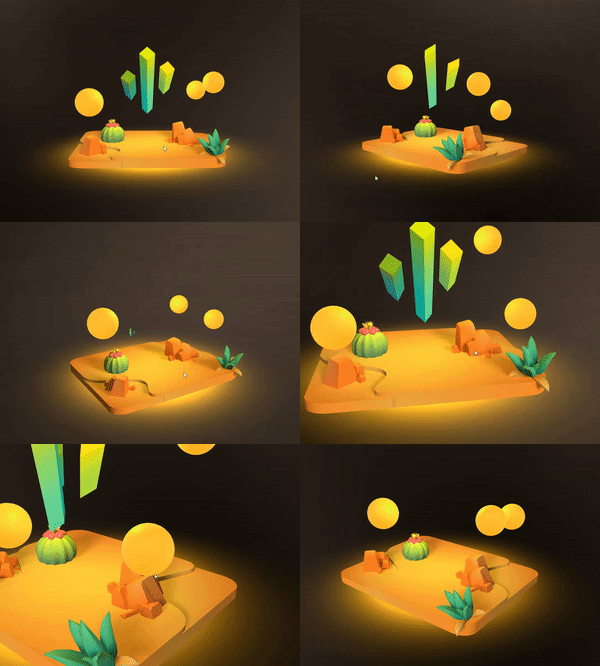
* [OrbitControls](https://engine.needle.tools/docs/api/OrbitControls) provides interactive camera control using three.js OrbitControls.
* Users can rotate, pan, and zoom the camera to explore 3D scenes.
*
* **Features:**
* - Rotation around a target point (orbit)
* - Panning to move the view
* - Zooming via scroll or pinch
* - Auto-rotation for showcases
* - Configurable angle and distance limits
* - Smooth damping for natural feel
*
* 
*
* **Access underlying controls:**
* - `controls` - The three.js OrbitControls instance
* - `controllerObject` - The object being controlled (usually the camera)
*
* **Debug options:**
* - `?debugorbit` - Log orbit control events
* - `?freecam` - Enable unrestricted camera movement
*
* @example Basic setup
* ```ts
* const orbitControls = camera.getComponent(OrbitControls);
* orbitControls.autoRotate = true;
* orbitControls.autoRotateSpeed = 2;
* ```
*
* @example Set look-at target
* ```ts
* orbitControls.setLookTargetPosition(new Vector3(0, 1, 0), true);
* // Or move both camera and target
* orbitControls.setCameraTargetPosition(new Vector3(5, 2, 5), new Vector3(0, 0, 0));
* ```
*
* @summary Camera controller using three.js OrbitControls
* @category Camera and Controls
* @group Components
* @see {@link LookAtConstraint} for setting the look-at target
* @see {@link SmoothFollow} for smooth camera following
* @see {@link Camera} for camera configuration
* @link https://threejs.org/docs/#examples/en/controls/OrbitControls
* @link https://engine.needle.tools/samples/panorama-controls alternative controls in samples
*/
export declare class OrbitControls extends Behaviour implements ICameraController {
/**
* @inheritdoc
*/
get isCameraController(): boolean;
/** The underlying three.js OrbitControls.
* See {@link https://threejs.org/docs/#examples/en/controls/OrbitControls}
* @returns {@type ThreeOrbitControls | null}
*/
get controls(): ThreeOrbitControls | null;
/** The object being controlled by the OrbitControls (usually the camera)
* See {@link https://threejs.org/docs/#examples/en/controls/OrbitControls.object}
* @returns {@type Object3D | null}
*/
get controllerObject(): Object3D | null;
/** Register callback when user starts interacting with the orbit controls */
onStartInteraction(callback: Function): void;
/** When enabled OrbitControls will automatically raycast find a look at target in start
* @default true
*/
autoTarget: boolean;
/** When enabled the scene will be automatically fitted into the camera view in onEnable
* @default false
*/
autoFit: boolean;
/** When enabled the camera can be rotated
* @default true
*/
enableRotate: boolean;
/** When enabled the camera will rotate automatically
* @default false
*/
autoRotate: boolean;
/** The speed at which the camera will rotate automatically. Will only be used when `autoRotate` is enabled
* @default 1.0
*/
autoRotateSpeed: number;
/** The minimum azimuth angle in radians */
minAzimuthAngle: number;
/** The maximum azimuth angle in radians */
maxAzimuthAngle: number;
/** The minimum polar angle in radians
* @default 0
*/
minPolarAngle: number;
/** The maximum polar angle in radians
* @default Math.PI
*/
maxPolarAngle: number;
/** When enabled the camera can be moved using keyboard keys. The keys are defined in the `controls.keys` property
* @default false
*/
enableKeys: boolean;
/** When enabled the camera movement will be damped
* @default true
*/
enableDamping: boolean;
/** The damping factor for the camera movement. For more information see the [three.js documentation](https://threejs.org/docs/#examples/en/controls/OrbitControls.dampingFactor)
* @default 0.1
*/
dampingFactor: number;
/** When enabled the camera can be zoomed
* @default true
*/
enableZoom: boolean;
/** The minimum zoom level
* @default 0
*/
minZoom: number;
/** The maximum zoom level
* @default Infinity
*/
maxZoom: number;
/**
* Sets the zoom speed of the OrbitControls
* @default 1
*/
zoomSpeed: number;
/**
* Set to true to enable zooming to the cursor position.
* @default false
*/
zoomToCursor: boolean;
/** When enabled the camera can be panned
* @default true
*/
enablePan: boolean;
/** Assigning a {@link LookAtConstraint} will make the camera look at the constraint source
* @default null
*/
lookAtConstraint: LookAtConstraint | null;
/** The weight of the first lookAtConstraint source
* @default 1
*/
lookAtConstraint01: number;
/** If true user input interrupts the camera from animating to a target
* @default true
*/
allowInterrupt: boolean;
/** If true the camera will focus on the target when the middle mouse button is clicked */
middleClickToFocus: boolean;
/** If true the camera will focus on the target when the left mouse button is double clicked
* @default true
*/
doubleClickToFocus: boolean;
/**
* When enabled the camera will fit the scene to the camera view when the background is clicked the specified number of times within a short time
* @default 2
*/
clickBackgroundToFitScene: number;
/**
* This is the DOM element that the OrbitControls will listen to for input events. By default this is the renderer's canvas element.
* Set this to a different element to make the OrbitControls listen to that element instead.
*/
get targetElement(): HTMLElement | null;
set targetElement(value: HTMLElement | null);
private _targetElement;
/**
* @internal If true debug information will be logged to the console
* @default false
*/
debugLog: boolean;
/**
* @deprecated use `targetLerpDuration` instead
* ~~The speed at which the camera target and the camera will be lerping to their destinations (if set via script or user input)~~
* */
get targetLerpSpeed(): number;
set targetLerpSpeed(v: number);
/** The duration in seconds it takes for the camera look ad and position lerp to reach their destination (when set via `setCameraTargetPosition` and `setLookTargetPosition`)
* @default 1
*/
get targetLerpDuration(): number;
set targetLerpDuration(v: number);
private _lookTargetLerpDuration;
targetBounds: Object3D | null;
/**
* Rotate the camera left (or right) by the specified angle in radians.
* For positive angles the camera will rotate to the left, for negative angles it will rotate to the right.
* Tip: Use Mathf to convert between degrees and radians.
* @param angleInRadians The angle in radians to rotate the camera left
* @example
* ```typescript
* // Rotate the camera left by 0.1 radians
* orbitControls.rotateLeft(0.1);
* ```
*/
rotateLeft(angleInRadians: number): void;
/**
* Rotate the camera up (or down) by the specified angle in radians.
* For positive angles the camera will rotate up, for negative angles it will rotate down.
* Tip: Use Mathf to convert between degrees and radians.
* @param angleInRadians The angle in radians to rotate the camera up
* @example
* ```typescript
* // Rotate the camera up by 0.1 radians
* orbitControls.rotateUp(0.1);
* ```
*/
rotateUp(angleInRadians: number): void;
/**
* Pan the camera by the specified amount in the x and y direction in pixels.
* @param dx The amount to pan the camera in the x direction in pixels.
* @param dy The amount to pan the camera in the y direction in pixels.
*/
pan(dx: number, dy: number): void;
/**
* Zoom the camera in or out by the specified scale factor. The factor is applied to the current zoom radius / distance.
* If the scale is greater than 0 then the camera will zoom in, if it is less than 0 then the camera will zoom out.
* @param scale The scale factor to zoom the camera in or out. Expected range is between -1 and 1, where 0 means no zoom.
* @example
* ```typescript
* // Zoom in by 0.1
* orbitControls.zoomIn(0.1);
* // Zoom out by 0.1
* orbitControls.zoomIn(-0.1);
* ```
*/
zoomIn(scale: number): void;
private _controls;
private _cameraObject;
private _lookTargetLerpActive;
private _lookTargetStartPosition;
private _lookTargetEndPosition;
private _lookTargetLerp01;
private _cameraLerpActive;
private _cameraStartPosition;
private _cameraEndPosition;
private _cameraLerp01;
private _cameraLerpDuration;
private _fovLerpActive;
private _fovLerpStartValue;
private _fovLerpEndValue;
private _fovLerp01;
private _fovLerpDuration;
private _inputs;
private _enableTime;
private _startedListeningToKeyEvents;
private _eventSystem?;
private _afterHandleInputFn?;
private _camera;
private _syncedTransform?;
private _didSetTarget;
/** @internal */
awake(): void;
/** @internal */
start(): void;
/** @internal */
onDestroy(): void;
/** @internal */
onEnable(): void;
/** @internal */
onDisable(): void;
private _activePointerEvents;
private _lastTimeClickOnBackground;
private _clickOnBackgroundCount;
private _onPointerDown;
private _onPointerDownLate;
private _onPointerUp;
private _onPointerUpLate;
private updateTargetNow;
private _orbitStartAngle;
private _zoomStartDistance;
private onControlsChangeStarted;
private onControlsChangeEnded;
private _shouldDisable;
private afterHandleInput;
onPausedChanged(isPaused: boolean): void;
/** @internal */
onBeforeRender(): void;
private __onPreRender;
/**
* Sets camera target position and look direction using a raycast in forward direction of the object.
*
* @param source The object to raycast from. If a camera is passed in the camera position will be used as the source.
* @param immediateOrDuration If true the camera target will move immediately to the new position, otherwise it will lerp. If a number is passed in it will be used as the duration of the lerp.
*
* This is useful for example if you want to align your camera with an object in your scene (or another camera). Simply pass in this other camera object
* @returns true if the target was set successfully
*/
setCameraAndLookTarget(source: Object3D | Camera, immediateOrDuration?: number | boolean): boolean;
/** Moves the camera to position smoothly.
* @param position The position in local space of the controllerObject to move the camera to. If null the camera will stop lerping to the target.
* @param immediateOrDuration If true the camera will move immediately to the new position, otherwise it will lerp. If a number is passed in it will be used as the duration of the lerp.
*/
setCameraTargetPosition(position?: Object3D | Vector3Like | null, immediateOrDuration?: boolean | number): void;
/** True while the camera position is being lerped */
get cameraLerpActive(): boolean;
/** Call to stop camera position lerping */
stopCameraLerp(): void;
setFieldOfView(fov: number | undefined, immediateOrDuration?: boolean | number): void;
/** Moves the camera look-at target to a position smoothly.
* @param position The position in world space to move the camera target to. If null the camera will stop lerping to the target.
* @param immediateOrDuration If true the camera target will move immediately to the new position, otherwise it will lerp. If a number is passed in it will be used as the duration of the lerp.
*/
setLookTargetPosition(position?: Object3D | Vector3Like | null, immediateOrDuration?: boolean | number): void;
/** True while the camera look target is being lerped */
get lookTargetLerpActive(): boolean;
/** Call to stop camera look target lerping */
stopLookTargetLerp(): void;
/** Sets the look at target from an assigned lookAtConstraint source by index
* @param index The index of the source to use
* @param t The interpolation factor between the current look at target and the new target
*/
private setLookTargetFromConstraint;
private lerpLookTarget;
private setTargetFromRaycast;
/**
* Fits the camera to show the objects provided (defaults to the scene if no objects are passed in)
* @param options The options for fitting the camera. Use to provide objects to fit to, fit direction and size and other settings.
*/
fitCamera(options?: OrbitFitCameraOptions): any;
/** @deprecated Use fitCamera(options) */
fitCamera(objects?: Object3D | Array<Object3D>, options?: Omit<OrbitFitCameraOptions, "objects">): any;
private _haveAttachedKeyboardEvents;
}
type OrbitFitCameraOptions = FitCameraOptions & {
immediate?: boolean;
};
export {};