@needle-tools/engine
Version:
Needle Engine is a web-based runtime for 3D apps. It runs on your machine for development with great integrations into editors like Unity or Blender - and can be deployed onto any device! It is flexible, extensible and networking and XR are built-in.
94 lines (93 loc) • 3.28 kB
TypeScript
import { Behaviour } from "./Component.js";
/**
* The [GroundProjectedEnv](https://engine.needle.tools/docs/api/GroundProjectedEnv) projects the environment map onto a virtual ground plane.
* Creates a realistic floor from 360° panoramas/HDRIs by deforming the skybox
* into a hemisphere with a beveled floor.
*
*
* [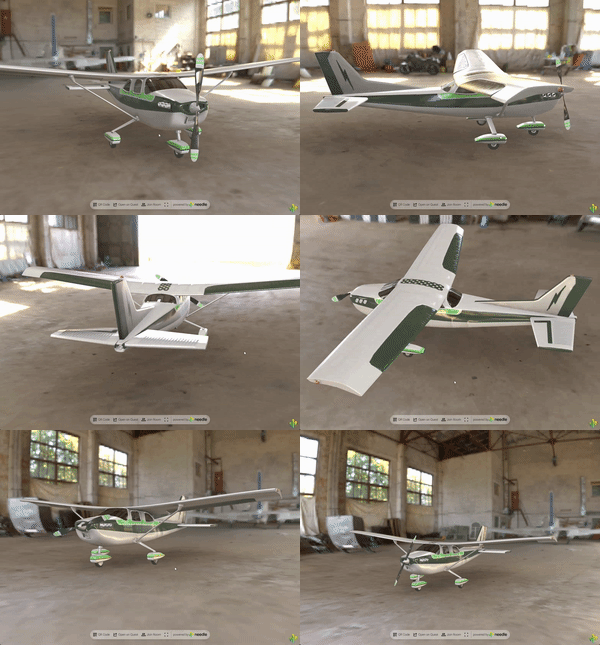](https://engine.needle.tools/samples/ground-projection)
*
* **Key properties:**
* - `radius` - Size of the projection sphere (keep camera inside)
* - `height` - How high the original photo was taken (affects floor magnification)
* - `autoFit` - Automatically center and position at ground level
* - `arBlending` - Blend with real-world in AR (0=hidden, 1=visible)
*
* **Debug:** Use `?debuggroundprojection` URL parameter.
*
* @example Apply ground projection
* ```ts
* const ground = myObject.getComponent(GroundProjectedEnv);
* ground.radius = 100;
* ground.height = 2;
* ground.apply();
* ```
*
* @summary Projects the environment map onto the ground
* @category Rendering
* @group Components
* @see {@link Camera} for environment/skybox settings
* @see {@link ContactShadows} for ground shadows
* @link https://engine.needle.tools/samples/ground-projection for a demo of ground projection
*/
export declare class GroundProjectedEnv extends Behaviour {
/**
* If true the projection will be created on awake and onEnable
* @default false
*/
applyOnAwake: boolean;
/**
* When enabled the position of the projected environment will be adjusted to be centered in the scene (and ground level).
* @default true
*/
autoFit: boolean;
/**
* Radius of the projection sphere. Set it large enough so the camera stays inside (make sure the far plane is also large enough)
* @default 50
*/
set radius(val: number);
get radius(): number;
private _radius;
/**
* How far the camera that took the photo was above the ground. A larger value will magnify the downward part of the image.
* @default 3
*/
set height(val: number);
get height(): number;
private _height;
/**
* Blending factor for the AR projection being blended with the scene background.
* 0 = not visible in AR - 1 = blended with real world background.
* Values between 0 and 1 control the smoothness of the blend while lower values result in smoother blending.
* @default 0
*/
set arBlending(val: number);
get arBlending(): number;
private _arblending;
private _lastBackground?;
private _lastRadius?;
private _lastHeight?;
private _projection?;
private _watcher?;
/** @internal */
awake(): void;
/** @internal */
onEnable(): void;
/** @internal */
onDisable(): void;
/** @internal */
onEnterXR(): void;
/** @internal */
onLeaveXR(): Promise<void>;
/** @internal */
onBeforeRender(): void;
private updateAndCreate;
private _needsTextureUpdate;
/**
* Updates the ground projection. This is called automatically when the environment or settings change.
*/
updateProjection(): void;
private _blurrynessShader;
private _lastBlurriness;
private updateBlurriness;
}