@nataliapc/mcp-openmsx
Version:
Model context protocol server for openMSX automation and control
737 lines (564 loc) • 118 kB
Markdown
# CHAPTER 2 - BASIC
The BASIC of MSX2 has been upgraded: the new version is called MSX BASIC version 2.0. And, when using a disk system, MSX DISK-BASIC can be used, which consists of MSX BASIC version 2.0 and additional instructions for disk operations. The following sections describe these two versions of BASIC.
## Index
- [1. LIST OF INSTRUCTIONS](#1-list-of-instructions)
- [1.1 Instructions of MSX BASIC version 2.0](#11-instructions-of-msx-basic-version-20)
- [1.2 Instructions of MSX DISK-BASIC](#12-instructions-of-msx-disk-basic)
- [2. DIFFERENCES IN MSX BASIC VERSION 2.0](#2-differences-in-msx-basic-version-20)
- [2.1 Additions or Modifications to Screen Mode](#21-additions-or-modifications-to-screen-mode)
- [2.2 Additions or Modifications for the Colour Specification](#22-additions-or-modifications-for-the-colour-specification)
- [2.3 Additions or Modifications for the Character Display](#23-additions-or-modifications-for-the-character-display)
- [2.4 Additions or Modifications for the Graphics Display](#24-additions-or-modifications-for-the-graphics-display)
- [2.5 Additions or modifications for VDP access](#25--additions-or-modifications-for-vdp-access)
- [2.7 Additions or Modifications for Sprite](#27-additions-or-modifications-for-sprite)
- [2.8 Additions for Optional Features](#28-additions-for-optional-features)
- [2.9 Additions for Timer Features](#29-additions-for-timer-features)
- [2.10 Additions for Memory Switch](#210-additions-for-memory-switch)
- [2.11 Additions for RAM Disk](#211-additions-for-ram-disk)
- [2.12 Other Additions](#212-other-additions)
- [3. INTERNAL STRUCTURE OF BASIC](#3-internal-structure-of-basic)
- [3.1 User's Area](#31-users-area)
- [3.2 Detailed View of the User's Area](#32-detailed-view-of-the-users-area)
- [3.3 Storage format of BASIC programs](#33-storage-format-of-basic-programs)
- [4. LINKING WITH ASSEMBLY LANGUAGE PROGRAMS](#4--linking-with-assembly-language-programs)
- [4.1 USR Function](#41-usr-function)
- [4.2 Data Exchange by the Argument and Return Value of USR Function](#42-data-exchange-by-the-argument-and-return-value-of-usr-function)
- [4.3 Making New Commands](#43-making-new-commands)
- [4.4 Expansion of CMD command](#44-expansion-of-cmd-command)
- [4.5 Interrupt usage](#45-interrupt-usage)
- [5. NOTES ON SOFTWARE DEVELOPMENT](#5-notes-on-software-development)
- [Error code list](#error-code-list)
- [Changes from the original](#changes-from-the-original)
## 1. LIST OF INSTRUCTIONS
First of all, the sentence and function for each instruction of BASIC are listed. Each instruction is listed in the format shown in [Figure 2.1](#figure-21--instruction-list-format).
##### _Figure 2.1 Instruction list format_

#### (a) Syntax of instructions
If there is an **"*"** followed by a keyword, it indicates that the syntax or function of the instruction has just been modified after version 1.0, or that the instruction has been added to version 2.0.
Descriptions of sentences use the following notational conventions.
```
* [item] .............. the item is optional
* [, item ... ] ....... more items having the same form may appear
* [item1 | item2] ..... choose item1 or item2
```
And `<filename>`, which is used in the sentence, is a string specifying I/O devices or files for input/output in the format listed below. `<Filename>` for a cassette files is a string consisting of any combination of up to 6 characters. `<filename>` for disk or RAM disk is a string, whose form is `"<filename (up to 8 characters)> + <filename extension (up to 3 characters)>"`. `<drive>` is one of characters from A to H (depending on the number of drives connected).
```
"CAS:<filename>" ...... Cassette file
"MEM:<filename>" ...... RAM disk
"CRT:" ................ Text screen
"GRP:" ................ Graphic screen
"LPT:" ................ Printer
"<drive>:<filename>" .. Disk file
```
#### (b) Instruction type
There are four types of instructions:
```
* Function ............ Returns a certain value depending on the given parameter(s).
* System variable ..... Variables available from BASIC. Generally, assignment is allowed.
* Statement ........... Takes a certain action.
* Command ............. Gives an instruction to BASIC interpreter itself.
```
#### (c) Function or action of instruction
The following list gives a brief description of the action for each instruction. More detailed descriptions about instructions which have been modified or added at version 2.0 are given in [section 2](#2-differences-in-msx-basic-version-20).
### 1.1 Instructions of MSX BASIC version 2.0
#### --- A ---
| Format | Type | Function or action |
| --- | --- | --- |
| `ABS (<expression>)` | Function | Returns absolute value of `<expression>`. |
| `ASC (<string>)` | Function | Returns the code of the first character of `<string>`. |
| `ATN (<expression>)` | Function | Returns arc tangent of `<expression>` in radians. |
| `AUTO [<linenumber>[, <increment>]]` | Command | Produces line numbers automatically. |
#### --- B ---
| Format | Type | Function or action |
| --- | --- | --- |
| **`* BASE (<expression>)`** | System variable | Contains the table address of the screen assigned on VRAM. |
| `BEEP` | Statement | Produces beep to the audio terminal. |
| `BIN$ (<expression>)` | Function | Converts the value of `<expression>` to a string of binary expression, then returns its result. |
| `BLOAD "<filename>"[,R[,offset]]` | Command | Loads an assembly language program. |
| `BSAVE "<filename>",<start address>,<end address>[,<execution address>]` | Command | Saves an assembly language program. |
#### --- C ---
| Format | Type | Function or action |
| --- | --- | --- |
| `CALL <extended statement name>[(<argument>[,<argument>...])]` | Statement | Calls the extended statements by inserting various cartridges. |
| **`* CALL MEMINI [(<upper limitation of RAM disk>)]`** | Statement | Specifies the upper limit of memory for Ram disk. |
| **`* CALL MFILES`** | Statement | Lists file names in RAM disk. |
| **`* CALL MKILL ("<filename>")`** | Statement | Deletes a file in RAM disk. |
| **`* CALL MNAME ("<old filename>" AS "<new filename>")`** | Statement | Renames a file in RAM disk. |
| `CDBL (<expression>)` | Function | Converts the value of `<expression>` to a double precission real value and returns its result. |
| `CHR$ (<expression>) Returns a character which has the code of` | Function | `<expression>` value. |
| `CINT (<expression>)` | Function | Converts the value of `<expression>` to an integer value and returns its result. |
| **`* CIRCLE {(X,Y) \| STEP(X,Y)},<radius>[, <colour>[, <start angle>[, <end angle>[, <proportion>]]]]`** | Statement | Draws a circle whose center is at (X,Y) and whose size depends on `<radius>`. |
| `CLEAR [<size of string area>[, <upper limitation of memory>]]` | Statement | Initialises variables and sets the size of memory area. |
| `CLOAD ["<filename>"]` | Command | Loads a program from cassette. |
| `CLOAD? ["<filename>"]` | Command | Compares a program on cassette with the one in memory. |
| `CLOSE [[#]<filenumber>[, [#]<filenumber>...]]` | Command | Closes a file represented by `<filenumber>`. |
| `CLS` | Statement | Clears screen. |
| **`* COLOR [<foreground colour>[, <background colour>[, <border colour>]]]`** | Statement | Specifies the colours of each part of the screen. |
| **`* COLOR [=NEW]`** | Statement | Initialises the palette. |
| **`* COLOR = (<palette number>, <red brightness>, <green brightness>, <blue brightness>)`** | Statement | Sets the palette colour. |
| **`* COLOR = RESTORE`** | Statement | Puts the contents of the colour palette storage table into the palette register. |
| **`* COLOR SPRITE (<sprite plane number>)=<colour>`** | Statement | Sets the colour to the sprite of `<sprite plane number>` to the specified colour. |
| **`* COLOR SPRITE$ (<sprite plane number>)=<string expression>`** | Statement | Sets the colour of each horizontal line of the sprite using `<string expression>`. |
| `CONT` | Command | Resumes the execution of the program which has been stopped. |
| **`* COPY <source> TO <destination>`** | Statement | Transfers the screen data among the screen, array, and disk file. |
| **`* COPY SCREEN [<mode>]`** | Statement | Writes colour bus data into VRAM (optional). |
| `COS (<expression>)` | Function | Returns the cosine value of `<expression (in radians)>`. |
| `CSAVE "<filename>"[, <baud rate>]` | Command | Saves a program to cassette. |
| `CSGN (<expression>)` | Function | Converts the value of `<expression>` to a single precision real value, and returns its result. |
| `CSRLIN` | System variable | Contains the vertical screen location of the cursor. No assignment is allowed. |
#### --- D ---
| Format | Type | Function or action |
| --- | --- | --- |
| `DATA <constant>[, <constant>...]` | Statement | Prepares data to be read by READ statement. |
| `DEF FN <name> [(<argument>[, <argument>...])]=<function-definitive expression>` | Statement | Defines a user-defined function. |
| `DEFINT <character range>[, <character range>...]` | Statement | Declares the specified variable(s) as integer type. |
| `DEFSNG <character range>[, <character range>...]` | Statement | Declares the specified variable(s) as single precision real type. |
| `DEFDBL <character range>[, <character range>...]` | Statement | Declares the specified variable(s) as double precision real type. |
| `DEFSTR <character range>[, <character range>...]` | Statement | Declares the specified variable(s) as character type. |
| `DEF USR [<number>]=<start address>` | Statement | Defines the starting address for the execution of assembly language routine, called by USR function. |
| `DELETE {[<start linenumber>-<end linenumber>] \| <linenumber> \| -<end linenumber>}` | Command | Deletes the specified portion of the program. |
| `DIM <variable name> (<maximum subscript value>[, <maximum subscript value>...])` | Statement | Defines an array variable and allocates it into memory. |
| `DRAW <string expression>` | Statement | Draws a line or lines on the screen according to `<string expression (DRAW macro)>`. |
#### --- E ---
| Format | Type | Function or action |
| --- | --- | --- |
| `END` | Statement | Ens the program, close all files, and returns to the command level. |
| `EOF (<filenumber>)` | Function | Checks if the file is finished and returns -1 if at the end of file. |
| `ERASE <array variable name>[, <array variable name>...]` | Statement | Deletes the array variable(s). |
| `ERL` | System variable | Contains the error code for the preceding error. No assignment is allowed. |
| `ERR` | System variable | Contains the line number of the previous error. No assignment is allowed. |
| `ERROR <error code>` | Statement | Puts the program into the error condition. |
| `EXP (<expression>)` | Function | Returns the exponent (power) of the natural exponential form of `<expression>`. |
#### --- F ---
| Format | Type | Function or action |
| --- | --- | --- |
| `FIX (<expression>)` | Function | Returns the value of `<expression>`, without any decimal fractions. |
| `FOR <variable name> = <initial value> TO <end value> [STEP <increment>]` | Statement | Repeats the execution from FOR statement to NEXT statement for the specified times. |
| `FRE ({<expression> \| <string expression>})` | Function | Returns the size of unused user's area or unused character area. |
#### --- G ---
| Format | Type | Function or action |
| --- | --- | --- |
| **`* GET DATE <string variable name>[, A]`** | Statement | Assigns date into a string variable. |
| **`* GET TIME <string variable name>[, A]`** | Statement | Assigns time into a string variable. |
| `GOSUB <linenumber>` | Statement | Calls the subroutine at `<linenumber>`. |
| `GOTO <linenumber>` | Statement | Jumps to `<linenumber>`. |
#### --- H ---
| Format | Type | Function or action |
| --- | --- | --- |
| `HEX$ (<expression>)` | Function | Converts the value of `<expression>` to a string of hexadecimal expression, then returns its result. |
#### --- I ---
| Format | Type | Function or action |
| --- | --- | --- |
| `IF <condition> THEN {<statement> \| <linenumber>} [ELSE {<statement> \| <linenumber>}]` | Statement | Judges the condition. If `<condition>` is not zero, it is true. |
| `IF <condition> GOTO <linenumber> [ELSE {<statement> \| <linenumber>}]` | Statement | Judges the condition. If `<condition>` is not zero, it is true. |
| `INKEY$` | Function | Returns a character when a key is being pressed, or when not, returns null string. |
| `INP (<port number>)` | Function | Reads the port specified by `<port number>` and returns its result. |
| `INPUT ["<prompt statement>";]<variable name>[, <variable name>...]` | Statement | Assigns data input from keyboard into the specified variable(s). |
| `INPUT #<filenumber>, <variable name>[, <variable name>...]` | Statement | Reads data from the file and assigns the data into the specified variable(s). |
| `INPUT$ (<number of characters>[, [#]<filenumber>])` | Function | Reads the specified size of string from the keyboard or file. |
| `INSTR ([<expression>,]<string expression 1>,<string expression 2>)` | Function | Searches `<string expression 2>` from the left of `<string expression 1>`, and returns its location if found, otherwise zero. `<Expression>` is the character location to start searching. |
| `INT (<expression>)` | Function | Returns the largest integer less than `<expression>`. |
| `INTERVAL {ON \| OFF \| STOP}` | Statement | Allows, suppresses, or suspends the timer interrupt. |
#### --- K ---
| Format | Type | Function or action |
| --- | --- | --- |
| `KEY <key number>,<string>` | Command | Redefines a function key. |
| `KEY LIST` | Command | Displays the contents of function keys. |
| `KEY (<key number>){ON \| OFF \| STOP}` | Statement | Allows, supresses, os suspends the function key interrupt. |
| `KEY {ON \| OFF}` | Statement | Specifies whethter to display the contents of function keys at the bottom of the screen. |
#### --- L ---
| Format | Type | Function or action |
| --- | --- | --- |
| `LEFT$ (<string expression>,<expression>)` | Function | Gets `<expression>` characters from the left of `<string expression>`. |
| `LEN (<string expression>)` | Function | Returns the number of characters of `<string expression>`. |
| `[LET] <variable name> = <expression>` | Statement | Assigns the value of `<expression>` to the variable. |
| **`* LINE [{(X1,Y1) \| STEP(X1,Y1)}] - {(X2,Y2) \| STEP(X2,Y2)}[, <colour> [, {B\|BF}[, <logical operation>]]]`** | Statement | Draws a line or a rectangle on the screen. |
| `LINE INPUT ["<prompt statement>";]<string variable name>` | Statement | Assigns a whole line of string data from the keyboard into the string variable. |
| `LINE INPUT# <filenumber>, <string variable name>` | Statement | Reads data in lines from the file and assigns the data into the string variable. |
| `LIST [[<linenumber>] - [<linenumber>]]` | Command | Displays the program in memory on the screen. |
| `LLIST [[<linenumber>] - [<linenumber>]]` | Command | Sends the program in memory to the printer. |
| `LOAD "<filename>" [,R]` | Command | Loads a program saved in ASCII format. |
| **`* LOCATE [<X-coordinate>[, <Y-coordinate>[, <cursor switch>]]]`** | Statement | Locates the cursor on the text screen. |
| `LOG (<expression>)` | Function | Returns the natural logarithm of `<expression>`. |
| `LPOS (<expression>)` | System variable | Contains the location of the printer head. No assignment is allowed. |
| `LPRINT [<expression>[{; \| ,}<express]ion>...]` | Statement | Outputs characters or numerical values to the printer. |
| `LPRINT USING <form>; <expression>[{; \| ,}<expression>...]` | Statement | Outputs characters or numerical values through the printer according to `<form>`. |
#### --- M ---
| Format | Type | Function or action |
| --- | --- | --- |
| `MAXFILES = <number of files>` | Statement | Sets the number of files to be opened. |
| `MERGE "<filename>"` | Command | Merges the program in memory with the program saved in ASCII format (in external storage device). |
| `MID$ (<string expression>, <expression 1>[, <expression 2>])` | Function | Returns `<expression 2>` character(s) starting from the `<expression 1>`th position of `<string expression>`. |
| `MID$ (<string variable name>, <expression 1>[, <expression 2>]) = <string expression>` | Statement | Defines `<string expression>` using `<expression 2>` character(s) from the `<expression 1>`th position of `<string variable name>`. |
| `MOTOR [{ON \| OFF}]` | Statement | Turns the motor of cassette ON and OFF. |
#### --- N ---
| Format | Type | Function or action |
| --- | --- | --- |
| `NEW` | Command | Deletes the program in meory and clears variables. |
| `NEXT [<variable name>[, <variable name>...]]` | Statement | Indicates the end of FOR statement. |
#### --- O ---
| Format | Type | Function or action |
| --- | --- | --- |
| `OCT$ (<expression>)` | Function | Converts the value of `<expression>` to the string of octal expression and returns its result. |
| `ON ERROR GOTO <linenumber>` | Statement | Defines the line to begin the error handling routine. |
| `ON <expression> GOSUB <linenumber>[, <linenumber>...]` | Statement | Executes the subroutine at `<linenumber>` according to `<expression>`. |
| `ON <expression> GOTO <linenumber>[, <linenumber>...]` | Statement | Jumps to `<linenumber>` according to `<expression>`. |
| `ON INTERVAL = <time> GOSUB <linenumber>` | Statement | Defines the timer interrupt interval and the line to begin the interrupt handling routine. |
| `ON KEY GOSUB <linenumber>[, <linenumber>...]` | Statament | Defines the line to begin the function key interrupt handling routine. |
| `ON SPRITE GOSUB <linenumber>` | Statement | Defines the line to begin the piled-sprite interrupt handling routine. |
| `ON STOP GOSUB <linenumber>` | Statament | Defines the line to begin the CTRL+STOP key interrupt handling routine. |
| `ON STRING GOSUB <linenumber>[, <linenumber>...]` | Statement | Defines the line to begin the trigger button interrupt handling routine. |
| `OPEN "<filename>" [FOR <mode>] AS #<filenumber>` | Statement | Opens the file in the specified mode. |
| `OUT <port number>,<expression>` | Statement | Sends data to the output port specified by `<port number>`. |
#### --- P ---
| Format | Type | Function or action |
| --- | --- | --- |
| **`* PAD (<expression>)`** | Function | Examines the state of tablet, mouse, light pen, or track ball specified by `<expression>`, then returns its result. |
| **`* PAINT {(X,Y) \| STEP(X,Y)}[, <colour>[, <border colour>]]`** | Statement | Paints the area surrounded by specified `<border colour>` using `<colour>`. |
| `PDL (<paddle number>)` | Function | Returns the state of the paddle which has the specified number. |
| `PEEK (<address>)` | Function | Returns the contents of one byte of the memory specified by `<address>`. |
| `PLAY <string expression 1>[, <string expression 2>[, <string expression 3>]]` | Statement | Plays the music by `<string expression (music macro)>`. |
| `PLAY (<voice channel>)` | Function | Examines whethter the music is being played and returns its result (if in play, -1 is returned). |
| `POINT (X,Y)` | Function | Returns the colour of the dot specified by coordinate (X,Y). |
| `POKE <address>,<data>` | Statement | Writes one byte of `<data>` into the memory specified by `<address>`. |
| `POS (<expression>)` | System variable | Contains the horizontal location of the cursor on the text screen. No assignment is allowed. |
| **`* PRESET {(X,Y) \| STEP(X,Y)}[, <colour>[, <logical operation>]]`** | Statement | Erases the dot specified by coordinate (X,Y) on the graphic screen |
| `PRINT [<expression [{; \| ,}<expression>...]` | Statement | Displays characters of numbers on the screen. |
| `PRINT USING <form>; <expression>[{; \| ,}<expression>...]` | Statement | Displays characters or numbers on the screen according to `<form>`. |
| `PRINT #<filenumber>, [<expression>[{; \| ,}<expression>...]]` | Statement | Writes characters or numbers to the file specified by `<file number>`. |
| `PRINT #<filenumber>, USING <form>; <expression>[{; \| ,}<expression>...]` | Statement | Writes characters or numbers to the file specified by `<file number>` according to `<form>`. |
| `PSET {(X,Y) \| STEP(X,Y)}[, <colour>[, <logical operation>]]` | Statement | Draws the dot in the coordinate specified by (X,Y) on the graphic screen. |
| **`* PUT KANJI [(X,Y)],<JIS kanji code>[, <colour>[, <logical operation> [, <mode>]]]`** | Statement | Displays the kanji on the screen (KANJI ROM is required). |
| **`* PUT SPRITE <sprite plane number>[, {(X,Y) \| STEP(X,Y)}[, <colour>[, <sprite pattern number>]]]`** | Statement | Displays the sprite pattern. |
#### --- R ---
| Format | Type | Function or action |
| --- | --- | --- |
| `READ <variable name>[, <variable name>...]` | Statement | Reads data from DATA statement(s) and assigns the data to the variable(s). |
| `REM [<comment>]` | Statement | Puts the comment in the program. |
| `RENUM [<new linenumber>[, <old linenumber>[, <increment>]]]` | Command | Renumbers the line numbers. |
| `RESTORE [<linenumber>]` | Statement | Specifies the line to begin reading DATA by READ statement. |
| `RESUME {[0] \| NEXT \| <linenumber>}` | Statement | Ends the error recovery routine and resumes execution of the program. |
| `RETURN [<linenumber>]` | Statement | Returns from a subroutine. |
| `RIGHT$ (<string expression>, <expression>)` | Function | Gets `<expression>` characters from the right of `<string expression>`. |
| `RND [(<expression>)]` | Function | Returns a random number between 0 and 1. |
| `RUN [<linenumber>]` | Command | Executes the program from `<linenumber>`. |
#### --- S ---
| Format | Type | Function or action |
| --- | --- | --- |
| `SAVE "<filename>"` | Command | Saves the program in ASCII format. |
| **`* SCREEN <screen mode>[, <sprite size>[, <key click switch>[, <cassette baud rate>[, <printer option>[, <interlace mode>]]]]]`** | Statement | Sets the screen mode and so on. |
| **`* SET ADJUST (<X-coordinate offset>, <Y-coordinate offset>)`** | statement | Changes the display location of the screen. Ranges from -7 to 8. |
| **`* SET BEEP <timbre>, <volume>`** | Statement | Selects the BEEP tone. Ranges from 1 to 4. |
| **`* SET DATE <strign expression>[, A]`** | Statement | Sets a date. "A" is the specification of alarm. |
| **`* SET PAGE <display page>, <active page>`** | Statement | Specifies the page to display and the page to read and write data to. |
| **`* SET PASSWORD <string expression>`** | Statement | Sets a password. |
| **`* SET PROMPT <string expression>`** | Statement | Sets a prompt (up to 8 characters). |
| **`* SET SCREEN`** | Statement | Reserves the parameters of the current settings of SCREEN statement. |
| **`* SET TIME <string expression>[, A]`** | Statement | Sets time. "A" is the alarm specification. |
| **`* SET VIDEO [<mode>[, <Ym>[, <CB>[, <sync>[, <voice>[, <video input>[, <AV control>]]]]]]]`** | Statement | Sets superimposing and other modes (optional). |
| `SGN (<expression>)` | Function | Examines the sign of `<expression>` and returns its result (positive=1, zero=0, negative=-1). |
| `SIN (<expression>)` | Function | Returns the sine of `<expression>` in radians. |
| `SOUND <register number>,<data>` | Statement | Writes data to the register of PSG. |
| `SPACE$ (<expression>)` | Function | Returns a string containing `<expression>` spaces. |
| `SPC (<expression>)` | Function | Produces `<expression>` spaces; used in the instructions of PRINT family. |
| `SPRITE {ON \| OFF \| STOP}` | Statement | Allows, supresses, or suspends the piled-sprite interrupt. |
| `SPRITE$ (<sprite pattern number>)` | System variable | Contains the sprite pattern. |
| `SQR (<expression>)` | Function | Returns the square root of `<expression>`. |
| `STICK (<joystick number>)` | Function | Examines the direction of the joystick and returns its result. |
| `STOP` | Statement | Stops the execution of the program. |
| `STRIG (<joystick number>)` | Function | Examines the state of the trigger button and returns its result. |
| `STRIG (<joystick number>) {ON \| OFF \| STOP}` | Statement | Allows, supresses, or suspends interrupts from the trigger button. |
| `STR$ (<expression>)` | Function | Converts the value of `<expression>` to a string decimal expression and returns its result. |
| `STRING$ (<expression 1>, {<string expression> \| <expression 2>}` | Function | Converts the leading character of `<string expression>` or the character containing the code `<expression 2>` to a string whose length is `<expression 1>`, and returns the string. |
| `SWAP <variable name>, <variable name>` | Statement | Exchanges the value of two variables. |
#### --- T ---
| Format | Type | Function or action |
| --- | --- | --- |
| `TAB (<expression>)` | Function | Produces the specified spaces in PRINT instructions. |
| `TAN (<expression>)` | Function | Returns the tangent of `<expression>` in radians. |
| `TIME` | System variable | Contains the value of the interval timer. |
| `TRON` | Command | Keeps displaying the line numbers of the program currently being executed. |
| `TROFF` | Command | Cancels TRON and stops displaying the line numbers. |
#### --- U ---
| Format | Type | Function or action |
| --- | --- | --- |
| `USR [<number](<argument>)` | Function | Calls the assembly language routine. |
#### --- V ---
| Format | Type | Function or action |
| --- | --- | --- |
| `VAL (<string expression>)` | Function | Converts `<string expression>` to a numerical value and returns its result. |
| `VARPTR (<variable name>)` | Function | Returns the address containing the variable. |
| `VARPTR (#<filenumber>)` | Function | Returns the starting address of the file control block. |
| **`* VDP (<register number>)`** | System variable | Writes/reads data to/from the VDP registers. |
| **`* VPEEK (<address>)`** | Function | Reads data from `<address>` in VRAM. |
| **`* VPOKE (<address>)`** | Statement | Writes data to `<address>` in VRAM. |
#### --- W ---
| Format | Type | Function or action |
| --- | --- | --- |
| `WAIT <port number>, <expression 1>[, <expression 2>]` | Statement | Stops the execution until data of the input port grows to the specified value. |
| **`* WIDTH <number>`** | Statement | Specifies the number of characters per line in the display screen. |
### 1.2 Instructions of MSX DISK-BASIC
**Note:** Instructions marked with **"*\*"** have been added to version 2 of MSX DISK-BASIC and are not available in version 1.
#### --- B ---
| Format | Type | Function or action |
| --- | --- | --- |
| **`* BLOAD "<filename>"[{[, R] \| [, S]}[, <offset>]]`** | Command | Loads the assembly language program or screen data from a file. |
| **`* BSAVE "<filename>", <start address>, <end address>[, {<execution address> \| S}]`** | Command | Saves the assembly language program or screen data in a file. |
#### --- C ---
| Format | Type | Function or action |
| --- | --- | --- |
| `CLOSE [[#]<filenumber>[, [#]<filenumber>...]]` | Statement | Closes the file specified by `<filenumber>`. |
| **`** CALL CHDRV ("<drive name>:")`** | Command | Sets the drive specified by `<drive name>` as the default drive. |
| **`** CALL CHDIR ("<directory path>")`** | Command | Changes to the directory specified by `<directory path>`. |
| `CALL FORMAT` | Command | Formats the floppy disk. |
| **`** CALL MKDIR ("<directory name>")`** | Command | Creates the directory with the name specified in `<directory name>` in the current directory. |
| **`** CALL RAMDISK (<size in kilobytes>[, <variable name>])`** | Command | Tries to crate the DOS 2 RAM disk of the specified size, and returns in the variable (if specified) the actual size of the RAM disk created. |
| **`** CALL RMDIR ("<directory name>")`** | Command | Deletes the directory specified in `<directory name>`. If the directory is not empty, "File already exists" error will be returned. |
| `CALL SYSTEM` | Command | Returns to MSX-DOS. |
| **`** CALL SYSTEM [("<filename>")]`** | Command | Returns to MSX-DOS and executes the DOS command `<filename>` if it is specified. |
| `COPY "<filename 1>"[ TO "<filename 2>"]` | Command | Copies the contents of `<filename 1>` to the file specified by `<filename 2>`. |
| `CVD (<8-byte string>)` | Function | Converts the string to the double precision real value and returns its result. |
| `CVI (<2-byte string>)` | Function | Converts the string to the integer value and returns its result. |
| `CVS (<4-byte string>)` | Function | Converts the string to the single precision real value and returns its result. |
#### --- D ---
| Format | Type | Function or action |
| --- | --- | --- |
| `DSKF (<drive number>)` | Function | Returns the unused portions of the disk in clusters. |
| `DSKI$ (<drive number>, <sector number>)` | Function | Reads the specified sector of the specified drive to the memory area indicated by address &HF351, and returns a null string. |
| `DSKO$ (<drive number>, <sector number>)` | Statement | Writes 512 bytes starting from address indicated by &HF351 to the specified sector of the specified drive. |
#### --- E ---
| Format | Type | Function or action |
| --- | --- | --- |
| `EOF (<filenumber>)` | Function | Checks if the file has ended and returns -1 if at the end of file. |
#### --- F ---
| Format | Type | Function or action |
| --- | --- | --- |
| `FIELD [#]<filenumber>, <field width> AS <string variable name>[, <field width> AS <string variable name>...]` | Statement | Assigns the string variable name to the random input/output buffer. |
| `FILES ["<filename>"]` | Command | Displays the name of the file matched with `<filename>` on the screen. |
| **`** FILES ["<filename>"][,L]`** | Command | Displays the name of the file matched with `<filename>` on the screen, and also the attributes and the size of the file if "L" is specified. |
#### --- G ---
| Format | Type | Function or action |
| --- | --- | --- |
| `GET[#]<filenumber>[, <record number>]` | Statement | Reads one record from the random file to the random input/output buffer. |
#### --- I ---
| Format | Type | Function or action |
| --- | --- | --- |
| `INPUT #<filenumber>, <variable name>[, <variable name>...]` | Statement | Reads data from the file. |
| `INPUT$ (<the number of characters>[, [#]<filenumber>])` | Function | Gets the string of the specified length from the file. |
#### --- K ---
| Format | Type | Function or action |
| --- | --- | --- |
| `KILL "<filename>"` | Command | Delets the file specified by `<filename>`. |
#### --- L ---
| Format | Type | Function or action |
| --- | --- | --- |
| `LFILES ["<filename>"]` | Command | Sends the name of the file matched with `<filename>` to the printer. |
| **`** LFILES ["<filename>"][,L]`** | Command | Sends the name of the file matched with `<filename>` to the printer, and also the attributes and the size of the file if "L" is specified. |
| `LINE INPUT #<file number>, <string variable name>` | Statement | Reads lines of data from the file to the string variable. |
| `LOAD "<filename>"[, R]` | Command | Loads the program into memory. |
| `LOC (<filenumber>)` | Function | Returns the record number of the most recently accessed location of the file. |
| `LOF (<filenumber>)` | Function | Returns the size of the specified file in bytes. |
| `LSET <string variable name>=<string expression>` | Statement | Stores data padded on the left in the random input/output buffer. |
#### --- M ---
| Format | Type | Function or action |
| --- | --- | --- |
| `MAXFILES = <the number of files>` | Statement | Declares the maximum number of files that can be opened. |
| `MERGE "<filename>"` | Command | Merges the program in memory with the program saved in ASCII format. |
| `MKD$ (<double precision real value>)` | Function | Converts the double precision real value to the character code corresponding to the internal expression. |
| `MKI$ (<integer value>)` | Function | Converts the integer value to the character code corresponding to the internal expression. |
| `MKS$ (<single precision real value>)` | Function | Converts the single precision real value to the character code corresponding to the internal expression. |
#### --- N ---
| Format | Type | Function or action |
| --- | --- | --- |
| `NAME "<filename 1>" AS "<filename 2>"` | Command | Renames the name of a file. |
#### --- O ---
| Format | Type | Function or action |
| --- | --- | --- |
| `OPEN "<filename>"[FOR <mode>] AS #<filenumber>[LEN = <record length>]` | Statement | Opens the file. |
#### --- P ---
| Format | Type | Function or action |
| --- | --- | --- |
| `PRINT #<filenumber>, [<expression>[{; \| ,}<expression>...]]` | Statement | Sends data to the sequential file. |
| `PRINT #<filenumber>, USING <form>; <expression>[{; \| ,}<expression>...]]` | Statement | Sends data to the sequential file according to the form. |
| `PUT [#]<filenumber>[, <record number>]` | Statement | Sends data of the random input/output buffer to the random file. |
#### --- R ---
| Format | Type | Function or action |
| --- | --- | --- |
| `RSET <string varibale name>=<string expression>` | Statement | Stores data padded on the right in the random input/output buffer. |
| `RUN "<filename>"[, R]` | Command | Loads a program from the disk and executes it. |
#### --- S ---
| Format | Type | Function or action |
| --- | --- | --- |
| `SAVE "<filename>"[, A]` | Command | Saves a program. The program is saved in ASCII format when "A" is specified. |
#### --- V ---
| Format | Type | Function or action |
| --- | --- | --- |
| `VARPTR (#<filenumber>)` | Function | Returns the starting address of the file control block. |
## 2. DIFFERENCES IN MSX BASIC VERSION 2.0
A great deal of functions in MSX BASIC version 2.0 have been added or modified when compared with MSX BASIC version 1.0. They are either the functions that are added or modified with the version-up of VDP (Video Display Processor) or the functions that are added or modified because of the various hardware features such as RAM disk, clock, or memory switch; especially, the alternation of VDP affects, most of the statement for the screen display.
This section picks up these statements and indicates the additions or the modifications. In the following descriptions, "MSX1" means MSX BASIC version 1.0 and "MSX2" for MSX BASIC version 2.0.
### 2.1 Additions or Modifications to Screen Mode
* `SCREEN <screen mode>[, <sprite size>[, <key click switch>[, <cassette baud rate>[, <printer option>[, <interlace mode>]]]]]`
`<Screen mode>` and `<interlace mode>` have been modified.
`<Screen mode>` may be specified from 0 to 8. Modes from 0 to 3 are the same as MSX1 and the rest have been added. When specifying a screen mode, in BASIC it is called "SCREEN MODE", which is somewhat different from "screen mode" which is used by VDP internally. [Table 2.1](#table-21--correspondances-of-basic-screen-screen-modes-and-vdp-screen-modes) shows these correspondences and meanings. The difference between screen modes 2 and 4 is only in the sprite display functions.
##### _Table 2.1 Correspondances of BASIC screen (SCREEN) modes and VDP screen modes_
```
-----------------------------------------------------------------------------
| | | Meaning |
| BASIC | VDP |----------------------------------------------|
| mode | mode | Dots or | Display colours | Screen |
| | | characters | at a time | format |
|--------------+-------------+----------------+-----------------+-----------|
| SCREEN 0 (1) | TEXT 1 | 40 x 24 chars | 2 from 512 | Text |
|--------------+-------------+----------------+-----------------+-----------|
| SCREEN 0 (2) | TEXT 2 | 80 x 24 chars | 2 from 512 | Text |
|--------------+-------------+----------------+-----------------+-----------|
| SCREEN 1 | GRAPHIC 1 | 32 x 24 chars | 16 from 512 | Text |
|--------------+-------------+----------------+-----------------+-----------|
| SCREEN 2 | GRAPHIC 2 | 256 x 192 dots | 16 from 512 | High res. |
| | | | | graphics |
|--------------+-------------+----------------+-----------------+-----------|
| SCREEN 3 | MULTICOLOUR | 64 x 48 dots | 16 from 512 | Low res. |
| | | | | graphics |
|--------------+-------------+----------------+-----------------+-----------|
| SCREEN 4 | GRAPHIC 3 | 256 x 192 dots | 16 from 512 | High res. |
| | | | | graphics |
|--------------+-------------+----------------+-----------------+-----------|
| SCREEN 5 | GRAPHIC 4 | 256 x 212 dots | 16 from 512 | Bit map |
| | | | | graphics |
|--------------+-------------+----------------+-----------------+-----------|
| SCREEN 6 | GRAPHIC 5 | 512 x 212 dots | 4 from 512 | Bit map |
| | | | | graphics |
|--------------+-------------+----------------+-----------------+-----------|
| SCREEN 7 | GRAPHIC 6 | 512 x 212 dots | 16 from 512 | Bit map |
| | | | | graphics |
|--------------+-------------+----------------+-----------------+-----------|
| SCREEN 8 | GRAPHIC 7 | 256 x 212 dots | 256 | Bit map |
| | | | | graphics |
-----------------------------------------------------------------------------
```
Specifying `<interlace mode>` enables to set the interlace functions of VDP (see [Table 2.2](#table-22--differences-of-display-function-in-the-interlace-mode)). In the alternate screen display mode, the display page specified in "SET PAGE" must be odd. In this case the display page and the page of which the number is smaller by one is displayed alternately.
##### _Table 2.2 Differences of display function in the interlace mode_
```
-----------------------------------------------------------------
| Interlace mode | Display function |
|------------------+--------------------------------------------|
| 0 | Normal non-interlaced display (default) |
| 1 | Interlaced display |
| 2 | Non interlaced, Even/Odd alternate display |
| 3 | Interlaced, Even/Odd alternate display |
-----------------------------------------------------------------
```
* `SET PAGE <display page>, <active page>`
This statement is new. It allows users to set the page to display and the page to read and write data to. This is valid when the screen mode is between 5 and 8, and the value specified depends on the VRAM capacity and the screen mode (see [Table 2.3](#table-23--page-values-to-be-specified-depending-on-the-screen-mode-and-the-vram-capacity)).
##### Table 2.3 Page values to be specified depending on the screen mode and the VRAM capacity
```
------------------------------------------
| Screen mode | VRAM 64K | VRAM 128K |
|-------------+------------+-------------|
| SCREEN 5 | 0 to 1 | 0 to 3 |
| SCREEN 6 | 0 to 1 | 0 to 3 |
| SCREEN 7 | Unusable | 0 to 1 |
| SCREEN 8 | Unusable | 0 to 1 |
------------------------------------------
```
See the [VRAM map](Appendix5.md) in the APPENDIX for the page assignment on VRAM.
### 2.2 Additions or Modifications for the Colour Specification
* `COLOR [<foreground colour>[, <background colour>[, <border colour>]]]`
In MSX2, with its colour palette feature, the ranges and meanings of values specifying colours in the screen mode are different (see [Table 2.4](#table-24--colour-specifications-for-the-screen-mode)). The `<background colour>` except that of the text display changes when the CLS statement is executed. If the display mode is 0, specification of a `<border colour>` is ignored.
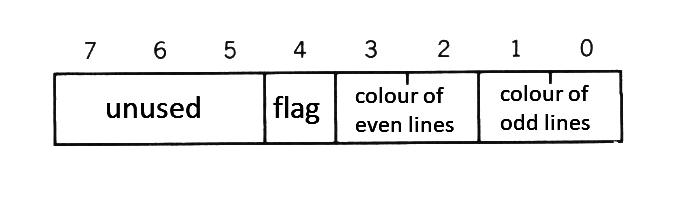
The "border colour" in screen mode 6 has special meanings. [Figure 2.2](#figure-22--bitwise-meanings-for-the-border-colour-on-screen-mode-6) shows the bitwise meanings of `<border colour>` in the mode. In this mode, by changing the flag (bit 4), the colour of vertical lines at odd X-coordinates and the colour of those at even coordinates can be specified differently.
When the flag is 0 (the value of border colour is one of the values from 0 to 15), different colours cannot be specified and the border colour is set as the colour of vertical odd lines. When the flag is 1 (the value of border colour is one of the values from 16 to 31), the border colours are set as the colour of vertical odd lines and that of vertical even lines; when these two colours are different, the screen shows a vertically-striped pattern.
##### _Figure 2.2 Bitwise meanings for the border colour on screen mode 6_
* `COLOR = (<palette number>, <red brightness>, <green brightness>, <blue brightness>)`
This statement sets the colour of the specified palette. See [Table 2.4](#table-24--colour-specifications-for-the-screen-mode) for the specification of `<palette number>`. Note that nothing happens and no error occurs wwhen the screen mode is 8, which has no palette feature. Though palette number 0 is ordinally fixed to a transparent colour (that is, border space is seen transparently), it can be dealt in the same way as other palettes by changing the register of VDP:
```
VDP(9)=VDP(9) OR &H20 (when dealing as with other palettes)
VDP(9)=VDP(9) AND &HDF (when fixing it to a transparent colour)
```
##### _Table 2.4 Colour specifications for the screen mode._
```
--------------------------------------------------------
| Screen mode | Colour specification | Range of number |
|-------------+----------------------+-----------------|
| SCREEN 0 | Palette number | 0 to 15 |
| SCREEN 1 | Palette number | 0 to 15 |
| SCREEN 2 | Palette number | 0 to 15 |
| SCREEN 3 | Palette number | 0 to 15 |
| SCREEN 4 | Palette number | 0 to 15 |
| SCREEN 5 | Palette number | 0 to 15 |
| SCREEN 6 | Palette number | 0 to 3 |
| SCREEN 7 | Palette number | 0 to 15 |
| SCREEN 8 | Colour number | 0 to 255 |
--------------------------------------------------------
```
Brightness of each colour can be set to one of eight steps from 0 to 7 and combinig them enables to display 512 colours; 8 (red) x 8 (green) x 8 (blue).
* `COLOR=RESTORE`
This statement resets the colour palette register according to the contents of the colour palette storage table (see APPENDIX [VRAM MAP](Appendix5.md)). For example, if image data written under unusual colour palette settings is BSAVEd, the original images cannot be reproduced because BLOADing the data does not change the colour palettes. Therefore, the image data should be BSAVEd with the colour palette storage table. To obtain the colours of the original images, BLOAD the data and reset the palettes with the COLOR=RESTORE instruction.
* `COLOR [=NEW]`
This statement initialises the colour palette to the same state as when the power of the computer is turned on (see [Table 2.5](#table-25--initial-colours-of-colour-palettes-and-palette-setting-values)). It is a good idea to place this statement at the beginning and the end of the program.
##### _Table 2.5 Initial colours of colour palettes and palette setting values_
```
------------------------------------------------------------------
| Palette | Colour | Brightness | Brightness | Brightness |
| number | | of red | of blue | of green |
|---------+---------------+------------+------------+------------|
| 0 | transparent | 0 | 0 | 0 |
| 1 | black | 0 | 0 | 0 |
| 2 | bright green | 1 | 1 | 6 |
| 3 | light green | 3 | 3 | 7 |
| 4 | deep blue | 1 | 7 | 1 |
| 5 | bright blue | 2 | 7 | 3 |
| 6 | deep red | 5 | 1 | 1 |
| 7 | light blue | 2 | 7 | 6 |
| 8 | bright red | 7 | 1 | 1 |
| 9 | light red | 7 | 3 | 3 |
| 10 | bright yellow | 6 | 1 | 6 |
| 11 | pale yellow | 6 | 3 | 6 |
| 12 | deep green | 1 | 1 | 4 |
| 13 | purple | 6 | 5 | 2 |
| 14 | grey | 5 | 5 | 5 |
| 15 | white | 7 | 7 | 7 |
------------------------------------------------------------------
```
### 2.3 Additions or Modifications for the Character Display
* `LOCATE [<X-coordinate>[, <Y-coordinate>[, <cursor switch>]]]`
This statement specifies the location to display a character in the text display screen.
Since an 80-character display feature has been added to the screen mode 0, the X-coordinate value can be specified up to 79.
### 2.4 Additions or Modifications for the Graphics Display
* `LINE [{(X1,Y1) | STEP(X1,Y1)}] - {(X2,Y2) | STEP(X2,Y2)}[, <colour> [, {B|BF}[, <logical operation>]]]`
* `PSET {(X,Y) | STEP(X,Y)}[, <colour>[, <logical operation>]]`
* `PRESET {(X,Y) | STEP(X,Y)}[, <colour>[, <logical operation>]]`
The specifiable coordinate range of these statements varies according to the screen mode (see [Table 2.6](#table-26--range-of-coordinates-for-each-screen-mode)).
##### _Table 2.6 Range of coordinates for each screen mode_
```
-------------------------------------------------
| Screen mode | X-coordinate | Y-coordinate |
|-------------+----------------+----------------|
| SCREEN 2 | 0 to 255 | 0 to 191 |
| SCREEN 3 | 0 to 255 | 0 to 191 |
| SCREEN 4 | 0 to 255 | 0 to 191 |
| SCREEN 5 | 0 to 255 | 0 to 211 |
| SCREEN 6 | 0 to 511 | 0 to 211 |
| SCREEN 7 | 0 to 511 | 0 to 211 |
| SCREEN 8 | 0 to 255 | 0 to 211 |
-------------------------------------------------
```
The logical operation feature is new. When `<logical operation>` is specified, a logical operation is done between the specified `<colour>` and the original colour, and the colour of its result will be used to draw. Logical operation types are listed in [Table 2.7](#table-27--logical-operation). `<Colour>` is specified by the palette number, except for screen mode 8.
##### _Table 2.7 Logical operation_
```
-----------------------------------------------------------------------------
| Logical operation | Function to draw |
|-------------------------+-------------------------------------------------|
| PSET (default) ,TPSET | Use "specified colour" |
| PRESET ,TPRESET | Use "NOT (specified colour)" |
| XOR ,TXOR | Use "(background colour) XOR (specified colour)"|
| OR ,TOR | Use "(background colour) OR (specified colour)" |
| AND ,AND | Use "(background colour) AND (specified colour)"|
-----------------------------------------------------------------------------
```
**Note:** The list above assumes that `<colour>` is (specified colour) and that the original colour of the place to be drawn is (background colour). Specifying a logical operation preceded by "T" causes nothing to be done when `<colour>` is transparent (colour 0).
* `CIRCLE {(X,Y) | STEP(X,Y)},<radius>[, <colour>[, <start angle>[, <end angle>[, <proportion>]]]]`
The coordinate range to be specified depends on the screen mode (see [Table 2.6](#table-26--range-of-coordinates-for-each-screen-mode)). `<colour>` is specified by the palette number, except for screen mode 8.
* `PAINT {(X,Y) | STEP(X,Y)}[, <colour>[, <border colour>]]`
The coordinate range to be specified depends on the screen mode (see [Table 2.6](#table-26--range-of-coordinates-for-each-screen-mode)). `<Colour>` is speci