@mymj/midjourney
Version:
Node.js client for the unofficial MidJourney API.
266 lines (220 loc) • 8.43 kB
Markdown
Node.js client for the unofficial MidJourney api.
English / [中文文档](README_zh.md)
<div align="center">
<p>
<a href="https://discord.gg/GavuGHQbV4"><img src="https://img.shields.io/discord/1082500871478329374?color=5865F2&logo=discord&logoColor=white" alt="Discord server" /></a>
<a href="https://www.npmjs.com/package/midjourney"><img src="https://img.shields.io/npm/v/midjourney.svg?maxAge=3600" alt="npm version" /></a>
</p>
</div>
- [face swap](https://github.com/erictik/midjourney-client/blob/main/example/faceswap.ts)
- [niji bot](https://github.com/erictik/midjourney-client/blob/main/example/imagine-niji.ts)
- [custom zoom](https://github.com/erictik/midjourney-client/blob/main/example/customzoom.ts)
- [remix mode](https://github.com/erictik/midjourney-client/blob/main/example/variation-ws.ts)
To run the included example, you must have [Node.js](https://nodejs.org/en/) installed. Then, run the following commands in the root directory of this project:
1. clone the repository
```bash
git clone https://github.com/erictik/midjourney-client.git
cd midjourney-client
```
2. install dependencies
```bash
yarn
npm install
```
3. set the environment variables
- [Login Discord](https://discord.com/channels/@me)`F12` _OR_ `Ctrl + Shift + I` (or `Command + Option + I` on Mac) to open the developer tools _AND_ paste the following code into the console
```javascript
window.webpackChunkdiscord_app.push([
[],
{},
(req) => {
for (const m of Object.keys(req.c)
.map((x) => req.c[x].exports)
.filter((x) => x)) {
if (m.default && m.default.getToken !== undefined) {
return copy(m.default.getToken());
}
if (m.getToken !== undefined) {
return copy(m.getToken());
}
}
},
]);
console.log("%cWorked!", "font-size: 50px");
console.log(`%cYou now have your token in the clipboard!`, "font-size: 16px");
```
OR [use network your Discord TOKEN](https://www.androidauthority.com/get-discord-token-3149920/)
- [Join my discord server](https://discord.com/invite/GavuGHQbV4)
```
export SERVER_ID="1082500871478329374"
export CHANNEL_ID="1094892992281718894"
```
- OR [Create a server](https://discord.com/blog/starting-your-first-discord-server) and [Invite Midjourney Bot to Your Server](https://docs.midjourney.com/docs/invite-the-bot)
```bash
export SERVER_ID="your-server-id"
export CHANNEL_ID="your-channel-id"
```
- wirte your token to `.env` file or set the environment variables
```bash
export SERVER_ID="1082500871478329374"
export CHANNEL_ID="1094892992281718894"
export SALAI_TOKEN="your-discord-token"
```
- Then, run the example with the following command:
```bash
npx tsx example/imagine-ws.ts
```
OR
```bash
yarn example:imagine
npm run example:imagine
```
- [more example](./example/)
1. Install
```bash
npm i midjourney
yarn add midjourney
```
2. config param
```typescript
export interface MJConfigParam {
SalaiToken: string; //DISCORD_TOKEN
ChannelId?: string; //DISCORD_CHANNEL_ID
ServerId?: string; //DISCORD_SERVER_ID
BotId?: typeof MJBot | typeof NijiBot; //DISCORD_BOT_ID MJBot OR NijiBot
Debug?: boolean; // print log
ApiInterval?: number; //ApiInterval request api interval
Limit?: number; //Limit of get message list
MaxWait?: number;
Remix?: boolean; //Remix:true use remix mode
Ws?: boolean; //Ws:true use websocket get discord message (ephemeral message)
HuggingFaceToken?: string; //HuggingFaceToken for verify human
SessionId?: string;
DiscordBaseUrl?: string;
ImageProxy?: string;
WsBaseUrl?: string;
fetch?: FetchFn; //Node.js<18 need node.fetch Or proxy
WebSocket?: WebSocketCl; //isomorphic-ws Or proxy
}
```
3. Use Imagine 、Variation and Upscale
```typescript
import { Midjourney } from "midjourney";
const client = new Midjourney({
ServerId: <string>process.env.SERVER_ID,
ChannelId: <string>process.env.CHANNEL_ID,
SalaiToken: <string>process.env.SALAI_TOKEN,
Debug: true,
Ws: true, //enable ws is required for remix mode (and custom zoom)
});
await client.init();
const prompt =
"Christmas dinner with spaghetti with family in a cozy house, we see interior details , simple blue&white illustration";
//imagine
const Imagine = await client.Imagine(
prompt,
(uri: string, progress: string) => {
console.log("loading", uri, "progress", progress);
}
);
console.log(Imagine);
if (!Imagine) {
console.log("no message");
return;
}
//U1 U2 U3 U4 V1 V2 V3 V4 "Vary (Strong)" ...
//⬅️,⬆️,⬇️,➡️
const V1CustomID = Imagine.options?.find((o) => o.label === "V1")?.custom;
if (!V1CustomID) {
console.log("no V1");
return;
}
// Varition V1
const Varition = await client.Custom({
msgId: <string>Imagine.id,
flags: Imagine.flags,
customId: V1CustomID,
content: prompt, //remix mode require content
loading: (uri: string, progress: string) => {
console.log("loading", uri, "progress", progress);
},
});
console.log(Varition);
const U1CustomID = Imagine.options?.find((o) => o.label === "U1")?.custom;
if (!U1CustomID) {
console.log("no U1");
return;
}
// Upscale U1
const Upscale = await client.Custom({
msgId: <string>Imagine.id,
flags: Imagine.flags,
customId: U1CustomID,
loading: (uri: string, progress: string) => {
console.log("loading", uri, "progress", progress);
},
});
if (!Upscale) {
console.log("no Upscale");
return;
}
console.log(Upscale);
const zoomout = Upscale?.options?.find((o) => o.label === "Custom Zoom");
if (!zoomout) {
console.log("no zoomout");
return;
}
// Custom Zoom
const CustomZoomout = await client.Custom({
msgId: <string>Upscale.id,
flags: Upscale.flags,
content: `${prompt} --zoom 2`, // Custom Zoom require content
customId: zoomout.custom,
loading: (uri: string, progress: string) => {
console.log("loading", uri, "progress", progress);
},
});
console.log(CustomZoomout);
```
- [x] `/imagine` `variation` `upscale` `reroll` `blend` `zoomout` `vary`
- [x] `/info`
- [x] `/fast ` and `/relax `
- [x] [`/prefer remix`](https://github.com/erictik/midjourney-client/blob/main/example/prefer-remix.ts)
- [x] [`variation (remix mode)`](https://github.com/erictik/midjourney-client/blob/main/example/variation-ws.ts)
- [x] `/describe`
- [x] [`/shorten`](https://github.com/erictik/midjourney-client/blob/main/example/shorten.ts)
- [x] `/settings` `reset`
- [x] verify human
- [x] [proxy](https://github.com/erictik/midjourney-discord/blob/main/examples/proxy.ts)
- [x] [niji bot](https://github.com/erictik/midjourney-client/blob/main/example/imagine-niji.ts)
- [x] [custom zoom](https://github.com/erictik/midjourney-client/blob/main/example/customzoom.ts)
- [x] autoload command payload
---
- [midjourney-ui](https://github.com/erictik/midjourney-ui/) next.js + vercel
- [midjourney-discord](https://github.com/erictik/midjourney-discord)-bot
- [phrame](https://github.com/jakowenko/phrame)
- [guapitu](https://www.guapitu.com/zh/draw?code=RRXQNF)
---
If you find it valuable and would like to show your support, any donations would be greatly appreciated. Your contribution helps me maintain and improve the program.
<span style="word-spacing:20px">
<img src="images/ali.png" height="300"/>
<img src="images/wechat.png" height="300"/>
<a href='https://ko-fi.com/erictik' target='_blank'><img height='36' style='border:0px;height:36px;' src='https://storage.ko-fi.com/cdn/kofi1.png?v=3' border='0' alt='Buy Me a Coffee' /></a>
</span>
[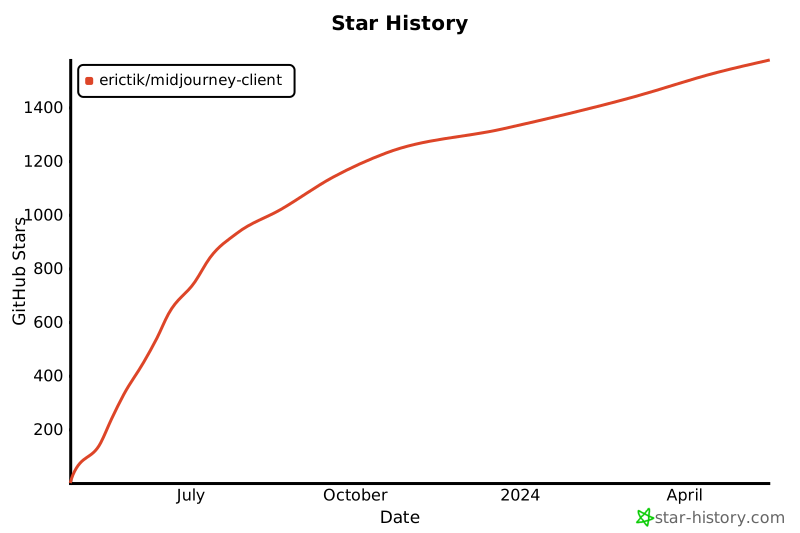](https://star-history.com/#erictik/midjourney-client&Date)