@mvkproject/nexus
Version:
Official Node.js wrapper for the MVKProject Nexus API and Free AI Services
425 lines (338 loc) • 13.2 kB
Markdown
## **@mvkproject/nexus**
[](https://www.npmjs.com/package/@mvkproject/nexus)
[](https://opensource.org/licenses/MIT)
> Official Node.js wrapper for the MVKProject Nexus API. Documentation available at [https://nexus.adonis-except.xyz/](https://nexus.adonis-except.xyz/)
This package provides easy access to AI models, image generation, and other services offered by the Nexus API at [https://nexus.adonis-except.xyz/](https://nexus.adonis-except.xyz/).
## 📋 Table of Contents
- [Installation](#-installation)
- [Getting Started](#-getting-started)
- [CommonJS](#commonjs-traditional-nodejs)
- [ES Modules](#es-modules-esm)
- [TypeScript](#typescript)
- [Features](#-features)
- [API Reference](#-api-reference)
- [AI Models](#-ai-models)
- [ChatGPT](#chatgpt)
- [Gemini](#gemini)
- [DeepSeek](#deepseek)
- [Meta AI](#meta-ai)
- [Image Services](#️-image-services)
- [AI Image Analysis](#ai-image-analysis-vision)
- [AI Image Generation](#ai-image-generation)
- [Discord Cards](#-discord-cards)
- [Welcome Image Generation](#welcome-image-generation)
- [Rank/Level Card Generation](#ranklevel-card-generation)
- [Level Up Card Generation](#level-up-card-generation)
- [Error Handling](#️-error-handling)
- [License](#-license)
- [Author](#-author)
- [Links](#-links)
---
## 📦 Installation
```bash
npm install @mvkproject/nexus
```
## 🚀 Getting Started
To use this package, you'll need an API key from the MVKProject Discord server. Join the server at [https://discord.gg/9d8MP9gRbz](https://discord.gg/9d8MP9gRbz) to obtain your key.
### CommonJS (Traditional Node.js)
```javascript
const NexusAPI = require('@mvkproject/nexus');
// Initialize with your API key
const nexus = new NexusAPI('your-api-key-here');
// Now you can use the API methods
```
### ES Modules (ESM)
```javascript
import NexusAPI from '@mvkproject/nexus';
// Initialize with your API key
const nexus = new NexusAPI('your-api-key-here');
// Now you can use the API methods
```
### TypeScript
```javascript
import NexusAPI from '@mvkproject/nexus';
// Initialize with your API key
const nexus = new NexusAPI('your-api-key-here');
// TypeScript provides full type definitions
const response = await nexus.chatGPT({
text: "Hello world",
userID: "user123"
});
// Type-checked and with IntelliSense support
```
## ✨ Features
This package provides access to the following Nexus API endpoints:
- **AI Models**: ChatGPT, Gemini, DeepSeek, Meta AI
- **Image Generation**: AI-powered image creation
- **Image Analysis**: Vision AI for image content analysis
- **Discord Cards**: Welcome images, rank cards, level-up cards
---
## 📚 API Reference
### 🤖 AI Models
#### ChatGPT
```javascript
const response = await nexus.chatGPT({
text: "What is artificial intelligence?",
userID: "user123",
personality: "professor",
length: 150,
systemInstruction: "You are a helpful assistant",
model: "gpt-4o-mini"
});
console.log(response.result);
```
**Parameters:**
- `text` (string, required): User input text
- `userID` (string, required): Unique user identifier
- `personality` (string, optional): AI personality (e.g., "happy", "professor")
- `length` (number, optional): Desired response length in tokens/characters
- `systemInstruction` (string, optional): Specific instructions for AI behavior
- `model` (string, optional): Specific model to use. Available models:
| Model Name | Description |
|------------|-------------|
| `gpt-3.5-turbo` | Standard GPT-3.5 model |
| `gpt-3.5-turbo-0301` | March 2023 version |
| `gpt-3.5-turbo-0613` | June 2023 version |
| `gpt-3.5-turbo-16k` | Extended context version |
| `gpt-4` | Standard GPT-4 model |
| `gpt-4-32k` | Extended context GPT-4 |
| `gpt-4-turbo` | Optimized GPT-4 |
| `gpt-4.1` | Latest GPT-4.1 |
| `gpt-4.1-mini` | Smaller GPT-4.1 variant |
| `gpt-4.1-nano` | Smallest GPT-4.1 variant |
| `gpt-4o-mini` | Optimized mini version (Default) |
| `o3-mini` | Lightweight O3 model |
Default: `gpt-4o-mini`
#### Gemini
```javascript
const response = await nexus.gemini({
text: "Describe this image",
userID: "user123",
image: "https://example.com/image.jpg",
personality: "descriptive",
model: "gemini-1.5-flash"
});
console.log(response.result);
```
**Parameters:**
- `text` (string, required): User input text
- `userID` (string, required): Unique user identifier
- `image` (string|array, optional): URL(s) of image(s) or video(s) for analysis
- `personality` (string, optional): AI personality
- `length` (number, optional): Desired response length in tokens/characters
- `systemInstruction` (string, optional): Specific instructions for AI behavior
- `model` (string, optional): Specific Gemini model (e.g., "gemini-1.5-flash", "gemini-pro")
#### DeepSeek
```javascript
const response = await nexus.deepSeek({
text: "Explain quantum computing",
userID: "user123",
personality: "technical",
length: 300,
context: "You are a quantum physics expert"
});
console.log(response.result);
```
**Parameters:**
- `text` (string, required): User input text
- `userID` (string, required): Unique user identifier
- `personality` (string, optional): AI personality
- `length` (number, optional): Desired response length in tokens/characters
- `context` (string, optional): Context or specific instructions for AI
#### Meta AI
```javascript
const response = await nexus.metaAI({
text: "Write a short story about space exploration",
userID: "user123",
personality: "creative",
length: 200,
context: "You are a science fiction author"
});
console.log(response.result);
```
**Parameters:**
- `text` (string, required): User input text
- `userID` (string, required): Unique user identifier
- `personality` (string, optional): AI personality
- `length` (number, optional): Desired response length in tokens/characters
- `context` (string, optional): Context or specific instructions for AI
### 🖼️ Image Services
#### AI Image Analysis (Vision)
```javascript
const response = await nexus.analyzeImage({
url: "https://example.com/image.jpg",
prompt: "What can you see in this image?",
userID: "user123"
});
console.log(response.result);
```
**Parameters:**
- `url` (string, required): URL of the image to analyze
- `prompt` (string, required): Text to guide the image analysis
- `userID` (string, required): Unique user identifier
#### AI Image Generation
```javascript
const response = await nexus.generateImage({
prompt: "A futuristic city with flying cars and neon lights",
negative_prompt: "blurry, low quality",
model: "flux-realism",
width: 1024,
height: 1024,
enhance: true,
autoDownload: true,
filename: "future-city.png",
downloadDirectory: "./my-images"
});
console.log(response.result);
```
**Parameters:**
- `prompt` (string, required): Descriptive text for image generation
- `negative_prompt` (string, optional): Elements to avoid in the image
- `model` (string, optional): AI model to use (default: "flux")
- `width` (number, optional): Image width in pixels (default: 1024)
- `height` (number, optional): Image height in pixels (default: 1024)
- `seed` (number, optional): Seed for reproducible results
- `nologo` (boolean, optional): Attempts to generate without logos/watermarks
- `private` (boolean, optional): Marks the image as private
- `enhance` (boolean, optional): Applies quality enhancements
- `safe` (boolean, optional): Applies safety filters
- `autoDownload` (boolean, optional): Automatically download the generated image (default: false)
- `filename` (string, optional): Custom filename for downloaded image
- `downloadDirectory` (string, optional): Custom directory path where images will be saved (default: "./downloads")
**Available models:**
- `flux`, `flux-realism`, `flux-anime`, `flux-3d`, `flux-pro`
- `any-dark`, `turbo`, `pimp-diffusion`, `magister-diffusion`
- `dolly-mini`, `stable-diffusion`, `stable-diffusion-animation`
- `photo3dwillit`, `lucid-sonic-dreams`, `codeformer`
- `bark`, `3d-photo-inpainting`
### 🎭 Discord Cards
#### Welcome Image Generation
```javascript
const response = await nexus.generateWelcomeImage({
background: "https://example.com/background.jpg",
text1: "Welcome to the Server!",
text2: "We're glad you're here",
useravatar: "https://example.com/avatar.png",
textColor: "#ffffff",
bordeColor: "#ff5500",
type: 2
});
console.log(response.result);
```
**Parameters:**
- `background` (string, required): URL of the background image
- `text1` (string, required): First text to display
- `text2` (string, required): Second text to display
- `useravatar` (string, required): URL of the user's avatar
- `textColor` (string, optional): Text color in hexadecimal (default: white)
- `bordeColor` (string, optional): Border color for avatar and image outline (default: white)
- `type` (number, optional): Welcome image style (1, 2, or 3)
#### Rank/Level Card Generation
**Type 1 (Default):**
```javascript
const response = await nexus.generateRankCard({
background: "https://example.com/background.jpg",
username: "CoolUser",
level: 15,
xp: 2500,
requiredXp: 5000,
avatar: "https://example.com/avatar.png",
status: "online",
color: "#ff5500",
border: "#ffffff",
colorBar: "#00ff00",
textcolorBar: "#000000"
});
console.log(response.result);
```
**Type 4:**
```javascript
const response = await nexus.generateRankCard({
background: "#1a1a1a",
username: "CoolUser",
level: 15,
xp: 2500,
requiredXp: 5000,
avatar: "https://example.com/avatar.png",
rank: 3,
tag: "1234",
color: "#ffffff",
border: 4,
colorBar: "#00ff00",
type: 4
});
console.log(response.result);
```
**Parameters:**
- `background` (string, required): URL or hex color for background (varies by type)
- `username` (string, required): User's name
- `level` (number, required): Current level
- `xp` (number, required): Current experience points
- `requiredXp` (number, required): Experience needed for next level
- `avatar` (string, required): URL of user's avatar
- `status` (string, optional): User status (e.g., "online", "idle", default: "online")
- `rank` (number, optional): Ranking position (required for some types)
- `color` (string, optional): Username text color (hex)
- `border` (string|number, optional): Border color (hex) or width (px)
- `colorBar` (string, optional): Progress bar color (hex)
- `textcolorBar` (string, optional): Progress bar text color (hex)
- `tag` (string, optional): User tag/discriminator
- `type` (number, optional): Card style (1, 2, 3, or 4, default: 1)
#### Rank Card Types
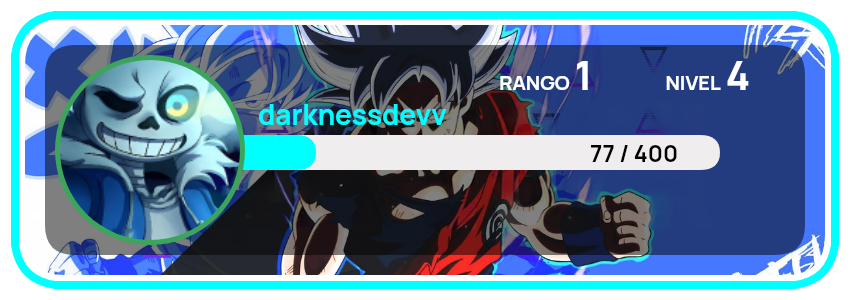
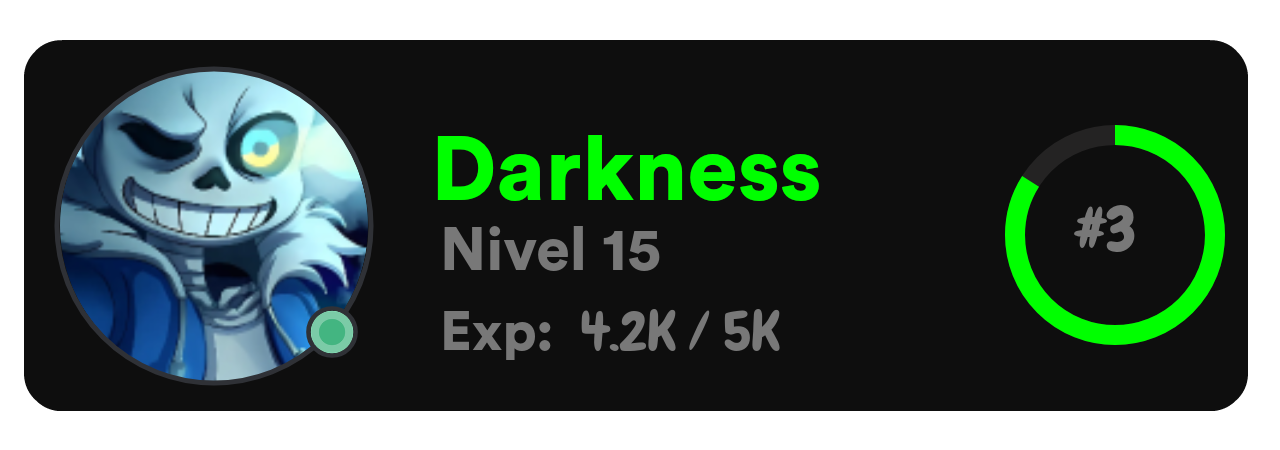
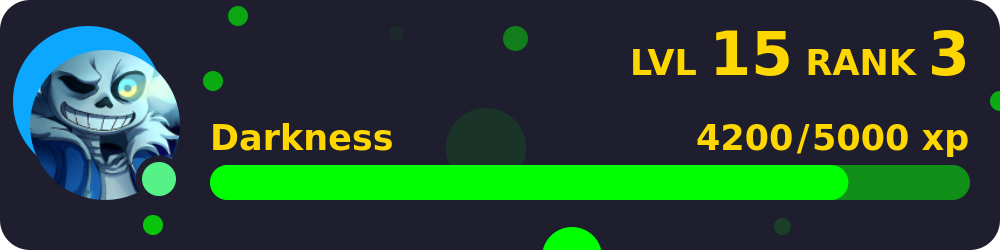
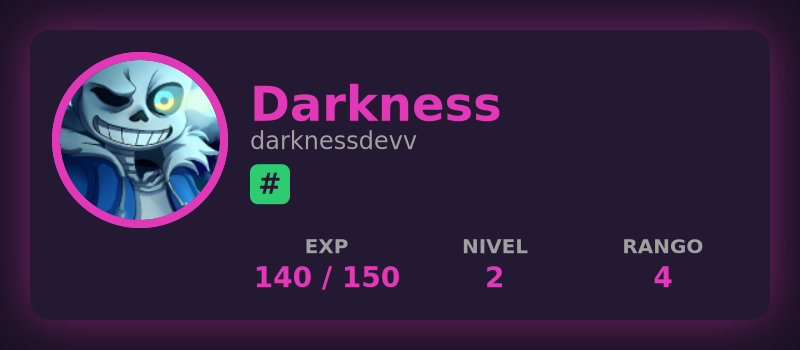
Here are examples of the four different rank card styles available:
**Type 1** (Default):
**Type 2**:
**Type 3**:
**Type 4**:
**Behavior by type:**
- **Type 1:** Uses most parameters, `background` (URL/hex), `border` (color hex)
- **Type 2:** Doesn't use `background`, `color` (text), `border` (color), `textcolorBar`, `tag`
- **Type 3:** Requires `rank`, uses `background` (URL/hex), `border` (avatar border color), `colorBar` (bubble color), `textcolorBar` (XP text color), `color` (username color)
- **Type 4:** Requires `rank`, uses `background` (hex color only), `tag`, `color` (general text color), `border` (avatar border width), `colorBar` (progress bar color)
#### Level Up Card Generation
```javascript
const response = await nexus.generateLevelUpCard({
avatar: "https://example.com/avatar.png",
backround: "#1a1a1a",
username: "CoolUser",
levels: [10, 11],
border: "#ffffff",
avatarBorder: "#ff5500",
opacity: 0.7
});
console.log(response.result);
```
**Parameters:**
- `avatar` (string, required): URL of user's avatar
- `backround` (string, required): Background color (hex) or image URL
- `username` (string, required): User's name
- `levels` (array|object, required): Previous and new level info (e.g., `[10, 11]` or `{"old": 10, "new": 11}`)
- `border` (string, optional): Card border color (hex)
- `avatarBorder` (string, optional): Avatar border color (hex)
- `opacity` (number, optional): Overlay opacity (0-1)
## ⚠️ Error Handling
The package throws errors with descriptive messages when API requests fail:
```javascript
try {
const response = await nexus.chatGPT({
text: "Hello",
userID: "user123"
});
console.log(response);
} catch (error) {
console.error("Error:", error.message);
}
```
## 📄 License
MIT
## 👨💻 Author
DarknessDev
## 🔗 Links
- [Discord Server](https://discord.gg/9d8MP9gRbz) - Join to get your API key
- [GitHub Repository](https://github.com/DarknessDEVV/-mvkproject-nexus)
- [NPM Package](https://www.npmjs.com/package/@mvkproject/nexus)
- [Documentation](https://nexus.adonis-except.xyz/)