@molteni/export-csv
Version:
Quick and simply export JSON and tables data to CSV
79 lines (59 loc) • 2.34 kB
Markdown
https://marco.dev/2017/03/05/angular-and-javascript-export-your-data-to-csv-using-typescript/
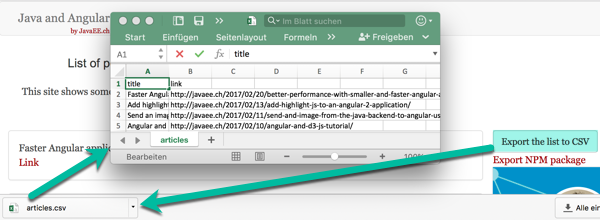
Many js applications show tables and data. Very often the business users need the possibility to export their data in excel.
Most of the time a simple export (no server required) is enough.
## Description
This package easily export to the CSV the content of an array of objects (JavaScript or JSON, e.g. table of data on the screen) to a format compatible with Excel.
The generated document is in UTF-8 with BOF. This allows the characters to be correctly showed in Excel.
## Features
- The library has been written in Typescript and target Angular (1.x, >=2).
- It is possible to decide which columns export and in which order.
- UTF-8 supported
## Installation
```
npm i @molteni/export-csv --save
```
or
add to your _package.json_ in the '_dependencies_' : "_@molteni/export-csv": "^0.0.3_",
## Mime
Until version 0.0.6 the mime used is `text\plain`. From version 0.0.7 the mime type is `text\csv`.
## Usage
In Angular import the library with:
_import {ExportToCSV} from "@molteni/export-csv";_
Use the library:
_Export only one specific columns_
exportColumnsToCSV(JSONListItemsToPublish : any[], fileName : string, columns : string[]);
```
exporter = new ExportToCSV();
exporter.exportColumnsToCSV(this.blogArticles, "filename", ["title"])
```
```
exporter = new ExportToCSV();
objectToExport = [{column : 'äàü£™ , ®, ©,'}, {column: 'second row'}];
exporter.exportColumnsToCSV(objectToExport, "filename", ["column"])
```
_Export all the columns_
exportAllToCSV(JSONListItemsToPublish : any[], fileName : string);
```
var exporter = new ExportToCSV();
exporter.exportColumnsToCSV(this.blogArticles, "filename")
```
_Configure the character to use as separator_
By default the character ';' is used for the generation of the file.
E.g.:
```
1;Test
```
If you need to generate the file with a different separator you can pass it as parameter, e.g.:
```
var exporter = new ExportToCSV();
exporter.exportColumnsToCSV(this.blogArticles, 'filename', {separator: ','});
```
The generated file will use the defined separator, e.g.:
```
1,Test
```