@moartube/moartube-node
Version:
A free, open-source, self-hosted, anonymous, decentralized video/live stream platform. Scalable via Cloudflare, works in the cloud or from home WiFi.
346 lines (250 loc) • 13.6 kB
Markdown
<img src="https://github.com/MoarTube/MoarTube-Node/assets/26640616/2dacfc1c-dbd0-4c71-b9a5-b11ac67d290f" alt="logo" width="200"/>
# MoarTube-Node
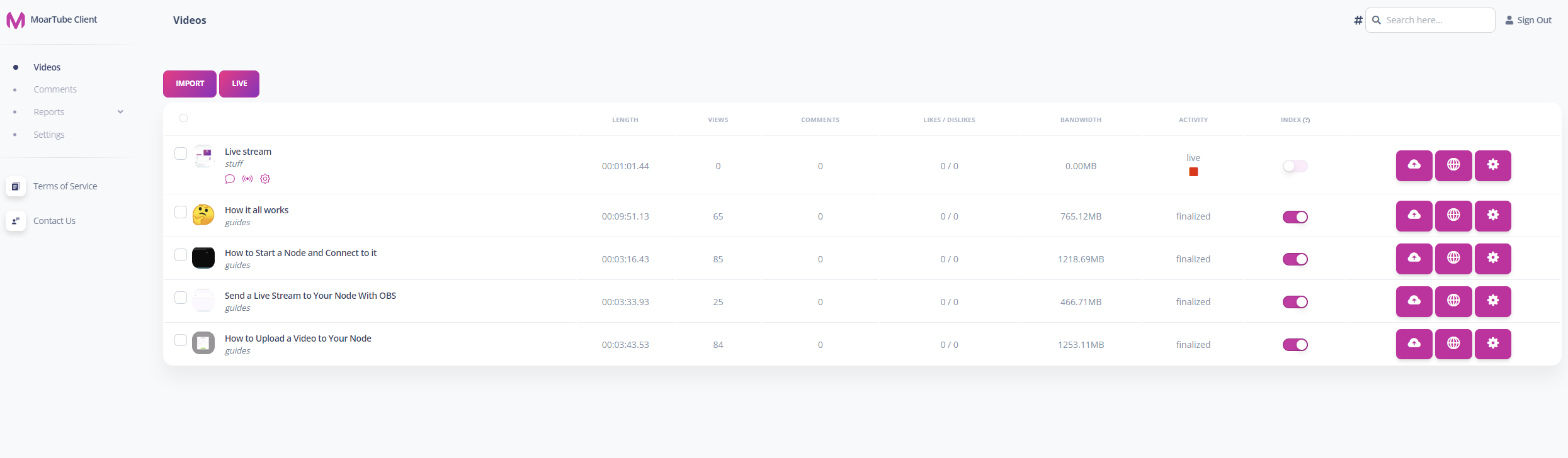
Welcome to **MoarTube Node**, the server-side software for hosting your own videos and live streams! This cross-platform, terminal-based Node.js Express application is managed by the [MoarTube Client](https://github.com/MoarTube/MoarTube-Client). Whether you want to share your node’s videos with [MoarTube](https://www.moartube.com) or run your node privately, MoarTube gives you the freedom to do it your way.
[TL;DR: Watch the Quickstart Video](https://www.moartube.com/guides/moartube-quick-start)
# 🚀 How to Get Started
Welcome to the **MoarTube Node setup guide**! Follow these simple steps to get your MoarTube Node up and running. Don’t worry—MoarTube is designed to be so easy to set up and use, you’ll be done in minutes.
When you’re ready, make sure to check out the [MoarTube Client](https://github.com/MoarTube/MoarTube-Client) if you haven’t already.
# Table of Contents
- [Features](#features)
- [System Requirements](#system-requirements-lightweight-flexible-and-powerful)
- [Prerequisites](#prerequisites)
- [Docker](#docker)
- [npm](#npm)
- [git](#git)
- [script (Ubuntu Linux)](#script-ubuntu-linux)
- [Installation Methods](#installation-methods)
- [Docker](#dockerhub)
- [npm](#npm-1)
- [git](#git-1)
- [script (Ubuntu Linux)](#script-ubuntu-linux-1)
- [Next Steps](#next-steps)
- [Default Login Credentials](#default-login-credentials)
- [Cloudflare](#cloudflare)
- [Get MoarTube Client](#get-moartube-client)
- [Guides](#guides)
- [Ubuntu Linux Node.js install Guide](#ubuntu-linux-nodejs-install-guide)
- [Ubuntu Linux Autostart Guide](#ubuntu-linux-autostart-guide)
# Features
## 🖥️ Platform Support
- Cross-platform compatibility: **Windows**, **macOS**, and **Linux**
- Capable of running on a **[Raspberry Pi Zero 2 W](https://www.raspberrypi.com/products/raspberry-pi-zero-2-w/)**
- Run your node **Privately** or **publicize** your videos and streams on [MoarTube](http://www.moartube.com)
- MoarTube Client performs **video and stream processing** on your local machine
- MoarTube Node handles **storage and distribution** of your content
- Host your node:
- **In the cloud**
- **On your home WiFi**
## 📹 Video & Streaming Features
- **Video on Demand (VoD)** and **HLS Live Streaming**
- Supported formats:
- **HLS** *(H.264, AAC)*
- **MP4** *(H.264, AAC)*
- **WEBM** *(VP9, Opus)*
- **OGV** *(VP8, Opus)*
- Transcoding capabilities:
- Convert **MP4/WEBM** videos to **HLS/MP4/WEBM/OGV**
- Transcode **RTMP streams** ([e.g., from OBS](https://www.moartube.com/guides/how-to-live-stream-obs)) into **HLS live streams**
- Video resolutions: **2160p**, **1440p**, **1080p**, **720p**, **480p**, **360p**, **240p**
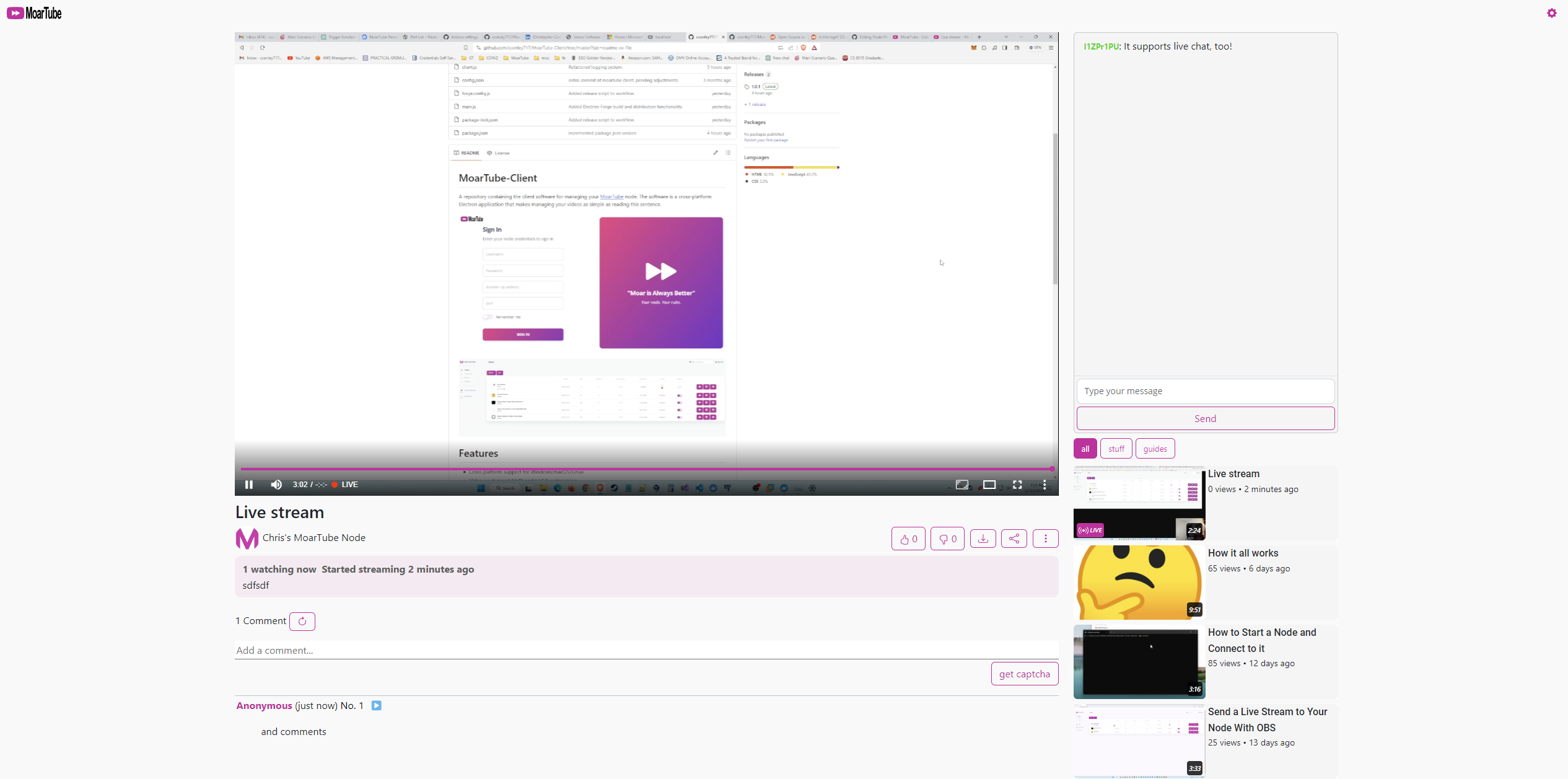
- Video player modes:
- **Streamer Mode**
- **Theater Mode**
- **Fullscreen Mode**
- **Anonymous Comments & Live Stream Chat**:
- Foster engagement while maintaining user privacy
## 💾 Data Processing, Storage, Distribution
- Processing
- **CPU** and **GPU** support
- Nvidia, AMD
- Windows Only
- Storage
- Local database storage using **SQLite**
- Decentralize your node with a remote **Postgres** database
- **File system** to store your videos and live streams locally on your node
- **S3-compatible provider** to store your videos and live streams in the cloud
- Amazon Web Services (AWS), DigitalOcean Spaces, Minio, etc...
- **path-style** and **vhost-style** URL compatibility
- Distribution
- Leverage Cloudflare's CDN for global content distribution
## ⚙️ Admin & Moderation
- **Admin Panel**
- Managing videos and live streams
- **Reports Section**:
- Track and moderate comments and videos
- **Comment Monitoring Overview**:
- Includes moderation tools
## 💵 Monetization & Promotion
- Monetization via cryptocurrency:
- Accept **ETH** and **BNB** via MetaMask
- Provide **wallet addresses** to your viewers for donations
- Promote your node by providing links to:
- **Social media platforms**
- **Websites**
- **External platforms**
## 🛠️ Advanced Features
- [**Cloudflare CDN**](https://www.moartube.com/guides/how-to-enable-cloudflare-cdn):
- Cloudflare's **global network** facilitates mass data propagation for audiences of any size, anywhere.
- Data is transmitted throughout Cloudflare's **global network** within milliseconds of beng requested.
- Available to a free-tier Cloudflare account.
- [**Cloudflare Turnstile**](https://www.moartube.com/guides/how-to-enable-cloudflare-turnstile):
- Next-generation **bot detection** and **human verification** without intrusive captchas.
- Available to a free-tier Cloudflare account.
- [**Postgres**](https://www.moartube.com/guides/how-to-configure-database)
- Remote database storage for video and live stream metadata and information.
- Host your database **anywhere**.
- [**S3 Providers**](https://www.moartube.com/guides/how-to-configure-storage)
- Remote storage for video and live stream content.
- Seemingly **unlimited** storage size and can meet **high demand**.
- cheap and affordable
- Compatible with any S3 provider that conforms to the AWS S3 specification.
- [**Dual Box Compatibility**](https://www.moartube.com/guides/how-to-dual-box):
- Broadcast an OBS RTMP stream to a dedicated processing system running the MoarTube Client.
- Can broadcast to a dedicated processing system over LAN or WAN.
- No plugins like NDI required.
- [**GPU Acceleration**](https://www.moartube.com/guides/how-to-enable-gpu-acceleration):
- Supports **Nvidia** and **AMD** GPUs for accelerated encoding/decoding (Windows only).
## 🏆 Why Choose MoarTube?
MoarTube empowers you to take control of your media hosting with privacy, decentralization, and features designed to rival major platforms while remaining lightweight, accessible, and cost-effective, all from a single node.

# System Requirements: Lightweight, Flexible, and Powerful
MoarTube is designed to be lightweight and accessible, making it the most resource-efficient self-hosted video and live streaming solution available today.
## 📋 **Minimal Requirements**
- **Node.js** is the only requirement to run a MoarTube Node, and it's supported on all major operating systems.
- MoarTube Node **efficiently** operates on even the most resource-constrained systems.
- Runs comfortably on a VPS with 1GB RAM and 1 vCPU.
- Can run on a [**Raspberry Pi Zero 2 W**](https://www.raspberrypi.com/products/raspberry-pi-zero-2-w/).
- Compatible with **Node.js v20 and later**.
## ⚙️ **Resource Efficiency**
- **MoarTube Node's** footprint is remarkably small because most computationally heavy tasks, like encoding and memory-intensive operations, are performed on your local machine by the **MoarTube Client**.
- Your node's responsibilities are **storage and distribution**, keeping its resource demands low so that it can run on just about anything.
- MoarTube Node is **multi-threaded**, utilizing the full potential of its system's CPU to ensure optimal operation.
## 🌐 **Decentralize your Deployment**
- Designate external providers such as **Postgres** and **S3** to store and distribute your content for greater scalability.
- Your node becomes completely disposable. Content and metadata are stored **externally** (e.g., S3, Postgres), allowing you to re-deploy your node at any time without data loss. Just tell your new node where its data is and you're back **online**.
- [Cloudflare](https://www.moartube.com/guides/how-to-enable-cloudflare-cdn) eliminates much of the strain on your storage distribution by leveraging the **world’s largest CDN**, giving your node the same global delivery reach as **major platforms**.
## 🌍 Run Your Node Anywhere
Whether on a cloud VPS, personal computer, or compact device like a Raspberry Pi, MoarTube gives you full control. MoarTube’s efficiency and flexibility make it the ideal solution for hosting media **anywhere**, on virtually **any hardware**, for audiences of **any size**.
# Prerequisites
Observe the corresponding prerequisite for your installation method.
## Docker
If you're using Docker, make sure that it is installed on your machine.
## npm
If you're using npm to install the software, make sure that [Node.js and npm](https://nodejs.org/en) are installed on your machine.
## git
You can clone the repo, but make sure that [Node.js and npm](https://nodejs.org/en) are installed on your machine.
## script (Ubuntu Linux)
A script to automate your entire setup. Installs Node.js using Snap, clones the git repo using git, installs dependencies using npm, and sets the node to autostart on system boot using systemctl
# Installation Methods
Choose any of the following installation methods.
## [DockerHub](https://hub.docker.com/r/moartube/moartube-node/tags)
MoarTube Node is available on DockerHub and can be easily set up using Docker Desktop or via the command line for a more manual approach.
### Using [Docker Desktop](https://www.docker.com/products/docker-desktop/)
You can manage MoarTube Node using Docker Desktop by searching for `moartube/moartube-node` on DockerHub within the Docker Desktop interface.
### Manual Docker Setup
To set up MoarTube Node manually using Docker, execute the following command in your terminal. This command pulls the latest MoarTube Node image, creates a container named `moartube-node-1`, assigns it port 8181, and configures it to auto-restart unless manually stopped.
#### For x86-64 architecture:
```bash
docker run --platform linux/amd64 -d --restart unless-stopped -p 8181:80 --name moartube-node-1 moartube/moartube-node:latest
```
#### For ARM64 architecture:
```bash
docker run --platform linux/arm64 -d --restart unless-stopped -p 8181:80 --name moartube-node-1 moartube/moartube-node:latest
```
*note: the Docker container uses [**/data**](https://github.com/MoarTube/MoarTube-Node/blob/master/Dockerfile#L19) for its volume container path.*
## [npm](https://www.npmjs.com/package/@moartube/moartube-node)
You can install MoarTube Node globally:
```bash
npm i @moartube/moartube-node -g
```
And run from the command-line globally:
```bash
moartube-node
```
<br>
You can install MoarTube Node locally:
```bash
npm i @moartube/moartube-node
```
And run from the command-line locally:
```bash
node node_modules/@moartube/moartube-node/moartube-node.js
```
## [git](https://github.com/MoarTube/MoarTube-Node)
```bash
git clone https://github.com/MoarTube/MoarTube-Node
```
Open a terminal in the cloned directory and run:
```bash
npm install
```
```bash
node moartube-node.js
```
## [script (Ubuntu Linux)](https://www.moartube.com/bash/install/node)
```bash
bash <(wget -O - https://www.moartube.com/bash/install/node)
```
# Next Steps
## Default Login Credentials
The default login credentials for your node are below. Be sure to change these upon logging in.
By default, MoarTube Node listens on port 80.
**username**: admin<br/>**password**: admin
## Cloudflare
At this point, you should probably look into creating a free [Cloudflare account](https://www.cloudflare.com/network/) so that you can [give your node CDN capabilities](https://www.moartube.com/guides/how-to-enable-cloudflare-integration). With its global network, Cloudflare will distribute most of your node's videos and live streams.
## Get MoarTube Client
If you haven't already, it's time to get the [MoarTube Client](https://github.com/MoarTube/MoarTube-Client).
# Guides
## Ubuntu Linux Node.js Install Guide
Ubuntu Linux comes pre-installed with the Snap package manager. It's the easiest way to install Node.js.
Run the command:
```bash
sudo snap install node --classic --channel=21
```
## Ubuntu Linux Autostart Guide
This guide will configure your node to autostart on system boot.
Stop the Moartube Node software if it is running
Run the command:
```bash
sudo nano /etc/systemd/system/moartube-node.service
```
Below is an example of a moartube-node systemd service unit file
Make any necessary changes and paste it into the nano text editor
```
[Unit]
Description=MoarTube Node
After=network.target
[Service]
Type=simple
User=root
ExecStart=/snap/bin/node /home/Moartube-Node/moartube-node.js
Restart=always
[Install]
WantedBy=multi-user.target
```
Reload all services.
```bash
sudo systemctl daemon-reload
```
Make the moartube-node service autostart on system boot.
```bash
sudo systemctl enable moartube-node
```
Start the moartube-node service.
```bash
sudo systemctl start moartube-node
```
View the status of the moartube-node service
```bash
sudo systemctl status moartube-node
```
### some commands of interest
Stop the moartube-node service.
```bash
sudo systemctl stop moartube-node
```
Restart the moartube-node service.
```bash
sudo systemctl restart moartube-node
```