@miyax/ganttjs
Version:
An open source gantt chart for the web
231 lines (197 loc) • 5.12 kB
Markdown
An open source gantt chart for the web
----
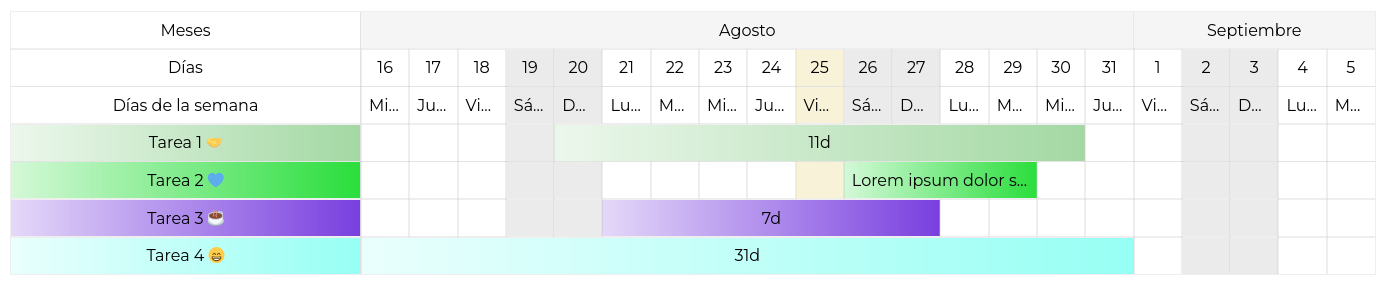
```bash
npm i @miyax/ganttjs
```
or
```bash
yarn add @miyax/ganttjs
```
Create a html element
```html
<div id="gantt-chart"></div>
```
```javascript
import { GanttChart, ES } from '@miyax/ganttjs'
import '@miyax/ganttjs/src/theme/default.css'
// Define the tasks
const tasks = [
{
id: "1",
name: "Hello world!!",
start: new Date("2023/08/09"),
end: new Date("2023/08/15"),
color: "#CC8888",
description: "Lorem ipsum dolor sit amet consectetur adipisicing elit.",
}
]
// Define the element
const ganttChartHtmlElement = document.getElementById("gantt-chart")
// Define the period
const startGanttChart = new Date("2023/08/01")
const endGanttChart = new Date("2023/08/10")
// Create a new gantt chart
const gantt = new GanttChart() // or new GanttChart(ganttChartHtmlElement)
// Basic
gantt
.element(ganttChartHtmlElement) // set the element
.period(startGanttChart, endGanttChart) // show the period from 2023/08/01 to 2023/08/31
.tasks(tasks) // add the tasks
.render() // render the gantt chart
// All options
gantt
.element(ganttChartHtmlElement) // set the element
.period(startGanttChart, endGanttChart) // show the period from 2023/08/01 to 2023/08/31
// .todayTo(2) // show the period from today to 2 days after
.tasks(tasks) // add the tasks
.widthHeader('350px') // set the width of the header, default is 150px
.withWeekDays() // show the week days
.withMonthDay() // show the month day
.withYearMonths() // show the year months
.withTime() // show the duration of the tasks
.showHeaders(false) // disable or enable the headers, default is true
.i18n(ES) // set the language, default is EN
.render() // render the gantt chart
// Update the gantt chart
const newTask = {
id: "2",
name: "¡¡Hola mundo!!",
start: new Date("2023/08/09"),
end: new Date("2023/08/15"),
color: "#88CC88",
}
tasks.push(newTask)
gantt
.task(tasks) // add the tasks
.period(new Date("2023/08/01"), new Date("2023/08/31")) // show the period from 2023/08/01 to 2023/08/31
.render() // update the gantt chart
```
```javascript
// Selected task event
ganttChartId.addEventListener("selected", (e) => console.log('Task selected', e.detail))
```
Sandbox example: https://codesandbox.io/s/dawn-browser-k66vzr?file=/src/App.vue
```html
<template>
<main>
<form @submit.prevent="update" class="form">
<input type="date" v-model="start" />
<input type="date" v-model="end" />
<button type="submit">Update</button>
<button type="button" @click="toggleHeaders">Toggle headers</button>
</form>
<div ref="gantt" @selected="selectedTask"></div>
<div>{{ lastSelectedTask }}</div>
</main>
</template>
<script>
import { GanttChart, ES } from '@miyax/ganttjs'
import '@miyax/ganttjs/src/themes/default.css'
const tasks = [
{
id: "1",
name: "Hello world!!",
start: new Date("2023/08/1"),
end: new Date("2023/08/10"),
color: "#a3d8a3",
},
{
id: "2",
name: "¡¡Hola mundo!!",
start: new Date("2023/08/9"),
end: new Date("2023/08/21"),
color: "#2ade3c",
description: "Lorem ipsum dolor sit amet consectetur adipisicing elit. Quisquam, voluptatum.",
},
]
const gantt = new GanttChart()
export default {
name: 'App',
data() {
return {
toggleHeader: true,
lastSelectedTask: {},
start: '2023-08-01',
end: '2023-08-31'
}
},
mounted() {
gantt
.element(this.$refs.gantt)
.tasks(tasks)
.period(new Date("2023/08/01"), new Date("2023/08/31"))
.widthHeader('350px')
.withWeekDays()
.withMonthDay()
.i18n(ES)
.render()
},
methods: {
update() {
const start = new Date(this.start)
const end = new Date(this.end)
gantt
.period(start, end)
.render()
},
toggleHeaders() {
this.toggleHeader = !this.toggleHeader
gantt
.showHeaders(this.toggleHeader)
.render()
},
selectedTask(task) {
this.lastSelectedTask = task.detail
console.log(task.detail)
},
}
}
</script>
<style scoped>
.form {
display: flex;
justify-content: center;
align-items: center;
padding: 1rem;
gap: 1rem;
}
</style>
```
Createa new object with the translations
```js
const ES = {
daysOfWeek: {
monday: 'Lunes',
tuesday: 'Martes',
wednesday: 'Miércoles',
thursday: 'Jueves',
friday: 'Viernes',
saturday: 'Sábado',
sunday: 'Domingo',
},
monthsOfYear: {
january: 'Enero',
february: 'Febrero',
march: 'Marzo',
april: 'Abril',
may: 'Mayo',
june: 'Junio',
july: 'Julio',
august: 'Agosto',
september: 'Septiembre',
october: 'Octubre',
november: 'Noviembre',
december: 'Diciembre',
},
monthsTitle: 'Meses',
daysTitle: 'Días',
dayOfweekTitle: 'Días de la semana',
}
```