@mescius/dsdataviewer
Version:
Document Solutions Data Viewer
192 lines (144 loc) • 9.09 kB
Markdown
# Document Solutions Data Viewer
A full-featured JavaScript Data viewer that comes with Document Solutions for Excel, both the [.NET](https://developer.mescius.com/document-solutions/dot-net-excel-api?utm_source=NPM&utm_medium=DocSols&utm_campaign=DsDataViewer-Listing) and [Java](https://developer.mescius.com/document-solutions/java-excel-api?utm_source=NPM&utm_medium=DocSols&utm_campaign=DsDataViewer-Listing) editions.
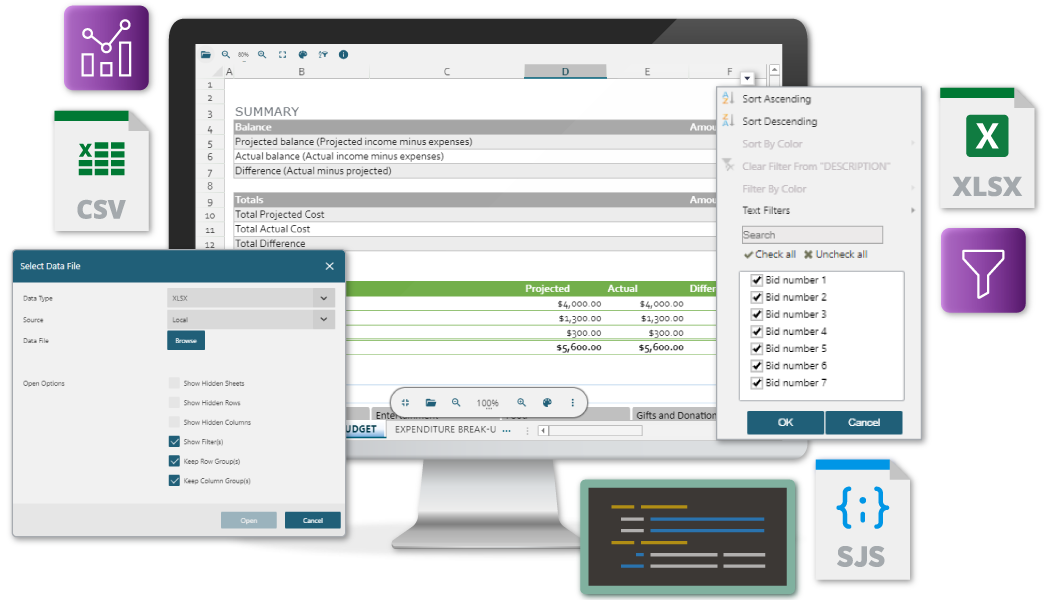
__Document Solutions Data Viewer__ (__DsDataViewer__, formerly __GcDataViewer__) is a fast, modern JavaScript-based data viewer that runs in all major browsers. The DsDataViewer is a unified client-side viewer that can load and preview any data-related document (such as Excel, CSV, SSJSON, [SJS](https://developer.mescius.com/document-solutions/dot-net-excel-api/import-export-sjs-file?utm_source=NPM&utm_medium=DocSols&utm_campaign=DsDataViewer-Listing), Apache Arrow, Parquet, etc) all in one place.
The viewer can be used as a cross-platform solution to view data documents on Windows, MAC, Linux, iOS, and Android devices.
DsDataViewer is included in Document Solutions for Excel (DsExcel, formerly GcExcel) both the [.NET](https://developer.mescius.com/document-solutions/dot-net-excel-api?utm_source=NPM&utm_medium=DocSols&utm_campaign=DsDataViewer-Listing) and [Java](https://developer.mescius.com/document-solutions/java-excel-api?utm_source=NPM&utm_medium=DocSols&utm_campaign=DsDataViewer-Listing) editions - a feature-rich cross-platform SpreadSheet API library for .NET and Java.
DsDataViewer provides a rich client side JavaScript object model, see the [client API documentation](https://developer.mescius.com/document-solutions/javascript-data-viewer/api/README?utm_source=NPM&utm_medium=DocSols&utm_campaign=DsDataViewer-Listing) for additional information.
Product highlights:
- Works in all modern browsers, including Edge, Chrome, FireFox, Opera, Safari
- Works with frameworks such as React, Preact, Angular, Vue
- Allows opening data files from local disks
- Supports data document [formats](https://developer.mescius.com/document-solutions/javascript-data-viewer/docs/load-a-file?utm_source=NPM&utm_medium=DocSols&utm_campaign=DsDataViewer-Listing) including XLSX, SSJSON, CSV, SJS, Apache Arrow, Parquet
- Support data interactions using sort, filter, and slicer
- Extensive viewer support for Excel features such as Conditional Formatting, Databars, Tables, Pivots, Group outlines Password-protected, frozen panes, and many others
- Can seamlessly integrate this JS data viewer with DsExcel (.NET or Java edition) to take advantage of these powerful Excel server-side APIs
- Offers a customizable toolbar layout allowing users to hide or reorder buttons
- ...and more.
## See it in action
- Go to [Document Solutions Data Viewer demos]( https://developer.mescius.com/document-solutions/javascript-data-viewer/demos/Overview?utm_source=NPM&utm_medium=DocSols&utm_campaign=DsDataViewer-Listing)
to explore the various features of DsDataViewer.
## Latest changes
## [8.1.0] - 04/01/2025
### Changelog
- The product version to 8.1.0 match Document Solutions for Excel (DsExcel) version.
## [8.0.0] - 09/12/2024
### Added
- Load Arrow/Parquet files.(DOCXLS-10867)
- Enhanced performance when loading large data from CSV files.(DOCXLS-10868)
## [7.2.0] - 01/08/2024
### Added
- Allow data search capability.(DOCXLS-8730)
- Extract data from any/selected cell programmatically.(DOCXLS-10192)
### Fixed
- Performance issues on loading large Excel files.(DOCXLS-10768)
## [7.1.0] - 04/01/2024
### Changelog
- Version Update: Updated to 7.1.0
## [7.0.0] - 11/30/2023
### Important note
- This is the initial release of the @mescius/dsdataviewer package. It replaces @grapecity/gcdataviewer, and provides the same functionality, ensures future enhancements, and is backwards compatible with @grapecity/gcdataviewer. Existing subscriptions will continue to work with DsDataViewer.
### Changes
- Product version raised to 7.0.0 to match Document Solutions for Excel (DsExcel) version.
- GcDataViewer class is renamed to DsDataViewer
## [1.2.0] - 07/28/2023
### Added
- Support keyboard shortcuts.(DOCXLS-6805)
- Load SpreadJS .sjs files.(DOCXLS-8005)
- Support numerical count aggregation in status bar.(DOCXLS-8258)
## [1.1.0] - 04/28/2023
### Added
- UI improvements.(DOCXLS-7022)
- Load data files stored on the web/from URL.(DOCXLS-7131)
- Customize the toolbar to remove or reorder buttons.(DOCXLS-7132)
- Support 'Show/Hide Notes' button in toolbar.(DOCXLS-7133)
- Support sorting of values.(DOCXLS-7145)
- Support filtering of values.(DOCXLS-7146)
- Support charts/pictures/shapes/slicers/SpreadJS barcodes.(DOCXLS-7147)
- Support interaction with tables.(DOCXLS-7149)
- Support Pro license.(DOCXLS-7266)
### See __CHANGELOG.​md__ for release notes.
## Installation
### To install the latest release version:
```sh
npm install @mescius/dsdataviewer
```
### To install from the zip archive:
Go to [https://developer.mescius.com/document-solutions/javascript-data-viewer](https://developer.mescius.com/document-solutions/javascript-data-viewer?utm_source=NPM&utm_medium=DocSols&utm_campaign=DsDataViewer-Listing) and follow the directions on that page to get the DsDataViewer package, your 30-day evaluation, and deployment license key.
The license key will allow you to develop and deploy your application to a test server.
Unzip the viewer distribution files (list below) to an appropriate location accessible from the web page where the viewer will live.
Viewer zip includes the following files:
- README.​md (this file)
- dsdataviewer.js
- package.json
- index.html (sample page)
- index.d.ts (typeScript declaration file)
- CHANGELOG.​md
- Theme files:
- themes/dark.css
- themes/dark-yellow.css
- themes/gc-blue.css
- themes/light.css
- themes/light-blue.css
- themes/viewer.css
- docs/index.html(api doc)
## Documentation
Online documentation is available [here](https://developer.mescius.com/document-solutions/javascript-data-viewer/docs/Overview?utm_source=NPM&utm_medium=DocSols&utm_campaign=DsDataViewer-Listing).
## Licensing
Document Solutions Data Viewer is a commercially licensed product. Please [visit this page](https://developer.mescius.com/document-solutions/licensing?utm_source=NPM&utm_medium=DocSols&utm_campaign=DsDataViewer-Listing) for details.
## Getting more help
Document Solutions Data Viewer is distributed as part of Document Solutions for Excel([.NET](https://developer.mescius.com/document-solutions/dot-net-excel-api?utm_source=NPM&utm_medium=DocSols&utm_campaign=DsDataViewer-Listing) and [Java](https://developer.mescius.com/document-solutions/java-excel-api?utm_source=NPM&utm_medium=DocSols&utm_campaign=DsDataViewer-Listing) Editions).
You can ask any questions about the viewer, or report bugs using the
[Document Solutions for Excel, .NET public forum](https://developer.mescius.com/forums/documents-excel?utm_source=NPM&utm_medium=DocSols&utm_campaign=DsDataViewer-Listing) or [Document Solutions for Excel, Java public forum](https://developer.mescius.com/forums/documents-excel-java?utm_source=NPM&utm_medium=DocSols&utm_campaign=DsDataViewer-Listing).
## More details on using the viewer
### Adding the viewer to an HTML page:
```HTML
<!DOCTYPE html>
<html lang="en">
<head>
<meta charset="utf-8">
<!-- Limit content scaling to ensure that the viewer zooms correctly on mobile devices: -->
<meta name="viewport" content="width=device-width, initial-scale=1.0, minimum-scale=1.0, maximum-scale=1.0, user-scalable=no" />
<meta name="theme-color" content="#000000" />
<title>Document Solutions Data Viewer</title>
<script type="text/javascript" src="dsdataviewer.js"></script>
<script>
function loadDataViewer(selector) {
var viewer = new DsDataViewer(selector);
}
</script>
<style>
#root { height:100%}
</style>
</head>
<body onload="loadDataViewer('#root')">
<div id="root"></div>
</body>
</html>
```
### How to license the viewer:
Set the DsDataViewer Deployment key to the DsDataViewer.LicenseKey property before you create and initialize the data viewer.
This must precede the code that references the js files.
```javascript
// Add your license
DsDataViewer.LicenseKey = 'xxx';
// Add your code
const viewer = new DsDataViewer("#viewer1");
```
### Using the viewer in frameworks such as React, Preact, Angular, Vue etc.
Add a reference to the viewer script.
```HTML
<body>
<script type="text/javascript" src="dsdataviewer.js"></script>
...
```
Add the placeholder to your App template, e.g.:
```HTML
<section id="dataviewer"></section>
```
Render the viewer:
```javascript
let viewer = new DsDataViewer('section#dataviewer');
```
---
_The End._