@mantic-ui/fomantic-ui-angular
Version:
Fomantic UI Angular theme for mantic UI. Requires @mantic-ui/angular
111 lines (79 loc) • 3.18 kB
Markdown
# mantic UI
| [Documentation](https://mantic-ui.ky-programming.de/semantic) | [Github Repository](https://github.com/KY-Programming/mantic-ui) | [Support](https://support.ky-programming.de/) |
[Fomantic UI](https://fomantic-ui.com/) theme for [mantic UI](https://www.npmjs.com/package/@mantic-ui/angular) Angular components
Requires [@mantic-ui/angular](https://www.npmjs.com/package/@mantic-ui/angular)
## !!! This theme is currently not yet fully implemented and tested, and probably contains some bugs. So please use the [Semantic UI Theme](https://www.npmjs.com/package/@mantic-ui/semantic-ui-angular) !!!
## Example
A common button with some styling
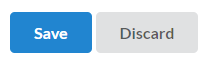
````
<m-button primary (click)="...">
Save
</m-button>
<m-button (click)="...">
Discard
</m-button>
````
## Getting Started with Fomantic UI Theme
Install base package for angular and Fomantic UI theme
```
npm i @mantic-ui/angular @mantic-ui/fomantic-ui-angular
```
### Import theme in AppModule
app.module.ts
```
import { FomanticUiModule } from '@mantic-ui/fomantic-ui-angular';
@NgModule({
imports: [
...
FomanticUiModule
]
})
export class AppModule { }
```
### Apply style in AppComponent
app.component.html
```
<m-fomantic-ui-theme>
<!-- Import common styles for site -->
<m-fomantic-ui-site></m-fomantic-ui-site>
<!-- Import reset to normalize values for CSS properties -->
<m-fomantic-ui-reset></m-fomantic-ui-reset>
<!-- Import local hosted lato font -->
<m-fomantic-ui-lato-local></m-fomantic-ui-lato-local>
</m-fomantic-ui-theme>
```
As alternative for <m-fomantic-ui-theme>, you can use a CDN
```
<link rel="stylesheet" href="https://cdn.jsdelivr.net/npm/fomantic-ui@2.4.2/dist/fomantic.min.css">
```
Or install via [Fomantic Docs](https://fomantic-ui.com/introduction/getting-started.html)
### Configure package assets usage
angular.json
```
"projects": {
"<your-project-name>": {
"architect": {
"build": {
"options": {
"assets": [
// Copy all package assets to app asset folder on build
{
"glob": "**/*",
"input": "./node_modules/@mantic-ui/fomantic-ui-angular/assets",
"output": "/assets/"
}
}
}
}
}
}
}
```
## Credits
Original css from [Fomantic UI](https://fomantic-ui.com/)
## Work-in-progress
Currently we are not yet done. So please do not expect a perfect framework
If you have a issue, look in our [issue tracker on github](https://github.com/KY-Programming/mantic-ui/issues)
To support us fork our [github repository](https://github.com/KY-Programming/mantic-ui)
[Direct contact](https://support.ky-programming.de/) (German, English) via [email](https://email.support.ky-programming.de/), [WhatsApp](https://whatsapp.support.ky-programming.de/) or join our [Discord server](https://discord.mantic-ui.ky-programming.de/)