@loopback/docs
Version:
Documentation files rendered at [https://loopback.io](https://loopback.io)
75 lines (47 loc) • 2.06 kB
Markdown
# @loopback/example-soap-calculator
Integrating a Calculator SOAP web service with LoopBack 4.
## Overview
This example project shows how to integrate a SOAP web service with LoopBack 4
and expose its methods through the REST API server. Acceptance and Integration
tests are provided.
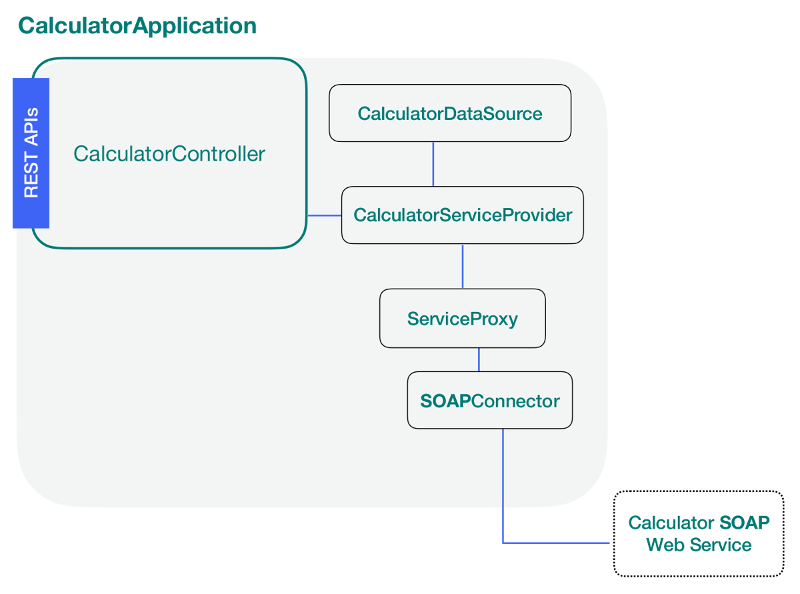
Before each step, you will be presented an image containing the artifacts that
you will be creating in blue.
## Setup
You'll need to make sure you have some things installed:
- [Node.js](https://nodejs.org/en/) at v10 or greater
Lastly, you'll need to install the LoopBack 4 CLI toolkit:
```sh
npm i -g @loopback/cli
```
## Start the Tutorial
Follow the following steps to start building your application:
### Steps
1. [SOAP web service overview](https://loopback.io/doc/en/lb4/soap-calculator-tutorial-web-service-overview.html)
2. [Scaffold the application](https://loopback.io/doc/en/lb4/soap-calculator-tutorial-scaffolding.html)
3. [Add a data source](https://loopback.io/doc/en/lb4/soap-calculator-tutorial-add-datasource.html)
4. [Add a service proxy](https://loopback.io/doc/en/lb4/soap-calculator-tutorial-add-service.html)
5. [Add a controller](https://loopback.io/doc/en/lb4/soap-calculator-tutorial-add-controller.html)
6. [Run and test the application](https://loopback.io/doc/en/lb4/soap-calculator-tutorial-run-and-test.html)
## Try it out
If you'd like to see the final results of this tutorial as an example
application, follow these steps:
### Generate the example using CLI
1. Run the `lb4 example` command to select and clone the soap-calculator
repository:
```sh
lb4 example soap-calculator
```
2. Jump into the directory and then install the required dependencies:
```sh
cd loopback4-example-soap-calculator
```
3. Finally, start the application!
```sh
$ npm start
Server is running at http://127.0.0.1:3000
```
Feel free to look around in the application's code to get a feel for how it
works.
## License
MIT