@kreativsoftware/react-lz-editor
Version:
An open source react editor based on draft-Js and ant design, good support HTML, markdown and Draft Raw format.
242 lines (221 loc) • 11.8 kB
Markdown
[ENGLISH](https://github.com/leejaen/react-lz-editor/blob/master/README.md)
# react-lz-editor
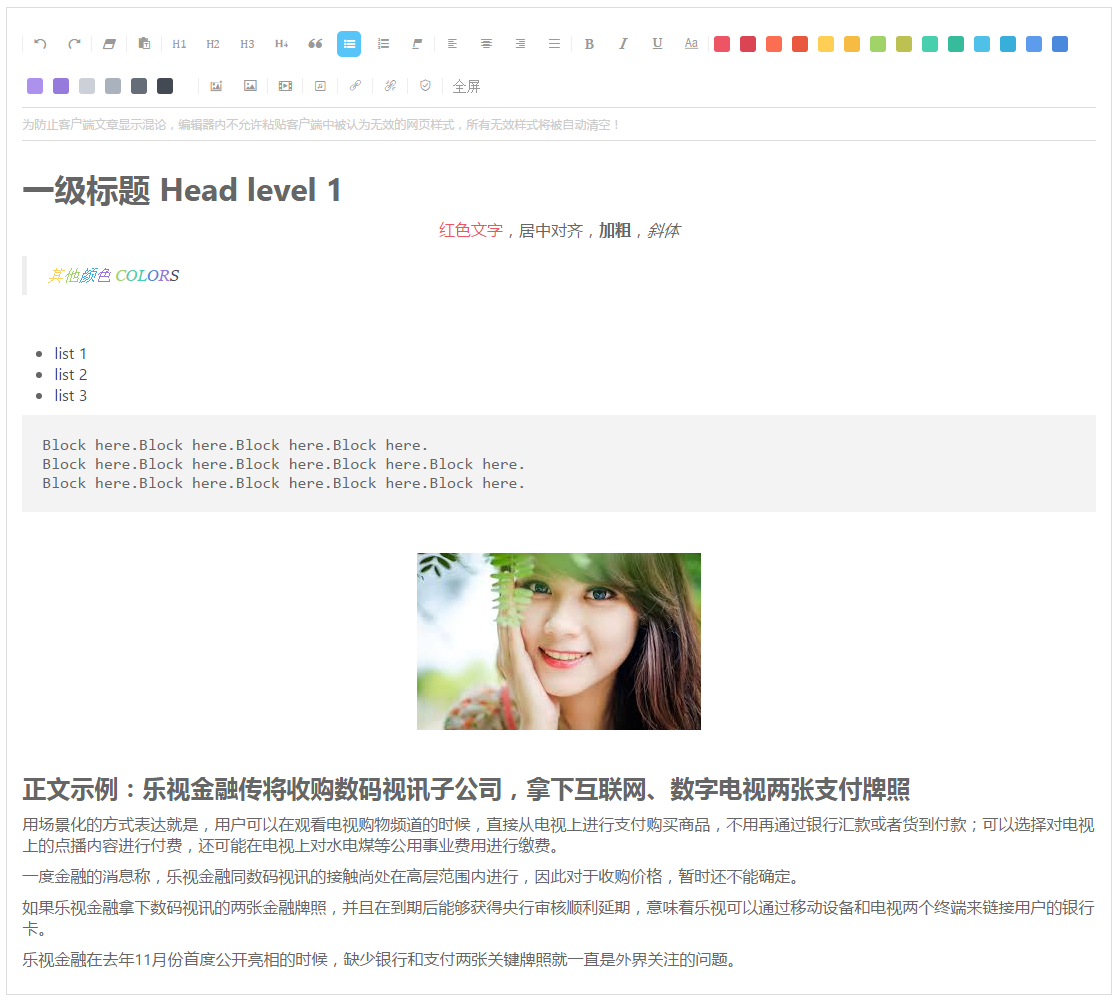
An open source react rich-text editor ( mordern react editor includes media support such as texts, images, videos, audios, links etc. ), development based on Draft-Js and Ant-design, good support html, markdown, draft-raw mode.
一款基于 draft-Js 和 ant-design 实现的 react 富文本编辑器,支持文本、图片、视频、音频、链接等元素插入,同时支持HTML、markdown、draft-raw格式。
## Live demo
[react-lz-editor](https://leejaen.github.io/react-lz-editor/index.html)
Disabled media insert feature on demo page, because of there was no online API support for the time being, here is [The server side API demo in java](https://github.com/leejaen/react-lz-editor/blob/master/java_demo/getQiniuUptoken.java) you may want.
因为上传图片视频多媒体等文件需要后端服务器接口配合,这部分暂时没有实现在线demo接口,所以暂时通过配置去掉了,java版本接口实现示例请参考[示例代码](https://github.com/leejaen/react-lz-editor/blob/master/java_demo/getQiniuUptoken.java)。
# Install
```
npm install react-lz-editor --save
OR
yarn add react-lz-editor
```
Version note: React 15.4.2+ and react-dom 15.4.2+ is required. Antd version at last 2.8.3 in your project is recommended.
版本号说明:react、react-dom 版本必须在15.4.2以上,Antd版本最好在2.8.3以上。
# Git
git+ssh://git@github.com/leejaen/react-lz-editor.git
# Usage & Examples
``` js
import React from 'react';
import ReactDOM from 'react-dom';
// import {LzEditor} from './index'
import hmacsha1 from "hmacsha1";
import {Base64} from "js-base64";
import md5 from "md5";
import findIndex from "lodash/findIndex";
import uniqBy from "lodash/uniqBy";
import LzEditor from './editor/index.jsx'
class Test extends React.Component {
constructor(props) {
super(props);
this.state = {
htmlContent: "",
markdownContent: "## 二级标题 HEAD 2 \n markdown 格式示例 \n ``` 欢迎使用 ```",
rawContent: '{"entityMap":{"0":{"type":"image","mutability":"IMMUTABLE","data":{"src":"https://image.qiluyidian.mobi/4305350813991067' +
'8747.jpg"}},"1":{"type":"image","mutability":"IMMUTABLE","data":{"src":"https://image.qiluyidian.mobi/430535081399106787' +
'47.jpg"}}},"blocks":[{"key":"fr2lj","text":"正文示例","type":"header-one","depth":0,"inlineStyleRanges":[],"entityRanges":[]' +
',"data":{}},{"key":"90kdv","text":"一度金融的消息称,乐视金融同数码视讯的接触尚处在高层范围内进行,因此对于收购价格,暂时还不能确定。","type":"unstyled","depth":0,"inlin' +
'eStyleRanges":[],"entityRanges":[],"data":{}},{"key":"b60ni","text":"如果乐视金融拿下数码视讯的两张金融牌照,并且在到期后能够获得央行审核顺利延期,意味着乐视可以通过移动设' +
'备和电视两个终端来链接用户的银行卡。","type":"unstyled","depth":0,"inlineStyleRanges":[],"entityRanges":[],"data":{}},{"key":"eui4h","text' +
'":"乐视金融在去年11月份首度公开亮相的时候,缺少银行和支付两张关键牌照就一直是外界关注的问题。","type":"unstyled","depth":0,"inlineStyleRanges":[],"entityRanges":[],' +
'"data":{}},{"key":"29t6l","text":" ","type":"atomic","depth":0,"inlineStyleRanges":[],"entityRanges":[{"offset":0,"lengt' +
'h":1,"key":0}],"data":{}},{"key":"7ujeo","text":"","type":"unstyled","depth":0,"inlineStyleRanges":[],"entityRanges":[],' +
'"data":{}},{"key":"3n9d4","text":" ","type":"atomic","depth":0,"inlineStyleRanges":[],"entityRanges":[{"offset":0,"lengt' +
'h":1,"key":1}],"data":{}},{"key":"9r0k2","text":"","type":"unstyled","depth":0,"inlineStyleRanges":[],"entityRanges":[],' +
'"data":{}}]}',
responseList: []
}
this.receiveHtml = this.receiveHtml.bind(this);
this.receiveMarkdown = this.receiveMarkdown.bind(this);
this.receiveRaw = this.receiveRaw.bind(this);
this.onChange = this.onChange.bind(this);
this.beforeUpload = this.beforeUpload.bind(this);
this.getSignature = this.getSignature.bind(this);
this.getPolicy = this.getPolicy.bind(this);
}
receiveHtml(content) {
console.log("recieved HTML content", content);
this.setState({responseList:[]});
}
componentDidMount() {}
receiveMarkdown(content) {
console.log("recieved markdown content", content);
}
receiveRaw(content) {
console.log("recieved Raw content", content);
}
onChange(info) {
// console.log("onChange:", info);
// console.log("upload onChange this.state.files",this.state.files,info)
let currFileList = info.fileList;
currFileList = currFileList.filter((f) => (!f.length));
let url = "http://devopee.b0.upaiyun.com";
//读取远程路径并显示链接
currFileList = currFileList.map((file) => {
if (file.response) {
// 组件会将 file.url 作为链接进行展示
file.url = url + file.response.url;
}
if (!file.length) {
return file;
}
});
let _this = this;
//按照服务器返回信息筛选成功上传的文件
currFileList = currFileList.filter((file) => {
//根据多选选项更新添加内容
let hasNoExistCurrFileInUploadedList = !~findIndex(_this.state.responseList, item => item.name === file.name)
if (hasNoExistCurrFileInUploadedList) {
if (!!_this.props.isMultiple == true) {
_this.state.responseList.push(file);
} else {
_this.state.responseList = [file];
}
}
return !!file.response || (!!file.url && file.status == "done") || file.status == "uploading";
});
currFileList = uniqBy(currFileList, "name");
if (!!currFileList && currFileList.length != 0) {
// console.log("upload set files as fileList", currFileList);
this.setState({responseList: currFileList});
}
_this.forceUpdate();
}
beforeUpload(file) {
console.log("beforeUpload like", file);
}
getSignature(fileName) {
let now = new Date();
let h = hmacsha1('19931944122b23f77681b6ab765648f8', 'POST&/upyun-temp/' + fileName + '&' + now);
let Signature = Base64.encode(h);
return Signature;
}
getPolicy(fileName) {
let now = new Date();
let afterHour = new Date(now.getTime() + 1 * 60 * 60 * 1000); //过期时间1小时后
let policy = Base64.encode(JSON.stringify({
"bucket": "devopee",
"save-key": "/" + fileName,
"expiration": Math.round(afterHour.getTime() / 1000),
"date": now
}));
return policy;
}
render() {
const uploadConfig = {
QINIU_URL: "http://up.qiniu.com", //上传地址,现在暂只支持七牛上传
QINIU_IMG_TOKEN_URL: "http://www.yourServerAddress.mobi/getUptokenOfQiniu.do", //请求图片的token
QINIU_PFOP: {
url: "http://www.yourServerAddress.mobi/doQiniuPicPersist.do" //七牛持久保存请求地址
},
QINIU_VIDEO_TOKEN_URL: "http://www.yourServerAddress.mobi/getUptokenOfQiniu.do", //请求媒体资源的token
QINIU_FILE_TOKEN_URL: "http://www.yourServerAddress.mobi/getUptokenOfQiniu.do?name=patch", //其他资源的token的获取
QINIU_DOMAIN_IMG_URL: "https://image.yourServerAddress.mobi", //图片文件地址的前缀
QINIU_DOMAIN_VIDEO_URL: "https://video.yourServerAddress.mobi", //视频文件地址的前缀
QINIU_DOMAIN_FILE_URL: "https://static.yourServerAddress.com/", //其他文件地址前缀
}
let policy = "";
//uploadProps 配置方法见 https://ant.design/components/upload-cn/
const uploadProps = {
action: "http://v0.api.upyun.com/devopee",
onChange: this.onChange,
listType: 'picture',
fileList: this.state.responseList,
data: (file) => { //自定义上传参数,这里使用UPYUN
return {
Authorization: "UPYUN reactlzeditor:" + this.getSignature(file.name),
policy: (() => {
policy = this.getPolicy(file.name);
return policy;
})(),
signature: md5(policy + '&pLv/J4I6vfpeznxtwU+g/dsUcEY=')
}
},
multiple: true,
beforeUpload: this.beforeUpload,
showUploadList: true
}
return (
<div>
<div>Editor demo 1 (use default html format ):
</div>
<LzEditor active={true} importContent={this.state.htmlContent} cbReceiver={this.receiveHtml} uploadProps={uploadProps}/>
<br/>
<br/>
<div>Editor demo 2 (use markdown format ):
</div>
<LzEditor
active={true}
importContent={this.state.markdownContent}
cbReceiver={this.receiveMarkdown}
image={false}
video={false}
audio={false}
convertFormat="markdown"/>
<br/>
<br/>
<div>Editor demo 3 (use Raw format ):
</div>
<LzEditor
active={true}
importContent={this.state.rawContent}
cbReceiver={this.receiveRaw}
uploadConfig={uploadConfig}
image={false}
video={false}
audio={false}
convertFormat="raw"/>
</div>
);
}
}
ReactDOM.render(
<Test/>, document.getElementById('test'));
```
# API
| 配置项 | 类型 | 默认值 | 说明 |
| -- | -- | -- | -- |
| active | bool | false | 有更新时是否刷新 |
| importContent | string | "" | 编辑器显示内容 |
| cbReceiver | function | null | 编辑器内容更新后的回调函数,此函数接受一个改动后的返回参数值 |
| undoRedo | bool | true | 是否启用撤销恢复功能,默认启用 |
| removeStyle | bool | true | 是否启用移除格式功能,默认启用 |
| pasteNoStyle | bool | true | 是否启用文本粘贴功能,默认启用 |
| blockStyle | bool | true | 是否启用段落样式设置功能(H1、列表、区段等),默认启用 |
| alignment | bool | true | 是否启用文本对齐设置功能,默认启用 |
| inlineStyle | bool | true | 是否启用文字样式设置功能(加粗、倾斜、下划线等),默认启用 |
| color | bool | true | 是否启用文字颜色设置功能,默认启用 |
| image | bool | true | 是否启用图片上传后插入功能,默认启用 |
| video | bool | true | 是否启用视频上传后插入功能,默认启用 |
| audio | bool | true | 是否启用音频上传后插入功能,默认启用 |
| urls | bool | true | 是否启用添加删除链接功能,默认启用 |
| autoSave | bool | true | 是否启用自动保存功能,默认启用 |
| fullScreen | bool | true | 是否启用全屏功能,默认启用 |
| disabled | bool | false | 是否禁用编辑器所有功能 |
| convertFormat | string | "html" | 设置内容导入导出格式,支持html、markdown、raw三种格式,默认html |
| uploadConfig | object | null | 启用媒体上传后插入功能时,上传参数配置对象(上传到七牛,无需配置uploadProps) |
| uploadProps | object | null | 自定义上传方法及上传设置(无需配置uploadConfig,同时配置uploadConfig和uploadProps,则uploadProps优先),[API请参考Antd.Upload](https://ant.design/components/upload-cn/) |
# QA