@kinvolk/headlamp-plugin
Version:
The needed infrastructure for building Headlamp plugins.
417 lines (312 loc) • 12.1 kB
Markdown
# Strimzi Headlamp Plugin
[](https://artifacthub.io/packages/search?repo=strimzi-headlamp)
A Headlamp plugin for managing Strimzi (Apache Kafka on Kubernetes) resources directly from the Headlamp UI.
## 🎬 Demo
[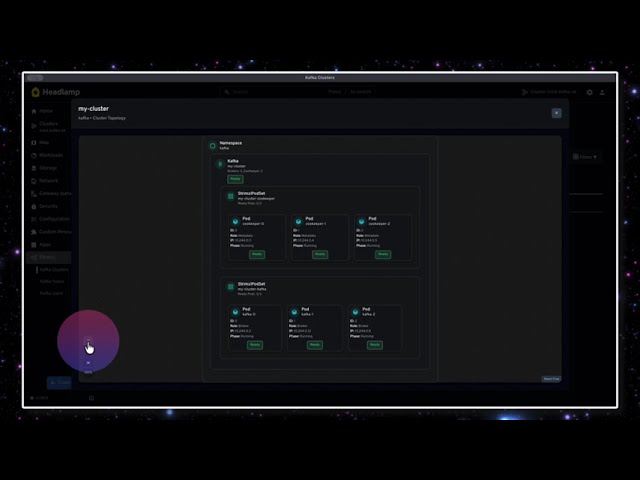](https://www.youtube.com/watch?v=MNt28s6b5d8)
## ✨ Features
- **Kafka Clusters**: View Kafka cluster resources with KRaft/ZooKeeper mode detection
- **Kafka Topics**: Full CRUD operations (Create, Read, Update, Delete)
- Create topics with custom partitions, replicas, retention, and compression
- Edit topic configurations (partitions, replicas, retention, min ISR)
- Delete topics with confirmation
- **Kafka Users**: Complete user management with security
- Create users with SCRAM-SHA-512 or TLS authentication
- Configure ACLs for fine-grained authorization
- View passwords and certificates (secrets)
- Delete users with confirmation
- **Kafka Connect**: Read-only view of `KafkaConnect` clusters
- Inspect replicas, version, bootstrap servers, and Ready status
- Browse the connector plugins discovered by the operator
- Detail page surfaces the Connect REST URL for deep-linking
- **Kafka Connectors**: Manage connectors running inside a Connect cluster
- List connectors with desired vs runtime state, max tasks, class, and
Ready status (per-connector topic associations live on the detail page)
- Pause / Resume / Start a connector with a single confirmation step
(uses a JSON merge-patch on `spec.state` so it stays safe with
GitOps-managed resources)
- Detail page exposes the full connector configuration (with credential-like
values masked behind an explicit reveal step), the Connect task list,
and topic associations
- **Search & Filter**: Real-time search and advanced filtering on all lists
- Filter by status, mode, authentication type, partitions, replicas, and more
- Real-time status monitoring for all Strimzi resources
- Multi-namespace support - view resources across all namespaces
## 📋 Prerequisites
- [Headlamp](https://headlamp.dev/) installed
- A Kubernetes cluster with [Strimzi operator](https://strimzi.io/) deployed (0.x with `v1beta2` APIs, or 1.0+ with `v1` APIs; the plugin detects and uses whichever version the cluster serves)
## 🚀 Quick Start
### Install the Plugin
#### 📦 Install from npm
```bash
npm install strimzi-headlamp
```
#### 💾 Manual Installation
1. Download the latest release package (.tar.gz file)
2. Extract the plugin to your Headlamp plugins directory:
**macOS:**
```bash
mkdir -p ~/Library/Application\ Support/Headlamp/plugins/strimzi
tar -xzf strimzi-headlamp-*.tar.gz -C ~/Library/Application\ Support/Headlamp/plugins/strimzi --strip-components=1
```
**Linux:**
```bash
mkdir -p ~/.config/Headlamp/plugins/strimzi
tar -xzf strimzi-headlamp-*.tar.gz -C ~/.config/Headlamp/plugins/strimzi --strip-components=1
```
3. Restart Headlamp
#### Using Headlamp Server
```bash
headlamp-server -plugins-dir=/path/to/extracted/plugin
```
## 🛠️ Development
### Building the Plugin
```bash
# Install dependencies
npm install
# Build the plugin
npm run build
```
The build creates a `dist/` directory with:
- `main.js` - Plugin entry point (required by Headlamp)
### Testing
```bash
# Run all tests
npm run test
# Run tests in watch mode
npm run test -- --watch
# Run tests with coverage
npm run test -- --coverage
```
Tests are written using Vitest and cover utility functions and CRD helpers.
### Sample manifests (real cluster)
YAML for Kafka, KafkaTopic, and KafkaUser to exercise the plugin against a cluster with the Strimzi operator is in **[`test-files/`](test-files/README.md)** (apply order, cleanup, and Headlamp checks are documented there).
### Packaging the Plugin
To create a distributable package with all required files:
```bash
npm run package
```
This creates a tarball `strimzi-headlamp-<version>.tar.gz` containing:
- `strimzi-headlamp/main.js` - Compiled plugin
- `strimzi-headlamp/package.json` - Plugin metadata
### Testing Locally
#### Method 1: Using Headlamp Desktop App
1. Build the plugin:
```bash
npm run build
```
2. Install to Headlamp's plugins directory:
**macOS:**
```bash
mkdir -p ~/Library/Application\ Support/Headlamp/plugins/strimzi
cp -r dist/* ~/Library/Application\ Support/Headlamp/plugins/strimzi/
# Create package.json (required)
cat > ~/Library/Application\ Support/Headlamp/plugins/strimzi/package.json << 'EOF'
{
"name": "strimzi-headlamp",
"version": "0.1.0",
"main": "main.js"
}
EOF
```
**Linux:**
```bash
mkdir -p ~/.config/Headlamp/plugins/strimzi
cp -r dist/* ~/.config/Headlamp/plugins/strimzi/
# Create package.json (required)
cat > ~/.config/Headlamp/plugins/strimzi/package.json << 'EOF'
{
"name": "strimzi-headlamp",
"version": "0.1.0",
"main": "main.js"
}
EOF
```
3. Restart Headlamp completely (quit and reopen)
**Required structure:**
```
plugins/strimzi/
├── main.js # Entry point (required)
├── package.json # Plugin metadata (required)
├── components/ # Compiled components
└── other files...
```
### Method 2: Using Headlamp in Development Mode
If you have Headlamp's source code:
```bash
# In Headlamp's repository
cd headlamp
# Set the plugins directory to your plugin's dist folder
export HEADLAMP_PLUGINS_DIR=/path/to/strimzi-headlamp/dist
# Start Headlamp in development mode
make run-frontend
```
### Method 3: Using Headlamp Server with Plugin Directory
```bash
# Build your plugin
npm run build
# Run Headlamp server with plugins directory
headlamp-server -plugins-dir=/path/to/strimzi-headlamp/dist
```
### Method 4: Deploy Headlamp to Kubernetes (Docker Desktop)
Deploy Headlamp with the Strimzi plugin directly to your Kubernetes cluster.
**Step 1: Build and package the plugin**
```bash
npm run build
npm run package
# Extract to plugins directory
mkdir -p plugins
tar -xzf strimzi-headlamp-*.tar.gz -C plugins/
```
**Step 2: Update the manifest path**
Edit `deploy/headlamp.yaml` and update the hostPath to your plugins directory:
```yaml
volumes:
- name: plugins
hostPath:
path: /path/to/your/strimzi-headlamp/plugins # Update this path
type: Directory
```
**Step 3: Deploy**
```bash
kubectl apply -f deploy/headlamp.yaml
# Generate authentication token (valid 24h)
kubectl -n headlamp create token headlamp --duration=24h
```
**Step 4: Access Headlamp**
- URL: http://localhost:30080
- Use the generated token to authenticate
**Alternative: Use port-forward**
```bash
kubectl port-forward -n headlamp svc/headlamp 8080:80
# Access at http://localhost:8080
```
**Updating the plugin:**
```bash
# Rebuild and repackage
npm run build && npm run package
# Remove old version and extract new
rm -rf plugins/strimzi-headlamp
tar -xzf strimzi-headlamp-*.tar.gz -C plugins/
# Restart Headlamp deployment
kubectl rollout restart deployment/headlamp -n headlamp
# Clear browser cache: Cmd+Shift+R (macOS) or Ctrl+Shift+R (Linux)
```
To uninstall: `kubectl delete -f deploy/headlamp.yaml`
## 📊 Supported Strimzi Resources
### Kafka (kafka.strimzi.io/v1beta2)
- View Kafka cluster status and configuration
- Monitor replicas and versions
- Check listener addresses and connection details
- KRaft and ZooKeeper mode detection
### KafkaTopic (kafka.strimzi.io/v1beta2)
- **Create** topics with configurable:
- Partitions and replicas
- Retention period
- Compression type (gzip, snappy, lz4, zstd, producer)
- Min in-sync replicas
- **Edit** existing topic configurations
- **Delete** topics with confirmation dialog
- View partition and replica counts
- Monitor topic status (Ready/Not Ready)
### KafkaUser (kafka.strimzi.io/v1beta2)
- **Create** users with:
- SCRAM-SHA-512 or TLS authentication
- Simple ACL authorization with custom rules
- Support for topic, group, and cluster resources
- **View secrets**: Display passwords (SCRAM) or certificates/keys (TLS)
- **Delete** users with confirmation dialog
- Monitor user status (Ready/Not Ready)
- View authentication and authorization types
### KafkaConnect (kafka.strimzi.io/v1beta2)
- View Kafka Connect cluster spec (replicas, version, bootstrap servers,
TLS, authentication summary)
- See connector plugins discovered by the operator (class, type, version)
- Surfaces the Connect REST endpoint (`status.url`) for deep-linking
- Monitor cluster status (Ready / Not Ready / Unknown)
> Cluster creation is intentionally left to YAML for now: KafkaConnect
> spec involves image, version, config, TLS, and authentication blocks
> that are best authored as files.
### KafkaConnector (kafka.strimzi.io/v1beta2)
- View desired state from spec vs runtime state from
`status.connectorStatus.connector.state`
- **Pause / Resume / Start** a connector with a single confirmation step
(uses a JSON merge-patch on `spec.state`, leaving the rest of the
resource untouched — safe for GitOps-managed connectors)
- See per-task state and worker assignments in the detail view
- View the full connector configuration as a name/value table
## 📁 Plugin Structure
```
strimzi-headlamp/
├── src/
│ ├── components/ # React components for UI
│ ├── crds.ts # Strimzi CRD definitions
│ └── index.tsx # Plugin entry point
├── deploy/ # Kubernetes manifests
│ └── headlamp.yaml # Headlamp deployment
├── dist/ # Build output
├── package.json
├── tsconfig.json
└── README.md
```
## 🚀 Releases and Versioning
This project uses semantic versioning (MAJOR.MINOR.PATCH) and GitHub Actions for automated releases.
### Creating a New Release
**Important:** Always create releases from the `main` branch after merging your PR and ensuring all checks pass.
**Step 1: Merge your changes**
```bash
# Create feature branch, make changes, commit
git checkout -b feature/my-changes
# ... make changes ...
git add .
git commit -m "feat: description"
git push origin feature/my-changes
# Create PR, wait for tests to pass, then merge to main
```
**Step 2: Create release from main**
```bash
# Switch to main branch
git checkout main
git pull origin main
# Run npm version (automatically creates commit + tag)
npm version patch # 0.1.0 → 0.1.1 (bug fixes)
npm version minor # 0.1.0 → 0.2.0 (new features)
npm version major # 0.1.0 → 1.0.0 (breaking changes)
```
The `npm version` command automatically:
- Updates `package.json` version
- Creates a git commit with the version number
- Creates a git tag (e.g., `v0.1.1`)
**Step 3: Push to trigger release workflow**
```bash
git push origin main
git push origin v0.1.1 # Push the tag created by npm version
```
**Step 4: Automated workflow runs**
The `release.yml` workflow automatically:
- ✅ Verifies package.json version matches tag version
- ✅ Runs tests and linter
- ✅ Builds the plugin
- ✅ Creates `.tar.gz` package
- ✅ Calculates SHA-256 checksum
- ✅ Creates GitHub Release with artifacts
### Version Verification
The release workflow enforces version consistency. If `package.json` version doesn't match the git tag, the workflow fails:
```bash
# Tag: v0.1.1
# package.json: "version": "0.1.1" ✅ Match - workflow succeeds
# Tag: v0.1.1
# package.json: "version": "0.1.0" ❌ Mismatch - workflow fails
```
## 📦 Publishing to npm (Manual)
After creating a GitHub Release, publish to npm manually:
```bash
npm publish --access public
```
## 📄 License
This project is licensed under the Apache License 2.0 - see the [LICENSE](LICENSE) file for details.
---
Developed on 🌎
## 📚 Resources
- [Strimzi Documentation](https://strimzi.io/documentation/)
- [Headlamp Plugin Development](https://headlamp.dev/docs/latest/development/plugins/)
- [Apache Kafka](https://kafka.apache.org/)