@kansnpms/storage-pipe
Version:
Browser storage and cookies monitoring - Real-time tracking of localStorage, sessionStorage, cookies, and IndexedDB
379 lines (283 loc) • 12.6 kB
Markdown
[](https://www.npmjs.com/package/@kansnpms/storage-pipe)
[](https://www.npmjs.com/package/@kansnpms/storage-pipe)
[](https://github.com/kgptapps/consolelogpipe/actions/workflows/ci.yml)
[](https://github.com/kgptapps/consolelogpipe/actions/workflows/code-quality.yml)
[](LICENSE)
> 🎉 **v2.5.0 Released!** - Major API consistency fixes and improved documentation. All browser and
> Node.js APIs now work as documented. See [CHANGELOG.md](CHANGELOG.md) for details.
> ⚠️ **IMPORTANT**: This is a **monitoring tool** that pipes browser storage changes to your CLI
> terminal. It does **NOT** provide storage methods like `.set()`, `.get()`, `.delete()`. If you
> need a general storage solution, this is not the right package.
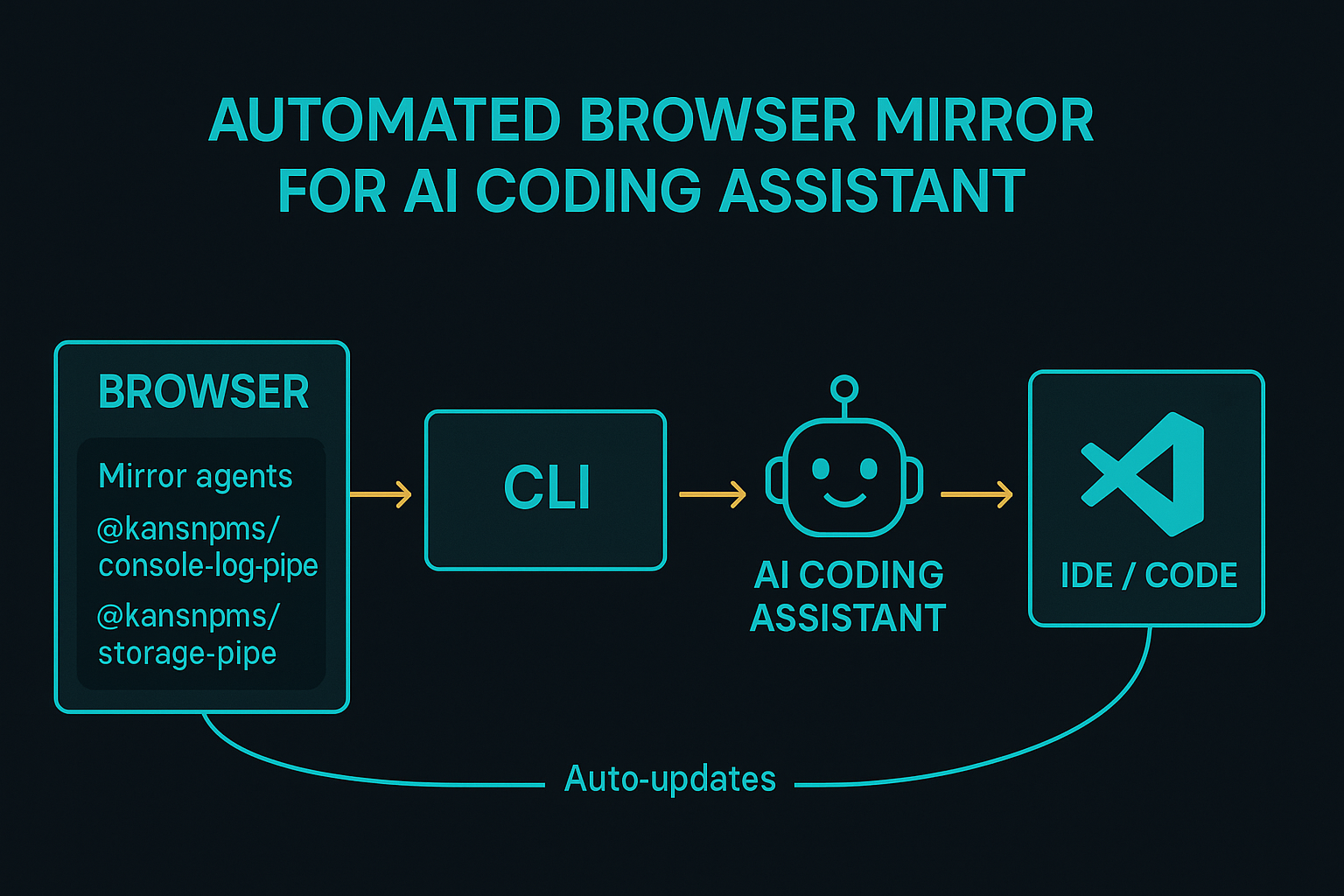
> **AI‑Friendly storage monitoring client** – track real‑time changes to cookies, `localStorage`,
> `sessionStorage`, and IndexedDB from your web applications directly to your **Console Log Pipe
> CLI**. Perfect for **AI coding assistants** debugging storage‑related issues.
- **Monitors** browser storage changes in real-time
- **Pipes** storage events to your CLI terminal
- **Tracks** localStorage, sessionStorage, cookies, IndexedDB changes
- **Streams** storage data via WebSocket to Console Log Pipe CLI
- **Provides** monitoring methods: `.init()`, `.start()`, `.stop()`, `.getCurrentState()`
- **Does NOT** provide storage methods like `.set()`, `.get()`, `.delete()`, `.clear()`
- **Does NOT** act as a general storage solution or database
- **Does NOT** store or persist data itself
- **Does NOT** replace localStorage, sessionStorage, or other storage APIs
- Use native browser APIs: `localStorage`, `sessionStorage`, `indexedDB`
- Try storage libraries like: `localforage`, `dexie`, `idb`
- This package is specifically for **monitoring existing storage**, not creating new storage
---
| Feature | Description |
| -------------------------------- | ------------------------------------------------------------------------------ |
| **Real‑time storage monitoring** | Track cookies, localStorage, sessionStorage, IndexedDB changes as they happen. |
| **WebSocket streaming** | <10 ms latency from browser storage changes to CLI terminal. |
| **AI‑optimised JSON format** | Storage changes formatted as structured JSON for effortless AI parsing. |
| **Multi‑storage support** | Monitor all browser storage APIs in one unified interface. |
| **Session isolation** | Each browser tab/app gets unique sessionId for organized storage debugging. |
| **Configurable monitoring** | Enable/disable specific storage types and adjust polling intervals. |
---
```bash
npm install -g @kansnpms/console-log-pipe-cli
```
```bash
clp storage --port 3002
```
```html
<script src="https://unpkg.com/@kansnpms/storage-pipe/dist/storage-monitor.umd.js"></script>
<script>
// Initialize storage monitoring (NOT storage creation)
StorageMonitor.init({
serverPort: 3002, // Must match CLI port
}).then(() => {
console.log('Storage monitoring active!');
});
</script>
```
```bash
npm install @kansnpms/storage-pipe
```
```javascript
import { ConsoleLogPipeStorage } from '@kansnpms/storage-pipe';
// Initialize storage monitoring
const storage = await ConsoleLogPipeStorage.init({
serverPort: 3002, // Must match CLI port
});
```
**Now when your app uses storage, changes appear in CLI:**
```javascript
localStorage.setItem('theme', 'dark'); // ← This will be monitored
sessionStorage.setItem('user', 'john'); // ← This will be monitored
document.cookie = 'session=abc123'; // ← This will be monitored
// The monitor pipes these changes to your CLI terminal in real-time!
// Note: Use native storage APIs for actual storage operations
```
- **🍪 Cookie Monitoring**: Real-time tracking of cookie changes (add, modify, delete)
- **💾 localStorage Monitoring**: Automatic detection of localStorage changes
- **🔄 sessionStorage Monitoring**: Live updates for sessionStorage modifications
- **🗃️ IndexedDB Monitoring**: Basic IndexedDB operation tracking
- **📡 Real-time Updates**: WebSocket-based instant change notifications
- **🎯 AI-Friendly**: Structured data format perfect for AI development tools
- **🔧 Configurable**: Customizable polling intervals and feature toggles
## 🛠️ Usage Examples
## 📋 API Usage by Environment
### 🌐 Browser Script Tag (Recommended for Quick Setup)
```html
<script src="https://unpkg.com/@kansnpms/storage-pipe/dist/storage-monitor.umd.js"></script>
<script>
// Initialize storage monitoring with static methods
StorageMonitor.init({
serverPort: 3002,
serverHost: 'localhost',
enableCookies: true,
enableLocalStorage: true,
enableSessionStorage: true,
enableIndexedDB: false, // Disable IndexedDB monitoring
pollInterval: 500, // Check for changes every 500ms
}).then(monitor => {
console.log('🍪 Storage monitoring started!');
// Use static methods for control
console.log('Monitoring active:', StorageMonitor.isMonitoring());
console.log('Connected:', StorageMonitor.isConnected());
});
// Stop monitoring
// StorageMonitor.stop();
</script>
```
```javascript
import { ConsoleLogPipeStorage } from '@kansnpms/storage-pipe';
// Create instance with configuration
const storage = new ConsoleLogPipeStorage({
serverPort: 3002,
sessionId: 'my-custom-session',
enableCookies: true,
enableLocalStorage: true,
enableSessionStorage: false,
pollInterval: 1000,
autoConnect: false, // Manual connection control
});
// Initialize when ready
await storage.init();
// Get current storage state
const currentState = storage.getCurrentState();
console.log('Current storage:', currentState);
// Stop monitoring
storage.stop();
```
```javascript
import { ConsoleLogPipeStorage } from '@kansnpms/storage-pipe';
// Quick initialization with static method
const monitor = await ConsoleLogPipeStorage.init({
serverPort: 3002,
enableIndexedDB: false,
});
console.log('Storage monitoring active:', monitor.isMonitoring());
```
```bash
clp storage --port 3002
clp storage --port 3002 \
--poll-interval 500 \
--no-cookies \
--no-indexeddb
clp storage --port 3002 --session-id "my-debug-session"
```
| Option | Description | Default |
| --------------------- | --------------------------------- | -------------- |
| `--port` | Storage monitor port | `3002` |
| `--host` | Storage monitor host | `localhost` |
| `--session-id` | Custom session ID | Auto-generated |
| `--poll-interval` | Polling interval (ms) | `1000` |
| `--no-cookies` | Disable cookie monitoring | `false` |
| `--no-localstorage` | Disable localStorage monitoring | `false` |
| `--no-sessionstorage` | Disable sessionStorage monitoring | `false` |
| `--no-indexeddb` | Disable IndexedDB monitoring | `false` |
## 📊 Dashboard
Access the web dashboard at `http://localhost:3002` when the storage monitor is running:
- **Real-time Statistics**: Active sessions, tracked items
- **Configuration Info**: Enabled features, polling settings
- **API Documentation**: Available endpoints and WebSocket info
- **Integration Examples**: Copy-paste code snippets
## 🔌 API Reference
### ✅ Available Methods (Monitoring Only)
```javascript
import { ConsoleLogPipeStorage } from '@kansnpms/storage-pipe';
// Static methods
await ConsoleLogPipeStorage.init(options); // Initialize and start monitoring
ConsoleLogPipeStorage.create(options); // Create instance without starting
// Instance methods
await monitor.start(); // Start monitoring
monitor.stop(); // Stop monitoring
monitor.getCurrentState(); // Get current storage state (read-only)
monitor.isMonitoring(); // Check if monitoring is active
monitor.isConnected(); // Check WebSocket connection
monitor.getSession(); // Get session information
monitor.checkNow(); // Force immediate storage check
```
```javascript
// These methods DO NOT exist - use native APIs instead:
monitor.set('key', 'value'); // ❌ Use: localStorage.setItem('key', 'value')
monitor.get('key'); // ❌ Use: localStorage.getItem('key')
monitor.delete('key'); // ❌ Use: localStorage.removeItem('key')
monitor.clear(); // ❌ Use: localStorage.clear()
monitor.setItem('key', 'value'); // ❌ Use: localStorage.setItem('key', 'value')
monitor.getItem('key'); // ❌ Use: localStorage.getItem('key')
```
```typescript
interface StorageMonitorConfig {
serverHost?: string; // Default: 'localhost'
serverPort?: number; // Default: 3002
sessionId?: string; // Default: auto-generated
enableCookies?: boolean; // Default: true
enableLocalStorage?: boolean; // Default: true
enableSessionStorage?: boolean; // Default: true
enableIndexedDB?: boolean; // Default: true
pollInterval?: number; // Default: 1000 (ms)
autoConnect?: boolean; // Default: true
}
```
Perfect for AI-assisted development workflows:
```javascript
// Get structured storage data for AI analysis
const storageState = monitor.getCurrentState();
// Example output format (AI-friendly):
{
cookies: [
{ name: 'user_id', value: '12345', domain: '.example.com', timestamp: '...' }
],
localStorage: [
{ key: 'theme', value: 'dark', timestamp: '...' }
],
sessionStorage: [
{ key: 'temp_data', value: '{"session": "active"}', timestamp: '...' }
]
}
```
Monitor multiple applications simultaneously:
```bash
clp storage --port 3002
clp storage --port 3003
clp storage --port 3004
```
```javascript
// App 1
await StorageMonitor.init({ serverPort: 3002 });
// App 2
await StorageMonitor.init({ serverPort: 3003 });
// App 3
await StorageMonitor.init({ serverPort: 3004 });
```
```bash
curl http://localhost:3002/api/storage/state
```
1. **Port already in use**: Change port with `--port 3003`
2. **CORS errors**: Storage monitor enables CORS by default
3. **WebSocket connection failed**: Check firewall settings
4. **No storage changes detected**: Verify polling interval and enabled features
- Production release
- Cookie monitoring with real-time change detection
- localStorage and sessionStorage monitoring
- Basic IndexedDB support
- WebSocket-based real-time communication
- CLI integration with Console Log Pipe
- Web dashboard for monitoring
This is a production feature of Console Log Pipe. Feedback and contributions welcome!
MIT License - see [LICENSE](../../LICENSE) file for details.
- [`@kansnpms/console-log-pipe-cli`](../cli) - Main CLI tool
- [`@kansnpms/console-log-pipe-client`](../client) - Console logging client