@kansnpms/console-log-pipe-cli
Version:
Global CLI tool for Console Log Pipe - Real-time log streaming server and management
262 lines (191 loc) • 8.83 kB
Markdown
# @kansnpms/console-log-pipe-cli
[](https://www.npmjs.com/package/@kansnpms/console-log-pipe-cli)
[](https://www.npmjs.com/package/@kansnpms/console-log-pipe-cli)
[](https://github.com/kgptapps/consolelogpipe/actions/workflows/ci.yml)
[](https://github.com/kgptapps/consolelogpipe/actions/workflows/code-quality.yml)
[](LICENSE)
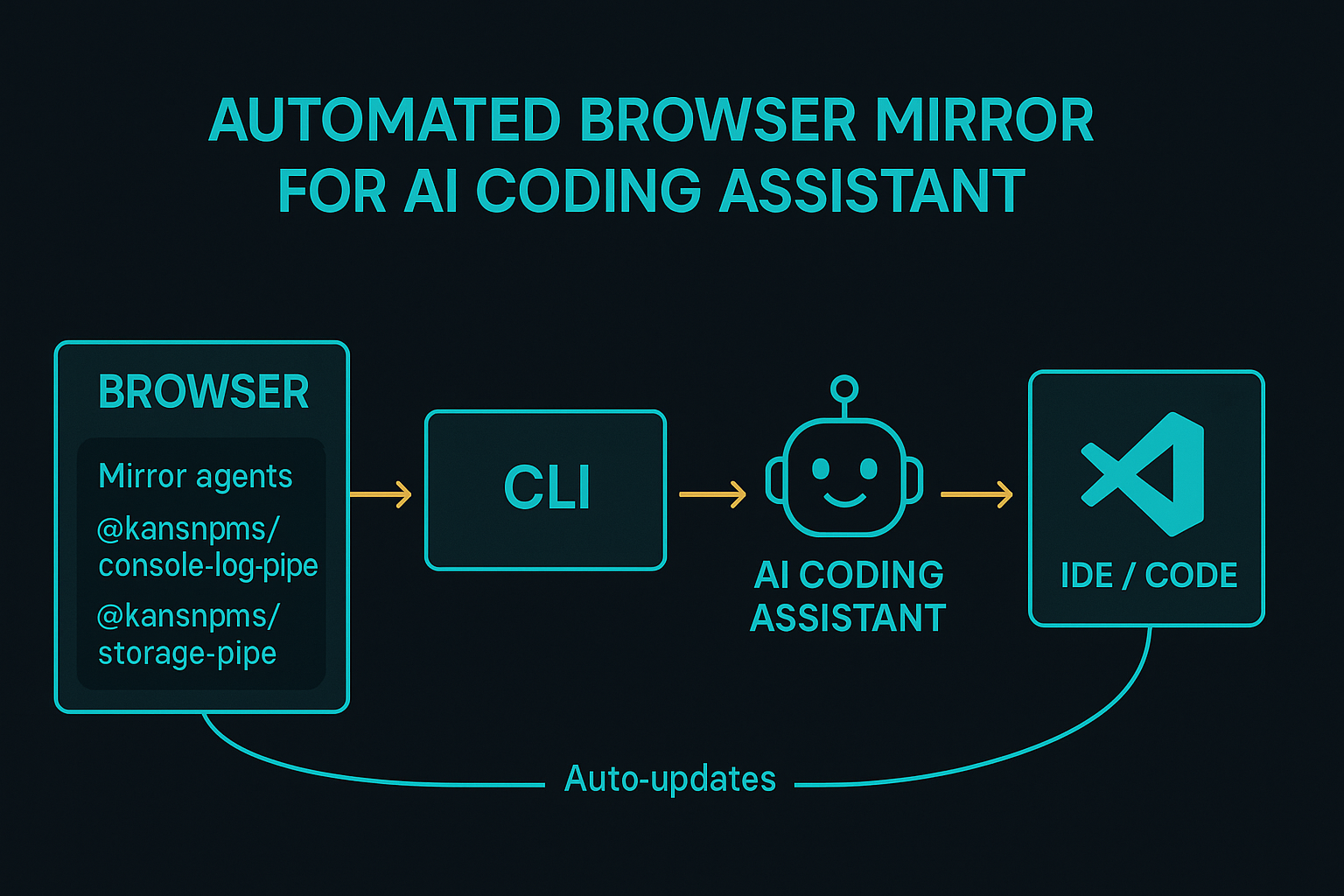
> **AI‑Friendly CLI server** – receive real‑time browser console logs, errors, network traffic, and
> storage changes from your web applications directly in your terminal. Perfect for **AI coding
> assistants** and developers who want instant debugging feedback.
## ✨ Highlights
| Feature | Description |
| -------------------------------- | ------------------------------------------------------------------------------------ |
| **Global CLI installation** | Install once, use everywhere → `npm i -g @kansnpms/console-log-pipe-cli` |
| **Real‑time WebSocket server** | <10 ms latency from browser to terminal on typical localhost. |
| **Multi‑application monitoring** | Run multiple CLI instances on different ports for isolated app debugging. |
| **AI‑optimised terminal output** | Structured, colorized logs designed for effortless AI parsing and human readability. |
| **Storage + Network capture** | Monitor cookies, localStorage, sessionStorage, and network requests in real‑time. |
| **Session isolation** | Each browser tab/app gets unique sessionId for organized debugging. |
## 📦 Installation
```bash
# Install globally – use anywhere
npm i -g @kansnpms/console-log-pipe-cli
# Verify installation
clp --version
```
> **Companion client** – you'll also need the browser client:
>
> ```bash
> npm i @kansnpms/console-log-pipe-client # for your web app
> ```
## 🚀 Quick Start
```bash
# 1. Start the CLI server (port is required)
clp start --port 3001
# 2. Add client to your web app
npm install @kansnpms/console-log-pipe-client
# 3. Initialize in your app (port must match CLI port)
import ConsoleLogPipe from '@kansnpms/console-log-pipe-client';
await ConsoleLogPipe.init({
serverPort: 3001, // ⚠️ serverPort is mandatory
serverHost: 'localhost' // optional, defaults to 'localhost'
});
# 4. Watch logs stream to your terminal! 📡
```
## ⚙️ CLI Commands
### `clp start --port <port>`
Start the WebSocket server and begin monitoring. **Port is required.**
```bash
# Basic usage
clp start --port 3001
# With options
clp start --port 3001 --developer "alice" --env production
```
**Options:**
| Option | Type | Default | Notes |
| -------------- | -------------------------------------------- | ------------- | ---------------------------------------------- |
| `--port, -p` | `number` | **required** | WebSocket server port (1024-65535). |
| `--host` | `string` | `localhost` | Server host binding. |
| `--env` | `"development" \| "staging" \| "production"` | `development` | Environment context. |
| `--developer` | `string` | – | Developer name for session identification. |
| `--log-level` | `"debug" \| "info" \| "warn" \| "error"` | `debug` | Minimum log level to display. |
| `--max-logs` | `number` | `1000` | Maximum logs to store in memory. |
| `--session-id` | `string` | auto | Custom session ID (auto-generated if omitted). |
## 📋 Commands
### `clp start --port <port>`
Start Console Log Pipe server. **Port number is required.** **Monitoring happens automatically** -
logs appear in real-time in your terminal.
```bash
# Basic usage
clp start --port 3001
clp start --port 3016
clp start --port 3002
# With additional options
clp start --port 3001 --log-level warn --developer "John"
clp start --port 3001 --env production --branch "feature/auth"
clp start --port 3001 --max-logs 500 --host localhost
# Stop with Ctrl+C when done
```
**Options:**
- `--port, -p <port>` - Server port (required, must be between 1024-65535)
- `--host <host>` - Server host (default: localhost)
- `--env <environment>` - Environment (development, staging, production) (default: development)
- `--log-level <level>` - Minimum log level (debug, info, warn, error) (default: debug)
- `--max-logs <number>` - Maximum logs to store (default: 1000)
- `--developer <name>` - Developer name for identification
- `--branch <name>` - Git branch name for context
- `--session-id <id>` - Custom session ID (auto-generated if not provided)
- `--no-browser` - Do not open browser automatically
- `--enable-compression` - Enable gzip compression (default: true)
- `--enable-cors` - Enable CORS (default: true)
### `clp storage --port <port>`
Start Storage Monitor service for real-time browser storage and cookies monitoring.
```bash
# Basic usage
clp storage --port 3002
# With custom options
clp storage --port 3002 --poll-interval 500 --no-indexeddb
clp storage --port 3002 --session-id "debug-session" --no-cookies
```
**Options:**
- `--port, -p <port>` - Storage monitor port (default: 3002)
- `--host <host>` - Storage monitor host (default: localhost)
- `--session-id <sessionId>` - Custom session ID for storage monitoring
- `--poll-interval <ms>` - Polling interval for storage changes in milliseconds (default: 1000)
- `--no-cookies` - Disable cookie monitoring
- `--no-localstorage` - Disable localStorage monitoring
- `--no-sessionstorage` - Disable sessionStorage monitoring
- `--no-indexeddb` - Disable IndexedDB monitoring
**Features:**
- 🍪 Real-time cookie change detection
- 💾 localStorage monitoring with method interception
- 🔄 sessionStorage tracking
- 🌈 Color-coded output (green=add, yellow=modify, red=delete)
- 📊 Web dashboard at `http://localhost:<port>`
## 🎯 Real-World Examples
### Basic Usage
```bash
# 1. Start monitoring (port is required)
clp start --port 3001
# 2. Add client to your React app
npm install @kansnpms/console-log-pipe-client
# 3. Initialize in your app
import ConsoleLogPipe from '@kansnpms/console-log-pipe-client';
ConsoleLogPipe.init({ port: 3001 });
# 4. Logs appear automatically in real-time
# Stop with Ctrl+C when done
```
### Multi-Application Development
```bash
# Start multiple servers (each in separate terminal)
clp start --port 3001
clp start --port 3002
clp start --port 3003
# Each terminal shows logs automatically
# Stop each with Ctrl+C when done
```
## 🔧 Configuration
The CLI automatically manages configuration and stores data in:
- **Config**: `~/.console-log-pipe/config.json`
- **Logs**: `~/.console-log-pipe/logs/`
- **Sessions**: `~/.console-log-pipe/sessions/`
## 🌐 Integration
### React
```bash
# Start CLI server first
clp start --port 3001
```
```javascript
import { useEffect } from 'react';
import ConsoleLogPipe from '@kansnpms/console-log-pipe-client';
function App() {
useEffect(() => {
ConsoleLogPipe.init({ port: 3001 });
}, []);
return <div>My App</div>;
}
```
### Vue.js
```bash
# Start CLI server first
clp start --port 3016
```
```javascript
import { createApp } from 'vue';
import ConsoleLogPipe from '@kansnpms/console-log-pipe-client';
const app = createApp({});
ConsoleLogPipe.init({ port: 3016 });
```
### Vanilla JavaScript
```bash
# Start CLI server first
clp start --port 3002
```
```html
<script src="https://unpkg.com/@kansnpms/console-log-pipe-client"></script>
<script>
ConsoleLogPipe.init({ port: 3002 });
</script>
```
## 📚 More Information
- **Main Repository**: [Console Log Pipe](https://github.com/kgptapps/consolelogpipe)
- **Client Library**:
[@kansnpms/console-log-pipe-client](https://www.npmjs.com/package/@kansnpms/console-log-pipe-client)
- **Documentation**: [Full Documentation](https://github.com/kgptapps/consolelogpipe#readme)
## 📄 License
MIT