@jwplayer/jwplayer-react-native
Version:
React-native Android/iOS plugin for JWPlayer SDK (https://www.jwplayer.com/)
452 lines (350 loc) • 80.8 kB
Markdown
# react-native-jw-media-player
### A react-native bridge for JWPlayer native SDK's
⚠️ Important you need a `JWPlayer` license to use this library https://jwplayer.com/
<img width="150" alt="sample" src=".././images/1.png">
<img width="150" alt="sample" src=".././images/2.png">
<img width="150" alt="sample" src=".././images/3.png">
## Getting started
`npm i react-native-jw-media-player --save`
### Mostly automatic installation
For iOS you have to run `cd ios/` && `pod install`.
For Android the package is automatically linked.
### Important
This **README** is for `react-native-jw-media-player` version `0.2.0` and higher, for previous version check out the [Old README](https://github.com/chaimPaneth/react-native-jw-media-player/blob/master/Pre.0.2.0_README.md).
Since version `0.2.0` we use the new JWPlayerKit && SDK 4 check out [iOS get started](https://developer.jwplayer.com/jwplayer/docs/ios-get-started) && [Android get started](https://developer.jwplayer.com/jwplayer/docs/android-get-started)
##### Android dependencies
Insert the following lines inside the allProjects.dependencies block in `android/build.gradle`:
```
maven{
url 'https://mvn.jwplayer.com/content/repositories/releases/'
}
```
As so
```
allprojects {
repositories {
mavenLocal()
maven {
// All of React Native (JS, Obj-C sources, Android binaries) is installed from npm
url("$rootDir/../node_modules/react-native/android")
}
maven {
// Android JSC is installed from npm
url("$rootDir/../node_modules/jsc-android/dist")
}
google()
jcenter()
maven { url 'https://jitpack.io' }
// Add these lines
maven{
url 'https://mvn.jwplayer.com/content/repositories/releases/'
}
}
}
```
## Usage
```javascript
...
import JWPlayer, { JWPlayerState } from 'react-native-jw-media-player';
...
const styles = StyleSheet.create({
container: {
flex: 1,
},
player: {
flex: 1,
},
});
...
const playlistItem = {
title: 'Track',
mediaId: -1,
image: 'http://image.com/image.png',
description: 'My beautiful track',
startTime: 0,
file: 'http://file.com/file.mp3',
autostart: true,
repeat: false,
displayDescription: true,
displayTitle: true,
tracks: [
{
file: 'http://file.com/english.vtt',
label: 'en'
},
{
file: 'http://file.com/spanish.srt',
label: 'es'
}
],
sources: [
{
file: 'http://file.com/file.mp3',
label: 'audio'
},
{
file: 'http://file.com/file.mp4',
label: 'video',
default: true
}
]
}
const config = {
license:
Platform.OS === 'android'
? 'YOUR_ANDROID_SDK_KEY'
: 'YOUR_IOS_SDK_KEY',
backgroundAudioEnabled: true,
autostart: true,
styling: {
colors: {
timeslider: {
rail: "0000FF",
},
},
},
playlist: [playlistItem],
}
...
async isPlaying() {
const playerState = await this.JWPlayer.playerState();
return playerState === JWPlayerState.JWPlayerStatePlaying;
}
...
render() {
...
<View style={styles.container}>
<JWPlayer
ref={p => (this.JWPlayer = p)}
style={styles.player}
config={config}
onBeforePlay={() => this.onBeforePlay()}
onPlay={() => this.onPlay()}
onPause={() => this.onPause()}
onIdle={() => console.log("onIdle")}
onPlaylistItem={event => this.onPlaylistItem(event)}
onSetupPlayerError={event => this.onPlayerError(event)}
onPlayerError={event => this.onPlayerError(event)}
onBuffer={() => this.onBuffer()}
onTime={event => this.onTime(event)}
onFullScreen={() => this.onFullScreen()}
onFullScreenExit={() => this.onFullScreenExit()}
/>
</View>
...
}
```
## Run example project
Running the example project:
1. Checkout this repository.
2. Go to `Example` directory and run `yarn` or `npm i`
3. Go to `Example/ios` and install Pods with `pod install`
4. Open `RNJWPlayer.xcworkspace` with XCode.
5. Add your JW SDK license in `App.js` under the `config `prop.
## Available props
| Prop | Description | Default | Type |
| -------------- | -------------------------------- | ----------- | --------- |
| **`config`** | The JW [Config](#Config) object. | `undefined` | `Object` |
| **`controls`** | Should the player controls show. | `true` | `Boolean` |
##### Config
| Prop | Description | Type | Platform | Default |
| ------------------------------ | ----------------------------------------------------------------------------------------------------------------------------------------------------------------------------------------------------------------------------------------------------------------------------------------------------------------------------------------------------------------------- | ---------------------------------------------------------------------------------------------------------------------------------------------------------------------------------------------------------------------- | ------------------------------------------- | ---------- |
| **`offlineImage`** | The url for the player offline thumbnail. | `String` | `iOS` | `none` |
| **`offlineMessage`** | The message when the player is offline. | `String` | `iOS` | `none` |
| **`autostart`** | Should the tracks auto start. | `Boolean` | `iOS && Android` | `false` |
| **`controls`** | Should the control buttons show. | `Boolean` | `Android` | `true` |
| **`repeat`** | Should the track repeat. | `Boolean` | `iOS && Android` | `false` |
| **`playlist`** | An array of playlistItems. | `[playlistItem]` see [PlaylistItem](#PlaylistItem)] | `iOS && Android` | `none` |
| **`nextUpStyle`** | How the next up videos should be presented. | `{offsetSeconds: Int, offsetPercentage, Int}` | `iOS && Android` | `none` |
| **`styling`** | All the stylings for the player see [Styling](#Styling) section. | `Object` | `iOS && Android` | `none` |
| **`advertising`** | General Advertising settings on the player see [Advertising](#Advertising) section. | `Object` | `iOS && Android` | `none` |
| **`fullScreenOnLandscape`** | When this is true the player will go into full screen on rotate of phone to landscape | `Boolean` | `iOS && Android` | `false` |
| **`landscapeOnFullScreen`** | When this is true the player will go into landscape orientation when on full screen | `Boolean` | `iOS && Android` | `false` |
| **`portraitOnExitFullScreen`** | When this is true the player will go into portrait orientation when exiting full screen | `Boolean` | `Android` | `false` |
| **`exitFullScreenOnPortrait`** | When this is true the player will exit full screen when the phone goes into portrait | `Boolean` | `Android` | `false` |
| **`enableLockScreenControls`** | When this is true the player will show media controls on lock screen | `Boolean` | `iOS` | `true` |
| **`stretching`** | Resize images and video to fit player dimensions. See below [Stretching](#Stretching) section. | `String` | `Android` | `none` |
| **`backgroundAudioEnabled`** | Should the player continue playing in the background and handle interruptions. | `Boolean` | `iOS && Android` | `false` |
| **`category`** | Controls the audio session category. See below [AudioSessionCategory](#AudioSessionCategory) | `String` | `iOS` | `Playback` |
| **`mode`** | Controls the audio session mode. See below [AudioSessionMode](#AudioSessionMode) | `String` | `iOS` | `none` |
| **`viewOnly`** | When true the player will not have any controls it will show only the video. | `Boolean` | `iOS` | `false` |
| **`pipEnabled`** | When true the player will be able to go into Picture in Picture mode. **Note: This is true by default for iOS PlayerViewController**. **For Android you will also need to follow the instruction mentioned [here](https://developer.jwplayer.com/jwplayer/docs/android-invoke-picture-in-picture-playback) && below [Picture in picture](Picture-in-picture) section.** | `Boolean` | `iOS when viewOnly prop is true && Android` | `false` |
| **`interfaceBehavior`** | The behavior of the player interface. | `'normal', 'hidden', 'onscreen'` | `iOS` | `normal` |
| **`interfaceFadeDelay`** | The number of seconds to wait when fading the interface. The default value is 3 seconds. | `number` | `iOS` | `3` |
| **`preload`** | The behavior of the preload. | `'auto', 'none'` | `iOS` | `auto` |
| **`related`** | The related videos behaviors. Check out the [Related](#Related) section. | `Object` | `iOS` | `none` |
| **`hideUIGroups`** | A way to hide certain UI groups in the player. | Array of `'overlay', 'control_bar', 'center_controls', 'next_up', 'error', 'playlist', 'controls_container', 'settings_menu', 'quality_submenu', 'captions_submenu', 'playback_submenu', 'audiotracks_submenu', 'casting_menu'` | `Android` | `none` |
| **`processSpcUrl`** | Your DRM License URL. Checkout the [DRM](#DRM) section below. | `String` | `iOS` | `none` |
| **`fairplayCertUrl`** | Your DRM Certificate URL. Checkout the [DRM](#DRM) section below. | `String` | `iOS` | `none` |
| **`contentUUID`** | Your DRM content UUID. Checkout the [DRM](#DRM) section below. | `String` | `iOS` | `none` |
##### PlaylistItem
| Prop | Description | Type |
| --------------------- | -------------------------------------------------------------------------------------------------------- | ------------------------------------------------- |
| **`mediaId`** | The JW media id. | `Int` |
| **`startTime`** | the player should start from a certain second. | `Int` |
| **`adVmap`** | The url of ads VMAP xml. (iOS only) | `String` |
| **`adSchedule`** | Array of tags and and offsets for ads. (iOS only) | `{tag: String, offset: String}` |
| **`description`** | Description of the track. | `String` |
| **`file`** | The url of the file to play. | `String` |
| **`tracks`** | Array of caption tracks. | `{file: String, label: String}` |
| **`sources`** | Array of media sources. | `{file: String, label: String, default: Boolean}` |
| **`image`** | The url of the player thumbnail. | `String` |
| **`title`** | The title of the track. | `String` |
| **`recommendations`** | Url for recommended videos. | `String` |
| **`autostart`** | Should the track auto start. | `Boolean` |
| **`authUrl`** | Only Available on **Android**, Used for Authorizing DRM content. Checkout the [DRM](#DRM) section below. | `String` |
##### JWControlType
| Key | Value |
| ---------------- | ----- |
| **`forward`** | 0 |
| **`rewind`** | 1 |
| **`pip`** | 2 |
| **`airplay`** | 3 |
| **`chromecast`** | 4 |
| **`next`** | 5 |
| **`previous`** | 6 |
| **`settings`** | 7 |
| **`languages`** | 8 |
| **`fullscreen`** | 9 |
##### JWPlayerAdClients
| Client | Value |
| -------------------------- | ----- |
| **`JWAdClientVast`** | 0 |
| **`JWAdClientGoogima`** | 1 |
| **`JWAdClientGoogimaDAI`** | 2 |
##### JWPlayerState
#### **iOS**
| State | Value |
| ---------------------------- | ----- |
| **`JWPlayerStateUnknown`** | 0 |
| **`JWPlayerStateIdle`** | 1 |
| **`JWPlayerStateBuffering`** | 2 |
| **`JWPlayerStatePlaying`** | 3 |
| **`JWPlayerStatePaused`** | 4 |
| **`JWPlayerStateComplete`** | 5 |
| **`JWPlayerStateError`** | 6 |
#### **Android**
| State | Value |
| ---------------------------- | ----- |
| **`JWPlayerStateIdle`** | 0 |
| **`JWPlayerStateBuffering`** | 1 |
| **`JWPlayerStatePlaying`** | 2 |
| **`JWPlayerStatePaused`** | 3 |
| **`JWPlayerStateComplete`** | 4 |
| **`JWPlayerStateError`** | 5 |
##### Styling
| Prop | Description | Type | Platform | Default |
| ------------------------ | ------------------------------------------------------------------------------------------------------------------------------------------------------------------ | -------------------------------------------------------------------------------------------------------------------------------------------------------------------------------------------------- | ---------------- | -------- |
| **`displayDescription`** | Should the player show the description. | `Boolean` | `iOS && Android` | `true` |
| **`displayTitle`** | Should the player show the title. | `Boolean` | `iOS && Android` | `true` |
| **`colors`** | Object with colors in hex format (without hashtag), for the icons and progress bar See below [Colors](#Colors) section. | `Object` |
| **`font`** | Name and size of the fonts for all texts in the player. **Note: the font must be added properly in your native project** | `{name: String, size: Int}` | `iOS` | `System` |
| **`captionsStyle`** | Style of the captions: name and size of the fonts, backgroundColor, edgeStyle and highlightColor. **Note: the font must be added properly in your native project** | `{font: {name: String, size: Int}, backgroundColor: String, highlightColor: String, edgeStyle: 'none', 'dropshadow', 'raised', 'depressed', 'uniform'}` See the [edgeStyle](#EdgeStyle) enum below | `iOS` | `System` |
| **`menuStyle`** | Style of the menu: name and size of the fonts, backgroundColor and fontColor. **Note: the font must be added properly in your native project** | `{font: {name: String, size: Int}, backgroundColor: String, fontColor: String}` | `iOS` | `System` |
##### Colors
| Prop | Description | Type | Platform | Default |
| --------------------- | ---------------------------- | ------------------------------------------------------------------ | ------------------------------------------------------------- | -------- |
| **`buttons`** | Color of all the icons. | `String` | `iOS` | `FFFFFF` |
| **`timeslider`** | Colors for the progress bar. | `{progress: String, buffer: String, rail: String, thumb: String,}` | `iOS & Android **Note: buffer is only available on android**` | `FFFFFF` |
| **`backgroundColor`** | Color for the background. | `String` | `iOS & Android` | `FFFFFF` |
**Note: It is expected to pass the colors in hex format without the hashtag example for white FFFFFF.**
```javascript
colors: PropTypes.shape({
buttons: PropTypes.string,
timeslider: PropTypes.shape({
progress: PropTypes.string,
rail: PropTypes.string,
thumb: PropTypes.string,
}),
});
```
##### EdgeStyle
| State | Value |
| ---------------------------------- | ----- |
| **`JWCaptionEdgeStyleUndefined`** | 1 |
| **`JWCaptionEdgeStyleNone`** | 2 |
| **`JWCaptionEdgeStyleDropshadow`** | 3 |
| **`JWCaptionEdgeStyleRaised`** | 4 |
| **`JWCaptionEdgeStyleDepressed`** | 5 |
| **`JWCaptionEdgeStyleUniform`** | 6 |
### AudioTrack
Each AudioTrack object has the following keys:
`autoSelect`: boolean
`defaultTrack`: boolean
`groupId`: string
`name`: string
`language`: string
A video file can include multiple audio tracks. The onAudioTracks event is fired when the list of available AudioTracks is updated (happens shortly after a playlist item starts playing).
Once the AudioTracks list is available, use getAudioTracks to return an array of available AudioTracks.
Then use getCurrentAudioTrack or setCurrentAudioTrack(index) to view or change the current AudioTrack.
This is all handled automatically if using the default player controls, but these functions are helpful if you're implementing custom controls.
### Stretching
`uniform`: (default) Fits JW Player dimensions while maintaining aspect ratio
`exactFit`: Will fit JW Player dimensions without maintaining aspect ratio
`fill`: Will zoom and crop video to fill dimensions, maintaining aspect ratio
`none`: Displays the actual size of the video file. (Black borders)
##### Stretching Examples:
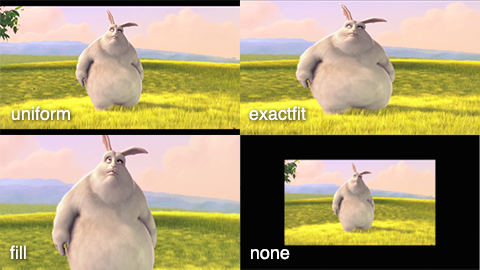
(image from JW Player docs - here use `exactFit` instead of `exactfit`)
##### DRM
Checkout the official DRM docs [iOS](https://developer.jwplayer.com/jwplayer/docs/ios-play-drm-protected-content) & [Android](https://developer.jwplayer.com/jwplayer/docs/android-play-drm-protected-content).
As of now June 7, 2022 there is only support for **Fairplay** on iOS and **Widevine** for Android.
In short when passing a protected file URL in the `file` prop you will also need to pass additional props for the player to be able to decode your encrypted content; per each respective platform.
- iOS - your `processSpcUrl?: string` (License) and `fairplayCertUrl?: string` (Certificate) on the `config` prop. We will try to parse the `contentUUID` from the FPS server
playback context (SPC), but you can override it by passing it in `config` along the other two props;
- Android - your `authUrl?: string` on each **PlaylistItem** in the `playlist` prop;
Checkout the DRMExample in the Example app. (The DRMExample cannot be run in the Simulator).
##### Advertising
### Important
When using an **IMA** ad client you need to do some additional setup.
- **iOS**: Add `$RNJWPlayerUseGoogleIMA = true` to your Podfile, this will add `GoogleAds-IMA-iOS-SDK` pod.
- **Android**: Add `RNJWPlayerUseGoogleIMA = true` in your *app/build.gradle* `ext {}` this will add `'com.google.ads.interactivemedia.v3:interactivemedia:3.29.0'`
and `'com.google.android.gms:play-services-ads-identifier:18.0.1'`.
| Prop | Description | Type | Availability |
|-------------------------------|----------------------------------------------------------------------------------------------------------|-----------------------------------------------|-------------------------|
| **`adVmap`** | The URL of the ads VMAP XML. | `String` | All Clients (iOS only) |
| **`adSchedule`** | Array of tags and offsets for ads. | `{tag: String, offset: String}[]` | All Clients |
| **`openBrowserOnAdClick`** | Should the player open the browser when clicking on an ad. | `Boolean` | All Clients |
| **`adClient`** | The ad client. One of `vast`, `ima`, or `ima_dai`, check out [JWPlayerAdClients](#JWPlayerAdClients), defaults to `vast`. | `'vast'`, `'ima'`, `'ima_dai'` | All Clients |
| **`adRules`** | Ad rules for VAST client. | `{startOn: Number, frequency: Number, timeBetweenAds: Number, startOnSeek: 'none' \| 'pre'}` | VAST only |
| **`imaSettings`** | Settings specific to Google IMA SDK. | `{locale: String, ppid: String, maxRedirects: Number, sessionID: String, debugMode: Boolean}` | IMA and IMA DAI |
| **`companionAdSlots`** | Array of objects representing companion ad slots. | `{viewId: String, size?: {width: Number, height: Number}}[]` | IMA only |
| **`friendlyObstructions`** | Array of objects representing friendly obstructions for viewability measurement. | `{viewId: String, purpose: 'mediaControls' \| 'closeAd' \| 'notVisible' \| 'other', reason?: String}[]` | IMA and IMA DAI |
| **`googleDAIStream`** | Stream configuration for Google DAI (Dynamic Ad Insertion). | `{videoID?: String, cmsID?: String, assetKey?: String, apiKey?: String, adTagParameters?: {[key: string]: string}}` | IMA DAI only |
| **`tag`** | Vast xml URL. | `String` | Vast only (iOS only) |
##### Related
| Prop | Description | Type |
| --------------------- | ------------------------------------------------------------------------------------------ | ---------------------------- |
| **`onClick`** | Sets the related content onClick action using a JWRelatedOnClick. Defaults to `play` | `'play', 'link'` |
| **`onComplete`** | Sets the related content onComplete action using a JWRelatedOnComplete. Defaults to `show` | `'show', 'hide', 'autoplay'` |
| **`heading`** | Sets the related content heading using a String. Defaults to “Next up”. | `String` |
| **`url`** | Sets the related content url using a URL. | `String` |
| **`autoplayMessage`** | Sets the related content autoplayMessage using a String. Defaults to `title` | `String` |
| **`autoplayTimer`** | Sets the related content autoplayTimer using a Int. Defaults to 10 seconds. | `Int` |
### AudioSessions iOS
Check out the official apple docs for more information on [AVAudioSessions](https://developer.apple.com/documentation/avfaudio/avaudiosession?language=objc). Below is a summarized description of each value.
##### AudioSessionCategory
**Available on iOS**
| Prop | Description |
| ------------------- | ---------------------------------------------------------------------------------------------------- |
| **`Ambient`** | Use this category for background sounds such as rain, car engine noise, etc. Mixes with other music. |
| **`SoloAmbient`** | Use this category for background sounds. Other music will stop playing. |
| **`Playback`** | Use this category for music tracks. |
| **`Record`** | Use this category when recording audio. |
| **`PlayAndRecord`** | Use this category when recording and playing back audio. |
| **`MultiRoute`** | Use this category when recording and playing back audio. |
##### AudioSessionCategoryOptions
**Available on iOS**
| Prop | Description |
| -------------------------------- | ----------------------------------------------------------------------------------------------------------------------------------------------------------------------------------------------------------------------------------------------------------------------------------------------------------------------------------------------------------------------------------------------------------------------------------------------------------------------------------------------------------------------------------------------------------------------------------------------------------------------------------------------------------------------------------------------------------------------------------------------------- |
| **`MixWithOthers`** | Controls whether other active audio apps will be interrupted or mixed with when your app's audio session goes active. Details depend on the category. |
| **`DuckOthers`** | Controls whether or not other active audio apps will be ducked when when your app's audio session goes active. An example of this is a workout app, which provides periodic updates to the user. It reduces the volume of any music currently being played while it provides its status. |
| **`AllowBluetooth`** | Allows an application to change the default behavior of some audio session categories with regard to whether Bluetooth Hands-Free Profile (HFP) devices are available for routing. The exact behavior depends on the category. |
| **`DefaultToSpeaker`** | Allows an application to change the default behavior of some audio session categories with regard to the audio route. The exact behavior depends on the category. |
| **`InterruptSpokenAudioAndMix`** | When a session with InterruptSpokenAudioAndMixWithOthers set goes active, then if there is another playing app whose session mode is AVAudioSessionModeSpokenAudio (for podcast playback in the background, for example), then the spoken-audio session will be interrupted. A good use of this is for a navigation app that provides prompts to its user: it pauses any spoken audio currently being played while it plays the prompt. |
| **`AllowBluetoothA2DP`** | Allows an application to change the default behavior of some audio session categories with regard to whether Bluetooth Advanced Audio Distribution Profile (A2DP) devices are available for routing. The exact behavior depends on the category. |
| **`AllowAirPlay`** | Allows an application to change the default behavior of some audio session categories with regard to showing AirPlay devices as available routes. This option applies to various categories in the same way as AVAudioSessionCategoryOptionAllowBluetoothA2DP; see above for details. |
| **`OverrideMutedMicrophone`** | Some devices include a privacy feature that mutes the built-in microphone at a hardware level under certain conditions e.g. when the Smart Folio of an iPad is closed. The default behavior is to interrupt the session using the built-in microphone when that microphone is muted in hardware. This option allows an application to opt out of the default behavior if it is using a category that supports both input and output, such as AVAudioSessionCategoryPlayAndRecord, and wants to allow its session to stay activated even when the microphone has been muted. The result would be that playback continues as normal, and microphone sample buffers would continue to be produced but all microphone samples would have a value of zero. |
##### AudioSessionMode
**Available on iOS**
| Prop | Description