@jswf/react
Version:
Virtual Window for React
136 lines (106 loc) • 4.95 kB
Markdown
[](https://badge.fury.io/js/%40jswf%2Freact)
Virtual window component for React
- [Storybook](https://javascript-windowframework.github.io/jswf-react/storybook-static/?path=/story/pages--index)
Components for realizing virtual windows with React
Just enclose with JSWindow and it will become a virtual window
- MoveWindow
- Resize
- Maximize
- Minimize
- Parent-child window
- SplitScreen
- ListView
- TreeView
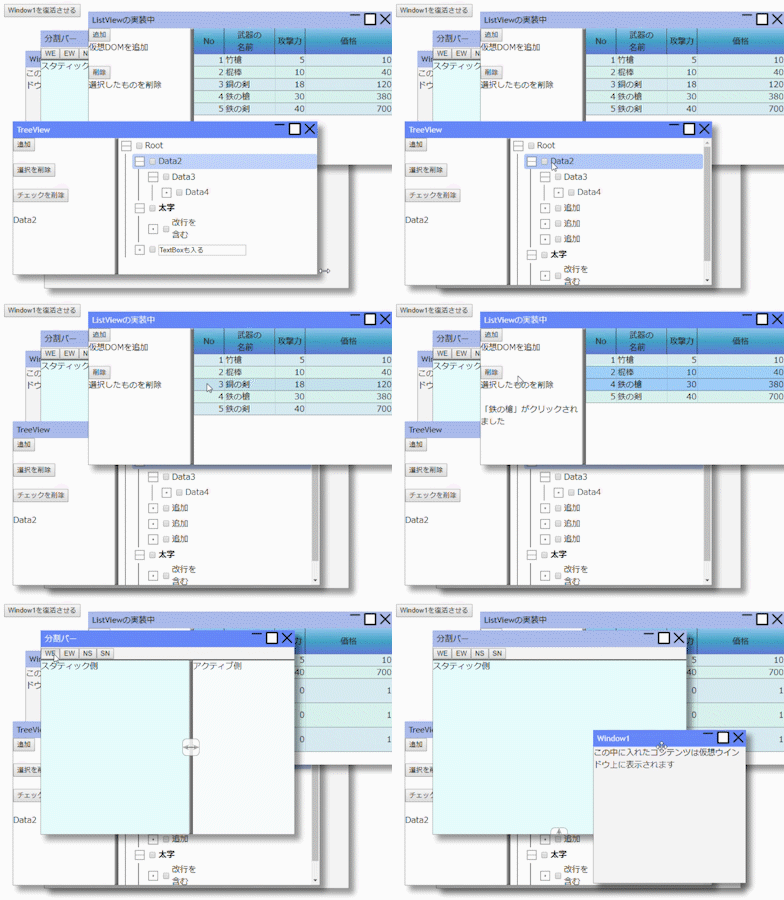
- The website where the document is written
[](https://ttis.croud.jp/?uuid=b292d429-dbad-49b5-8fed-6d268f4feaf0)
- Source code
[](https://github.com/JavaScript-WindowFramework/jswf-react)
- Sample code
[](https://github.com/JavaScript-WindowFramework/jwf-react-sample01)
- Operation sample
[](https://javascript-windowframework.github.io/jwf-react-sample01/dist/)
```tsx:index.tsx
import * as React from "react";
import * as ReactDOM from "react-dom";
import {
JSWindow,
WindowState,
WindowStyle,
WindowInfo,
SplitView,
SplitType
} from "@jswf/react";
function App() {
const frame = React.createRef<JSWindow>();
const [info, setInfo] = React.useState<WindowInfo | null>(null);
const [type, setType] = React.useState<SplitType>("ew");
return (
<>
{/* -------- Simply display the window ------------*/}
<JSWindow ref={frame} title="Window1" x={50} y={100}>
The content you put in this will be displayed on the virtual window
</JSWindow>
{/* -------- Window inside window ------------*/}
<JSWindow title="Window2" width={600} height={500} windowStyle={~WindowStyle.CLOSE}>
If the window position is not set, it will be displayed in the center.
<br />
You can set the function used in windowStyle
<JSWindow title="ChildWindow" overlapped={false} width={200} height={200}>
If overlapped is set to false, it will be displayed in the client area,
if it is set to true, only the overlap will be adjusted.
</JSWindow>
</JSWindow>
{/* -------- Display window information ------------*/}
<JSWindow title="Update test" y={50} onUpdate={p => setInfo(p)}>
<pre>
{info && JSON.stringify(info,["realX", "realY", "realWidth", "realHeight"]," ")}
</pre>
</JSWindow>
{/* -------- Installation of split bar ------------*/}
<JSWindow width={500} height={400} title="Split bar" clientStyle={{ display: "flex", flexDirection: "column" }}>
{/* Button installation */}
<div style={{ borderBottom: "solid 2px" }}>
<button onClick={() => setType("we")}>WE</button>
<button onClick={() => setType("ew")}>EW</button>
<button onClick={() => setType("ns")}>NS</button>
<button onClick={() => setType("sn")}>SN</button>
</div>
{/* Split bar (default style extends to the maximum of the parent client area) */}
<SplitView type={type} style={{ position: "relative", flex: 1 }}>
<div style={{ height: "100%" }}>Active side</div>
<div style={{ height: "100%", backgroundColor: "rgb(230,255,255)" }}>
Static side
</div>
</SplitView>
</JSWindow>
{/* -------- Non-window normal button ------------*/}
<button onClick={() => {
frame.current!.foreground();
frame.current!.setWindowState(WindowState.NORMAL);
}}>
Revive Window1
</button>
</>
);
}
ReactDOM.render(<App />, document.getElementById("root") as HTMLElement);
```
| Name | Usage |
| ----------------------------------------------------------------------------- | --------------------------- |
| [JSWindow](https://ttis.croud.jp/?uuid=f111063f-5af3-4158-816d-ae8c4f4c2ac7) | Virtual Window Components |
| [SplitView](https://ttis.croud.jp/?uuid=b3aa0115-2d3a-4ff3-afb0-c221d3e3918b) | Component for region split |
| [ListView](https://ttis.croud.jp/?uuid=7f858598-112b-4d98-8890-19f4084c49a2) | Similar to Windows ListView |
| [TreeView](https://ttis.croud.jp/?uuid=2ab9d650-0deb-4cdd-84c5-0481aee71ed3) | TreeView components |
| [TreeItem](https://ttis.croud.jp/?uuid=faedbbf6-eef3-43fc-9d02-7d61a4db7ed6) | TreeView Item components |
MIT