@jinyaoma/vuepress-theme-mustom
Version:
Simple design theme for VuePress,Blog,耀 の 个人网站 | Mark の Personal Website (QQ Group: 595614161)
638 lines (516 loc) • 21.9 kB
Markdown
<h1 align="center">Mustom</h1>
<div align="center">
Simple design theme for VuePress,Blog,耀 の 个人网站 | Mark の Personal Website (QQ Group: 595614161)
</div>
<div align="center">
  
</div>
文档语言:
- [中文](https://github.com/jinyaoMa/vuepress-theme-mustom/blob/master/README.zh.md)
- [English](https://github.com/jinyaoMa/vuepress-theme-mustom/blob/master/README.md)
> **当你看完本文档之后,如果还是感觉不会不清楚,请仔细研究我 [\$docs](https://github.com/jinyaoMa/vuepress-theme-mustom/blob/master/$docs) 的目录结构,或者也可以在 Github Issues 里面放出你的问题,我有空就回复。最好是加 QQ 群:595614161。**
> **要是主题出 Bug 了或者有什么建议想提,可以发到 Github Issues 里,不用在意什么报告的格式啥的。当然最好加 QQ 群:595614161。**
# 安装
创建以下结构的文件夹,如果想看 `$docs` 的详细结构,点这里 [\$docs](https://github.com/jinyaoMa/vuepress-theme-mustom/blob/master/$docs)。`_posts` 文件夹请参考 [\$docs/_posts](https://github.com/jinyaoMa/vuepress-theme-mustom/blob/master/$docs/_posts)。
```yml
# 在创建的新文件夹里
+ $docs # 放网站资源
- _posts # 放文章资源
- .vuepress # 放静态资源和配置
+ public # 放静态资源
+ config.js # 配置
+ package.json # 使用命令 `npm init` 生成
```
在新文件夹中运行一下其中一个命令,安装 `vuepress` 和 `vuepress-theme-mustom`。
```bash
yarn add @jinyaoma/vuepress-theme-mustom -D
```
或使用 npm
```bash
npm i @jinyaoma/vuepress-theme-mustom -D
```
或点 [这里](https://github.com/jinyaoMa/vuepress-theme-mustom/archive/master.zip) 手动下载并解压主题文件夹到上一步的新建文件夹。接着对照下方代码设置 `config.js` 中属性 `theme`。
```js
theme: require.resolve('../../vuepress-theme-mustom-master/')
```
安装成功后,使用以下命令运行到 `localhost`。
```bash
vuepress dev \$docs
```
或者生成到 `$docs/.vuepress/dist`
```bash
vuepress build \$docs
```
> 注意:上面命令里的反斜杠(“\\”)属于转义符,用于在命令行或终端里对特殊符号进行转义。
# 简单讲解 `_secret.tpl.js`
想看我的 `_secret.tpl.js` 长啥样可以点 [这里](https://github.com/jinyaoMa/vuepress-theme-mustom/blob/master/$docs/.vuepress/_secret.tpl.js)。
使用一个分离的保密文件的话,`appid` 和 `appkey` 什么的就不用上传到线上,有一些保密作用吧。可以参照以下代码在 `config.js` 引用保密文件。
```js
const secret = require('./_secret');
module.exports = { // https://www.vuepress.cn/zh/config/
// ...
themeConfig: {
// ...
translate: secret.translate, // 百度翻译设置
comment: secret.comment, // vssue 设置
// ...
}
// ...
}
```
# 简单讲解 `config.js`
想看我的 `config.js` 长啥样可以点 [这里](https://github.com/jinyaoMa/vuepress-theme-mustom/blob/master/$docs/.vuepress/config.js)。
> 很多代码太长就不翻译了 ~ 习惯了代码里写英文,这是病,以后要改。。。
## 普通 VuePress 设置
```js
module.exports = { // https://www.vuepress.cn/zh/config/
// Entry of used theme
// theme: require.resolve('../../'), // My value
// manually download theme, and folder `vuepress-theme-mustom-master` is in the root of the project
// theme: require.resolve('../../vuepress-theme-mustom-master/'),
theme: '@jinyaoma/vuepress-theme-mustom', // Your value
// Site base
// base: '/', // My value, due to https://ma-jinyao.cn/
base: '/MyBlog/', // Your value, if https://yourUsername.github.io/MyBlog/
// Default title that appended to your site title
// title: '耀 の 个人网站 | Mark の Personal Website', // My value
title: 'XXX 的博客 | XXX\'s Blog', // Your value
// Default description that appended to your site description
description: 'XXX 的博客, XXX\'s Blog, XXX, Mustom, VuePress',
themeConfig: {
// ...
// About this section, go to header "Configuration of themeConfig"
}
// It isn't necessary to change 'head' if you want to replace files directly
// favicon is in folder $docs/.vuepress/public/
// apple-touch-icon is in folder $docs/.vuepress/public/assets/img/
head: [
// PWA settings, https://www.vuepress.cn/plugin/official/plugin-pwa.html
['link', { rel: 'icon', href: '/favicon.ico', type: "image/x-icon" }],
['link', { rel: 'manifest', href: '/manifest.json' }],
['meta', { name: 'theme-color', content: '#ffffff' }],
['meta', { name: 'apple-mobile-web-app-capable', content: 'yes' }],
['meta', { name: 'apple-mobile-web-app-status-bar-style', content: '#ffffff' }],
['link', { rel: 'apple-touch-icon', href: '/assets/img/apple-touch-icon.png' }]
],
// It isn't necessary to change 'markdown' if you don't mind to use settings below
// https://www.vuepress.cn/zh/config/#markdown
markdown: {
lineNumbers: false,
extractHeaders: ['h1', 'h2', 'h3', 'h4', 'h5', 'h6']
},
// It isn't necessary to change 'evergreen'
evergreen: true, // using old browser ?
// To use jsdelivr cdn, you should change the publicPath below
configureWebpack: () => {
if (process.env.NODE_ENV === 'production') {
return {
output: {
// My value, username=jinyaoMa, repo=vuepress-theme-mustom, branch=gh-pages
//publicPath: 'https://cdn.jsdelivr.net/gh/jinyaoMa/vuepress-theme-mustom@gh-pages/'
// Your value, if username=XXX, repo=MyBlog, branch=gh-pages
publicPath: 'https://cdn.jsdelivr.net/gh/XXX/MyBlog@gh-pages/'
}
}
}
}
}
```
## 配置 `themeConfig`
> 以下所有属性都是包含在 `config.js` 的 `themeConfig` 里的
> `author`, `year`, `maximizeLaunch`, `noEmpty` 和 `images`; 这些属性挺简单的,你们可以自己试试。设置 `maximizeLaunch` 为 `true` 可以让开始封面的图最大化到全窗口。 `noEmpty` 可以关闭空白占位组件。`images` 可以让你自定义能改的图片的链接,但是必须符合以下代码中的格式。
```js
images: { // for image replacment; no base needed; first layer key points to component name
ad: '/assets/img/ad.png',
avatar: '/assets/img/avatar.png',
brand: '/assets/img/brand.png',
hitokoto: {
left: '/assets/img/hitokoto.left.png',
right: '/assets/img/hitokoto.right.png',
},
empty: '/assets/img/empty.png',
records: '/assets/img/records.png',
},
```
### domain
**这个属性只用于 sitemap 的生成**
- 我的设置值: `'https://ma-jinyao.cn'`
- 你可以设置成: `'https://yourdomain.com/'`
### clustrmaps
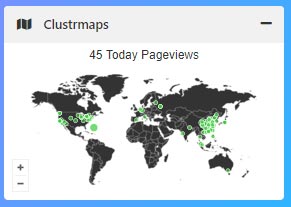
设置 `clustrmaps` 为 `null` 或者直接删掉它可以关掉这访问监测组件。这个组件需要 [clustrmaps.com](https://clustrmaps.com/) 的服务,就是要注册一下。
```js
clustrmaps: {
id: "clustrmaps", // clstr_globe / clustrmaps
src: "//cdn.clustrmaps.com/map_v2.js?cl=333333&w=a&t=t&d=kuCCiVvtASTqmAMxPSTLcjxs-p8j6ht3LUi9z9Q-OKc&co=ffffff&cmo=3acc3a&cmn=ff5353&ct=333333"
},
```
### customBackgrounds
This attribute is for adding background images to the site under `skin-default`. If there are multiple images, they will be in slide show. You can have value looking like the below.
这个属性可以让你添加背景图片,但只会在默认皮肤里显示。如果添加了多个背景图,就会以幻灯片播放的形式展示。你可以对照以下代码中的格式设置。
```js
customBackgrounds: [
'/assets/img/background.png',
'https://timgsa.baidu.com/timg?image&quality=80&size=b9999_10000&sec=1596065328389&di=ad7a9cc49e45547721005bd528325f0d&imgtype=0&src=http%3A%2F%2Fpic1.win4000.com%2Fwallpaper%2F2%2F58b4ef69ed377.jpg',
'https://timgsa.baidu.com/timg?image&quality=80&size=b9999_10000&sec=1596063652971&di=8b659ee5cd46f4006d082b626eb3bd0d&imgtype=0&src=http%3A%2F%2Fpicture.ik123.com%2Fuploads%2Fallimg%2F180330%2F4-1P330160644.jpg'
],
```
### socialShare

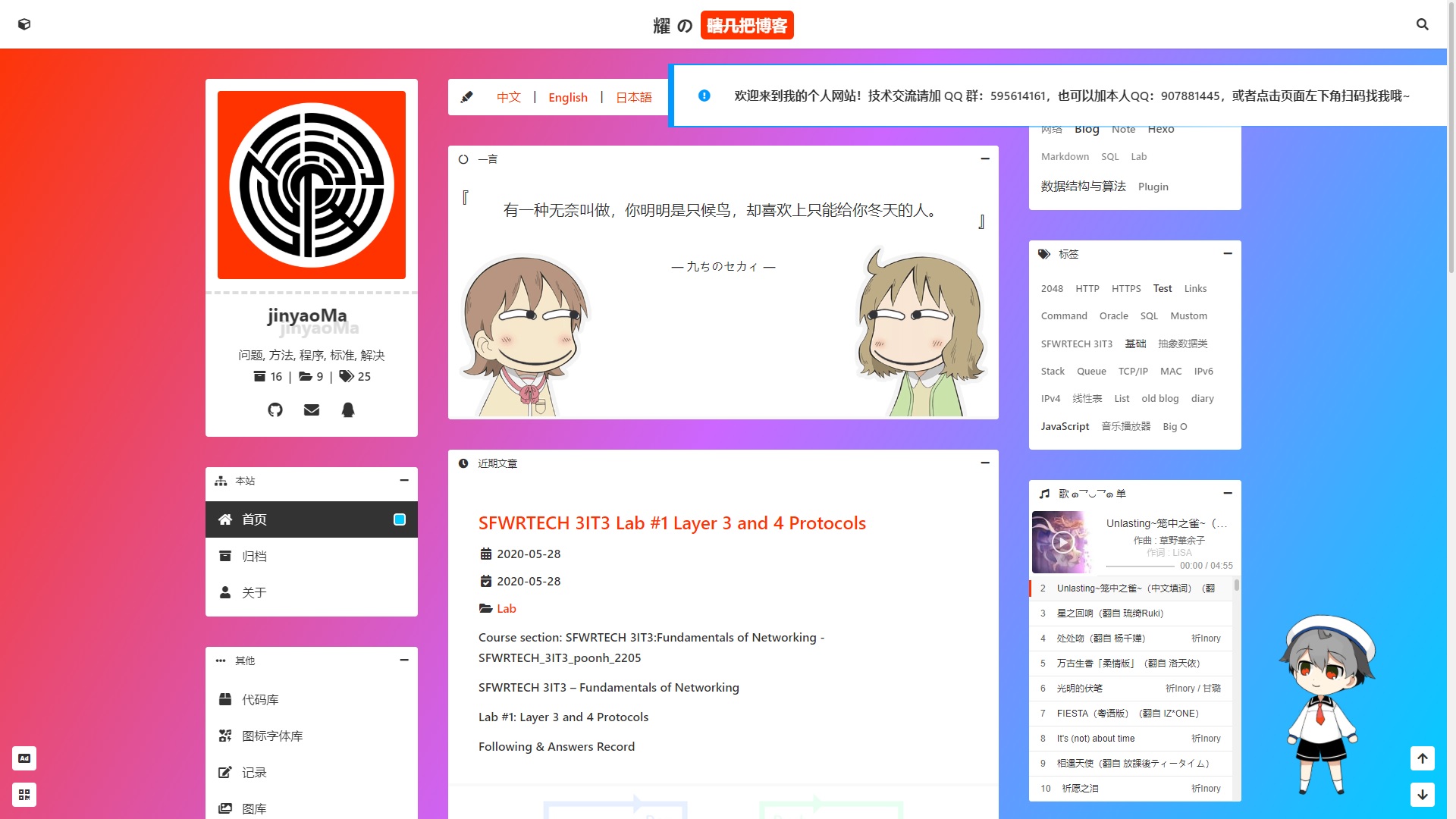
参考 [这里](https://sns.goyfe.com/guide/) 来设置。以下代码会生成上图的结果。
```js
socialShare: { // https://sns.goyfe.com/guide/
networks: ['qq', 'weibo', 'douban', 'email', 'whatsapp', 'facebook', 'reddit', 'telegram', 'line'],
email: 'jinyao.ma@outlook.com',
fallbackImage: '/assets/img/avatar.png',
noGlobalSocialShare: true
},
```
### notification

> `msg` 中字符串必须按照特定顺序/下标. 0 => `zh`, 1 => `en`
你可以在进站时有多个通知弹出,并且它们会一个接一个的显示,不会同时显示。`msg` 必需按顺序存放中英文的字符串。以下代码会生成上图的结果。
```js
notification: [
{ // welcome msg
type: 'default', // default or warning or error
msg: [
'<strong>欢迎来到我的个人网站!技术交流请加 QQ 群:595614161,也可以加本人QQ:907881445,或者点击页面左下角扫码找我哦~<strong>', // zh
'<strong>Welcome to my personal website! <strong>' // en
]
},
],
```
### qrcodes

> `locale` 中字符串必须按照特定顺序/下标. 0 => `zh`, 1 => `en`
`locale` 必需按顺序存放中英文的字符串。以下代码会生成上图的结果。
```js
qrcodes: [{ // qrcode for contact and friending
locale: [
'QQ', // zh
'QQ' // en
],
path: '/assets/img/qq.png' // no base needed
}, {
locale: [
'微信', // zh
'WeChat' // en
],
path: '/assets/img/wechat.png' // no base needed
}],
```
### header

> `sitename` 中字符串必须按照特定顺序/下标. 0 => `zh`, 1 => `en`
`sitename` 必需按顺序存放中英文的字符串。以下代码会生成上图的结果。
```js
header: {
sitename: [
'耀 の 个人网站', // zh
'Mark の Personal Website' // en
]
},
```
### brand

> `signatures` 中字符串必须按照特定顺序/下标. 0 => `zh`, 1 => `en`
`signatures` 必需按顺序存放中英文的字符串。以下代码会生成上图的结果。
```js
brand: {
signatures: [
'我只想安静地做笔记', // zh
'I just wanna note silently' // en
],
contacts: [{
icon: '<i class="fab fa-github fa-fw"></i>',
text: 'jinyaoMa',
link: 'https://github.com/jinyaoMa'
}, {
icon: '<i class="fas fa-envelope fa-fw"></i>',
text: 'jinyao.ma@outlook.com',
link: 'mailto://jinyao.ma@outlook.com'
}, {
icon: '<i class="fab fa-qq fa-fw"></i>',
text: '907881445',
link: 'tencent://Message/?uin=907881445'
}]
},
```
### menus
> `caption` 和 `text` 中字符串必须按照特定顺序/下标. 0 => `zh`, 1 => `en`
`caption` 和 `text` 必需按顺序存放中英文的字符串。
你可以删除某些链接。如果你有一个跟我一样的 [\$docs](https://github.com/jinyaoMa/vuepress-theme-mustom/blob/master/$docs) 目录结构,那这个属性不必要改。
```yml
# 在创建的新文件夹里
+ $docs # 放网站资源
- _posts # 放文章资源,自动生成“主页”和“归档”页面
- .vuepress # 放静态资源和配置
- about # “关于”页面
- codes # “代码库”页面
- icons # “图标字体库”页面
- letter # “求职信小贴士”页面
- records # “记录”页面
- resume # “简历小贴士”页面
# “图库”页面为自动生成
```
以下代码对应以上目录结构。
```js
menus: [{
caption: [
'本站', // zh
'MAIN' // en
],
icon: '<i class="fas fa-sitemap fa-fw"></i>',
items: [{
icon: '<i class="fas fa-home fa-fw"></i>',
text: [
'首页', // zh
'Home' // en
],
link: '/'
}, {
icon: '<i class="fas fa-archive fa-fw"></i>',
text: [
'归档', // zh
'Archive' // en
],
link: '/archive/'
}, {
icon: '<i class="fas fa-user fa-fw"></i>',
text: [
'关于', // zh
'About' // en
],
link: '/about/'
}]
}, {
caption: [
'工作', // zh
'JOB RELATED' // en
],
icon: '<i class="fas fa-briefcase fa-fw"></i>',
items: [{
icon: '<i class="fas fa-paper-plane fa-fw"></i>',
text: [
'简历小贴士', // zh
'Resume Tips' // en
],
link: '/resume/'
}, {
icon: '<i class="fas fa-file-contract fa-fw"></i>',
text: [
'求职信小贴士', // zh
'Cover Letter Tips' // en
],
link: '/letter/'
}]
}, {
caption: [
'其他', // zh
'OTHERS' // en
],
icon: '<i class="fas fa-ellipsis-h fa-fw"></i>',
items: [{
icon: '<i class="fas fa-box fa-fw"></i>',
text: [
'代码库', // zh
'Code Library' // en
],
link: '/codes/'
}, {
icon: '<i class="fas fa-icons fa-fw"></i>',
text: [
'图标字体库', // zh
'Icon Font Library' // en
],
link: '/icons/'
}, {
icon: '<i class="fas fa-edit fa-fw"></i>',
text: [
'记录', // zh
'Records' // en
],
link: '/records/'
}, {
icon: '<i class="fas fa-images fa-fw"></i>',
text: [
'图库', // zh
'Gallery' // en
],
link: '/gallery/'
}]
}],
```
### meting
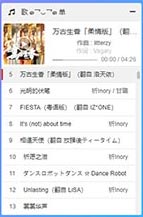
以下代码会生成上图的结果。
```js
meting: {
server: 'netease', // netease, tencent, kugou, xiami, baidu
type: 'playlist', // song, playlist, album, search, artist
id: '4989572738', // song id / playlist id / album id / search keyword
theme: 'var(--link)', // e.g. #ff3300
height: '297px' // playlist height, 297px ==> 9 lines
},
```
### portals
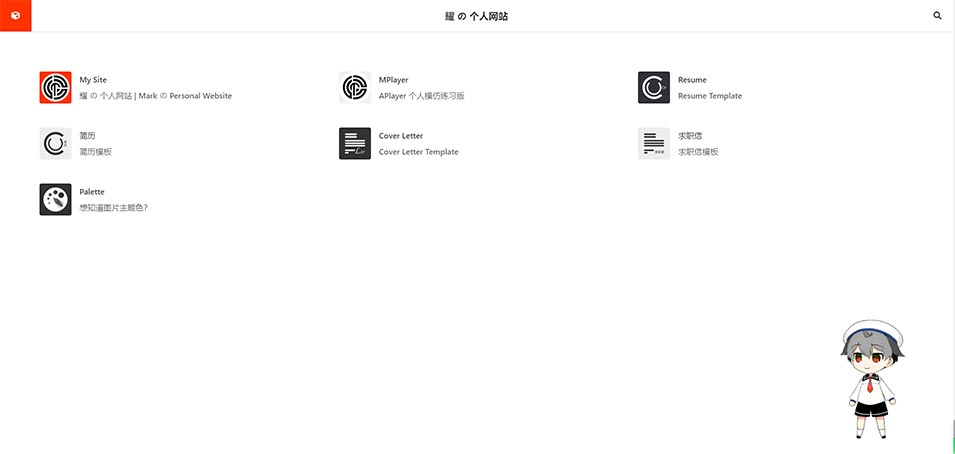
以下代码会生成上图的结果。
```js
// external links; use for the component that displays after clicking on the left-top button of header
portals: [{
name: 'My Site',
desc: '耀 の 个人网站 | Mark の Personal Website',
icon: 'https://jinyaoMa.github.io/asset/img/author.medium.png',
link: 'https://jinyaoMa.github.io/'
}, {
name: 'MPlayer',
desc: 'APlayer 个人模仿练习版',
icon: 'https://blog.ma-jinyao.cn/asset/img/icon.medium.png',
link: 'https://blog.ma-jinyao.cn/MPlayer'
}, {
name: 'Resume',
desc: 'Resume Template',
icon: 'https://blog.ma-jinyao.cn/extension/resume/icon.png',
link: 'https://blog.ma-jinyao.cn/extension/resume/english/'
}, {
name: '简历',
desc: '简历模板',
icon: 'https://blog.ma-jinyao.cn/extension/resume/icon.reverse.png',
link: 'https://blog.ma-jinyao.cn/extension/resume/chinese/'
}, {
name: 'Cover Letter',
desc: 'Cover Letter Template',
icon: 'https://blog.ma-jinyao.cn/extension/letter/icon.png',
link: 'https://blog.ma-jinyao.cn/extension/letter/english/'
}, {
name: '求职信',
desc: '求职信模板',
icon: 'https://blog.ma-jinyao.cn/extension/letter/icon.reverse.png',
link: 'https://blog.ma-jinyao.cn/extension/letter/chinese/'
}, {
name: 'Palette',
desc: '想知道图片主题色?',
icon: 'https://blog.ma-jinyao.cn/extension/palette/icon.png',
link: 'https://blog.ma-jinyao.cn/extension/palette/'
}],
```
### hitokoto
You can put your words to `customs` for displaying, and these words are randomly picked on home page loaded. `type` is for hitokoto service setting referred to [developer.hitokoto.cn](https://developer.hitokoto.cn/sentence/#请求参数)
你可以设置自己的话或句子。设置好后,每次进首页都会随机显示 `customs` 中的一句话。 设置 `type` 可以参考 [请求参数](https://developer.hitokoto.cn/sentence/#请求参数)。
```js
hitokoto: {
customs: [/*{ // format; if customs exist, API will be ignored, and customs will be in use
word: 'https://developer.hitokoto.cn',
from: '一言开发者中心'
}*/],
type: 'i' // https://developer.hitokoto.cn/sentence/#请求参数
},
```
### gallery
你可以添加线上的图片到图库页面。添加的图片会置顶显示,接着才是自动检测的本地图片。本地图片都是凡在 `/$docs/.vuepress/public/gallery` 中,点 [这里](https://github.com/jinyaoMa/vuepress-theme-mustom/blob/master/$docs/.vuepress/public/gallery) 看我是怎么样子放的。
```js
gallery: [/*{ format; these gallery items will be appended to /gallery/ page
name: 'test image from baidu',
url: 'https://timgsa.baidu.com/timg?image&quality=80&size=b9999_10000&sec=1596063652971&di=8b659ee5cd46f4006d082b626eb3bd0d&imgtype=0&src=http%3A%2F%2Fpicture.ik123.com%2Fuploads%2Fallimg%2F180330%2F4-1P330160644.jpg'
}*/],
```
### pwa
> `message` 和 `buttonText` 中字符串必须按照特定顺序/下标. 0 => `zh`, 1 => `en`
`message` 和 `buttonText` 必需按顺序存放中英文的字符串。
`popupComponent` 是已经设置好的包含在主题资源中的自定义组件。如果你不想要这个更新弹窗,可以设置 `updatePopup` 为 `false`。如果你 SW 相关功能都不想要,可以把 `serviceWorker` 和 `updatePopup` 都设成 `false`。
```js
pwa: { // https://www.vuepress.cn/plugin/official/plugin-pwa.html
serviceWorker: true,
popupComponent: 'CustomSWUpdatePopup',
updatePopup: {
message: [
'检测到可用的新内容。', // zh
'New content is available.' // en
],
buttonText: [
'更新缓存', // zh
'Refresh' // en
]
}
}
```
## 文章 Front-Matter
> `categories` 和 `tags` 必须只有一层,即一维数组。本主题**不支持**分类标签使用多维数组。
每篇文章都需要有跟以下结构相似的 front-matter。
```yml
---
title: 'Post Title'
categories: # flat, ONLY ONE layer acceptable
- cate1
- cate2
tags: # flat, ONLY ONE layer acceptable
- tag1
- tag2
date: 2020-12-12 00:00:00
updated: 2020-12-12 00:00:00
---
```
## 普通页面 Front-Matter
从我的“关于”页面找的例子,或者查看原 `index.md` 文件可以点 [这里](https://github.com/jinyaoMa/vuepress-theme-mustom/blob/master/$docs/about/index.md)。
```yml
---
title: 关于 | About
---
```
### 想要做和我的“记录”页面相似的页面?
根据以下格式写代码,或者查看我的“记录”页面原 `index.md` 文件可以点 [这里](https://github.com/jinyaoMa/vuepress-theme-mustom/blob/master/$docs/records/index.md)。
```yml
---
title: # page title
records:
enabled: true # set this to true to enable Records component
items:
- cover: # [empty] to use default cover
date: # string
title:
# e.g. [empty]
# e.g. book / article / paper / newspaper / report / picture / anime / video / movie / audio / project / website
# e.g. [customized] --> "Journal"
type:
author:
source:
# format 'number/total' OR '100%' OR [customized]; [empty] to use 'N/A', NO DECIMAL POINT ALLOW
# e.g. 12 / 34 ; 32/52 ; 22% ; 88% ; "Latest" ; "Complete"
progress:
summary:
---
```
### 想要做和我的“代码库”页面相似的页面?
> 代码库在 Github 仓库中的结构可以参考 [jinyaoMa/code-lib](https://github.com/jinyaoMa/code-lib)
根据以下格式写代码,或者查看我的“代码库”页面原 `index.md` 文件可以点 [这里](https://github.com/jinyaoMa/vuepress-theme-mustom/blob/master/$docs/codes/index.md)。
```yml
---
title: # page title
github:
user: # Github username
repo: # Github repo
readme:
enabled: true # set this to true to enable Readme component
stack:
enabled: true # set this to true to enable Stack component
---
```
### 想要做和我的“图标字体库”页面相似的页面?
> 图标字体库在 Github 仓库中的结构可以参考 [jinyaoMa/icon-lib](https://github.com/jinyaoMa/icon-lib)
根据以下格式写代码,或者查看我的“图标字体库”页面原 `index.md` 文件可以点 [这里](https://github.com/jinyaoMa/vuepress-theme-mustom/blob/master/$docs/icons/index.md)。
```yml
---
title: # page title
github:
user: # Github username
repo: # Github repo
readme:
enabled: true # set this to true to enable Readme component
iframe:
enabled: true # set this to true to enable Iframe component
url: https://blog.ma-jinyao.cn/icon-lib/ # subpage should be in same-origin
---
```