@jeremytenjo/super-code-generator
Version:
A powerful, fast, and scalable code generator that saves you time
164 lines (119 loc) • 3.99 kB
Markdown
<p align="center">
<a href="https://jeremytenjo.com/" rel="noopener" target="_blank"><img width="200" src="https://github.com/jeremytenjo/super-code-generator/blob/main/assets/images/logo.png?raw=true" alt="Create Modern App Logo"></a></p>
</p>
<h1 align="center">Super Code Generator</h1>
<p align="center">A powerful, fast, and scalable code generator that saves you time</p>
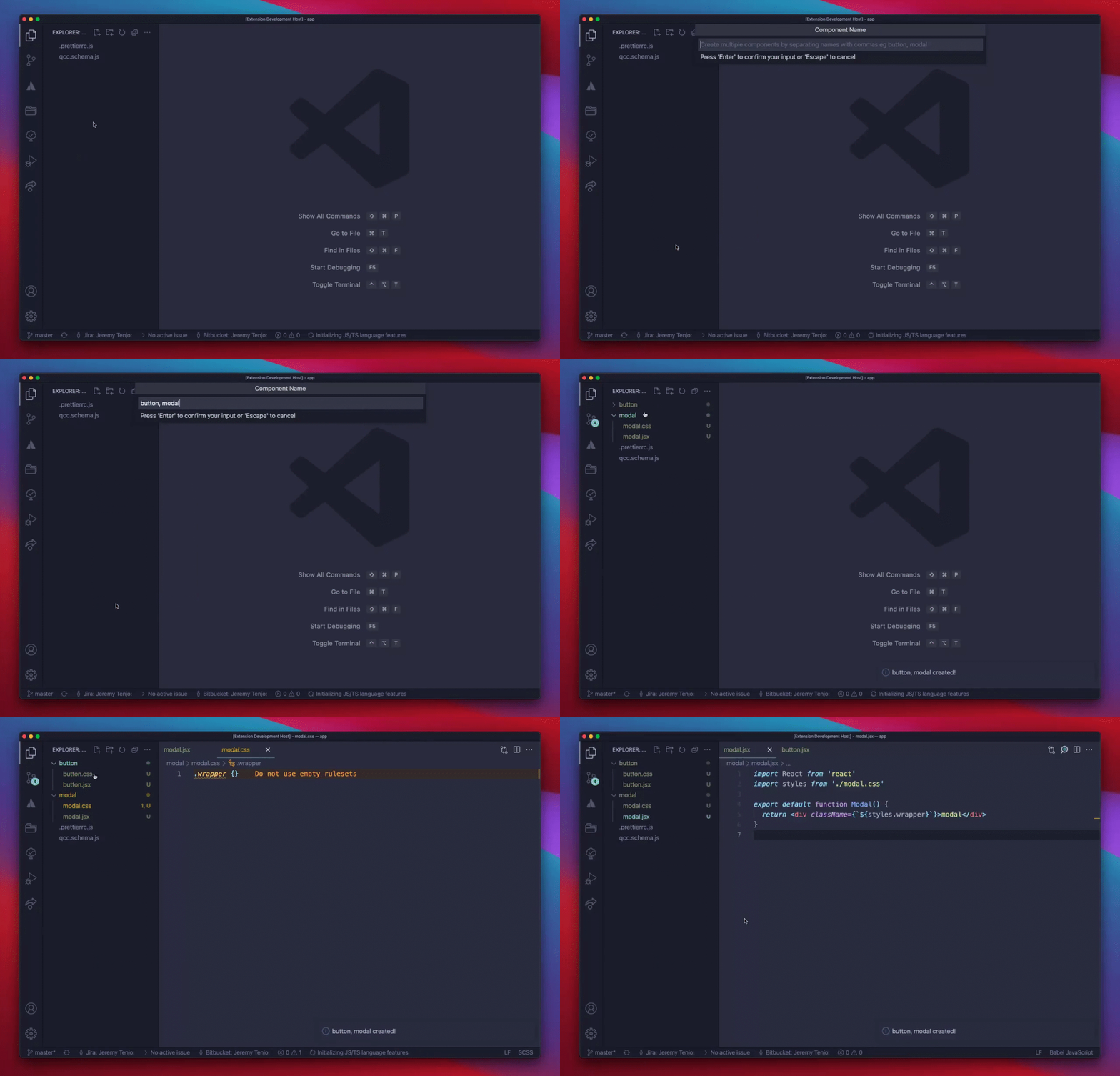
1. Create `superCodeGen.schema.ts`
```ts
import type { SuperCodeGeneratorConfigSchema } from '@jeremytenjo/super-code-generator'
const superCodeGeneratorConfig: SuperCodeGeneratorConfigSchema = [
{
type: 'React component',
files: [
{
path: ({ name, helpers: { changeCase } }) => changeCase.paramCase(name) + '.tsx',
template: ({ name, helpers: { wrapInTemplateLiteral, changeCase } }) => `
import React from 'react';
import styles from './${changeCase.paramCase(name)}.css';
export default function ${changeCase.pascalCase(name)}() {
return (
<div className={${wrapInTemplateLiteral('styles.wrapper')}}>
${name}
</div>
);
}
`,
},
{
path: ({ name, helpers: { changeCase } }) => changeCase.paramCase(name) + '.css',
template: () => `.wrapper {}`,
},
],
},
]
export default superCodeGeneratorConfig
```
2. Click right button in mouse and selected `Create Component`
3. Pick component type
4. Add component names
5. Profit! ✨
Creates the following component when selecting type `React component` and inputting name `button`
`button.jsx`
```js
import React from 'react'
import styles from './button.css'
export default function Button() {
return <div className={`${styles.wrapper}`}>button</div>
}
```
`button.css`
```css
.wrapper {
}
```
## Generator Properties
**type**
Name of the scaffold eg React Component
**files**
Array of files to generate
**usageInstructions** Optional
Instructions the user will see when they type the component name
**outputWithoutParentDir** Optional
Determined whether to output generated code inside the parent directory
**Options**
`createNamedFolder` - default `true`
Creates files inside a folder named based on the component name
`outputInRootFolder` - default `false`
Always output code in root folder
`formatParentFolderName` - default `undefined`
Format the parent folder name, must be a function that takes { currentName: string } and returns { newName: string }
## Hooks
`onCreate`
Trigger function after component is created.
```ts
import type {
SuperCodeGeneratorTemplateSchema,
SuperCodeGeneratorFilesSchema,
} from '@jeremytenjo/super-code-generator'
import shell from 'child_process'
const files: SuperCodeGeneratorFilesSchema = [
{
type: 'React component',
hooks: {
onCreate: ({ outputPath }) => {
shell.exec(`cd ${outputPath}`)
},
},
files: [
{
path: () => 'src/index.jsx',
template: ({ name, helpers: { changeCase } }) => `
import React from 'react';
export default function ${changeCase.pascalCase(name)}() {
return <div>${changeCase.pascalCase(name)}</div>
}
`,
},
],
},
]
const template: SuperCodeGeneratorTemplateSchema = {
type: 'Component',
files,
}
export default template
```
## Component Type properties
Properties passed to `path` and `template` functions
```js
name: 'component name input by user',
folderPath: 'component folder path',
helpers: {
changeCase: 'function to change case of a string',
wrapInTemplateLiteral: 'helps add templates literals within a template literal'
addEmptyTemplateLiteral: 'returns ``'
}
```
Change case uses the [change-case](https://github.com/blakeembrey/change-case#core) library
> Pro Tip: Add a prettier config file path to format your created files.