@jawg/taxonomy
Version:
Building a map taxonomy chart with style.json
138 lines (108 loc) • 4.88 kB
Markdown
# Taxonomy
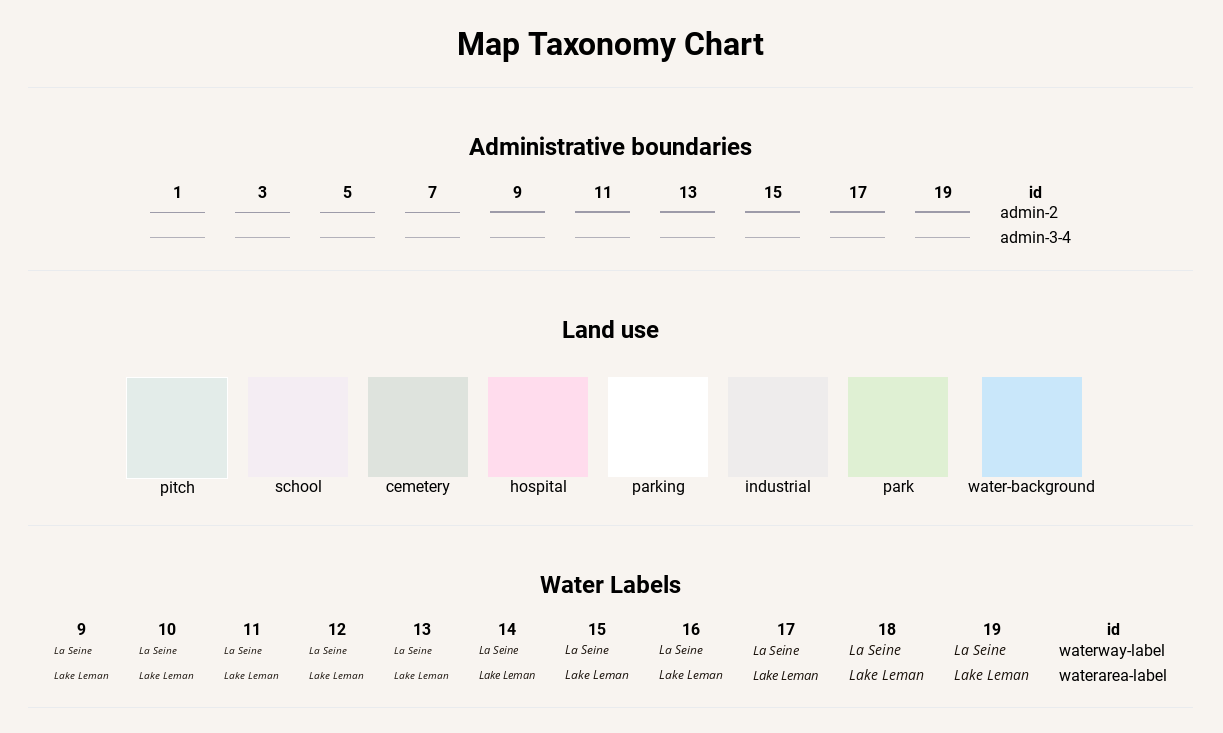
Map taxonomy chart for mapbox GL styles.
Thanks [Nath Slaughter](https://github.com/natslaughter) @natslaughter for the original article and idea of taxonomy.
Read the original article [here](https://blog.mapbox.com/map-design-taxonomy-chart-ae17b23df019)
Read the **new** article about this tool [here](https://blog.jawg.io/map-taxonomy-chart-with-jawg-maps/)
## [GitHub Page](https://jawg.github.io/taxonomy/) and [Live Demo](https://jawg.github.io/taxonomy/demo)
## Usage
### Simple page
For a simple view of your taxonomy chart, you can use our demo on github.
Here is the link and what it should look like :
https://jawg.github.io/taxonomy/demo?url=<your-style-url>
Without style url in the query parameter, it will show our simple example.
<form action="https://jawg.github.io/taxonomy/demo" target="_blank">
<input type="text" name="url" placeholder="Style JSON URL" style="color: #24292e; background-color: #fff; border: 1px solid #d1d5da; border-radius: 3px;"> <input type="submit" value="Submit" class="btn">
</form>
### Web integration
You can add your taxonomy chart in your website or blog by using this code in your HTML :
```html
<head>
<link rel="stylesheet" type="text/css" href="https://jawg.github.io/taxonomy/dist/style.css">
</head>
<body>
<taxonomy style-url="<your-style-url>"></taxonomy>
<script src="https://jawg.github.io/taxonomy/dist/taxonomy-bundle+riot.js"></script>
</body>
```
## Specification
### Global metadata
```json
{
"metadata": {
"taxonomy:title": "Global taxonomy title",
"taxonomy:groups": [
{
"id": "admin-boundaries",
"type": "line",
"title":"Administrative boundaries"
},
{
"id": "roads",
"type": "line",
"title":"Roads",
"zooms": {
"minzoom": 5,
"maxzoom": 20
}
},
{
"id": "landcover",
"type": "polygon",
"title":"Water & Landcover",
"zooms": 13
},
{
"id": "places",
"type": "symbol",
"title":"Political & Place Labels",
"zooms": [2, 4, 6, 8, 10, 12, 14, 16]
},
{
"type": "annotation",
"content": "<div style='font-size: 12px; text-align: center;'>Annotation for ending</a></div>"
}
]
}
}
```
#### `taxonomy:groups`
- `taxonomy:title`: This is the title that will be displayed on the top of your taxonomy.
- `taxonomy:groups`: This an array of objects in your style `metadata`. `Required`
- `id`: This is the identifier for your taxonomy group. This will be use for your layer grouping. `Required`.
- `type`: This is the type of your style object. This is use for the taxonomy rendering. One of `line`, `polygon`, `symbol` and `annotation`. `Required`.
- `title`: This is the title that will be displayed for your taxonomy group.
- `zooms`: This is all zoooms where taxonomy will be computed. Can be `array`, `number`, `object`. Default zooms from 1 to 19.
- Examples:
- `array`: `[0, 2, 4, 6, 8, 10, 12, 14]`, `[5, 6, 7, 8]`...
- `number`: `3`, `16`...
- `object`: `minzoom` and `maxzoom` are required `{minzoom: 5, maxzoom: 20}`, `{minzoom: 0, maxzoom: 12}`...
### Layers metadata
```json
{
"id": "layer-id",
"ref": "layer-for-casing",
"metadata": {
"taxonomy:group": "taxonomy-groups-id",
"taxonomy:casing": "layer-for-casing",
"taxonomy:example": "Example for symbols",
"taxonomy:matches": [
{ "name": "meta-layer-name", "get:class": "value-from-tile", "example": "Example for symbols" }
]
}
}
```
- `taxonomy:group`: This must match a `taxonomy:groups`.`id` from your global metadata.
`Required`.
- `taxonomy:casing`: This will refer to another layer id. That's mean the current layer is the casing of the layer pointed by `taxonomy:casing`. This layer must be a line type. This will render an outline for `taxonomy:casing` (We can also use `ref` id from your layer).
- `taxonomy:example`: This is a text example for symbols groups. Default text is layer id.
- `taxonomy:matches`: This is an array of objects that will process a `match` or `case` expression.
- `name`: The name or title to display for this example.
- `example`: The text to display if it's a symbol.
- `[expression]:[key]`: The value to return when this expression is found, this should be a value that can be found in your tile. You can add many expressions.
- Example `{"name": "Green Grass", "get:class": "grass"}` will display Green Grass and replace occurences of `["get", "class"]` by `grass`.
### Concrete example
See example.json
## Credits
Powered by [JawgMaps](https://www.jawg.io)
Sponsored by [Qwant](https://www.qwant.com/)