@jalez/react-flow-smart-edge
Version:
Smart edge routing for @xyflow/react v12+ (maintained fork of @tisoap/react-flow-smart-edge)
402 lines (318 loc) • 12.2 kB
Markdown
# React Flow Smart Edge v12+
> **Maintained fork** of [@tisoap/react-flow-smart-edge](https://github.com/tisoap/react-flow-smart-edge) by Tiso Alvarez Puccinelli
> Updated for **@xyflow/react v12+** with zero security vulnerabilities
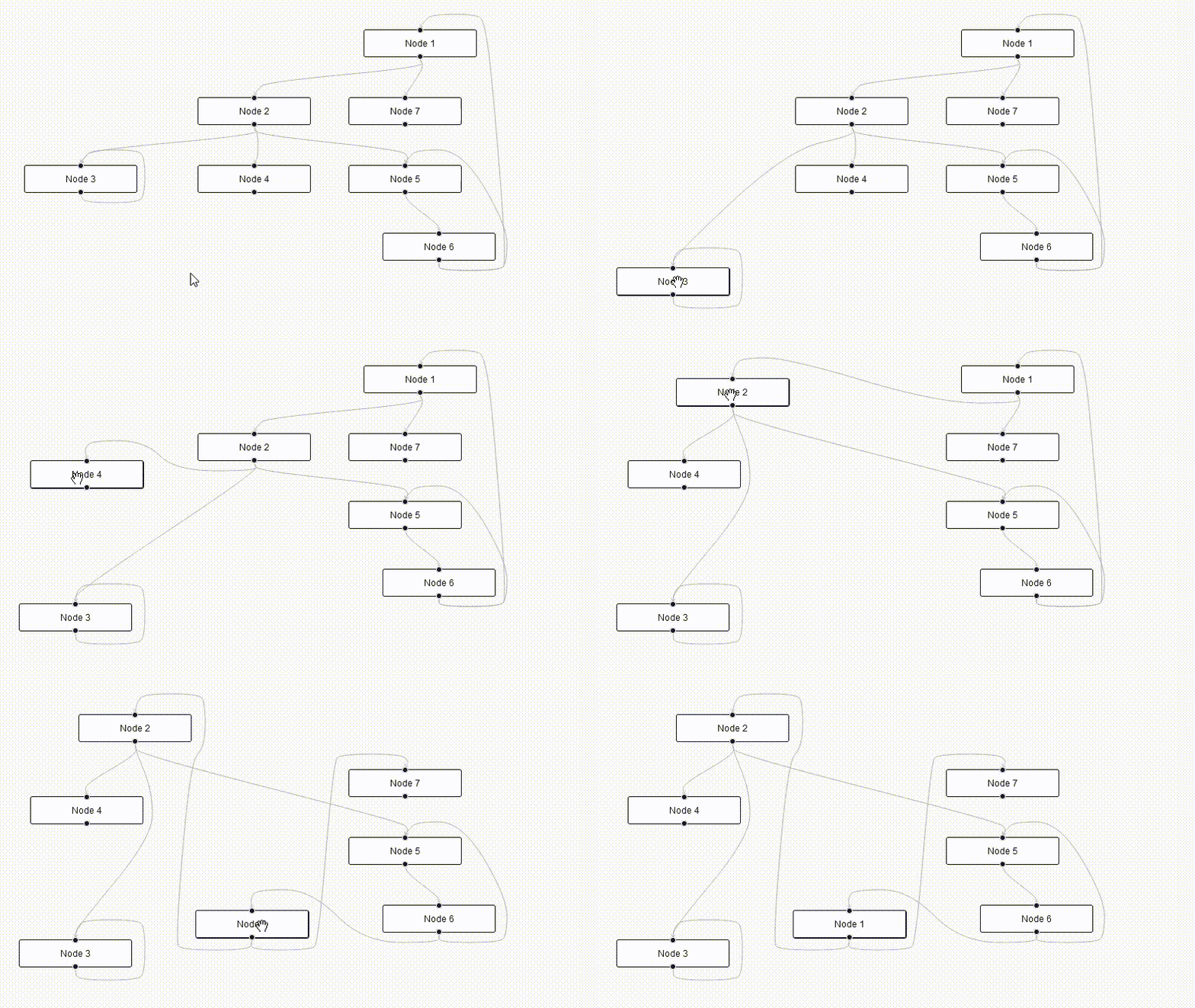
Custom Edges for React Flow that never intersect with other nodes, using pathfinding.




## Why This Fork?
The original [@tisoap/react-flow-smart-edge](https://github.com/tisoap/react-flow-smart-edge) has been **archived** and unmaintained for 3+ years. This fork provides:
- ✅ **@xyflow/react v12+ compatibility** (migrated from deprecated `reactflow` package)
- ✅ **Zero security vulnerabilities** (was 22+ in original)
- ✅ **Reduced bundle size** (removed Storybook dependencies)
- ✅ **Updated dependencies** (all packages updated to latest compatible versions)
- ✅ **Modern TypeScript** support (TypeScript 5.8+)
- ✅ **Active maintenance** (accepting issues and PRs)
## Migration from Original
If you're using the original package:
```bash
# Remove old package
npm uninstall @tisoap/react-flow-smart-edge reactflow
# Install new packages
npm install @jalez/react-flow-smart-edge @xyflow/react
```
The API remains **100% compatible** - just update your imports:
```typescript
// Update your React Flow imports
import { ReactFlow, Node, Edge } from '@xyflow/react'
import '@xyflow/react/dist/style.css'
// Smart Edge imports remain the same
import { SmartBezierEdge } from '@jalez/react-flow-smart-edge'
```
## Install
With `npm`:
```bash
npm install @jalez/react-flow-smart-edge @xyflow/react
```
With `yarn`:
```bash
yarn add @jalez/react-flow-smart-edge @xyflow/react
```
This package is compatible with **@xyflow/react v12+** (the new official React Flow package).
## Usage
This package ships with the following Smart Edges components:
- `SmartBezierEdge`: A smart equivalent to React Flow's [BezierEdge](https://reactflow.dev/docs/api/edges/edge-types/)
- `SmartStraightEdge`: A smart equivalent to React Flow's [StraightEdge](https://reactflow.dev/docs/api/edges/edge-types/)
- `SmartStepEdge`: A smart equivalent to React Flow's [StepEdge](https://reactflow.dev/docs/api/edges/edge-types/)
Each one can be imported individually as a named export.
### Example
```jsx
import React from 'react'
import { ReactFlow } from '@xyflow/react'
import { SmartBezierEdge } from '@jalez/react-flow-smart-edge'
import '@xyflow/react/dist/style.css'
const nodes = [
{
id: '1',
data: { label: 'Node 1' },
position: { x: 300, y: 100 }
},
{
id: '2',
data: { label: 'Node 2' },
position: { x: 300, y: 200 }
}
]
const edges = [
{
id: 'e21',
source: '2',
target: '1',
type: 'smart'
}
]
// You can give any name to your edge types
// https://reactflow.dev/docs/api/edges/custom-edges/
const edgeTypes = {
smart: SmartBezierEdge
}
export const Graph = (props) => {
const { children, ...rest } = props
return (
<ReactFlow
defaultNodes={nodes}
defaultEdges={edges}
edgeTypes={edgeTypes}
{...rest}
>
{children}
</ReactFlow>
)
}
```
## Edge Options
All smart edges will take the exact same options as a [React Flow Edge](https://reactflow.dev/docs/api/edges/edge-options/).
## Custom Smart Edges
You can have more control over how the edge is rerendered by creating a [custom edge](https://reactflow.dev/docs/api/edges/custom-edges/) and using the provided `getSmartEdge` function. It takes an object with the following keys:
- `sourcePosition`, `targetPosition`, `sourceX`, `sourceY`, `targetX` and `targetY`: The same values your [custom edge](https://reactflow.dev/docs/examples/edges/custom-edge/) will take as props
- `nodes`: An array containing all graph nodes, you can get it from the [`useNodes` hook](https://reactflow.dev/docs/api/hooks/use-nodes/)
### Example
Just like you can use `getBezierPath` from `reactflow` to create a [custom edge with a button](https://reactflow.dev/docs/examples/edges/edge-with-button/), you can do the same with `getSmartEdge`:
```jsx
import React from 'react'
import { useNodes, BezierEdge } from '@xyflow/react'
import { getSmartEdge } from '@jalez/react-flow-smart-edge'
const foreignObjectSize = 200
export function SmartEdgeWithButtonLabel(props) {
const {
id,
sourcePosition,
targetPosition,
sourceX,
sourceY,
targetX,
targetY,
style,
markerStart,
markerEnd
} = props
const nodes = useNodes()
const getSmartEdgeResponse = getSmartEdge({
sourcePosition,
targetPosition,
sourceX,
sourceY,
targetX,
targetY,
nodes
})
// If the value returned is null, it means "getSmartEdge" was unable to find
// a valid path, and you should do something else instead
if (getSmartEdgeResponse === null) {
return <BezierEdge {...props} />
}
const { edgeCenterX, edgeCenterY, svgPathString } = getSmartEdgeResponse
return (
<>
<path
style={style}
className='react-flow__edge-path'
d={svgPathString}
markerEnd={markerEnd}
markerStart={markerStart}
/>
<foreignObject
width={foreignObjectSize}
height={foreignObjectSize}
x={edgeCenterX - foreignObjectSize / 2}
y={edgeCenterY - foreignObjectSize / 2}
requiredExtensions='http://www.w3.org/1999/xhtml'
>
<button
onClick={(event) => {
event.stopPropagation()
alert(`remove ${id}`)
}}
>
X
</button>
</foreignObject>
</>
)
}
```
## Advanced Custom Smart Edges
The `getSmartEdge` function also accepts an optional object `options`, which allows you to configure aspects of the path-finding algorithm. You may use it like so:
```js
const myOptions = {
// your configuration goes here
nodePadding: 20,
gridRatio: 15
}
// ...
const getSmartEdgeResponse = getSmartEdge({
sourcePosition,
targetPosition,
sourceX,
sourceY,
targetX,
targetY,
nodes,
// Pass down options in the getSmartEdge object
options: myOptions
})
```
The `options` object accepts the following keys (they're all optional):
- `nodePadding`: How many pixels of padding are added around nodes, or by how much should the edge avoid the walls of a node. Default `10`, minimum `2`.
- `gridRatio`: The size in pixels of each square grid cell used for path-finding. Smaller values for a more accurate path, bigger for faster path-finding. Default `10`, minimum `2`.
- `drawEdge`: Allows you to change the function responsible to draw the SVG line, by default it's the same used by `SmartBezierEdge` ([more below](#drawedge))
- `generatePath`: Allows you to change the function for the path-finding, by default it's the same used by `SmartBezierEdge` ([more below](#generatepath))
### `drawEdge`
With the `drawEdge` option, you can change the function used to generate the final [SVG path string](https://developer.mozilla.org/en-US/docs/Web/SVG/Tutorial/Paths), used to draw the line. By default it's the `svgDrawSmoothLinePath` function (same as used by the `SmartBezierEdge`), but the package also includes `svgDrawStraightLinePath` (same as used by the `SmartStraightEdge` and `SmartStepEdge`), or you can provide your own.
```jsx
import {
getSmartEdge,
// Available built-in SVG draw functions
svgDrawSmoothLinePath,
svgDrawStraightLinePath
} from '@jalez/react-flow-smart-edge'
// Using provided SVG draw functions:
const result = getSmartEdge({
// ...
options: {
drawEdge: svgDrawSmoothLinePath
}
})
// ...or using your own custom function
const result = getSmartEdge({
// ...
options: {
drawEdge: (source, target, path) => {
// your code goes here
// ...
return svgPath
}
}
})
```
The function you provided must comply with this signature:
```ts
type SVGDrawFunction = (
source: XYPosition, // The starting {x, y} point
target: XYPosition, // The ending {x, y} point
path: number[][] // The sequence of points [x, y] the line must follow
) => string // A string to be used in the "d" property of the SVG line
```
For inspiration on how to implement your own, you can check the [`drawSvgPath.ts` source code](https://github.com/tisoap/react-flow-smart-edge/blob/main/src/functions/drawSvgPath.ts).
### `generatePath`
With the `generatePath` option, you can change the function used to do [Pathfinding](https://en.wikipedia.org/wiki/Pathfinding). By default, it's the `pathfindingAStarDiagonal` function (same as used by the `SmartBezierEdge`), but the package also includes `pathfindingAStarNoDiagonal` (used by `SmartStraightEdge`) and `pathfindingJumpPointNoDiagonal` (used by `SmartStepEdge`), or your can provide your own. The built-in functions use the [`pathfinding` dependency](https://www.npmjs.com/package/pathfinding#advanced-usage) behind the scenes.
```jsx
import {
getSmartEdge,
// Available built-in pathfinding functions
pathfindingAStarDiagonal,
pathfindingAStarNoDiagonal,
pathfindingJumpPointNoDiagonal
} from '@jalez/react-flow-smart-edge'
// Using provided pathfinding functions:
const result = getSmartEdge({
// ...
options: {
generatePath: pathfindingJumpPointNoDiagonal
}
})
// ...or using your own custom function
const result = getSmartEdge({
// ...
options: {
generatePath: (grid, start, end) => {
// your code goes here
// ...
return { fullPath, smoothedPath }
}
}
})
```
The function you provide must comply with this signature:
```ts
type PathFindingFunction = (
grid: Grid, // Grid representation of the graph
start: XYPosition, // The starting {x, y} point
end: XYPosition // The ending {x, y} point
) => {
fullPath: number[][] // Array of points [x, y] representing the full path with all points
smoothedPath: number[][] // Array of points [x, y] representing a smaller, compressed path
} | null // The function should return null if it was unable to do pathfinding
```
For inspiration on how to implement your own, you can check the [`generatePath.ts` source code](https://github.com/tisoap/react-flow-smart-edge/blob/main/src/functions/generatePath.ts) and the [`pathfinding` dependency](https://www.npmjs.com/package/pathfinding#advanced-usage) documentation.
### Advanced Examples
```jsx
import {
getSmartEdge,
svgDrawSmoothLinePath,
svgDrawStraightLinePath
pathfindingAStarDiagonal,
pathfindingAStarNoDiagonal,
pathfindingJumpPointNoDiagonal
} from '@jalez/react-flow-smart-edge'
// ...
// Same as importing "SmartBezierEdge" directly
const bezierResult = getSmartEdge({
// ...
options: {
drawEdge: svgDrawSmoothLinePath,
generatePath: pathfindingAStarDiagonal,
}
})
// Same as importing "SmartStepEdge" directly
const stepResult = getSmartEdge({
// ...
options: {
drawEdge: svgDrawStraightLinePath,
generatePath: pathfindingJumpPointNoDiagonal,
}
})
// Same as importing "SmartStraightEdge" directly
const straightResult = getSmartEdge({
// ...
options: {
drawEdge: svgDrawStraightLinePath,
generatePath: pathfindingAStarNoDiagonal,
}
})
```
## Credits & Attribution
This package is a maintained fork of [@tisoap/react-flow-smart-edge](https://github.com/tisoap/react-flow-smart-edge) by **Tiso Alvarez Puccinelli**.
Original project contributors:
- Tiso Alvarez Puccinelli ([@tisoap](https://github.com/tisoap)) - Original author
- All [original contributors](https://github.com/tisoap/react-flow-smart-edge/graphs/contributors)
## Community & Support
- 🐛 **Bug reports**: [Open an issue](https://github.com/jalez/react-flow-smart-edge/issues)
- 💡 **Feature requests**: [Open an issue](https://github.com/jalez/react-flow-smart-edge/issues)
- 📖 **Documentation**: This README and inline TypeScript types
- 💬 **Discussions**: [GitHub Discussions](https://github.com/jalez/react-flow-smart-edge/discussions)
## License
This project is [MIT](LICENSE) licensed, same as the original.
Original license: [MIT](https://github.com/tisoap/react-flow-smart-edge/blob/main/LICENSE) by Tiso Alvarez Puccinelli