@intlayer/skills
Version:
Agent skills for the Intlayer internationalization ecosystem
895 lines (703 loc) • 34.9 kB
Markdown
---
createdAt: 2024-12-06
updatedAt: 2026-05-06
title: Next.js i18n - How to translate an Next.js 14 app in 2026
description: Discover how to make your Next.js 14 App Router website multilingual. Follow the documentation to internationalize (i18n) and translate it.
keywords:
- Internationalization
- Documentation
- Intlayer
- Next.js 14
- JavaScript
- React
slugs:
- doc
- environment
- nextjs
- 14
applicationTemplate: https://github.com/aymericzip/intlayer-next-14-template
applicationShowcase: https://intlayer-next-14-template.vercel.app
history:
- version: 8.9.0
date: 2026-05-04
changes: "Update Solid useIntlayer API usage to direct property access"
- version: 7.5.9
date: 2025-12-30
changes: "Add init command"
- version: 6.2.0
date: 2025-10-09
changes: "Added docs for `useLocale` hook with `onLocaleChange` option"
- version: 5.6.6
date: 2025-10-02
changes: "Added docs for `getLocale` function on server actions"
- version: 5.6.2
date: 2025-09-22
changes: "Added docs for `multipleMiddlewares` helper"
- version: 5.6.0
date: 2025-07-06
changes: "Transform `withIntlayer()` function to a promise based function"
- version: 5.5.10
date: 2025-06-29
changes: "Initial history"
---
# Translate your Next.js 14 and App Router website using Intlayer | Internationalization (i18n)
## Table of Contents
<TOC/>
## What is Intlayer?
**Intlayer** is an innovative, open-source internationalization (i18n) library designed to simplify multilingual support in modern web applications. Intlayer seamlessly integrates with the latest **Next.js 14** framework, including its powerful **App Router**. It is optimized to work with **Server Components** for efficient rendering and is fully compatible with [**Turbopack**](https://nextjs.org/docs/architecture/turbopack) (from Next.js >= 15).
With Intlayer, you can:
- **Easily manage translations** using declarative dictionaries at the component level.
- **Dynamically localize metadata**, routes, and content.
- **Access translations in both client-side and server-side components**.
- **Ensure TypeScript support** with autogenerated types, improving autocompletion and error detection.
- **Benefit from advanced features**, like dynamic locale detection and switching.
> Intlayer is compatible with Next.js 12, 13, 14, and 15. If you are using Next.js Page Router, you can refer to this [guide](https://github.com/aymericzip/intlayer/blob/main/docs/docs/en/intlayer_with_nextjs_page_router.md). For Next.js 15 with or without turbopack, refer to this [guide](https://github.com/aymericzip/intlayer/blob/main/docs/docs/en/intlayer_with_nextjs_15.md).
---
## Step-by-Step Guide to Set Up Intlayer in a Next.js Application
<Tabs defaultTab="code">
<Tab label="Code" value="code">
<iframe
src="https://ide.intlayer.org/aymericzip/intlayer-next-14-template?file=intlayer.config.ts"
className="m-auto overflow-hidden rounded-lg border-0 max-md:size-full max-md:h-[700px] md:aspect-16/9 md:w-full"
title="Demo CodeSandbox - How to Internationalize your application using Intlayer"
sandbox="allow-forms allow-modals allow-popups allow-presentation allow-same-origin allow-scripts"
loading="lazy"
/>
</Tab>
<Tab label="Demo" value="demo">
<iframe
src="https://intlayer-next-14-template.vercel.app"
className="m-auto overflow-hidden rounded-lg border-0 max-md:size-full max-md:h-[700px] md:aspect-16/9 md:w-full"
title="Demo - intlayer-next-14-template"
sandbox="allow-forms allow-modals allow-popups allow-presentation allow-same-origin allow-scripts"
loading="lazy"
/>
</Tab>
</Tabs>
See [Application Template](https://github.com/aymericzip/intlayer-next-14-template) on GitHub.
### Step 1: Install Dependencies
Install the necessary packages using npm:
```bash packageManager="npm"
npm install intlayer next-intlayer
npx intlayer init
```
```bash packageManager="pnpm"
pnpm add intlayer next-intlayer
pnpm intlayer init
```
```bash packageManager="yarn"
yarn add intlayer next-intlayer
yarn intlayer init
```
```bash packageManager="bun"
bun add intlayer next-intlayer
bun x intlayer init
```
- **intlayer**
The core package that provides internationalization tools for configuration management, translation, [content declaration](https://github.com/aymericzip/intlayer/blob/main/docs/docs/en/dictionary/content_file.md), transpilation, and [CLI commands](https://github.com/aymericzip/intlayer/blob/main/docs/docs/en/cli/index.md).
- **next-intlayer**
The package that integrates Intlayer with Next.js. It provides context providers and hooks for Next.js internationalization. Additionally, it includes the Next.js plugin for integrating Intlayer with [Webpack](https://webpack.js.org/) or [Turbopack](https://nextjs.org/docs/app/api-reference/turbopack), as well as middleware for detecting the user's preferred locale, managing cookies, and handling URL redirection.
### Step 2: Configure Your Project
Here is the final structure that we will make:
```bash
.
├── src
│ ├── app
│ │ ├── [locale]
│ │ │ ├── layout.tsx # Locale layout for the Intlayer provider
│ │ │ ├── page.content.ts
│ │ │ └── page.tsx
│ │ └── layout.tsx # Root layout for style and global providers
│ ├── components
│ │ ├── client-component-example.content.ts
│ │ ├── ClientComponentExample.tsx
│ │ ├── LocaleSwitcher
│ │ │ ├── localeSwitcher.content.ts
│ │ │ └── LocaleSwitcher.tsx
│ │ ├── server-component-example.content.ts
│ │ └── ServerComponentExample.tsx
│ └── middleware.ts
├── intlayer.config.ts
├── next.config.ts
├── package.json
└── tsconfig.json
```
> If you don't want locale routing, intlayer can be used as a simple provider / hook. See [this guide](https://github.com/aymericzip/intlayer/blob/main/docs/docs/en/intlayer_with_nextjs_no_locale_path.md) for more details.
Create a config file to configure the languages of your application:
```typescript fileName="intlayer.config.ts" codeFormat={["typescript", "esm", "commonjs"]}
import { Locales, type IntlayerConfig } from "intlayer";
const config: IntlayerConfig = {
internationalization: {
locales: [
Locales.ENGLISH,
Locales.FRENCH,
Locales.SPANISH,
// Your other locales
],
defaultLocale: Locales.ENGLISH,
},
};
export default config;
```
> Through this configuration file, you can set up localized URLs, middleware redirection, cookie names, the location and extension of your content declarations, disable Intlayer logs in the console, and more. For a complete list of available parameters, refer to the [configuration documentation](https://github.com/aymericzip/intlayer/blob/main/docs/docs/en/configuration.md).
### Step 3: Integrate Intlayer in Your Next.js Configuration
Configure your Next.js setup to use Intlayer:
```typescript fileName="next.config.mjs"
import { withIntlayer } from "next-intlayer/server";
/** @type {import('next').NextConfig} */
const nextConfig = {};
export default withIntlayer(nextConfig);
```
> The `withIntlayer()` Next.js plugin is used to integrate Intlayer with Next.js. It ensures the building of content declaration files and monitors them in development mode. It defines Intlayer environment variables within the [Webpack](https://webpack.js.org/) or [Turbopack](https://nextjs.org/docs/app/api-reference/turbopack) environments. Additionally, it provides aliases to optimize performance and ensures compatibility with server components.
> The `withIntlayer()` function is a promise function. If you want to use it with other plugins, you can await it. Example:
>
> ```tsx
> const nextConfig = await withIntlayer(nextConfig);
> const nextConfigWithOtherPlugins = withOtherPlugins(nextConfig);
>
> export default nextConfigWithOtherPlugins;
> ```
### Step 4: Configure Middleware for Locale Detection
Set up middleware to detect the user's preferred locale:
```typescript fileName="src/middleware.ts" codeFormat={["typescript", "esm", "commonjs"]}
export { intlayerMiddleware as middleware } from "next-intlayer/middleware";
export const config = {
matcher:
"/((?!api|static|assets|robots|sitemap|sw|service-worker|manifest|.*\\..*|_next).*)",
};
```
> The `intlayerMiddleware` is used to detect the user's preferred locale and redirect them to the appropriate URL as specified in the [configuration](https://github.com/aymericzip/intlayer/blob/main/docs/docs/en/configuration.md). Additionally, it enables saving the user's preferred locale in a cookie.
> Adapt the `matcher` parameter to match the routes of your application. For more details, refer to the [Next.js documentation on configuring the matcher](https://nextjs.org/docs/app/building-your-application/routing/middleware).
> If you need to chain several middlewares together (for example, `intlayerMiddleware` with authentication or custom middlewares), Intlayer now provides a helper called `multipleMiddlewares`.
```ts
import {
multipleMiddlewares,
intlayerMiddleware,
} from "next-intlayer/middleware";
import { customMiddleware } from "@utils/customMiddleware";
export const middleware = multipleMiddlewares([
intlayerMiddleware,
customMiddleware,
]);
```
### Step 5: Define Dynamic Locale Routes
Remove everything from `RootLayout` and replace it with the following code:
```tsx fileName="src/app/layout.tsx" codeFormat={["typescript", "esm"]}
import type { PropsWithChildren, FC } from "react";
import "./globals.css";
const RootLayout: FC<PropsWithChildren> = ({ children }) => (
// You can still wrap the children with other providers, Like `next-themes`, `react-query`, `framer-motion`, etc.
<>{children}</>
);
export default RootLayout;
```
> Keeping the `RootLayout` component empty allows to set the [`lang`](https://developer.mozilla.org/fr/docs/Web/HTML/Global_attributes/lang) and [`dir`](https://developer.mozilla.org/fr/docs/Web/HTML/Global_attributes/dir) attributes to the `<html>` tag.
To implement dynamic routing, provide the path for the locale by adding a new layout in your `[locale]` directory:
```tsx fileName="src/app/[locale]/layout.tsx" codeFormat={["typescript", "esm"]}
import {
type Next14LayoutIntlayer,
IntlayerClientProvider,
} from "next-intlayer";
import { Inter } from "next/font/google";
import { getHTMLTextDir } from "intlayer";
const inter = Inter({ subsets: ["latin"] });
const LocaleLayout: Next14LayoutIntlayer = ({
children,
params: { locale },
}) => (
<html lang={locale} dir={getHTMLTextDir(locale)}>
<body className={inter.className}>
<IntlayerClientProvider locale={locale}>
{children}
</IntlayerClientProvider>
</body>
</html>
);
export default LocaleLayout;
```
> The `[locale]` path segment is used to define the locale. Example: `/en-US/about` will refer to `en-US` and `/fr/about` to `fr`.
> At this stage, you will encounter the error: `Error: Missing <html> and <body> tags in the root layout.`. This is expected because the `/app/page.tsx` file is no longer in use and can be removed. Instead, the `[locale]` path segment will activate the `/app/[locale]/page.tsx` page. Consequently, pages will be accessible via paths like `/en`, `/fr`, `/es` in your browser. To set the default locale as the root page, refer to the `middleware` setup in step 4.
Then, implement the `generateStaticParams` function in your application Layout.
```tsx {1} fileName="src/app/[locale]/layout.tsx" codeFormat={["typescript", "esm"]}
export { generateStaticParams } from "next-intlayer"; // Line to insert
const LocaleLayout: Next14LayoutIntlayer = ({
children,
params: { locale },
}) => {
/*... Rest of the code*/
};
export default LocaleLayout;
```
> `generateStaticParams` ensures that your application pre-builds the necessary pages for all locales, reducing runtime computation and improving the user experience. For more details, refer to the [Next.js documentation on generateStaticParams](https://nextjs.org/docs/app/building-your-application/rendering/static-and-dynamic-rendering#generate-static-params).
### Step 6: Declare Your Content
Create and manage your content declarations to store translations:
```typescript fileName="src/app/[locale]/page.content.ts" contentDeclarationFormat={["typescript", "esm", "commonjs"]}
import { t, type Dictionary } from "intlayer";
const pageContent = {
key: "page",
content: {
getStarted: {
main: t({
en: "Get started by editing",
fr: "Commencez par éditer",
es: "Comience por editar",
}),
pageLink: "src/app/page.tsx",
},
},
} satisfies Dictionary;
export default pageContent;
```
```json fileName="src/app/[locale]/page.content.json" contentDeclarationFormat="json"
{
"$schema": "https://intlayer.org/schema.json",
"key": "page",
"content": {
"getStarted": {
"nodeType": "translation",
"translation": {
"en": "Get started by editing",
"fr": "Commencez par éditer",
"es": "Comience por editar"
}
},
"pageLink": {
"nodeType": "translation",
"translation": {
"en": "src/app/page.tsx",
"fr": "src/app/page.tsx",
"es": "src/app/page.tsx"
}
}
}
}
```
> Your content declarations can be defined anywhere in your application as soon they are included into the `contentDir` directory (by default, `./src`). And match the content declaration file extension (by default, `.content.{json,ts,tsx,js,jsx,mjs,cjs}`).
> For more details, refer to the [content declaration documentation](https://github.com/aymericzip/intlayer/blob/main/docs/docs/en/dictionary/content_file.md).
### Step 7: Utilize Content in Your Code
Access your content dictionaries throughout your application:
```tsx fileName="src/app/[locale]/page.tsx" codeFormat={["typescript", "esm"]}
import { ClientComponentExample } from "@components/ClientComponentExample";
import { ServerComponentExample } from "@components/ServerComponentExample";
import { type Next14PageIntlayer } from "next-intlayer";
import { IntlayerServerProvider, useIntlayer } from "next-intlayer/server";
const Page: Next14PageIntlayer = ({ params: { locale } }) => {
const content = useIntlayer("page", locale);
return (
<>
<p>
{content.getStarted.main}
<code>{content.getStarted.pageLink}</code>
</p>
<IntlayerServerProvider locale={locale}>
<ServerComponentExample />
<ClientComponentExample />
</IntlayerServerProvider>
</>
);
};
export default Page;
```
- **`IntlayerClientProvider`** is used to provide the locale to client-side components. It can be placed in any parent component, including the layout. However, placing it in a layout is recommended because Next.js shares layout code across pages, making it more efficient. By using `IntlayerClientProvider` in the layout, you avoid reinitializing it for every page, improving performance and maintaining a consistent localization context throughout your application.
- **`IntlayerServerProvider`** is used to provide the locale to the server children. It cannot be set set in the layout.
> Layout and page cannot share a common server context because the server context system is based on a per-request data store (via [React’s cache](https://react.dev/reference/react/cache) mechanism), causing each “context” to be re-created for different segments of the application. Placing the provider in a shared layout would break this isolation, preventing the correct propagation of the server context values to your server components.
```tsx {4,7} fileName="src/components/ClientComponentExample.tsx" codeFormat={["typescript", "esm"]}
"use client";
import type { FC } from "react";
import { useIntlayer } from "next-intlayer";
const ClientComponentExample: FC = () => {
const content = useIntlayer("client-component-example"); // Create related content declaration
return (
<div>
<h2>{content.title}</h2>
<p>{content.content}</p>
</div>
);
};
```
```tsx {2} fileName="src/components/ServerComponentExample.tsx" codeFormat={["typescript", "esm"]}
import type { FC } from "react";
import { useIntlayer } from "next-intlayer/server";
const ServerComponentExample: FC = () => {
const content = useIntlayer("server-component-example"); // Create related content declaration
return (
<div>
<h2>{content.title}</h2>
<p>{content.content}</p>
</div>
);
};
```
> If you want to use your content in a `string` attribute, such as `alt`, `title`, `href`, `aria-label`, etc., you can use the value of the function, like:
> ```html
> <img src="{content.image.src.value}" alt="{content.image.value}" />
> <img src="{content.image.src.toString()}" alt="{content.image.toString()}" />
> <img src="{String(content.image.src)}" alt="{String(content.image)}" />
> ```
> To Learn more about the `useIntlayer` hook, refer to the [documentation](https://github.com/aymericzip/intlayer/blob/main/docs/docs/en/packages/next-intlayer/useIntlayer.md).
### (Optional) Step 8: Internationalization of your metadata
In the case you want to internationalize your metadata, such as the title of your page, you can use the `generateMetadata` function provided by Next.js. Inside, you can retrieve the content from the `getIntlayer` function to translate your metadata.
```typescript fileName="src/app/[locale]/metadata.content.ts" contentDeclarationFormat={["typescript", "esm", "commonjs"]}
import { type Dictionary, t } from "intlayer";
import { Metadata } from "next";
const metadataContent = {
key: "page-metadata",
content: {
title: t({
en: "Create Next App",
fr: "Créer une application Next.js",
es: "Crear una aplicación Next.js",
}),
description: t({
en: "Generated by create next app",
fr: "Généré par create next app",
es: "Generado por create next app",
}),
},
} satisfies Dictionary<Metadata>;
export default metadataContent;
```
```json fileName="src/app/[locale]/metadata.content.json" contentDeclarationFormat="json"
{
"key": "page-metadata",
"content": {
"title": {
"nodeType": "translation",
"translation": {
"en": "Preact logo",
"fr": "Logo Preact",
"es": "Logo Preact",
},
},
"description": {
"nodeType": "translation",
"translation": {
"en": "Generated by create next app",
"fr": "Généré par create next app",
"es": "Generado por create next app",
},
},
},
};
```
````typescript fileName="src/app/[locale]/layout.tsx or src/app/[locale]/page.tsx" codeFormat={["typescript", "esm"]}
import { getIntlayer, getMultilingualUrls } from "intlayer";
import type { Metadata } from "next";
import type { LocalParams } from "next-intlayer";
export const generateMetadata = ({
params: { locale },
}: LocalParams): Metadata => {
const metadata = getIntlayer("page-metadata", locale);
/**
* Generates an object containing all url for each locale.
*
* Example:
* ```ts
* getMultilingualUrls('/about');
*
* // Returns
* // {
* // en: '/about',
* // fr: '/fr/about',
* // es: '/es/about',
* // }
* ```
*/
const multilingualUrls = getMultilingualUrls("/");
const localizedUrl =
multilingualUrls[locale as keyof typeof multilingualUrls];
return {
...metadata,
alternates: {
canonical: localizedUrl,
languages: { ...multilingualUrls, "x-default": "/" },
},
openGraph: {
url: localizedUrl,
},
};
};
// ... Rest of the code
````
> Note that the `getIntlayer` function imported from `next-intlayer` returns your content wrapped in an `IntlayerNode`, allowing integration with the visual editor. In contrast, the `getIntlayer` function imported from `intlayer` returns your content directly without additional properties.
Alternatively, you can use the `getTranslation` function to declare your metadata. However, using content declaration files is recommended to automate the translation of your metadata and externalize the content at some point.
```typescript fileName="src/app/[locale]/layout.tsx or src/app/[locale]/page.tsx" codeFormat={["typescript", "esm"]}
import {
type IConfigLocales,
getTranslation,
getMultilingualUrls,
} from "intlayer";
import type { Metadata } from "next";
import type { LocalParams } from "next-intlayer";
export const generateMetadata = ({
params: { locale },
}: LocalParams): Metadata => {
const t = <T>(content: IConfigLocales<T>) => getTranslation(content, locale);
return {
title: t<string>({
en: "My title",
fr: "Mon titre",
es: "Mi título",
}),
description: t({
en: "My description",
fr: "Ma description",
es: "Mi descripción",
}),
};
};
// ... Rest of the code
```
> Learn more about the metadata optimization [on the official Next.js documentation](https://nextjs.org/docs/app/building-your-application/optimizing/metadata).
### (Optional) Step 9: Internationalization of your sitemap.xml and robots.txt
To internationalize your `sitemap.xml` and `robots.txt`, you can use the `getMultilingualUrls` function provided by Intlayer. This function allows you to generate multilingual URLs for your sitemap.
```tsx fileName="src/app/sitemap.ts" codeFormat={["typescript", "esm", "commonjs"]}
import { getMultilingualUrls } from "intlayer";
import type { MetadataRoute } from "next";
const sitemap = (): MetadataRoute.Sitemap => [
{
url: "https://example.com",
alternates: {
languages: {
...getMultilingualUrls("https://example.com"),
"x-default": "https://example.com",
},
},
},
{
url: "https://example.com/login",
alternates: {
languages: {
...getMultilingualUrls("https://example.com/login"),
"x-default": "https://example.com/login",
},
},
},
{
url: "https://example.com/register",
alternates: {
languages: {
...getMultilingualUrls("https://example.com/register"),
"x-default": "https://example.com/register",
},
},
},
];
export default sitemap;
```
```tsx fileName="src/app/robots.ts" codeFormat={["typescript", "esm", "commonjs"]}
import type { MetadataRoute } from "next";
import { getMultilingualUrls } from "intlayer";
const getAllMultilingualUrls = (urls: string[]) =>
urls.flatMap((url) => Object.values(getMultilingualUrls(url)) as string[]);
const robots = (): MetadataRoute.Robots => ({
rules: {
userAgent: "*",
allow: ["/"],
disallow: getAllMultilingualUrls(["/login", "/register"]),
},
host: "https://example.com",
sitemap: `https://example.com/sitemap.xml`,
});
export default robots;
```
> Learn more about the sitemap optimization [on the official Next.js documentation](https://nextjs.org/docs/app/api-reference/file-conventions/metadata/sitemap). Learn more about the robots.txt optimization [on the official Next.js documentation](https://nextjs.org/docs/app/api-reference/file-conventions/metadata/robots).
### (Optional) Step 10: Change the language of your content
To change the language of your content in Next.js, the recommended way is to use the `Link` component to redirect users to the appropriate localized page. The `Link` component enables prefetching of the page, which helps avoid a full page reload.
```tsx fileName="src/components/LocaleSwitcher.tsx" codeFormat={["typescript", "esm"]}
"use client";
import {
Locales,
getHTMLTextDir,
getLocaleName,
getLocalizedUrl,
} from "intlayer";
import { useLocale } from "next-intlayer";
import { type FC } from "react";
import Link from "next/link";
const LocaleSwitcher: FC = () => {
const { locale, pathWithoutLocale, availableLocales, setLocale } =
useLocale();
return (
<div>
<button popoverTarget="localePopover">{getLocaleName(locale)}</button>
<div id="localePopover" popover="auto">
{availableLocales.map((localeItem) => (
<Link
href={getLocalizedUrl(pathWithoutLocale, localeItem)}
hrefLang={localeItem}
key={localeItem}
aria-current={locale === localeItem ? "page" : undefined}
onClick={() => setLocale(localeItem)}
replace // Will ensure that the "go back" browser button will redirect to the previous page
>
<span>
{/* Locale - e.g. FR */}
{localeItem}
</span>
<span>
{/* Language in its own Locale - e.g. Français */}
{getLocaleName(localeItem, locale)}
</span>
<span dir={getHTMLTextDir(localeItem)} lang={localeItem}>
{/* Language in current Locale - e.g. Francés with current locale set to Locales.SPANISH */}
{getLocaleName(localeItem)}
</span>
<span dir="ltr" lang={Locales.ENGLISH}>
{/* Language in English - e.g. French */}
{getLocaleName(localeItem, Locales.ENGLISH)}
</span>
</Link>
))}
</div>
</div>
);
};
```
> An alternative way is to use the `setLocale` function provided by the `useLocale` hook. This function will not allow prefetching the page. See the [`useLocale` hook documentation](https://github.com/aymericzip/intlayer/blob/main/docs/docs/en/packages/next-intlayer/useLocale.md) for more details.
> You can also set a function in the `onLocaleChange` option to trigger a custom function when the locale changes.
```tsx fileName="src/components/LocaleSwitcher.tsx"
"use client";
import { useRouter } from "next/navigation";
import { useLocale } from "next-intlayer";
import { getLocalizedUrl } from "intlayer";
// ... Rest of the code
const router = useRouter();
const { setLocale } = useLocale({
onLocaleChange: (locale) => {
router.push(getLocalizedUrl(pathWithoutLocale, locale));
},
});
return (
<button onClick={() => setLocale(Locales.FRENCH)}>Change to French</button>
);
```
> Documentation references:
>
> - [`useLocale` hook](https://github.com/aymericzip/intlayer/blob/main/docs/docs/en/packages/next-intlayer/useLocale.md)
> - [`getLocaleName` hook](https://github.com/aymericzip/intlayer/blob/main/docs/docs/en/packages/intlayer/getLocaleName.md)
> - [`getLocalizedUrl` hook](https://github.com/aymericzip/intlayer/blob/main/docs/docs/en/packages/intlayer/getLocalizedUrl.md)
> - [`getHTMLTextDir` hook](https://github.com/aymericzip/intlayer/blob/main/docs/docs/en/packages/intlayer/getHTMLTextDir.md)
> - [`hrefLang` attribute](https://developers.google.com/search/docs/specialty/international/localized-versions?hl=fr)
> - [`lang` attribute](https://developer.mozilla.org/en-US/docs/Web/HTML/Global_attributes/lang)
> - [`dir` attribute](https://developer.mozilla.org/en-US/docs/Web/HTML/Global_attributes/dir)
> - [`aria-current` attribute](https://developer.mozilla.org/en-US/docs/Web/Accessibility/ARIA/Attributes/aria-current)
### (Optional) Step 11: Creating a Localized Link Component
To ensure that your application’s navigation respects the current locale, you can create a custom `Link` component. This component automatically prefixes internal URLs with the current language, so that. For example, when a French-speaking user clicks on a link to the "About" page, they are redirected to `/fr/about` instead of `/about`.
This behavior is useful for several reasons:
- **SEO and User Experience**: Localized URLs help search engines index language-specific pages correctly and provide users with content in their preferred language.
- **Consistency**: By using a localized link throughout your application, you guarantee that navigation stays within the current locale, preventing unexpected language switches.
- **Maintainability**: Centralizing the localization logic in a single component simplifies the management of URLs, making your codebase easier to maintain and extend as your application grows.
Below is the implementation of a localized `Link` component in TypeScript:
```tsx fileName="src/components/Link.tsx" codeFormat={["typescript", "esm"]}
"use client";
import { getLocalizedUrl } from "intlayer";
import NextLink, { type LinkProps as NextLinkProps } from "next/link";
import { useLocale } from "next-intlayer";
import { forwardRef, PropsWithChildren, type ForwardedRef } from "react";
/**
* Utility function to check whether a given URL is external.
* If the URL starts with http:// or https://, it's considered external.
*/
export const checkIsExternalLink = (href?: string): boolean =>
/^https?:\/\//.test(href ?? "");
/**
* A custom Link component that adapts the href attribute based on the current locale.
* For internal links, it uses `getLocalizedUrl` to prefix the URL with the locale (e.g., /fr/about).
* This ensures that navigation stays within the same locale context.
*/
export const Link = forwardRef<
HTMLAnchorElement,
PropsWithChildren<NextLinkProps>
>(({ href, children, ...props }, ref: ForwardedRef<HTMLAnchorElement>) => {
const { locale } = useLocale();
const isExternalLink = checkIsExternalLink(href.toString());
// If the link is internal and a valid href is provided, get the localized URL.
const hrefI18n: NextLinkProps["href"] =
href && !isExternalLink ? getLocalizedUrl(href.toString(), locale) : href;
return (
<NextLink href={hrefI18n} ref={ref} {...props}>
{children}
</NextLink>
);
});
Link.displayName = "Link";
```
#### How It Works
- **Detecting External Links**:
The helper function `checkIsExternalLink` determines whether a URL is external. External links are left unchanged because they do not need localization.
- **Retrieving the Current Locale**:
The `useLocale` hook provides the current locale (e.g., `fr` for French).
- **Localizing the URL**:
For internal links (i.e., non-external), `getLocalizedUrl` is used to automatically prefix the URL with the current locale. This means that if your user is in French, passing `/about` as the `href` will transform it to `/fr/about`.
- **Returning the Link**:
The component returns an `<a>` element with the localized URL, ensuring that navigation is consistent with the locale.
By integrating this `Link` component across your application, you maintain a coherent and language-aware user experience while also benefitting from improved SEO and usability.
### (Optional) Step 12: Get the current locale in Server Actions
If you need the active locale inside a Server Action (e.g., to localize emails or run locale-aware logic), call `getLocale` from `next-intlayer/server`:
```tsx fileName="src/app/actions/getLocale.ts" codeFormat="typescript"
"use server";
import { getLocale } from "next-intlayer/server";
export const myServerAction = async () => {
const locale = await getLocale();
// Do something with the locale
};
```
> The `getLocale` function follows a cascading strategy to determine the user's locale:
>
> 1. First, it checks the request headers for a locale value that may have been set by the middleware
> 2. If no locale is found in headers, it looks for a locale stored in cookies
> 3. If no cookie is found, it attempts to detect the user's preferred language from their browser settings
> 4. As a last resort, it falls back to the application's configured default locale
>
> This ensures the most appropriate locale is selected based on available context.
### (Optional) Step 13: Optimize your bundle size
When using `next-intlayer`, dictionaries are included in the bundle for every page by default. To optimize bundle size, Intlayer provides an optional SWC plugin that intelligently replace `useIntlayer` calls using macros. This ensures dictionaries are only included in bundles for pages that actually use them.
To enable this optimization, install the `/swc` package. Once installed, `next-intlayer` will automatically detect and use the plugin:
```bash packageManager="npm"
npm install /swc --save-dev
```
```bash packageManager="pnpm"
pnpm add /swc --save-dev
```
```bash packageManager="yarn"
yarn add /swc --save-dev
```
```bash packageManager="bun"
bun add /swc --dev
```
> Note: This optimization is only available for Next.js 13 and above.
> Note: This package is not installed by default because SWC plugins are still experimental on Next.js. It may change in the future.
> Note: If you set the option as `importMode: 'dynamic'` or `importMode: 'fetch'` (in the `dictionary` configuration), it will rely on Suspense, so you will have to wrap your `useIntlayer` calls in a `Suspense` boundary. That means, you will not be able to use the `useIntlayer` directly at the top level of your Page / Layout component.
### Configure TypeScript
Intlayer use module augmentation to get benefits of TypeScript and make your codebase stronger.
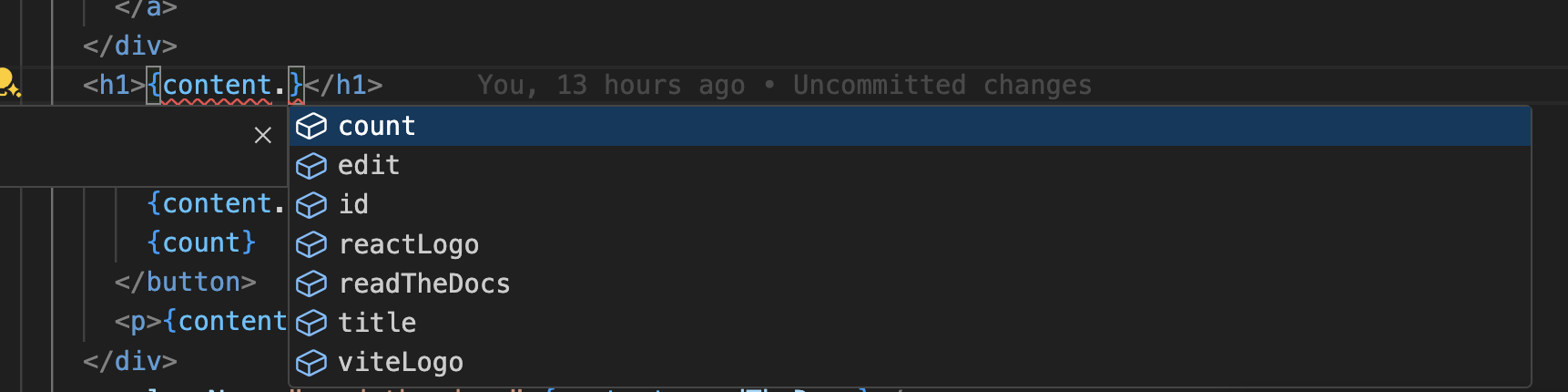
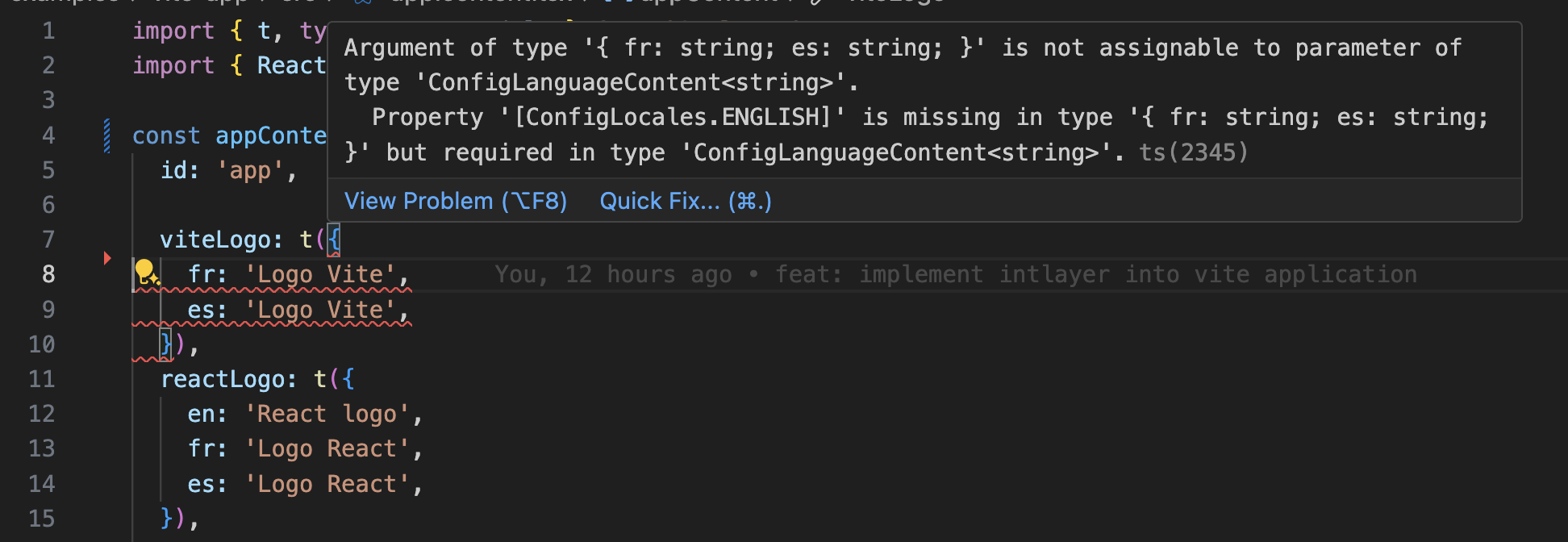
Ensure your TypeScript configuration includes the autogenerated types.
```json5 fileName="tsconfig.json"
{
// ... Your existing TypeScript configurations
"include": [
// ... Your existing TypeScript configurations
".intlayer/**/*.ts", // Include the auto-generated types
],
}
```
### Git Configuration
It is recommended to ignore the files generated by Intlayer. This allows you to avoid committing them to your Git repository.
To do this, you can add the following instructions to your `.gitignore` file:
```plaintext fileName=".gitignore"
# Ignore the files generated by Intlayer
.intlayer
```
### VS Code Extension
To improve your development experience with Intlayer, you can install the official **Intlayer VS Code Extension**.
[Install from the VS Code Marketplace](https://marketplace.visualstudio.com/items?itemName=intlayer.intlayer-vs-code-extension)
This extension provides:
- **Autocompletion** for translation keys.
- **Real-time error detection** for missing translations.
- **Inline previews** of translated content.
- **Quick actions** to easily create and update translations.
For more details on how to use the extension, refer to the [Intlayer VS Code Extension documentation](https://intlayer.org/doc/vs-code-extension).
### Go Further
To go further, you can implement the [visual editor](https://github.com/aymericzip/intlayer/blob/main/docs/docs/en/intlayer_visual_editor.md) or externalize your content using the [CMS](https://github.com/aymericzip/intlayer/blob/main/docs/docs/en/intlayer_CMS.md).