@imqueue/pg-pubsub
Version:
Reliable PostgreSQL LISTEN/NOTIFY with inter-process lock support
335 lines (268 loc) • 12.5 kB
Markdown
<h1 align="center">
/pg-pubsub
<a href="https://twitter.com/intent/tweet?text=Reliable%20PostgreSQL%20LISTEN/NOTIFY%20with%20inter-process%20lock%20support&url=https://github.com/imqueue/pg-pubsub&via=github&hashtags=typescript,javascript,nodejs,postgres,developers">
<img src="https://img.shields.io/twitter/url/http/shields.io.svg?style=social" alt="Tweet">
</a>
</h1>
<div align="center">
<a href="https://github.com/imqueue/pg-pubsub">
<img src="https://img.shields.io/github/actions/workflow/status/imqueue/pg-pubsub/build.yml" alt="Build Status">
</a>
<a href="https://codebeat.co/projects/github-com-imqueue-pg-pubsub-master">
<img src="https://codebeat.co/badges/579f6d7c-df61-4bc2-aa2e-d4fa9a3abf5a" alt="Codebeat Grade">
</a>
<a href="https://codeclimate.com/github/imqueue/pg-pubsub/maintainability">
<img src="https://api.codeclimate.com/v1/badges/22de50ce1d4b1e44c0ad/maintainability">
</a>
<a href="https://codeclimate.com/github/imqueue/pg-pubsub/test_coverage">
<img src="https://api.codeclimate.com/v1/badges/22de50ce1d4b1e44c0ad/test_coverage" />
</a>
<a href="https://coveralls.io/github/imqueue/pg-pubsub?branch=master">
<img src="https://coveralls.io/repos/github/imqueue/pg-pubsub/badge.svg?branch=master" alt="Coverage Status">
</a>
<a href="https://rawgit.com/imqueue/pg-pubsub/master/LICENSE">
<img src="https://img.shields.io/badge/license-GPL-blue.svg" alt="Coverage Status">
</a>
</div>
<hr>
<p align="center">
<strong>Reliable PostgreSQL LISTEN/NOTIFY with inter-process lock support</strong>
</p>
<hr>
<div align="center">
<img src="https://raw.githubusercontent.com/Mikhus/blob/master/pg-pubsub-ip.gif" alt="pg-pubsub in action">
</div>
<hr>
## What Is This?
This library provides a clean way to use PostgreSQL
[LISTEN](https://www.postgresql.org/docs/current/sql-listen.html) and
[NOTIFY](https://www.postgresql.org/docs/current/sql-notify.html) commands
for its asynchronous mechanism implementation. It comes as a top-level wrapper
over [node-postgres](https://www.npmjs.com/package/pg) and provides better,
cleaner way to work with database notifications engine.
To make it clear - it solves several major problems you will fall into if
you're going to use LISTEN/NOTIFY in your node app:
1. **Reliable connections**. This library comes with handy reconnect support
out-of-the box, so all you need, is, probably to tune several settings if
you have special needs, like max retry limit or reconnection delay.
2. It provides **clean way working with channels**, so you may subscribe to
an exactly required channel with no need to do additional filtering
implementation on messages receive. BTW, it does not hide from you
possibility to manage all messages in a single handler. You just choose
what you need.
3. The most important feature here is that this library comes with the first-class
implementation of **inter-process locking mechanism**, allowing avoiding
data duplication receive problem in scalable distributed architectures. It
means it allows you to define single-listener process across many similar
processes (which happens on scales) which would receive notifications
and with a guarantee that if it looses connection or dies - another similar
process replaces it as listener.
4. It comes with support of **graceful shutdown**, so you may don't care about
this.
## Install
As easy as:
~~~bash
npm i --save /pg-pubsub
~~~
## Usage & API
### Environment
It supports passing environment variables to configure locker schema name to use
and shutdown timeout.
- **`PG_PUBSUB_SCHEMA_NAME`** - string, by default is `'pgip_lock'`
- **`PG_PUBSUB_SHUTDOWN_TIMEOUT`** - number, by default is 1000,
in milliseconds
### Importing, instantiation and connecting
~~~typescript
import { PgPubSub } from '/pg-pubsub';
const connectionString = 'postgres://user:pass@localhost:5432/dbname';
const pubSub = new PgPubSub({ connectionString, singleListener: false });
(async () => {
await pubSub.connect();
})();
~~~
With such instantiation options natural behavior of PgPubSub will be as follows:
[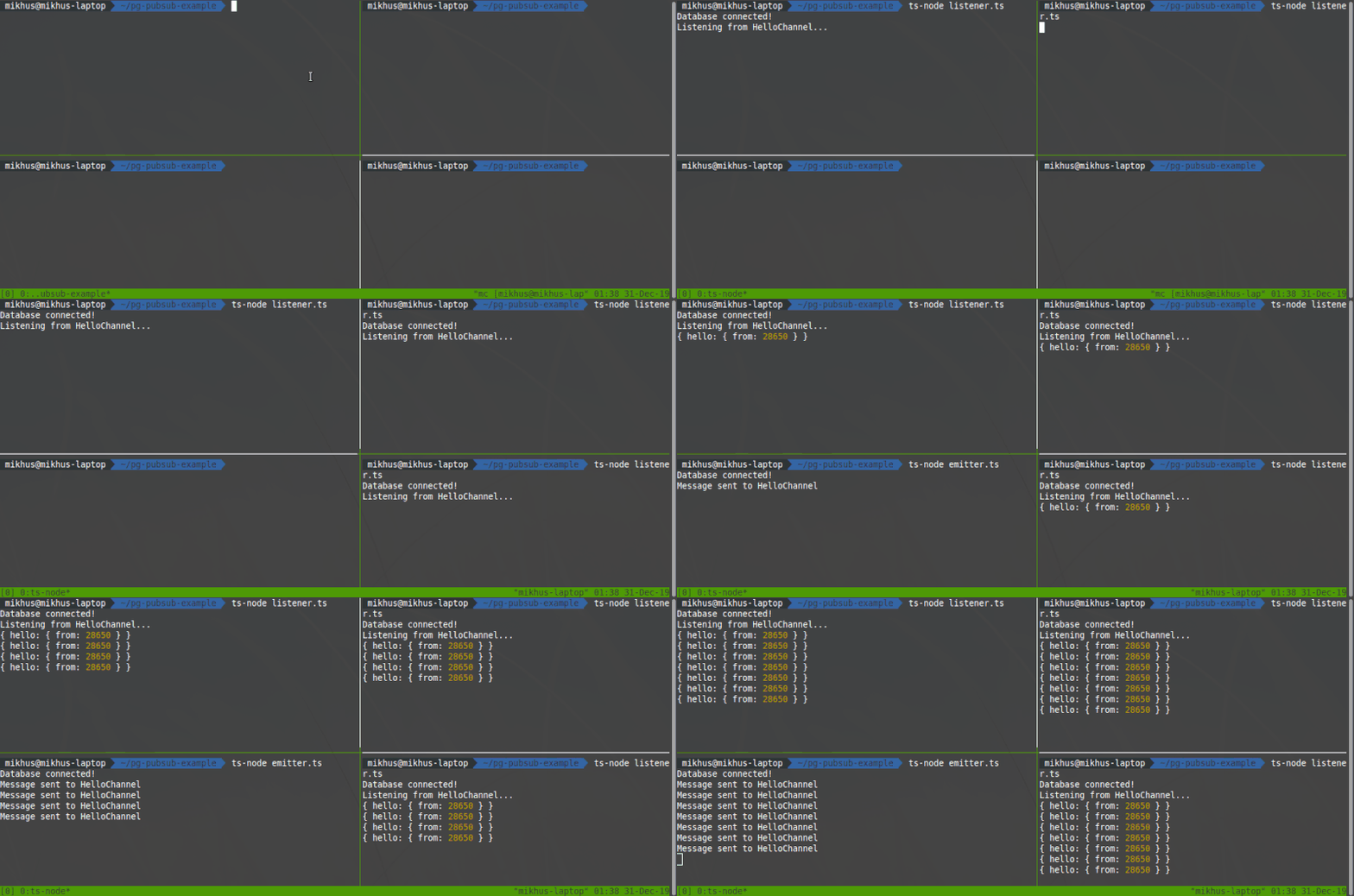]()
[See all options](https://github.com/imqueue/pg-pubsub/wiki/PgPubSubOptions).
### Listening channels
After connection established you may decide to listen for any numbers of
channels your application may need to utilize:
~~~typescript
await pubSub.listen('UserChanged');
await pubSub.listen('OrderCreated');
await pubSub.listen('ArticleUpdated');
~~~
BTW, the most reliable way is to initiate listening on `'connect'` event:
~~~typescript
pubSub.on('connect', async () => {
await Promise.all([
'UserChanged',
'OrderCreated',
'ArticleUpdated',
].map(channel => pubSub.listen(channel)));
});
~~~
Now, whenever you need to close/reopen connection, or reconnect occurred for any
reason you'll be sure nothing broken.
### Handling messages
All payloads on messages treated as JSON, so when the handler catches a
message it is already parsed as JSON value, so you do not need to manage
serialization/deserialization yourself.
There are 2 ways of handling channel messages - by using `'message'` event
handler on `pubSub` object, or using `pubSub.channels` event emitter and to
listen only particular channel for its messages. On message event fires first,
channels events fires afterwards, so this could be a good way if you need to
inject and transform a particular message in synchronously manner before it
will come to a particular channel listeners.
Also `'message'` listener could be useful during implementation of handling of
database side events. It is easy imagine that db can send us messages into, so
called, structural channels, e.g. `'user:insert'`, `'company:update'` or
`'user_company:delete'`, where such names generated by some generic trigger
which handles corresponding database operations and send updates to subscribers
using NOTIFY calls. In such case we can treat channel on application side
as self-describable database operation change, which we can easily manage with
a single piece of code and keep following DRY.
~~~typescript
// using 'message' handler:
pubSub.on('message', (channel: string, payload: AnyJson) => {
// ... do the job
switch (channel) {
case 'UserChanged': {
// ... do some staff with user change event payload
break;
}
default: {
// do something with payload by default
break;
}
}
});
~~~
~~~typescript
// handling using channels
pubSub.channels.on('UserChanged', (payload: AnyJson) => {
// do something with user changed payload
});
pubSub.channels.on('OrderCreated', (payload: AnyJson) => {
// do something with order created payload
});
pubSub.channels.on('ArticleUpdated', (payload: AnyJson) => {
// do something with article updated payload
});
~~~
Of course, it is better to set up listeners before calling `connect()` that it
starts handle payloads right up on connect time.
### Publishing messages
You can send messages in many ways. For example, you may create
database triggers which would notify all connected clients with some
specific updates. Or you may use a database only as notifications engine
and generate notifications on application level. Or you may combine both
approaches - there are no limits!
Here is how you can send notification with `PgPubSub` API (aka application
level of notifications):
~~~typescript
pubSub.notify('UserChanged', {
old: { id: 777, name: 'John Doe', phone: '555-55-55' },
new: { id: 777, name: 'Sam Peters', phone: '777-77-77' },
});
~~~
Now all subscribers, who listening `'UserChanged'` channel will receive a given
payload JSON object.
## Single Listener (Inter Process Locking)
There are variety of many possible architectures to come up with when you're
building scalable distributed system.
With services on scale in such systems it might be a need to make sure only
single service of much similar running is listening to particular database
notifications.
Here why comes an idea of inter process (IP) locking mechanism, which would
guarantee that only one process handles notifications and if it dies,
next one which is live will immediately handle listening.
This library comes with this option turned on by default. To make it work in
such manner, you would need to skip passing `singleListener` option to
`PgPubSub` constructor or set it to `true`:
~~~typescript
const pubSub = new PgPubSub({ connectionString });
// or, equivalently
const pubSub = new PgPubSub({ connectionString, singleListener: true });
~~~
Locking mechanism utilizes the same connection and LISTEN/NOTIFY commands, so
it won't consume any additional computing resources.
Also, if you already work with `pg` library in your application, and you
have a need to stay for some reason with that single connection usage, you
can bypass it directly as `pgClient` option, but that is not always a good idea.
Normally, you have to understand what you are doing and why.
~~~typescript
const pubSub = new PgPubSub({ pgClient: existingClient });
~~~
> **NOTE:** With LISTEN connections it is really hard to utilize power of
> connection pool as long as it will require additional implementation of
> some connection switching mechanism using listen/unlisten and some specific
> watchers which may fall into need of re-implementing pools from scratch. So,
> that is why most of existing listen/notify solutions based on a single
> connection approach. And this library as well. It is just more simple and
> reliable.
Also, PgPubSub supports execution lock. This means all services become listeners
in single listener mode but only one listener can process a notification. To
enable this feature, you can bypass `executionLock` as option and set it to
`true`. By default, this lock type is turned off.
> **NOTE:** Sometimes you might receive the notification with the same payloads
> in a very short period of time but execution lock will process them as the
> only notify message. If this important to you and your system will lave data
> leaks you need to ensure that payloads are unique.
## [Full API Docs](https://github.com/imqueue/pg-pubsub/wiki)
You may read API docs on [wiki pages](https://github.com/imqueue/pg-pubsub/wiki)
, read the code of the library itself, use hints in your IDE or generate HTML
docs with:
~~~bash
git clone git.com:imqueue/pg-pubsub.git
cd pg-pubsub
npm i
npm run doc
~~~
## Finally
Try to run the following minimal example code of single listener scenario (do
not forget to set proper database connection string):
~~~typescript
import { PgPubSub } from '/pg-pubsub';
import Timer = NodeJS.Timer;
let timer: Timer;
const NOTIFY_DELAY = 2000;
const CHANNEL = 'HelloChannel';
const pubSub = new PgPubSub({
connectionString: 'postgres://postgres@localhost:5432/postgres',
singleListener: true,
// filtered: true,
});
pubSub.on('listen', channel => console.info(`Listening to ${channel}...`));
pubSub.on('connect', async () => {
console.info('Database connected!');
await pubSub.listen(CHANNEL);
timer = setInterval(async () => {
await pubSub.notify(CHANNEL, { hello: { from: process.pid } });
}, NOTIFY_DELAY);
});
pubSub.on('notify', channel => console.log(`${channel} notified`));
pubSub.on('end', () => console.warn('Connection closed!'));
pubSub.channels.on(CHANNEL, console.log);
pubSub.connect().catch(err => console.error('Connection error:', err));
~~~
Or take a look at other minimal code
[examples](https://github.com/imqueue/pg-pubsub/tree/examples)
Play with them locally:
~~~bash
git clone -b examples git://github.com/imqueue/pg-pubsub.git examples
cd examples
npm i
~~~
Now you can start any of them, for example:
~~~bash
./node_modules/.bin/ts-node filtered.ts
~~~
## Contributing
Any contributions are greatly appreciated. Feel free to fork, propose PRs, open
issues, do whatever you think may be helpful to this project. PRs which passes
all tests and do not brake tslint rules are first-class candidates to be
accepted!
## License
This project is licensed under the GNU General Public License v3.0.
See the [LICENSE](LICENSE)
Happy Coding!